High-end processors can generate substantial heat, especially during gaming, rendering, streaming, and other sustained workloads. The right all-in-one liquid cooler can help maintain lower temperatures without overwhelming your build with custom-loop complexity.
We selected 10 notable AIO coolers ranging from value-focused 360mm models to premium LCD-equipped and Threadripper-compatible designs. Use the guide below to match radiator size, socket support, acoustics, features, and case compatibility to your system.
Best 10 Computer Liquid Coolers for High End PCs Picks for 2026
Flagship Display Cooling

- Asetek Gen8 V2 pump with three-phase motor
- 640x480 LCD for GIFs and live monitoring
- Embedded fan adds motherboard VRM cooling
Best For: Feature-focused high-end gaming PCs
Customizable RGB Showcase

- Asetek 8th Gen pump with high-speed RGB fans
- Customizable display through L-Connect 3
- Pre-installed fans and rotating tube connectors
Best For: RGB-centric high-end desktop builds
Threadripper Workstation Cooling
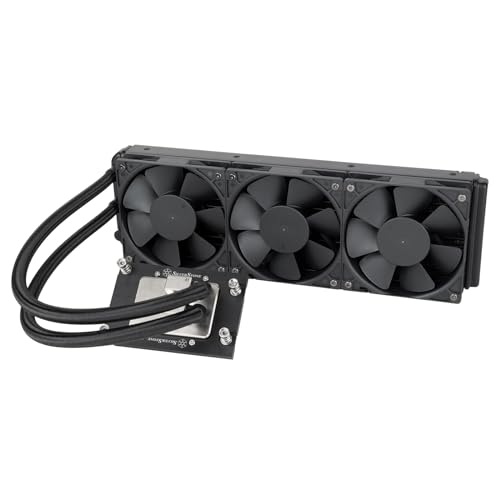
- Built for AMD TR5 and SP6 platforms
- Large nickel-plated copper micro-channel base
- Radiator-integrated pump and three included fans
Best For: Threadripper Pro 7000 workstations and servers
Efficient Offset Cooling
ARCTIC Liquid Freezer III Pro 360

- Offset cold plate targets CPU hotspot areas
- P12 PRO fans balance airflow and noise
- Integrated VRM fan and concealed fan wiring
Best For: Performance-focused Intel or AMD builds
Best Display-Ready Cooling
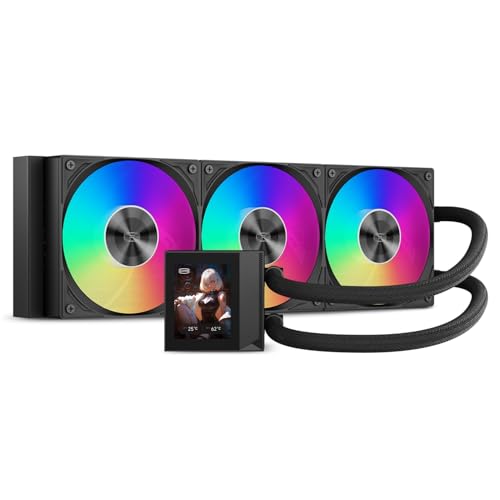
- 310W-rated 360mm cooling
- Customizable 2.4-inch IPS display
- AM5, AM4, and Intel socket support
Best For: High-end gaming and workstation builds with room for a 360mm radiator
Best Premium Ecosystem Option

- Large 420mm AIO design
- iCUE LINK System Hub included
- Zero RPM mode and three RX140 RGB fans
Best For: Spacious enthusiast builds using Corsair iCUE LINK components
Best Simplified Quiet Build
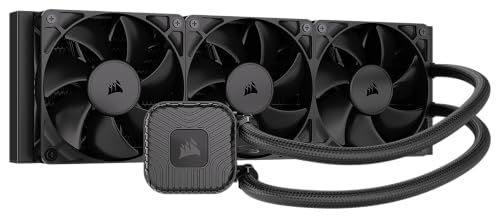
- 360mm radiator with three RS120 fans
- Daisy-chain fan connectivity
- Zero RPM mode for quiet idle operation
Best For: Performance desktops favoring simple cabling and no-RGB styling
Premium Display Pick
ASUS ROG Strix LC III 360 ARGB LCD

- 2.1-inch 480x480 IPS LCD
- Asetek Gen7 v2 pump and cold plate
- Six-year warranty with AM4/AM5 and Intel support
Best For: ROG-themed enthusiast PCs with customizable monitoring
Value Performance Pick
Thermalright Aqua Elite 360 V6 ARGB

- Three pre-installed 120mm PWM fans
- Up to 70.84 CFM airflow
- Supports Intel LGA 1851 and AMD AM4/AM5
Best For: High-performance builds needing broad compatibility
Connected Ecosystem Pick

- 2.1-inch customizable IPS LCD
- iCUE LINK hub reduces cable clutter
- FlowDrive engine with three RX RGB fans
Best For: CORSAIR-focused premium PCs with streamlined connections
Flagship Display Cooling – ROG Ryujin III Extreme 360
For builders comparing computer liquid coolers for high end pcs, the ASUS ROG Ryujin III ARGB Extreme 360 combines a 360mm radiator, Asetek Gen8 V2 pump, magnetic ARGB fans, and a high-resolution display. It is designed for demanding desktop or server builds using supported Intel and AMD sockets.
Best For: High-end gaming PCs where cooling performance, monitoring, and customizable lighting are priorities.
Pros:
- Asetek Emma Gen8 V2 pump uses a three-phase motor for high flow and lower impedance.
- 3.5-inch 640×480 LCD supports animated GIFs and live system monitoring.
- Embedded pump housing fan helps cool motherboard VRMs.
- Six-year warranty and support for Intel LGA1700/1851 and AMD AM4/AM5.
Cons:
- Its feature-rich design may be more than a minimalist build needs.
- Requires room for a 360mm radiator and additional software setup for advanced features.
This is a premium choice for enthusiasts who want a capable 360mm AIO with an unusually versatile display and extra VRM cooling. Verify radiator clearance and motherboard compatibility before installation.
Customizable RGB Showcase – Lian Li Galahad II LCD 360
The Lian Li Galahad II LCD SL-INF-360 is a strong option among computer liquid coolers for high end pcs, pairing an Asetek eighth-generation pump with high-speed RGB fans and a customizable pump display. Pre-installed radiator fans and flexible tubing connections simplify the build process.
Best For: RGB-focused desktop builders who want a customizable screen and streamlined installation.
Pros:
- Asetek 8th Gen pump and three-phase motor reach up to 3600 RPM.
- L-Connect 3 supports pump-display customization, including JPEG, PNG, GIF, and MP4 files.
- Fans arrive pre-installed on the radiator.
- 45-degree tubing connectors allow 360-degree tube rotation for installation flexibility.
Cons:
- The L-Connect 3 software is needed for the display’s customization features.
- A 360mm radiator requires a compatible case and sufficient mounting space.
Choose this Galahad II model when visual customization matters as much as cooling hardware. Its pre-installed fans and rotating tubing connectors can also reduce installation friction in a carefully planned build.
Threadripper Workstation Cooling – SilverStone XE360-TR5
Silverstone Technology XE360-TR5 360mm All-in-One Liquid Cooler for AMD TR5 / SP6, SST-XE360-TR5
Check Price On AmazonThe SilverStone XE360-TR5 is a specialized 360mm liquid cooler for AMD Threadripper Pro 7000 Series processors on sTR5 and SP6 platforms. Its nickel-plated copper water block, large micro-channel base, and radiator-integrated pump target demanding desktop and server workloads.
Best For: Threadripper Pro 7000 Series workstations and servers using sTR5 or SP6 sockets.
Pros:
- Designed specifically for AMD TR5 and SP6 platforms.
- Large nickel-plated copper micro-channel base plate supports heat transfer across the processor.
- Radiator-integrated pump reinforces the cooler’s overall structure.
- Includes three 120mm radiator-optimized fans with three-phase, six-pole motors.
Cons:
- Compatibility is limited to the listed TR5/SP6 platform focus.
- Its stated 46 dB noise level may matter in noise-sensitive workspaces.
- Requires a case that can accommodate a substantial 360mm cooling assembly.
For the right AMD workstation, this is a purpose-built alternative to general-purpose computer liquid coolers for high end pcs. Its platform-specific water block makes socket verification especially important before purchase.
Efficient Offset Cooling – ARCTIC Liquid Freezer III Pro 360
The ARCTIC Liquid Freezer III Pro 360 A-RGB emphasizes practical thermal design for computer liquid coolers for high end pcs. It combines a 360mm radiator, high-speed P12 PRO fans, native offset mounting, and an integrated VRM fan for supported Intel and AMD systems.
Best For: High-performance Intel or AMD builds seeking focused CPU contact, VRM assistance, and simplified cabling.
Pros:
- Offset mounting shifts the cold plate toward the CPU hotspot for Intel and AMD platforms.
- P12 PRO fans target high airflow and quiet operation, particularly at lower speeds.
- Integrated PWM-controlled VRM fan adds cooling around the motherboard power circuitry.
- Radiator fan cables are integrated into the hose sheathing, leaving one visible motherboard connection.
Cons:
- It lacks the LCD display and extensive screen customization offered by some premium rivals.
- Requires 360mm radiator support in the case.
- Socket compatibility should be checked, particularly for Intel LGA1851 or LGA1700 mounting.
This ARCTIC cooler is a sensible performance-oriented pick for builders who value thermal contact and cleaner cable routing over display features. Its six-year warranty further supports long-term use.
Best Display-Ready Cooling – PCCOOLER DC360 Pro
For builders comparing computer liquid coolers for high end pcs, the PCCOOLER DC360 Pro combines a large 360mm radiator with a customizable IPS display. Its 310W-rated cooling capacity, ARGB fans, and broad socket support make it suited to demanding gaming and workstation builds.
Best For: High-end PCs where strong sustained cooling and a customizable pump display are priorities.
Pros:
- 310W cooling capacity and a 360mm radiator for demanding processors.
- 2.4-inch 240×320 IPS LCD supports monitoring information, images, and animations.
- Three PWM FDB fans provide up to 90.56 CFM airflow and 4.07 mmH₂O static pressure.
- Supports Intel LGA1851/1700/1200/115X and AMD AM5/AM4.
Cons:
- The 360mm radiator requires a case with adequate mounting space.
- ARGB lighting and display features may be unnecessary for minimalist builds.
The DC360 Pro is a feature-rich choice when both thermal headroom and visual customization matter. Verify 360mm radiator clearance before buying.
Best Premium Ecosystem Option – Corsair Titan 420 RX RGB
The Corsair Titan 420 RX RGB is a premium option among computer liquid coolers for high end pcs, pairing a 420mm radiator with Corsair’s FlowDrive cooling engine and iCUE LINK connectivity. Its included System Hub is designed to simplify connections across a compatible build.
Best For: Enthusiasts seeking a large-format AIO with streamlined Corsair component connectivity and low-noise features.
Pros:
- 420mm radiator and FlowDrive engine target high-performance CPU cooling.
- Includes three pre-mounted RX140 RGB fans engineered for radiator airflow and static pressure.
- iCUE LINK System Hub enables sequential connections through a single hub port.
- PWM control supports speeds up to 1,700 RPM and Zero RPM operation at low temperatures.
Cons:
- The 420mm radiator demands a particularly spacious, compatible case.
- Its ecosystem features are most useful when paired with other iCUE LINK components.
Choose the Titan 420 RX RGB when your case supports a 420mm radiator and you value simplified Corsair ecosystem integration. Its six-year manufacturer warranty is an additional consideration.
Best Simplified Quiet Build – CORSAIR NAUTILUS 360 RS
The CORSAIR NAUTILUS 360 RS is a straightforward choice for shoppers evaluating computer liquid coolers for high end pcs. It includes three RS120 fans, supports current AMD and Intel sockets, and uses daisy-chain connectivity to reduce cable clutter during installation.
Best For: High-performance desktop builds that prioritize simple wiring, broad compatibility, and quiet everyday operation.
Pros:
- 360mm AIO format with three pre-installed RS120 fans.
- AirGuide technology focuses airflow, while Magnetic Dome bearings help reduce friction.
- Daisy-chained fans connect to the motherboard with one cable.
- Zero RPM mode can stop the fans at low temperatures for silent everyday computing.
Cons:
- The no-RGB configuration may not suit builders wanting integrated lighting.
- A 360mm radiator still requires compatible case mounting space.
The NAUTILUS 360 RS keeps the installation and cable layout relatively simple while retaining a large radiator and modern socket compatibility. It is a sensible fit for performance-focused systems without added RGB hardware.
Premium Display Pick – ASUS ROG Strix LC III 360 ARGB LCD
For high-end PCs where cooling and presentation matter equally, the ASUS ROG Strix LC III 360 ARGB LCD combines a 360mm-class radiator setup with a 2.1-inch IPS display. Its Asetek Gen7 v2 pump, premium ARGB fans, and broad Intel and AMD socket support make it a feature-rich choice among computer liquid coolers for high end pcs.
Best For: Enthusiasts building an ROG-themed system who want customizable display graphics alongside robust CPU cooling.
Pros:
- 2.1-inch, 480×480, 60 Hz IPS LCD supports system stats, custom art, and rotatable graphics.
- Asetek Gen7 v2 pump and updated cold plate are designed for high cooling performance.
- Premium ARGB fans offer high airflow, optimized acoustics, and 0dB technology.
- Supports Intel LGA 1700, 1200, 115X and AMD AM4 and AM5, with a six-year warranty.
Cons:
- The display and ROG-focused styling may be unnecessary for understated builds.
- Reported noise level is up to 36 dB.
This cooler stands out when a polished ROG aesthetic and on-pump monitoring are priorities. Verify radiator clearance and available motherboard connections before installation.
Value Performance Pick – Thermalright Aqua Elite 360 V6 ARGB
The Thermalright Aqua Elite 360 V6 ARGB focuses on strong specifications and straightforward installation. With a 360 cooling row, three pre-mounted 120mm PWM fans, and support for current Intel and AMD sockets, it is a practical option among computer liquid coolers for high end pcs.
Best For: Builders seeking a feature-packed 360mm AIO with extensive socket compatibility and synchronized ARGB lighting.
Pros:
- Three pre-installed 120mm fans provide up to 70.84 CFM airflow and 2.63 mmH2O air pressure.
- Fans are PWM-controlled, rated up to 2000 RPM, and specified at no more than 29.8 dBA.
- Fourth-generation vortex pump reaches up to 2800 RPM ±10%.
- Supports Intel LGA 1851, 1700, 1200, 115X-series sockets and AMD AM4/AM5.
Cons:
- The pump head and fans use ARGB connections, so lighting control requires compatible 5V 3-pin support.
- Installation still requires following the included platform-specific instructions.
Its pre-installed fans and broad mounting support simplify the build process, while the airflow and pump specifications suit demanding desktop CPUs. Check case radiator space and ARGB connectivity before buying.
Connected Ecosystem Pick – CORSAIR Titan 360 RX LCD
The CORSAIR Titan 360 RX LCD pairs a 360mm AIO design with an IPS display and iCUE LINK connectivity. Its FlowDrive cooling engine, pre-mounted RX RGB fans, and included system hub make it a compelling choice among computer liquid coolers for high end pcs, particularly for builders invested in CORSAIR components.
Best For: CORSAIR iCUE LINK systems that prioritize streamlined cabling, customizable visuals, and low-noise radiator cooling.
Pros:
- 2.1-inch, 480×480 IPS LCD supports temperatures, GIFs, logos, and other custom visuals.
- iCUE LINK sequential connections and included system hub help reduce cable clutter.
- FlowDrive engine combines a three-phase motor with a precision-engineered cold plate.
- Pre-mounted RX RGB fans provide up to 73.5 CFM airflow and support radiator-focused cooling.
Cons:
- Its streamlined connectivity is most useful within the CORSAIR iCUE LINK ecosystem.
- Specified noise level is up to 36 dB.
This is a strong fit for premium builds where synchronized lighting, display customization, and tidy wiring are central goals. Confirm case clearance and compatibility with the rest of your iCUE LINK setup.
How We Picked the Best Computer Liquid Coolers for High End PCs
We focused on coolers suited to powerful modern CPUs, prioritizing radiator capacity, pump design, fan configuration, platform compatibility, and practical installation requirements. The selection includes mainstream 360mm AIOs, a larger 420mm option, display-equipped models, and a specialized cooler for AMD Threadripper platforms.
We also considered useful ownership details such as included fans, lighting controls, LCD functionality, warranty expectations, and whether a cooler is better suited to quiet operation, maximum thermal headroom, or visual customization.
Quick Comparison
| Best For | Recommended Type | What to Look For |
|---|---|---|
| Maximum mainstream CPU cooling | 360mm or 420mm AIO | High-quality fans, strong pump, adequate case clearance |
| Large-screen customization | LCD-equipped 360mm model | Display size, software support, cable routing |
| AMD Threadripper systems | Dedicated TR5/SP6 cooler | Correct cold-plate coverage and socket mounting |
| Value-oriented builds | Standard 360mm AIO | Socket support, radiator thickness, included controller |
Key Buying Factors for Computer Liquid Coolers for High-End PCs
Radiator Size and Case Compatibility
A 360mm radiator is a strong fit for many high-performance desktop CPUs, while a 420mm model can provide additional surface area and potentially lower fan speeds. However, radiator support varies by case. Check the mounting location, radiator thickness, fan clearance, RAM height, and graphics-card clearance before buying.
Socket and CPU Coverage
Confirm support for your exact platform, not merely the processor brand. Current Intel and AMD sockets may require specific brackets, while Threadripper chips need a cooler designed for their larger heat spreader. A dedicated TR5/SP6 model is preferable to a conventional desktop AIO for compatible workstation systems.
Noise, Fans, and Pump Design
Cooling performance depends on more than radiator size. Review fan bearing design, maximum speed, airflow, static pressure, pump control, and the ability to tune curves through the motherboard or software. A larger radiator can help a cooler deliver the same temperature at lower fan speeds.
LCD Screens and RGB Features
LCD models can display temperatures, images, or system information, but they usually cost more and add software and cable-management requirements. Choose these features for aesthetics or monitoring convenience rather than assuming a screen improves raw cooling performance.
Installation and Long-Term Ownership
Check whether the cooler includes the mounting hardware, thermal compound, fan splitter, and lighting controller you need. Buy from a seller with clear warranty coverage, and install the radiator so the pump is not the highest point in the loop whenever possible.
Who Should Buy Which Computer Liquid Coolers for High End PCs?
Choose a 360mm AIO for Most High-End Gaming PCs
A well-equipped 360mm cooler is the most balanced choice for enthusiasts who want strong performance, broad case compatibility, and simpler installation. It is especially suitable for high-end gaming and productivity systems using current Intel or AMD desktop sockets.
Choose a 420mm AIO for Extra Thermal Headroom
Pick the 420mm Corsair option if your case supports its larger radiator and you prioritize sustained cooling or lower fan speeds over compact compatibility.
Choose an LCD Model for a Showcase Build
ASUS, Lian Li, PCCOOLER, or Corsair LCD-equipped models make sense when customization and on-pump monitoring are central to your build. Budget for software setup and verify internal USB and cable-routing space.
Choose the SilverStone Model for Threadripper
For AMD TR5 or SP6 workstations, the purpose-built SilverStone cooler is the logical choice because correct socket coverage matters more than generic 360mm specifications.