Dust buildup can raise temperatures, clog fans, and shorten the life of your computer hardware. The best electric air dusters offer a reusable alternative to disposable canned air, with adjustable power for delicate components and stubborn debris.
We compared 10 computer cleaning blowers under $100 by power, control, portability, battery convenience, and cleaning versatility. This guide highlights the features that matter most before you choose one for your PC or electronics.
Best 10 Computer Cleaning Blowers Under 100 Picks for 2026
Best Overall Value

- 150,000 RPM motor with three speeds
- Up to 240 minutes on low
- Lightweight 8.48-ounce design
Best For: High-power electronics and household cleaning
Best Feature Set
KKH 120,000RPM Electric Duster
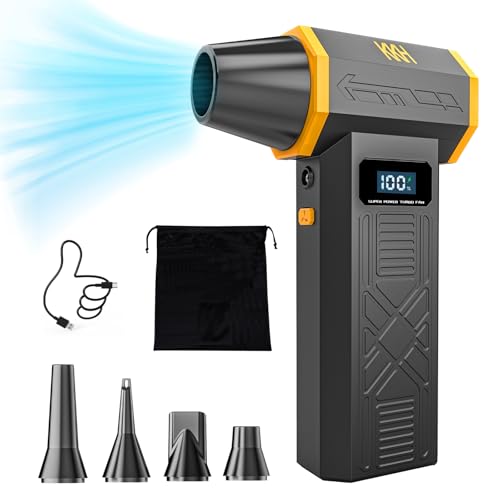
- Four adjustable airflow settings
- LED display and built-in work light
- Five nozzles and storage bag included
Best For: Accessory-focused PC, car, and workshop cleaning
Best Accessory Bundle

- 150,000 RPM and 45 m/s airflow
- Five nozzles plus two brushes
- 2.5-hour Type-C charging
Best For: Versatile electronics, car, and outdoor cleaning
Best Warranty Coverage

- 130,000 RPM brushless blower
- Up to 240 minutes on low
- Five-year stated warranty
Best For: Compact cordless cleaning with extended coverage
Best Overall

- 130,000RPM motor with airflow up to 52 m/s
- Four speeds plus six nozzles and 10 brushes
- 8000mAh battery with up to 120 minutes of low-speed use
Best For: Versatile computer, keyboard, car, and home cleaning
Best 2-in-1 Design

- 150,000RPM brushless motor and up to 54 m/s airflow
- Combines blowing and suction in one tool
- Up to 180 minutes of low-speed runtime
Best For: Users needing versatile computer and household cleanup
Best Compact Build
X3 130K RPM Cordless Air Duster

- 130,000RPM brushless motor with stepless control
- CNC metal turbine and high-speed bearings
- Compact cordless design with 10W Type-C charging
Best For: Portable, adjustable cleaning of electronics and vehicles
Power Pick
280,000 RPM Electric Air Duster

- 280,000 RPM brushless motor with 3 speeds
- Up to 240 minutes on low mode
- 0.65 lb body with 4 nozzles
Best For: High-output PC, car, and household cleaning
Versatile Choice
160,000 RPM Air Duster With Accessories

- 160,000 RPM motor and 3 speed settings
- 4 nozzles plus 4 precision brushes
- USB-C charging and battery display
Best For: Multi-surface cleaning with detailed accessories
Adjustable Option

- 6 speed levels for precise airflow control
- 6 nozzles, 2 brushes, and storage bag
- 20–40 minutes of use per charge
Best For: Portable, attachment-rich computer and car cleaning
Best Overall Value – GOOLOO F3
The GOOLOO F3 is a strong all-around pick among computer cleaning blowers under 100. Its 150,000 RPM motor, three speed settings, and compact rechargeable design make it useful for PCs, keyboards, cars, and general household dust.
Best For: Buyers who want high power, extended low-speed runtime, and a lightweight blower for electronics and everyday cleaning.
Pros:
- 150,000 RPM turbo performance with three adjustable speeds
- 5000mAh battery offers up to 240 minutes on the lowest setting
- Very light at 8.48 ounces and backed by an 18-month warranty
Cons:
- Maximum-speed runtime is limited to 19 minutes
- Only one piece is included, with no nozzle set listed in the supplied details
The F3 stands out for its combination of power, unusually long low-speed runtime, and portability. It is a practical reusable alternative to canned air for regular PC and home maintenance.
Best Feature Set – KKH 120,000RPM Electric Duster
The KKH portable electric duster is a versatile choice among computer cleaning blowers under 100, combining four airflow levels with an LED display, work light, and five nozzles. Its compact form suits desks, cars, workshops, and travel.
Best For: Users who value adjustable airflow, battery visibility, built-in lighting, and multiple attachments.
Pros:
- 120,000 RPM turbo fan with four adjustable airflow settings
- LED display shows remaining battery and selected wind gear
- Includes five nozzles, a storage bag, and a built-in LED light
Cons:
- Supplied notes do not specify battery runtime or charging time
- Maximum airflow is lower than the 150,000 RPM models listed here
- The product notes clarify that standalone lithium batteries are not sold separately
The KKH emphasizes convenience rather than headline motor speed. Its display, light, and broad accessory selection make it especially useful when cleaning in tight or poorly lit spaces.
Best Accessory Bundle – WOLFBOX MF100
The WOLFBOX MF100 is a capable option for computer cleaning blowers under 100 when attachments matter. It pairs a 150,000 RPM turbo fan and 45 m/s airflow with five nozzles and two brushes for more controlled cleaning across electronics, vehicles, and outdoor gear.
Best For: Buyers seeking a powerful, attachment-rich blower with fast Type-C charging and strong portability.
Pros:
- 150,000 RPM motor produces airflow up to 45 m/s
- Includes five nozzles and two brushes for varied cleaning tasks
- Fully charges in about 2.5 hours and runs up to 100 minutes on low
Cons:
- At 0.66 pound, it is heavier than the lightest options here
- Only three speed settings are provided
The MF100 offers a balanced blend of power, accessories, and charging convenience. Its included brushes give it an edge for debris that airflow alone may not dislodge.
Best Warranty Coverage – CAGIWIRU W20F
The CAGIWIRU W20F is a compact rechargeable choice among computer cleaning blowers under 100. Its 130,000 RPM brushless blower, three speed levels, LED light, and five nozzles cover routine PC, keyboard, car, pet, and household cleaning.
Best For: Buyers who want a small cordless blower with long low-speed runtime and an extended stated warranty.
Pros:
- 130,000 RPM motor with three adjustable speeds
- Up to 240 minutes of use on the lowest setting
- Includes five nozzles, USB-C fast charging, LED light, and a five-year warranty
Cons:
- Maximum-speed runtime is about 25 minutes
- Operating noise reaches up to 83 dB according to the supplied notes
- Requires a 10-minute cooling period before charging after use
The W20F is appealing for buyers prioritizing warranty coverage and low-speed endurance. Its noise level and battery-cooling guidance are worth considering if you plan frequent high-power cleaning.
Best Overall – 130K RPM Electric Air Duster
If you want computer cleaning blowers under 100 that balance strong airflow, portability, and accessories, this rechargeable electric duster is a versatile choice. Its 130,000RPM brushless motor produces airflow up to 52 m/s, while four speed settings help you adjust power for delicate electronics or heavier dust.
Best For: Users who want one compact blower for keyboards, computers, cars, and general home cleaning.
Pros:
- High-powered 130,000RPM motor and up to 52 m/s airflow
- Four adjustable gears, including a long-press storm mode
- Includes six nozzles and 10 detail brushes for varied cleaning tasks
- 8000mAh battery provides up to 120 minutes on Speed 1
Cons:
- High-power operation may be more than needed for light dusting
- Requires about 2.5 hours for a full Type-C recharge
With its broad accessory kit, lightweight 0.62-pound design, and reusable battery-powered operation, this model is a practical all-around pick for routine computer maintenance.
Best 2-in-1 Design – K&F Blower and Suction Duster
Among computer cleaning blowers under 100, the K&F CONCEPT model stands out for combining blowing and suction in one compact tool. Its brushless motor reaches 150,000RPM, with airflow up to 54 m/s and adjustable speed control for cleaning computers, keyboards, cars, and household surfaces.
Best For: Buyers who want both air-blowing and suction functions with extended low-speed runtime.
Pros:
- 150,000RPM brushless motor with up to 54 m/s wind speed
- Blower-and-suction design adds flexibility for different cleanup tasks
- Up to 180 minutes of continuous use on low gear
- Includes six nozzle or brush sets and five vacuum cleaning cloths
Cons:
- Its 5000mAh battery is smaller than some competing models in this roundup
- Children require adult supervision during use
The combination of suction, strong airflow, a compact 10-ounce body, and a generous accessory package makes this a flexible option for users who want more than a basic keyboard blower.
Best Compact Build – X3 130K RPM Cordless Air Duster
For shoppers comparing computer cleaning blowers under 100, the X3 offers a compact cordless format with a 130,000RPM brushless motor. Imported high-speed bearings, a CNC metal turbine, and a hand-wound motor are designed for consistent operation, while the stepless control knob lets you fine-tune airflow.
Best For: Portable cleaning of electronics, cars, homes, and outdoor items where adjustable power is useful.
Pros:
- 130,000RPM brushless motor with stepless speed adjustment
- CNC metal turbine and imported high-speed bearings support durable construction
- Compact, lightweight cordless design for indoor or outdoor use
- Type-C interface supports 10W fast charging
Cons:
- The supplied notes do not specify battery capacity or runtime
- The notes do not list included nozzles or brushes
This model is appealing when portability and build details matter most. Its adjustable control, overheating protection, and compact form make it suitable for targeted cleaning without the bulk of a larger blower.
Power Pick – 280,000 RPM Electric Air Duster
If you want computer cleaning blowers under 100 with maximum stated airflow, this compact YDNFE model stands out. Its three speed settings cover delicate electronics through stubborn dust, while the cordless design and four included nozzles make it useful beyond a desktop setup.
Best For: PC builders, gamers, and anyone who wants a high-output blower for computers, cars, home projects, and occasional outdoor use.
Pros:
- 280,000 RPM brushless motor with three adjustable speed modes
- Up to 240 minutes of low-speed runtime from the 5,000mAh battery
- Lightweight 0.65-pound body with four nozzles
- Includes a five-year warranty and 24/7 customer service
Cons:
- The advertised 240-minute runtime applies to low-speed use
- Requires about 3.5 hours for a full charge
- The highest setting may be more airflow than delicate components need
This is the strongest choice in the group for shoppers prioritizing headline airflow and long low-speed runtime. Use the lower setting around sensitive electronics, then reserve turbo mode for vents, filters, and heavier debris.
Versatile Choice – 160,000 RPM Air Duster With Accessories
Among computer cleaning blowers under 100, this rechargeable model is appealing if you want accessories and clear battery monitoring. It combines three speed settings with four nozzles, four precision brushes, and a display that shows remaining charge.
Best For: Buyers who want one compact tool for keyboards, PC cases, car vents, household cleanup, and light outdoor tasks.
Pros:
- 160,000 RPM brushless motor with up to 62 m/s wind speed
- Includes four detachable nozzles and four precision brushes
- 6000mAh battery charges via USB-C in about 2.5 hours
- Electronic display shows remaining battery level
Cons:
- Advertised runtime is up to 60 minutes on the first gear, not every setting
- Requires a 5V 2A power adapter, which may need to be supplied separately
- Blocking the outlet can trigger overheating protection and an E1 error
The accessory bundle makes this a flexible pick for detailed cleaning, especially when brushes are useful alongside airflow. Its display and comparatively quick charging also help with routine maintenance, provided you keep the outlet clear during operation.
Adjustable Option – A12 150,000 RPM Mini Blower
This A12 model is a practical contender among computer cleaning blowers under 100 for users who prefer fine airflow control. Six speed levels, six nozzles, two brushes, and a digital display make it easy to tailor the tool for keyboards, PC fans, vents, and other surfaces.
Best For: Portable cleaning kits that need multiple speed levels and attachments for computers, cars, furniture, and occasional inflatables.
Pros:
- 150,000 RPM motor with airflow up to 45 m/s
- Six adjustable speed levels for more control
- Includes six nozzles, two brushes, and a storage bag
- Digital display shows battery percentage and speed level
Cons:
- Approximately 20–40 minutes of use depending on speed
- USB-C charging takes about 2.5–4 hours
- Power adapter is not included
The A12 is best suited to shoppers who value adjustability and a broad accessory set over the longest runtime. Its compact 180-gram design is easy to carry, though frequent high-speed cleaning may require more regular charging.
How We Picked the Best Computer Cleaning Blowers Under 100
We focused on reusable electric blowers designed for electronics cleaning rather than general-purpose shop tools. Each option was evaluated for stated motor speed, airflow control, cordless convenience, charging practicality, and the ability to reach dust in cases, keyboards, vents, and other tight spaces.
Because advertised RPM figures are not directly comparable across manufacturers, we treated them as a useful performance indicator—not a guarantee of real-world cleaning strength. We also considered helpful extras such as LED lights, brush attachments, multiple speed settings, and suction functionality.
Quick Comparison
| Feature | What to look for | Why it matters |
|---|---|---|
| Power | High-RPM brushless or turbo motor | Moves packed dust and debris more effectively |
| Control | Three or more speed settings | Helps protect delicate fans and components |
| Power source | Rechargeable battery with practical runtime | Makes cleaning easier without a wall outlet |
| Accessories | Narrow nozzles, brushes, or LED light | Improves precision in cramped areas |
| Versatility | Blow-only or blow-and-suction design | Determines whether it suits broader household use |
Key Buying Factors for Computer Cleaning Blowers Under 100
Airflow and Speed Control
High speed is useful for case filters, heatsinks, and exterior vents, but maximum force is not always appropriate. Choose adjustable output so you can start gently around fans, circuit boards, and loose connectors, then increase power for heavier dust.
Battery Life and Charging
A rechargeable model is convenient for desktops, laptops, consoles, and vehicles. Check whether the listing states battery capacity, charging time, and runtime. USB charging is convenient, while a larger battery may add weight but reduce interruptions during a full cleaning session.
Design and Accessories
A narrow nozzle concentrates airflow into heatsink fins and keyboard gaps. An LED light can help you see inside dark cases, while a brush is useful for loosening caked-on dust. Keep the blower comfortable to hold, especially if you maintain several computers.
Safe Cleaning Technique
Use short bursts, hold fans in place so they do not spin freely, and keep the nozzle from touching components. Disconnect power before opening a desktop, and avoid forcing dust deeper into a device.
Who Should Buy Which Computer Cleaning Blowers Under 100?
For routine PC maintenance: Choose a compact, adjustable cordless blower with a precision nozzle. It should handle fans, filters, keyboards, and vents without taking up much storage space.
For powerful deep cleaning: Consider a high-RPM turbo model, particularly if your desktop has dense filters or significant dust buildup. Use the lower settings first around sensitive hardware.
For dark or cramped work areas: A model with an integrated LED light can make it easier to identify dust inside a case or behind a workstation.
For broader cleaning tasks: A blow-and-suction unit may be worthwhile if you also want to collect loose debris. For electronics, however, prioritize controllable airflow and careful technique over maximum advertised speed.