If you’re looking to spark your child’s interest in coding and STEM, coding robot pets can be an engaging solution. These innovative toys combine fun and education, allowing kids to learn essential skills while playing. From interactive robots that promote creativity to hands-on kits that foster problem-solving, there’s something for everyone. Curious about which coding robot pets stand out? Let’s explore the top picks that can make learning both enjoyable and effective.
Thames & Kosmos My Robotic Pet: Coding Chameleon STEM Kit

If you’re looking for an engaging way to introduce kids aged 8 and up to the world of robotics and coding, the Thames & Kosmos My Robotic Pet: Coding Chameleon STEM Kit is an excellent choice. You’ll build a 15-inch robotic chameleon with articulated joints that mimic realistic movements. This kit offers hands-on coding lessons without screens, using color sensors and infrared technology. With three play modes—Coding, Wild, and Pet—your child can program movements, watch the chameleon change colors, or interact through touch. The thorough manual guides assembly, making it a fantastic way to explore STEM concepts creatively!
Best For: Kids aged 8 and up who are interested in robotics and coding through hands-on learning.
Pros:
- Encourages STEM learning and problem-solving skills through creative building and coding.
- Three interactive play modes provide diverse experiences and keep kids engaged.
- No screens required, promoting unplugged learning and exploration.
Cons:
- Requires adult assistance for younger children, which may limit independent play.
- Assembly may be challenging for some kids, depending on their experience with similar kits.
- Limited to specific play modes, which may not offer endless variations in gameplay.
Educational Insights PYXEL Programmable Coding Robot for Kids

The Educational Insights PYXEL Programmable Coding Robot is an ideal choice for kids aged 8 and up who are enthusiastic to plunge into the world of robotics and coding. This interactive robot teaches coding through engaging play, using both Blockly for beginners and Python for advanced learners. With built-in tutorials, kids can easily grasp concepts while enjoying lights, sounds, and colors as PYXEL performs tricks. Plus, it connects to Wi-Fi-enabled devices without needing an app. Weighing 2.38 pounds and measuring 12 x 8 x 8 inches, it’s perfect for home or classroom, making it a great gift for birthdays or holidays.
Best For: Kids aged 8 and up who are interested in learning robotics and coding through interactive play.
Pros:
- Engaging Learning: Provides hands-on learning with built-in tutorials and interactive features like lights and sounds.
- Flexible Coding Languages: Supports both Blockly for beginners and Python for advanced users, catering to different skill levels.
- No App Required: Connects easily to Wi-Fi-enabled devices without the need for an app, ensuring straightforward usability.
Cons:
- Limited Age Range: Primarily designed for children aged 8 to 14, which may not appeal to younger or older users.
- Moderate Customer Ratings: Holds a customer rating of 3.8 out of 5 stars, indicating mixed feedback from users.
- Weight and Size: At 2.38 pounds and 12 x 8 x 8 inches, it may be less portable compared to smaller educational toys.
Learning Resources Code & Go Robot Mouse Activity Set for Kids
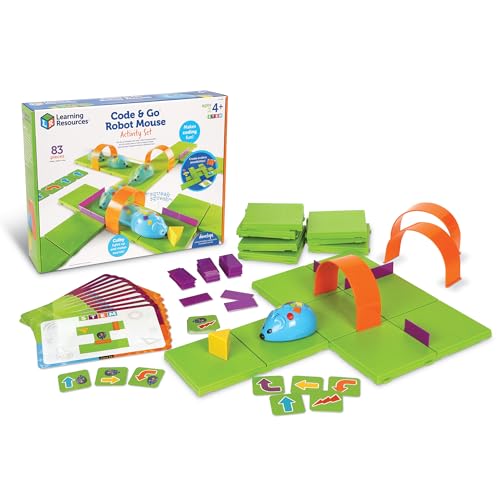
For young learners enthusiastic to explore coding, the Learning Resources Code & Go Robot Mouse Activity Set is an ideal choice. This interactive STEM toy helps kids aged 4 and up develop critical thinking and problem-solving skills through play. You’ll love programming Colby, the robot mouse, using colorful buttons that match coding cards. With 83 pieces, including maze grids, walls, and tunnels, the set promotes coding fundamentals in a fun way. Plus, Colby lights up and makes sounds, adding excitement to the learning experience. It’s a perfect gift for birthdays or holidays, making STEM learning enjoyable and engaging!
Best For: Kids aged 4 and up who are eager to learn coding and develop problem-solving skills through interactive play.
Pros:
- Engages young learners with hands-on coding experience and interactive play.
- Encourages the development of critical thinking and problem-solving skills.
- Includes a variety of components for creative maze building and programming challenges.
Cons:
- Requires 3 AAA batteries, which are not included in the set.
- Some pieces may be small and pose a choking hazard for younger children.
- Limited to children aged 4+, which may exclude older kids who might also enjoy coding activities.
ENERGIZE LAB Eilik – Cute Robot Pets for Kids and Adults

Looking for a delightful companion that sparks joy for both kids and adults? Meet Eilik, the interactive robot pet that’s perfect for everyone. With its engaging emotions and fun idle animations, you can easily interact by touching its head, belly, or back, shaping Eilik’s unique personality. Plus, it can connect with other Eiliks for playful chats and activities, making social engagement a breeze. No WiFi or Bluetooth is needed—just power it on and plunge into spontaneous fun! Frequent firmware updates keep Eilik fresh, introducing new emotions and games, ensuring endless entertainment for you and your family.
Best For: Eilik is best for kids and adults looking for an interactive and engaging companion that promotes social interaction and fun.
Pros:
- Engaging Interactions: Eilik features a variety of emotions and animations that enhance user interaction.
- Social Connectivity: Can connect with other Eiliks for group activities, fostering social engagement.
- No Setup Required: Ready to play right out of the box without the need for WiFi or Bluetooth.
Cons:
- Limited Functionality: While entertaining, interactions may become repetitive over time.
- Dependence on Firmware Updates: The experience relies on regular updates to maintain freshness and engagement.
- Not a Substitute for Real Pets: As a robotic companion, it may not fulfill the emotional connection that a real pet provides.
Robot Dog with Claw – Interactive STEM Pet for Kids
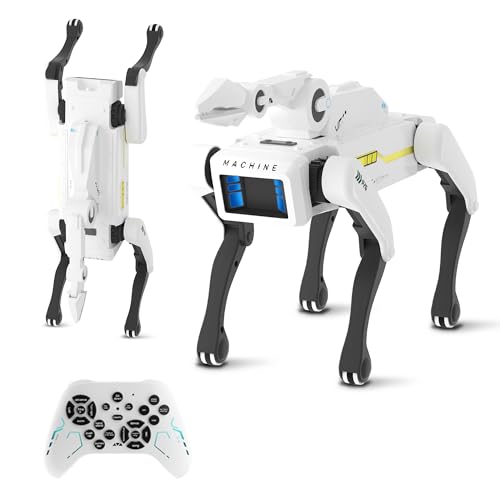
Designed specifically for kids ages 6 and up, the Robot Dog with Claw offers an engaging way to explore STEM concepts while having fun. With over 30 lifelike actions, including Kung Fu moves and hilarious pee pranks, it keeps kids entertained. You can control it using English voice commands or a remote, and it charges quickly via USB-C, giving you up to 6 hours of playtime. The coding mode lets your child create custom sequences, enhancing their creativity and logic skills. Made from non-toxic materials, it’s safe for play and built to last, making it a fantastic educational companion.
Best For: Kids ages 6 and up who are interested in exploring STEM concepts through interactive play.
Pros:
- Encourages creativity and logic skills through a coding mode for custom action sequences.
- Features over 30 lifelike actions for engaging and entertaining play.
- Safe and durable construction using non-toxic materials, ensuring long-term use.
Cons:
- Limited to kids aged 6 and up, which may exclude younger children.
- Some advanced features may require adult supervision for optimal use.
- Battery life, while decent, may not be sufficient for extended play sessions without recharging.
Ruko Smart Robot Dog with Interactive Features for Kids
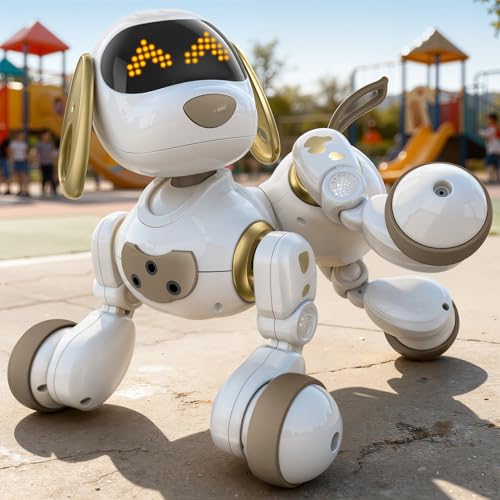
The Ruko Smart Robot Dog is perfect for kids ages 3 and up, offering a blend of fun and learning that captures their imagination. This interactive puppy performs 20 actions, from walking to dancing, making playtime lively. With 30 animated facial expressions and 70 glowing LED lights, kids can engage in creative storytelling. You can even program up to 50 custom moves, enhancing problem-solving and STEM skills. The remote control operates from 98 feet away, and its obstacle-avoidance sensors guarantee safe navigation. Plus, it’s durable and rechargeable, providing 45 minutes of play after just a 3-hour charge.
Best For: The Ruko Smart Robot Dog is best for children ages 3 to 8 who enjoy interactive play and learning.
Pros:
- Engaging interactive features with 20 actions and 30 facial expressions enhance imaginative play.
- Encourages creativity and STEM skills through programming custom moves.
- Safe for kids with obstacle-avoidance sensors and durable, child-safe materials.
Cons:
- Limited playtime of 45 minutes may require frequent recharging.
- May require supervision for younger children to ensure safe play.
- Some kids may lose interest after mastering its features.
Learning Resources Code & Go Robot Mouse Activity Set for Kids

For kids aged 4 and up, the Learning Resources Code & Go Robot Mouse Activity Set stands out as an engaging introduction to coding concepts. This rechargeable, screen-free toy comes with 83 pieces to spark creativity and learning. Your child will master coding fundamentals, sequencing, and problem-solving as they guide Colby, the robot mouse, through 16 maze grids. With colorful buttons and coding cards, programming becomes interactive and fun. Plus, Colby lights up, makes sounds, and can zoom at two speeds. It’s the perfect gift for birthdays or holidays, ensuring hours of educational play without the need for batteries.
Best For: The Learning Resources Code & Go Robot Mouse Activity Set is best for children aged 4 and up who are interested in learning coding concepts through interactive and hands-on play.
Pros:
- Engaging and interactive design promotes creativity and problem-solving skills.
- Rechargeable and screen-free, allowing for hours of educational play without the need for batteries.
- Includes a variety of components and activities that facilitate learning in coding fundamentals and sequencing.
Cons:
- May require adult supervision for younger children to navigate maze setups effectively.
- The complexity of coding concepts might be challenging for some children without guidance.
- Limited to specific activities included in the set, which might reduce long-term replay value.
Bittle Robot Dog Kit for STEM & Robotics Education
Looking for an engaging way to introduce STEM concepts to teens and young adults? The Bittle Robot Dog Kit is your answer! This palm-sized, servo-activated robotic dog offers a hands-on learning experience. You can build and program Bittle to perform tricks using Scratch-like coding, then advance to Arduino IDE and C++/Python. With its open-source platform, you’ll explore endless customization possibilities. Plus, program Bittle to interact with its environment using sensors. Ideal for ages 14 and up, it’s a perfect gift for budding engineers and programmers. Release creativity and problem-solving skills while having fun with Bittle!
Best For: Teens and young adults interested in STEM, robotics, and programming.
Pros:
- Hands-on learning experience that enhances problem-solving and engineering skills.
- Programmable and customizable through an open-source platform, allowing for creative exploration.
- Suitable for a wide age range (14 and up), making it a great gift for budding engineers and tech enthusiasts.
Cons:
- Requires some prior knowledge of coding for advanced programming options.
- Limited playtime of only 1 hour may not satisfy prolonged use.
- Assembly may be complex for younger users or those with little technical experience.
Petoi Programmable Robot Dog Bittle X V2

Designed for both kids aged 10 and up and adults, the Petoi Programmable Robot Dog Bittle X V2 stands out as an ideal choice in the world of coding robot pets. You can control this smart robot dog through an app, voice commands, or coding, making it interactive and engaging. With over 35 lifelike actions, including sit, walk, and backflip, it offers a realistic experience. The kit promotes learning in robotics and coding, starting with block coding and advancing to Arduino C++ and Python. Its open-source design allows for extensive customization, encouraging creativity in robotics for everyone.
Best For: The Petoi Programmable Robot Dog Bittle X V2 is best for kids aged 10 and up, as well as adults interested in robotics and coding.
Pros:
- Engaging interactive experience through app, voice commands, and coding.
- Offers educational value in robotics and coding, suitable for beginners to advanced users.
- Extensive customization options through open-source design promote creativity.
Cons:
- Limited playtime of 1 hour may require frequent recharging.
- May be challenging for complete beginners without prior coding knowledge.
- Some users might find the initial setup and programming complex.
Learning Resources Coding Critters Ranger & Zip 22 Piece Set
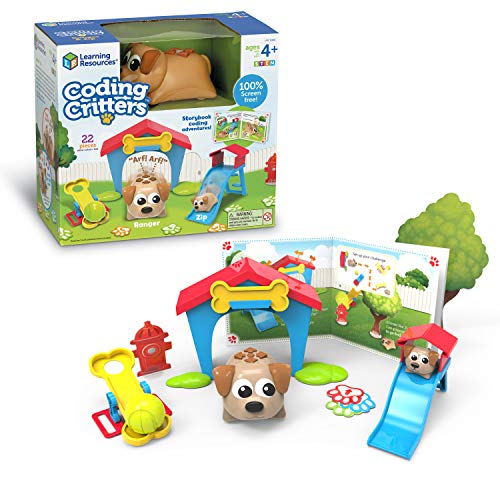
The Learning Resources Coding Critters Ranger & Zip 22 Piece Set is perfect for kids ages 4 and up, offering a fun, screen-free introduction to coding. This interactive toy invites your child to set out on a storybook coding adventure, where they can create coding challenges that enhance their understanding of programming concepts. With engaging play modes like fetch and hide-and-seek, Ranger and Zip come to life, promoting imaginative play while teaching important STEM skills. Ideal for birthdays, holidays, or homeschooling, this set makes a thoughtful gift, encouraging critical thinking and problem-solving skills essential for your child’s academic success.
Best For: The Learning Resources Coding Critters Ranger & Zip 22 Piece Set is best for children ages 4 and up who are interested in an interactive and screen-free introduction to coding.
Pros:
- Encourages early coding skills through interactive play.
- Promotes STEM learning, enhancing critical thinking and problem-solving abilities.
- Engaging play modes like fetch and hide-and-seek foster imaginative play.
Cons:
- May require adult supervision for younger children during play.
- Limited advanced coding concepts may not satisfy older children.
- The set may have small pieces that pose a choking hazard if not used properly.
Factors to Consider When Choosing Coding Robot Pets
When choosing a coding robot pet, you’ll want to take into account several key factors. Think about age appropriateness, the learning objectives you have in mind, and the interactive features that engage your child. Don’t forget to check the programming languages offered and verify the pet’s safety and durability.
Age Appropriateness
How do you guarantee that a coding robot pet is suitable for your child? Start by checking the recommended age range for each product, as many are designed for specific groups, from as young as 3 years old to teens and adults. Make sure the coding complexity matches your child’s developmental stage; younger kids need simpler systems, while older ones can handle advanced programming. Also, look for guidance on whether the toy is meant for independent play or needs adult supervision. Assess your child’s cognitive and physical skills to ascertain they can engage with the robot pet effectively. Choosing age-appropriate toys not only enhances learning but also keeps the experience safe and enjoyable, preventing frustration.
Learning Objectives
Choosing a coding robot pet involves more than just picking a cute design; you should consider its educational value. Look for robots that teach fundamental programming concepts like sequencing, logic, and problem-solving through interactive play. Ideally, the robot should support multiple coding languages or levels, allowing you to progress from beginner block coding to more advanced options like Python or C++.
Evaluate whether the robot offers hands-on learning experiences, such as assembly or customization, which deepen understanding of robotics and engineering principles. Additionally, check for built-in tutorials or guided activities that reinforce learning objectives. Finally, make sure the robot promotes STEM skills, vital for academic success and future career opportunities, making it a valuable addition to your learning journey.
Interactive Features
Interactive features play an essential role in enhancing the appeal and effectiveness of coding robot pets. Look for robots that respond to your actions with gestures, touch controls, lights, sounds, and animations. These elements make learning to code enjoyable and immersive. Some models even allow social interaction with other robots, encouraging collaborative or competitive play, which helps develop social skills. Advanced options offer programmable behaviors and customizable responses, letting you experiment and see how your coding choices impact the robot’s actions. Additionally, features like obstacle avoidance and environmental sensing introduce fundamental robotics principles while ensuring safe, dynamic play environments. These interactive elements create a richer learning experience and keep kids engaged.
Programming Languages Offered
When selecting a coding robot pet, the programming languages offered can greatly influence your child’s learning experience. Many robots provide multiple languages, like Blockly for beginners and Python for advanced users, tailoring the experience to your child’s skill level. Block-based coding is more accessible for younger kids, while Python dives deeper into coding concepts. Look for robots with built-in tutorials to make learning easier and more engaging. Customizing commands through programming fosters creativity and problem-solving skills as kids experiment to achieve their goals. Additionally, open-source platforms can expand programming options, allowing your child to explore various coding languages and develop advanced skills over time. This flexibility enhances their overall educational journey with coding robot pets.
Safety and Durability
While exploring coding robot pets, it’s essential to prioritize safety and durability to guarantee a positive experience for your child. Look for robots made from non-toxic materials like durable ABS plastic, which can handle rough play and last longer. Safety features, such as auto-shutdown mechanisms, protect the robot from damage during collisions or falls, ensuring it remains functional. Also, consider the age appropriateness of the robot; toys for younger kids should have smooth edges and be lightweight to minimize injury risks. Finally, always check the battery safety guidelines. Opt for robots with rechargeable batteries to avoid hazards associated with disposable ones. Prioritizing these factors will help you choose a safe and lasting coding companion for your child.
Assembly Requirements
Choosing the right coding robot pet often involves considering the assembly requirements. Some pets come pre-assembled and are ready to use right out of the box, while others require you to engage in hands-on assembly. The complexity of the assembly can vary; simpler kits are designed for kids ages 4 and up, while advanced models are better suited for ages 10 and older. Many kits include detailed manuals that guide you through the process step-by-step, ensuring a successful build. Engaging in the assembly not only fosters problem-solving skills but also boosts creativity as you explore the mechanics behind the robot. So, think about your or your child’s age and skill level when selecting the perfect coding robot pet.