If you want a small desktop that handles everyday work without clutter, this ACEMAGIC K1 Mini PC Ryzen 4300U review is for you.
The ACEMAGIC K1 Mini PC Ryzen 4300U balances compact size, generous storage, and broad connectivity in a way that makes sense for workspaces, schools, and light home use.
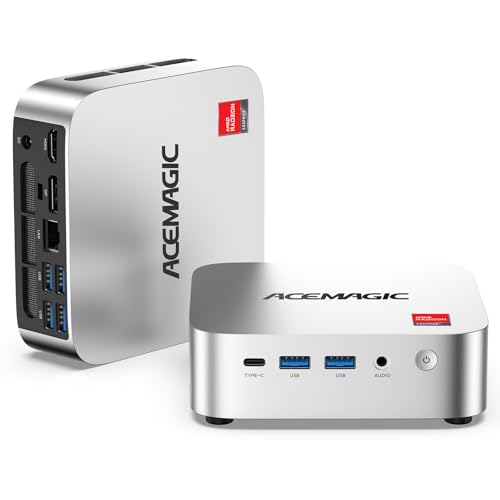
ACEMAGIC K1 Review Summary
The ACEMAGIC K1 Mini PC Ryzen 4300U is a practical mini desktop for buyers who care more about reliability, space savings, and multi-monitor productivity than raw gaming horsepower.
With a Ryzen 4300U, 16GB DDR4 memory, and a 1TB SSD already installed, it arrives close to ready for office work, browsing, streaming, remote learning, and light creative tasks.
What makes the ACEMAGIC K1 Mini PC Ryzen 4300U stand out is its business-friendly design: triple 4K display support, six USB 3.2 ports, USB-C with display output, auto power-on, RTC wake, and Wake-on-LAN.
That combination gives it a real advantage for small offices, point-of-sale setups, and home users who want a tiny PC that behaves like a serious desktop.
Bottom line: if you need a compact Windows 11 Pro machine that feels well equipped out of the box, the ACEMAGIC K1 is a strong value-oriented option.
If you want modern Wi-Fi, top-tier gaming, or heavy video editing, you should look higher up the stack.
Review Scorecard
| Category | Score | Why it matters |
|---|---|---|
| Performance | 8.0 | Ryzen 4300U with 4 cores and 4 threads is solid for office work, multitasking, HD media, and light creative tasks. |
| Graphics & Display Support | 8.0 | Integrated Radeon graphics and support for up to three 4K displays make it excellent for productivity and media use. |
| Storage & Memory | 9.0 | 16GB DDR4 and a 1TB SSD provide strong out-of-box headroom, with upgrade room later. |
| Connectivity & Ports | 9.0 | Multiple USB 3.2 ports, USB-C, HDMI, DisplayPort, Ethernet, Wi-Fi, and Bluetooth make setup flexible. |
| Cooling & Noise | 8.0 | Active cooling and aluminum heat dissipation are designed to keep temperatures and noise controlled. |
| Compact Design | 9.0 | Very small footprint and VESA-style placement flexibility make it easy to hide behind a monitor. |
| Business Versatility | 8.0 | Auto power-on, RTC wake, and Wake-on-LAN help with office and always-on workloads. |
Verdict: The ACEMAGIC K1 Mini PC Ryzen 4300U is best for buyers who want a compact, well-connected desktop for daily productivity and multi-screen work.
It is not a gaming rig, but as a small office PC it makes a compelling case.
Key Features and Specifications of ACEMAGIC K1
The ACEMAGIC K1 Mini PC Ryzen 4300U looks modest on paper, but the feature set is thoughtfully chosen for real-world use.
Here are the main specifications that matter most when evaluating this mini PC review.
| Specification | Details |
|---|---|
| Processor | AMD Ryzen 4300U |
| CPU cores / threads | 4 cores / 4 threads |
| Clock speed | 2.7GHz base, up to 3.7GHz boost |
| Architecture | 7nm Zen 2 |
| Graphics | Integrated AMD Radeon Graphics |
| Memory | 16GB DDR4 |
| Storage | 1TB SSD |
| Operating system | Windows 11 Pro |
| Power | 28W TDP |
| Wireless | Wi-Fi 5 |
| Bluetooth | Bluetooth 4.2 |
| Ethernet | Gigabit Ethernet 1000Mbps |
| Video outputs | HDMI 2.0, DisplayPort 1.4, USB-C/Type-C |
| Display support | Up to 3 x 4K monitors |
| Ports | 6 x USB 3.2, USB-C Gen 2 |
| Special features | Auto Power-On, RTC Wake, Wake-on-LAN |
| Cooling | Active cooling, aluminum heat dissipation, dual air outlets |
| Size | 5 x 2.6 x 2 inches |
| Weight | 1.39 pounds |
On the design side, the ACEMAGIC K1 Mini PC Ryzen 4300U is built to disappear into a workspace rather than dominate it.
At only 5 x 2.6 x 2 inches and 1.39 pounds, it is easy to mount behind a display, place under a desk, or use in a tight office cabinet.
The included Windows 11 Pro matters too.
For buyers who want a small business desktop, Pro features are usually a better fit than a basic home edition because they support more management-friendly use cases.
Pros and Cons of ACEMAGIC K1
Before deciding on the ACEMAGIC K1 Mini PC Ryzen 4300U, it helps to weigh the ACEMAGIC K1 Mini PC Ryzen 4300U pros and cons in plain language.
| Pros | Cons |
|---|---|
| Strong everyday performance for office tasks and multitasking | Integrated graphics are not intended for demanding AAA gaming |
| Large 1TB SSD and 16GB RAM included | Wi-Fi 5 and Bluetooth 4.2 are functional, but not the newest standards |
| Excellent port selection for a mini PC | Heavy sustained workloads can still be limited by the small chassis |
| Triple-monitor support is a big productivity advantage | Performance depends on thermal conditions and the 28W tuning |
| Compact and easy to place behind a monitor | Not the best fit if you need modern wireless-first connectivity |
| Upgradeable memory and storage options add longevity | Storage slot layout should be confirmed before planning upgrades |
Best strength: the ACEMAGIC K1 delivers a lot of useful hardware in a tiny footprint.
Biggest drawback: it is still an integrated-graphics mini PC, so expectations need to stay grounded.
How Well Does the Ryzen 4300U Handle Everyday Work?
For real-world use, the Ryzen 4300U is the kind of chip that performs best in tasks that rely on responsiveness rather than brute-force processing.
In the ACEMAGIC K1 Mini PC Ryzen 4300U, the 4-core, 4-thread design and boost speeds up to 3.7GHz are enough for office apps, web tabs, spreadsheets, video calls, and streaming without making the system feel sluggish.
If your day looks like email, documents, browser-based tools, remote desktop sessions, and light file management, this mini PC should feel comfortable.
The included 16GB DDR4 memory helps keep multitasking smoother than you would expect from a tiny machine in this class.
It also benefits from the 7nm Zen 2 architecture, which is older than current high-end laptop and desktop chips but still efficient for general computing.
In practical terms, that means good enough performance for many buyers who mainly need a dependable work box.
Where it starts to show limits is sustained heavier use.
Large photo batches, video exports, complex code builds, and demanding virtual machine workloads can tax a system like this.
The ACEMAGIC K1 Mini PC Ryzen 4300U is capable, but it is not trying to replace a workstation.
Ports, USB-C, and Triple-Monitor Setup
This is one of the strongest reasons to consider the ACEMAGIC K1 Mini PC Ryzen 4300U.
Mini PCs often cut corners on I/O, but this model is unusually practical for desk-based productivity.
You get 6 x USB 3.2 ports, which is enough for a keyboard, mouse, printer, storage drive, webcam, and still leave room for accessories.
The USB-C Gen 2 port supports up to 10Gbps data transfer, DP 1.4 4K@60Hz display output, and PD power delivery, making it much more versatile than a basic Type-C jack.
For displays, the ACEMAGIC K1 supports HDMI 2.0, DisplayPort 1.4, and USB-C output, with support for up to three 4K monitors.
That is a major plus if you work with documents on one screen, communication on another, and dashboards or reference material on a third.
Buyer takeaway: if your setup depends on multiple displays, the ACEMAGIC K1 Mini PC Ryzen 4300U is much easier to recommend than a low-port, single-output mini PC.
Can the K1 Be Upgraded Later?
Yes, and that improves the long-term value of the ACEMAGIC K1 Mini PC Ryzen 4300U.
It ships with a useful baseline of 16GB RAM and a 1TB SSD, but it is also described as upgrade-friendly with dual SO-DIMM slots supporting up to 64GB DDR4.
Storage flexibility is also a positive.
The machine includes two M.2 2280 interfaces and supports 1x SATA/NVMe PCIe 3.0 + 1x additional M.2 2280 slot.
That gives buyers room to expand depending on how they plan to use the machine.
That said, you should treat the storage layout carefully.
Because the configuration details mention multiple slot types and interface options, it is smart to confirm exactly how the installed drive is allocated before buying add-on storage.
If you expect to add a second drive later, verify your planned slot usage first.
This upgradeability is a real advantage compared with many ultra-compact PCs that lock everything down at the factory.
Cooling, Power Use, and Noise Levels
Cooling often separates a usable mini PC from a frustrating one.
The ACEMAGIC K1 Mini PC Ryzen 4300U uses active cooling, a high thermal conductivity aluminum profile, and dual air outlets to keep heat moving through the chassis.
With a 28W TDP, this system is designed for efficiency rather than high-wattage performance.
That is good news for office buyers who want a smaller power footprint and a machine that can run all day without acting like a space heater.
Noise is harder to judge from specs alone, but the thermal design suggests the ACEMAGIC K1 is built to stay controlled under typical workloads.
In everyday productivity use, that should translate into a reasonable balance of airflow and acoustics.
Under heavier load, however, a tiny chassis always has to work harder than a larger desktop.
If your priority is a quiet machine for writing, browsing, and background media, this is a sensible design.
If you want a silent workstation for long renders or constant heavy computation, you should look at a larger desktop with more thermal headroom.
Best Use Cases for Home, Office, and Light Creative Work
The ACEMAGIC K1 Mini PC Ryzen 4300U fits several buyer profiles very well.
It is especially attractive for people who want a compact machine that can handle a predictable set of tasks without needing a full tower.
- Home office users who need a clean desktop for documents, email, browsing, and video conferencing.
- Business users who value auto power-on, RTC wake, and Wake-on-LAN for managed or always-on systems.
- School and education setups where a small footprint and multiple display outputs are useful.
- Digital signage and kiosk-style deployments thanks to the compact size and display flexibility.
- Media viewers who want a small PC for streaming, playback, and light content management.
- Light creative users editing photos, preparing presentations, or working in basic design apps.
It is also a sensible choice for buyers who want a low-clutter PC behind a monitor instead of a desktop tower on the floor.
That kind of setup can make a room feel larger and a desk feel more organized.
Who should skip it? Gamers chasing high frame rates, creators who edit heavy 4K timelines, and buyers who need the newest wireless standards should probably move up to a stronger mini PC class.
Comparing the ACEMAGIC K1 to Common Alternatives
If you are shopping the mini PC category, the ACEMAGIC K1 Mini PC Ryzen 4300U sits in a very specific middle ground.
It is more capable than the cheapest entry-level systems, but not as aggressive as newer performance-focused models.
Intel N100 mini PCs are worth considering if your main goal is basic browsing, documents, and a lower-power budget machine.
They can be great for simple tasks, but the ACEMAGIC K1 offers a more flexible overall package with better multitasking headroom and stronger workstation-style features.
Ryzen 5500U mini PCs and Ryzen 5560U mini PCs are a logical step up if you want stronger CPU performance for heavier multitasking or occasional content work.
They are better picks for buyers who know they will push the system more often.
Ryzen 6600U mini PCs or Ryzen 7735HS mini PCs are the better choice if graphics capability matters more, especially for smoother light gaming or more demanding creative software.
Those options usually cost more, but they also give you more performance margin.
Where the ACEMAGIC K1 wins is the balance of price-to-features style value, especially if the included RAM, SSD, and port count matter more to you than maximum CPU or GPU power.
Who Should Buy ACEMAGIC K1?
The ACEMAGIC K1 Mini PC Ryzen 4300U is a smart buy for anyone who wants a compact Windows desktop that is ready for real work.
It is particularly well suited to buyers who need multiple monitor support, lots of USB ports, and a clean small-form-factor setup.
You should buy the ACEMAGIC K1 Mini PC Ryzen 4300U if you:
- Want a mini PC for office productivity, web work, and multitasking.
- Need triple-monitor support for dashboards or research-heavy workflows.
- Prefer a tiny, mountable desktop that keeps your workspace uncluttered.
- Like the idea of a machine with 16GB RAM and 1TB storage already included.
- Need features like Wake-on-LAN, RTC wake, and auto power-on for business use.
You should probably skip it if you:
- Expect modern AAA gaming performance.
- Need the fastest possible wireless connectivity out of the box.
- Regularly edit large video projects or run sustained heavy workloads.
- Want a mini PC with much stronger integrated graphics.
Practical verdict: this is a buyer-focused mini PC, not a spec-chasing toy.
That makes it easier to recommend for the right audience.
Is ACEMAGIC K1 Worth It?
So, is ACEMAGIC K1 Mini PC Ryzen 4300U worth it?
For home office users, small businesses, students, and anyone building a compact productivity setup, the answer is yes more often than not.
The ACEMAGIC K1 Mini PC Ryzen 4300U review story is simple: it gives you a well-rounded mix of memory, storage, ports, and display support in a tiny body.
That is exactly what many buyers want from a mini PC, and it is why the machine makes sense for everyday desktop computing.
The main tradeoff is that the Ryzen 4300U and integrated Radeon graphics are designed for practicality, not high-end performance.
If you understand that limitation, the ACEMAGIC K1 becomes easier to appreciate.
It is a strong value for productivity-first users and a weak fit for performance-first buyers.
Final advice: choose the ACEMAGIC K1 Mini PC Ryzen 4300U if you want a compact, well-connected Windows 11 Pro desktop for office work, media, and light multitasking.
If your workload is heavier or more graphics-focused, step up to a newer Ryzen mini PC instead.