A standing desk with anti-collision feature can make height adjustments safer by detecting resistance and stopping or reversing before the desktop causes damage. That matters in busy home offices where chairs, storage, cables, and other equipment may sit beneath the desk.
We selected 10 electric standing desks and frames across compact, spacious, high-capacity, gaming, and dual-motor designs. Compare their dimensions, lifting capacity, controls, stability, and workspace features to find the right fit for your setup.
Best 10 Standing Desk with Anti Collision Feature Picks for 2026
Best Compact Value
Garvee 55-Inch Anti-Collision Standing Desk

- Three memory presets for quick height changes
- Anti-collision protection for added safety
- 154-pound capacity and quiet motor
Best For: Compact home offices and everyday sit-stand use
Best Large Workstation
71-Inch Oak Desk with Power Outlets

- Large 70.8-by-27.5-inch work surface
- Three AC outlets and two USB ports
- Four presets with anti-collision function
Best For: Multi-monitor offices and gaming setups
Best for Long Workdays
VASAGLE 55-Inch Desk with Reminder

- Deep 28-inch desktop for dual-monitor setups
- Four memory presets and sedentary reminder
- Quiet motor tested for 20,000 lift cycles
Best For: Remote work, gaming, and extended desk sessions
Large-Workspace Pick
farexon 63-Inch Electric Standing Desk

- 63-by-24-inch desktop with included large mouse pad
- 27- to 46-inch range with four memory presets
- Anti-collision reverse function and 200-pound support
Best For: Large home offices, multi-monitor setups, and heavier equipment
Easy-Assembly Choice
FEZIBO 48-Inch Electric Standing Desk

- Quick setup with many components pre-assembled
- 28.3- to 46.5-inch range with three memory presets
- Reinforced frame supports up to 176 pounds
Best For: Home offices, study areas, and buyers seeking simple assembly
Best Overall
Monomi 59-Inch Electric Standing Desk

- 59-by-24-inch desktop with low-VOC, CARB P2-certified materials
- Three memory presets from 28.35 to 46.46 inches
- Auto-stop and reverse anti-collision protection
Best For: A complete, spacious electric desk for home and office use
Best Heavy-Duty Frame
Xyndyx 330-Lb Dual-Motor Desk Frame
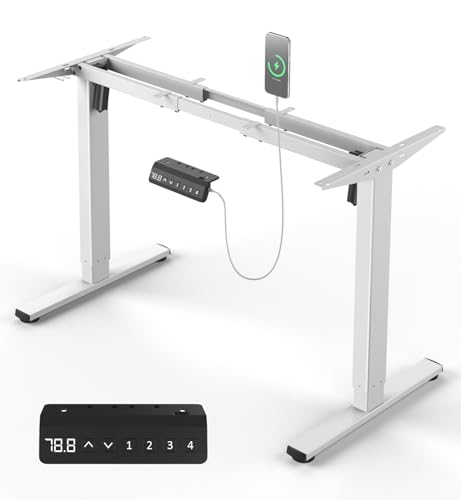
- 330-pound capacity with dual motors and double crossbars
- Fits tabletops from 41.4 to 70.8 inches long
- Four presets plus sensor-based anti-collision protection
Best For: Custom workstations using a large or existing tabletop
Best for Custom Tabletops
Heavy-Duty 264-Lb Dual-Motor Frame

- Supports DIY tabletops from 39.4 to 74.8 inches long
- 264-pound capacity with reinforced cold-rolled steel
- Three presets, anti-collision sensors, tray, clips, and hooks
Best For: Large custom workstations, gaming tables, and multi-monitor setups
Best Compact Value – Garvee 55-Inch Anti-Collision Standing Desk
The Garvee is a practical standing desk with anti collision feature for home offices, study areas, and gaming setups. Its 55-by-24-inch surface, three memory presets, and quiet electric lift provide straightforward sit-stand flexibility without taking up excessive room.
Best For: Compact workstations that need simple height presets and dependable everyday capacity.
Pros:
- Anti-collision technology detects obstacles during adjustment.
- Three one-touch memory presets simplify switching between sitting and standing heights.
- Supports up to 154 pounds with a steel frame and operates at 50 dB or less.
Cons:
- The 55-by-24-inch desktop is less spacious than the larger options in this roundup.
- Its single-motor system adjusts at up to 2 cm/s, so it may not be the fastest lifter.
Choose this model if you want core electric standing-desk features, obstacle protection, and a manageable footprint. It is a sensible fit for users who do not need an extra-deep or oversized desktop.
Best Large Workstation – 71-Inch Oak Desk with Power Outlets
This 71-inch electric standing desk with anti collision feature is designed for users who need expansive workspace and built-in device charging. Its four memory presets, wheels, cable-management features, and integrated outlets make it especially practical for busy offices and gaming stations.
Best For: Large, equipment-heavy setups with multiple monitors, accessories, and charging needs.
Pros:
- Spacious 70.8-by-27.5-inch desktop accommodates monitors, laptops, printers, and supplies.
- Built-in power strip includes three AC outlets, two USB ports, and a 6.5-foot cord.
- Four memory presets, anti-collision function, and height adjustment from 27 to 46.8 inches.
- Steel frame supports up to 176 pounds, with wheels for added mobility.
Cons:
- The large 83.7-pound desk requires more room than compact models.
- Its extensive features may be unnecessary for a minimal workstation.
This is the strongest choice when surface area and integrated power matter more than a small footprint. The oak finish and rounded corners also give the large workstation a more finished furniture-like appearance.
Best Heavy-Duty Choice – Huuger 48-Inch Anti-Collision Desk
The Huuger combines a relatively compact 47-by-27.6-inch desktop with a high 220-pound capacity, making it a versatile standing desk with anti collision feature. Its quiet motor, three presets, hooks, and cable managers suit home offices and gaming spaces where stability and organization are priorities.
Best For: Users who want strong load capacity and a deeper desktop in a compact footprint.
Pros:
- Anti-collision technology automatically reverses when it encounters an obstacle.
- Industrial-grade steel frame and T-shaped design support up to 220 pounds.
- Deep 27.6-inch surface includes two hooks and cable-management features.
- Motor operates below 45 dB, with three customizable height presets.
Cons:
- The 47-inch width provides less side-to-side room than the 55- and 71-inch desks.
- The listed configuration does not include power outlets.
For a smaller room that still needs a sturdy, deep workstation, the Huuger is compelling. Its generous weight rating and automatic reverse protection make it well suited to monitor-heavy or accessory-filled setups.
Best for Long Workdays – VASAGLE 55-Inch Desk with Reminder
The VASAGLE is a 55-by-28-inch electric standing desk with anti collision feature and a wider, deeper surface for dual monitors, laptops, and notebooks. Its four memory presets, sedentary reminder, quiet motor, and stated 20,000 lift-cycle testing make it a useful option for longer home-office or gaming sessions.
Best For: Remote workers, gamers, and creators who want a deep desktop and reminders to change positions.
Pros:
- 28-inch-deep, 55-inch-wide surface offers extra front-to-back workspace.
- Four memory presets enable one-touch height changes from 28.3 to 46.1 inches.
- Quiet operation below 50 dB and cycle-tested for 20,000 lifts.
- Sedentary reminder encourages regular standing breaks.
Cons:
- The supplied notes do not specify the desk’s anti-collision behavior in detail.
- Its 154-pound capacity is lower than the Huuger’s 220-pound rating.
This model stands out for users who value a deeper work surface and behavior-focused features. The sedentary reminder complements the sit-stand design, while four presets make frequent position changes convenient.
Large-Workspace Pick – farexon 63-Inch Electric Standing Desk
If you want a standing desk with anti collision feature and plenty of room for multiple monitors or shared tasks, the farexon offers a spacious 63-by-24-inch work surface. Its electric height range, memory buttons, double-beam frame, and automatic reverse function make it a practical choice for an active home office.
Best For: Users who need a large, sturdy desktop with generous weight capacity and built-in safety features.
Pros:
- 63-by-24-inch desktop provides ample room for monitors, keyboards, and office supplies.
- Adjusts from 27 to 46 inches with four memory buttons.
- Anti-collision system reverses the desk 2 cm when it encounters an obstacle.
- Double-beam frame supports up to 200 pounds, with overheat protection for the motor.
Cons:
- The large footprint may not suit compact work areas.
- The desktop is made of two boards except on 73-inch models.
Choose this farexon model when workspace and load capacity matter more than a compact footprint. Lockable casters, a cord-retraction hole, and the included mouse pad add useful everyday convenience.
Quiet Office Value – Cubiker 48-Inch Electric Standing Desk
The Cubiker is a practical standing desk with anti collision feature for everyday work, although the supplied notes emphasize its quiet motor and stable steel frame rather than specifying an anti-collision system. It combines a 48-by-24-inch desktop with smooth electric adjustment, three memory presets, and a lift range suited to sitting or standing.
Best For: Home-office or gaming users who want a compact, quiet electric desk with straightforward height presets.
Pros:
- Quiet motor operates under 45 dB during height changes.
- Adjusts from approximately 28.3 to 46.5 inches and stores three preferred heights.
- Industrial-grade steel frame supports up to 176 pounds and is tested for up to 100,000 lift cycles.
- 48-by-24-inch surface accommodates dual monitors and daily essentials.
Cons:
- The supplied product information does not confirm a dedicated anti-collision function.
- The desktop uses a splice-board design.
This Cubiker is a sensible option for buyers prioritizing quiet operation, stable support, and a moderate footprint. If anti-collision protection is essential, verify the current listing details before purchasing.
Easy-Assembly Choice – FEZIBO 48-Inch Electric Standing Desk
The FEZIBO is a compact electric option for shoppers searching for a standing desk with anti collision feature, though the supplied specifications do not state that it includes anti-collision protection. It focuses instead on simple setup, three memory presets, a quiet motor, and a reinforced frame for home-office or study use.
Best For: Buyers who want a manageable 48-inch desk with quick assembly and basic sit-stand flexibility.
Pros:
- Electric height adjustment spans approximately 28.3 to 46.5 inches.
- Three customizable memory presets make repeated adjustments convenient.
- Reinforced steel frame supports up to 176 pounds and is tested for up to 50,000 lift cycles.
- Most components come pre-assembled, with setup estimated at about 30 minutes.
Cons:
- The supplied notes do not confirm an anti-collision feature.
- The splice desktop may be less seamless than a one-piece top.
- Its 48-by-24-inch surface offers less room than larger desk models.
The FEZIBO makes sense when easy installation and a moderate footprint are priorities. For a confirmed anti-collision system, check the latest product specifications before relying on it for that feature.
Best Overall – Monomi 59-Inch Electric Standing Desk
The Monomi is a practical standing desk with anti collision feature for home offices, study spaces, and shared rooms. Its full desktop, three memory presets, and automatic reverse-stop protection make switching between sitting and standing straightforward.
Best For: Users who want a complete, spacious electric desk with simple preset controls and built-in obstacle protection.
Pros:
- 59-by-24-inch workspace accommodates working, studying, gaming, or writing.
- Three programmable heights range from 28.35 to 46.46 inches.
- Anti-collision protection reverses the desk when an obstacle is detected.
- Alloy-steel frame supports up to 178 pounds and includes a headphone hook.
Cons:
- The desktop arrives in two sections.
- It offers three memory positions, fewer than some desk frames.
Choose this model if you want an all-in-one desk rather than a frame-only setup. Its certified low-VOC desktop and included assembly tools add practical convenience, while the height range suits a variety of users.
Best Heavy-Duty Frame – Xyndyx 330-Lb Dual-Motor Desk Frame
For shoppers building a custom workstation, this frame is a standing desk with anti collision feature that combines dual-motor lifting with a high 330-pound capacity. Its adjustable width supports a broad range of tabletops, making it useful when an existing surface needs a sit-stand upgrade.
Best For: DIY desk builders and users who need a high-capacity, adjustable frame for larger tabletops.
Pros:
- 330-pound maximum load supports substantial desk setups.
- Dual motors adjust quietly at less than 45 dB.
- Four memory settings provide quick height changes.
- Anti-collision sensors detect obstacles and help prevent bumps and scratches.
Cons:
- This is a frame only; the desktop is not included.
- Its tabletop compatibility requires a surface within the stated size range.
This is the stronger choice for a custom build where load capacity and tabletop flexibility matter most. The double-crossbar design and 10-year warranty add reassurance for long-term office use.
Best for Custom Tabletops – Heavy-Duty 264-Lb Dual-Motor Frame
This adjustable base is a standing desk with anti collision feature designed for custom workstations, gaming tables, and multi-monitor setups. Its cold-rolled steel construction, extended width range, and included cable-management accessories make it a flexible foundation for a larger DIY desk.
Best For: Users creating a custom, wide tabletop workstation who want strong support and organized cable routing.
Pros:
- Supports up to 264 pounds and tabletops up to 74.8 inches long.
- Dual motors provide 28-to-47-inch adjustment at up to 45 dB.
- Three memory presets are managed through a smart LED controller.
- Anti-collision sensors stop or reverse movement around obstacles.
Cons:
- The desktop is not included.
- It has three memory presets rather than four.
- Assembly and tabletop selection are required for a complete desk.
Consider this frame when you need more tabletop flexibility than a prebuilt desk provides. Its adjustable width, reinforced steel structure, cable tray, clips, and dual hooks are well suited to a tailored workstation.
How We Picked the Best Standing Desk with Anti Collision Feature
We focused on desks and frames that offer powered height adjustment and are designed for safer movement around obstacles. Because anti-collision performance can vary by model and setup, verify the manufacturer’s specifications and test the feature during installation rather than assuming every desk uses the same sensor system.
Our comparison also considers desktop size, rated load, motor configuration, control options, assembly demands, cable management, and useful extras such as outlets, wheels, hooks, or an included mat. The goal is to match each desk to a realistic workspace—not simply rank products by price.
Quick Comparison
- Compact workspaces: 48 × 24-inch models are easier to fit in bedrooms, apartments, and smaller offices.
- More room to spread out: 55- to 63-inch desktops suit multiple monitors, speakers, and paperwork.
- Extra-wide setups: The 71 × 28-inch desk offers substantial surface area for large home-office or gaming arrangements.
- Heavy equipment: Dual-motor frames and high-capacity designs are better candidates for multiple monitors, desktop PCs, and accessories.
- Convenience features: Memory presets, one-touch controls, power outlets, wheels, hooks, and built-in mats can reduce daily friction.
Key Buying Factors for a Standing Desk with Anti-Collision Feature
Sensor Behavior and Adjustment Range
Look for clear information about collision detection, sensitivity, stopping, and reversal. Check the lowest and highest settings against your chair, filing cabinet, treadmill, or other equipment. A desk that detects contact but cannot fit your preferred sitting and standing heights is still a poor match.
Stability, Motors, and Weight Capacity
Dual-motor frames generally provide more lifting support and may be preferable for wide desktops or heavy loads. Treat the stated capacity as a limit, not a target; include the desktop, monitors, computer, speakers, and accessories when estimating weight. A broad base, sturdy legs, and a rigid desktop also affect stability at standing height.
Desktop Dimensions and Usable Depth
Measure the available floor space, then account for clearance behind the desk and room for cables. A 24-inch depth works for many monitor setups, while a deeper top can provide better viewing distance and space for larger equipment.
Controls, Noise, and Installation
Preset buttons make frequent transitions easier, while quiet motors are helpful in shared rooms. Review assembly time, frame compatibility, cable routing, and whether the top arrives in one piece or requires joining panels.
Who Should Buy Which Standing Desk with Anti Collision Feature?
Choose a compact 48 × 24-inch desk if you need a practical workstation for a small room. Pick a 55- to 63-inch option if you use two monitors or want space for writing and accessories. The 71-inch model is the better fit for expansive gaming or multi-device setups, provided your room can accommodate it.
Choose a dual-motor frame when load capacity, larger desktops, or frequent adjustments are priorities and you already have—or want to select—your own tabletop. For convenience-focused buyers, prioritize memory presets, outlets, wheels, hooks, or a bundled mat. Whatever the format, confirm the anti-collision instructions, maximum load, height range, and return policy before buying.