A standing desk can improve posture, comfort, and flexibility—but loose cords quickly undermine an otherwise organized workspace. The right cable-management features keep power strips, monitor leads, and charging cables under control while preserving usable legroom.
We compared 10 standing desks with cable management across desktop size, height adjustment, storage, mobility, and built-in wire-routing features to help you choose a cleaner workstation for home or office use.
Best 10 Standing Desk with Cable Management Picks for 2026
Best for Built-In Charging
FLEXISPOT EN2 48-Inch Standing Desk

- Clamp-on strip has three outlets and two USB ports
- Whole-piece FSC-certified desktop
- Four memory presets and 154-pound capacity
Best For: Study areas and offices that need convenient device charging
Best for Large Gaming Setups
60-Inch Flip-Top Cable Management Desk

- Flip-top panel conceals power strips and cords
- 60-by-30-inch surface with 250-pound capacity
- Includes baskets, desk pad, and clamp power strip
Best For: Multi-monitor workstations and gaming rigs
Best for Simple Height Adjustment
ErGear 48-Inch Electric Standing Desk

- Four memory presets from 28.35 to 46.46 inches
- Frame tested for 100,000 lift cycles
- Compact 48-by-24-inch format
Best For: Users adding separate cable-management accessories
Best Integrated Cable Storage
48-Inch Electric Standing Desk

- Rear box stores a power strip
- USB-C controller with presets
- 176-lb capacity and anti-collision
Best For: Home offices, gaming, and tidy dual-monitor setups
Best for Expanded Workspaces

- Large U-shaped work surface
- Three outlets and two USB ports
- Dual-monitor stand with keyboard tray
Best For: Dual-monitor workstations and gaming setups
Best Extra-Deep Surface

- Built-in cable management box
- Extra-deep 30-inch tabletop
- Curved edge with two presets
Best For: Spacious office, study, and gaming workstations
Best All-Around Value
SHW 55-Inch Electric Standing Desk
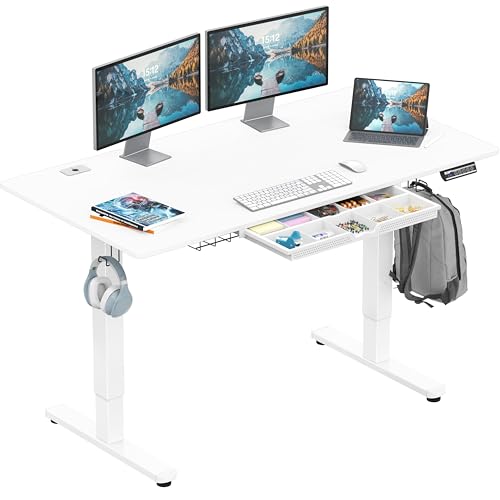
- Cable tray, grommets, and utility hooks
- 55-inch surface with built-in drawer
- Quiet lift with memory presets
Best For: Organized home office and study workstations
Best Compact Option
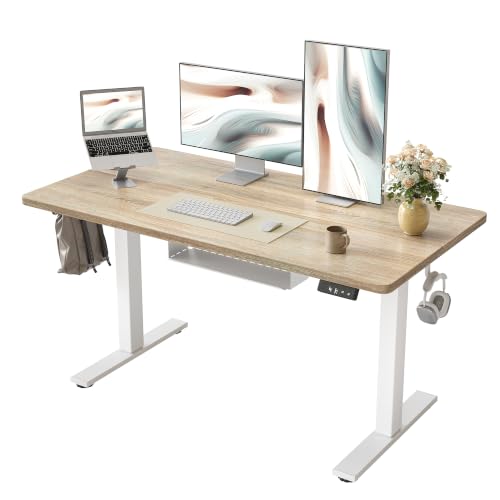
- Included cable-management tray
- Quiet lift with two memory presets
- Compact 47-by-24-inch work surface
Best For: Small offices, bedrooms, and focused setups
Best for Large Setups
OffiGo 71-Inch Executive Standing Desk

- Wide 71-inch multi-device desktop
- Cable grommets and integrated power ports
- Dual-beam frame with three presets
Best For: Multi-monitor home offices and equipment-heavy workstations
Best for Organized Stability – FEZIBO 48-Inch L-Shaped Standing Desk
If you want a standing desk with cable management built into the frame, this FEZIBO model combines an L-shaped crossbar, pegboard, and magnetic cable track to keep wires controlled. Its 48-by-24-inch surface and electric height adjustment suit everyday home-office work, studying, or gaming.
Best For: Buyers who prioritize built-in wire organization and a stable, compact workstation.
Pros:
- L-shaped crossbar is designed to reduce wobble and improve frame stability.
- Integrated pegboard and magnetic cable track help keep cords organized and out of sight.
- Electric height range of 28.3 to 46.5 inches with three memory presets.
- Motor is rated for up to 50,000 lift cycles and runs below 45 dB.
Cons:
- The 48-by-24-inch work surface provides less room than larger workstation desks.
- Only three height presets are available.
The FEZIBO is a practical choice when cable organization and frame stability matter more than maximum desktop space. Its included cable-management features reduce the need for separate accessories, while the quiet motor supports regular sit-stand use.
Best for Built-In Charging – FLEXISPOT EN2 48-Inch Standing Desk
The FLEXISPOT EN2 is a standing desk with cable management designed around easy device charging. Its removable clamp-on power strip provides three outlets and two USB ports, while the 48-by-24-inch whole-piece desktop leaves room for a computer, documents, and accessories.
Best For: Home offices, dorms, and study spaces where accessible charging and a clean desktop are priorities.
Pros:
- Removable power strip includes three outlets and two USB charging ports.
- Whole-piece FSC-certified desktop offers a spacious, uninterrupted work surface.
- Four programmable memory presets adjust the desk from 28.1 to 45.7 inches.
- Steel frame supports up to 154 pounds and includes a listed five-year frame and motor warranty.
Cons:
- Assembly may require an electric drill, which is not included.
- The supplied details describe cable management but do not specify a detailed routing system.
This model stands out for combining a clean one-piece top with convenient charging access. It is a sensible option for users who want fewer loose cords on the desktop and value multiple saved height positions.
Best for Large Gaming Setups – 60-Inch Flip-Top Cable Management Desk
For a larger workstation, this 60-by-30-inch standing desk with cable management uses a flip-top rear panel to conceal a power strip and cords. Its adjustable two-panel surface, storage baskets, and included clamp power strip make it suited to multi-monitor workstations and gaming setups.
Best For: Multi-monitor users and gamers who need a spacious surface, high weight capacity, and concealed cable access.
Pros:
- Flip-up rear panel provides access to cables while hiding them when closed.
- Dual storage baskets keep accessories and cable clutter off the desktop.
- 60-by-30-inch top supports up to 250 pounds and includes three memory presets.
- Includes a desk pad and clamp power strip with three AC outlets and two USB ports.
Cons:
- At 78 pounds, the desk is heavier than the smaller models in this roundup.
- The two-panel top can have a gap of up to 0.8 inches when opened for routing.
This is the strongest fit for equipment-heavy setups. The large top, 250-pound capacity, dual-beam frame, and dedicated flip-top compartment offer more workspace and cable access than a typical compact standing desk.
Best for Simple Height Adjustment – ErGear 48-Inch Electric Standing Desk
The ErGear is a straightforward electric sit-stand desk for buyers who want adjustable height without a complicated setup. Although its supplied details do not list a dedicated cable-management system, its compact 48-by-24-inch format works well as a foundation for adding a separate tray or clips.
Best For: Users seeking a stable, compact electric desk with multiple saved height settings.
Pros:
- Electric adjustment ranges from 28.35 to 46.46 inches.
- Four memory presets make it easy to return to preferred sitting and standing heights.
- Steel frame and aerospace-grade lifting columns are tested for 100,000 lift cycles.
- Low-VOC materials and included tools support a simpler setup.
Cons:
- Cable management is not identified as an included feature in the supplied specifications.
- Its 48-by-24-inch surface is more limited for multi-monitor arrangements.
- Assembly is required.
The ErGear makes sense if reliable height adjustment and stability come first. For a true standing desk with cable management, plan to pair it with an aftermarket cable tray or clips, since the listed package focuses on the desk and frame rather than integrated wire routing.
Best Integrated Cable Storage – 48-Inch Electric Standing Desk
If you want a standing desk with cable management that keeps the power strip tucked away, this 48-inch electric model combines a rear metal cable box, center cable-routing area, and movable cable clip. Its USB-C controller, height presets, timer reminder, and stable steel frame make it a practical fit for everyday office work or a dual-monitor setup.
Best For: Home offices, gaming setups, and users who want built-in power-strip storage with USB-C charging.
Pros:
- Rear metal box stores a power strip and helps reduce visible cables.
- Center routing area lets the desk sit close to a wall without pinching cords.
- Supports up to 176 pounds and includes anti-collision protection.
- Offers USB-C charging, height memory, and 30-minute timer reminders.
Cons:
- The 48-by-24-inch surface provides less room than larger desks.
- The supplied details do not specify the full height range.
This is a strong choice when cable organization is a priority rather than an afterthought. The dedicated storage and routing features are especially useful for keeping monitor and computer wiring tidy while preserving a clean wall-facing setup.
Best for Expanded Workspaces – OffiGo 55-Inch U-Shaped Desk
For shoppers who need a large standing desk with cable management-friendly power access, the OffiGo U-shaped desk provides an expansive 55-inch workspace plus three outlets and two USB ports. Its monitor stand, keyboard tray, hooks, and electric height adjustment support a more organized multi-device workstation.
Best For: Dual-monitor workstations, gaming setups, and users who need extra corner workspace.
Pros:
- U-shaped design offers extra room for monitors, peripherals, and supplies.
- Built-in three outlets and two USB ports simplify device charging.
- Full-size monitor stand accommodates two monitors while freeing desktop space.
- Electric adjustment spans 28.3 to 46.5 inches with three presets.
Cons:
- The 154-pound capacity is lower than some heavier-duty standing desks.
- Its larger U-shaped footprint may require more room than a standard rectangular desk.
- The supplied details emphasize power outlets rather than a dedicated cable box or routing channel.
This model stands out for workspace capacity and built-in charging. It is a good fit if you want a feature-rich workstation with monitor elevation and accessories, though shoppers seeking enclosed cable storage may prefer a desk with a dedicated cable-management compartment.
Best Extra-Deep Surface – TIQLAB Maple Standing Desk
The TIQLAB is a practical standing desk with cable management for users who need more front-to-back room. Its 55-by-30-inch extra-deep surface includes a built-in cable management box, while the curved front edge, two height presets, and 28.3-to-45.6-inch adjustment range support comfortable office, study, or gaming use.
Best For: Users who need extra depth for monitors, keyboards, office supplies, or gaming equipment.
Pros:
- Dedicated cable box organizes power and data cables below the work surface.
- Extra-deep 30-inch tabletop provides generous room for equipment and supplies.
- Curved edge supports a closer monitor position and more natural arm placement.
- Two preset buttons enable one-touch sitting and standing adjustments.
Cons:
- The supplied details list a 50-by-30-inch size in one specification and a 55-by-30-inch tabletop in the product description.
- The frame material is listed as engineered wood, which may be less reassuring for buyers seeking a steel frame.
- Only two height presets are specified.
This desk is compelling for anyone who values surface depth and straightforward wire storage. Confirm the listed dimensions before ordering, but the built-in cable box and curved tabletop make it well suited to spacious, organized work areas.
Best All-Around Value – SHW 55-Inch Electric Standing Desk
The SHW 55-inch model is a practical standing desk with cable management for home offices, study areas, and gaming setups. Its built-in tray, desktop grommets, utility hooks, and storage drawer help keep everyday equipment organized, while the electric lift and memory presets make switching between sitting and standing straightforward.
Best For: Users who want a well-organized workstation with integrated storage and a generous desktop.
Pros:
- Cable tray, grommets, and two utility hooks help manage wires and accessories.
- 55-by-28-inch surface accommodates dual monitors, a laptop, and other equipment.
- Quiet electric height adjustment includes memory presets.
- Built-in drawer and adjustable floor levellers add convenience and stability.
Cons:
- Its 110-pound recommended capacity is lower than some heavy-duty standing desks.
- Assembly is recommended for two people.
Choose this SHW desk if integrated organization matters as much as height adjustment. It combines a useful cable-management setup with storage and a comfortable curved-edge desktop, though buyers with especially heavy equipment may prefer a higher-capacity frame.
Best Compact Option – TIQLAB 47-Inch Standing Desk
The TIQLAB is a compact standing desk with cable management for work, study, and gaming spaces where floor area is limited. Its included cable-management tray supports a cleaner setup, while the electric frame adjusts from 28.3 to 45.6 inches and offers two memory presets for repeatable sit-to-stand transitions.
Best For: Small home offices, bedrooms, or users who want a straightforward electric desk at a compact size.
Pros:
- Included cable-management tray helps keep cords contained beneath the desktop.
- 47-by-24-inch work surface fits common office and computer equipment.
- Motor supports loads up to 176 pounds and operates below 45dB.
- Step-by-step instructions and labeled parts are designed for about 30 minutes of assembly.
Cons:
- The smaller desktop offers less room than larger workstation models.
- Only two memory presets are provided.
- The supplied details identify a headphone hook, but do not list desktop grommets or built-in power outlets.
The TIQLAB makes sense when you need electric height adjustment and basic cord control without a large footprint. Its quieter lift and sturdy stated capacity are useful strengths, but its 47-inch surface is best suited to a focused, relatively compact setup.
Best for Large Setups – OffiGo 71-Inch Executive Standing Desk
The OffiGo is a large executive standing desk with cable management for multi-monitor workstations and equipment-heavy home offices. Its 71-inch desktop provides substantial room, while two cable grommets, built-in AC outlets, USB-A ports, and USB-C ports help create a more convenient and organized workspace.
Best For: Multi-device users who need a wide work surface, integrated charging, and a sturdy electric frame.
Pros:
- 71-by-27.6-inch desktop offers ample space for monitors, laptops, documents, and accessories.
- Two cable grommets and a side hook support everyday organization.
- Built-in power includes three AC outlets, two USB-A ports, and two Type-C ports.
- Dual-beam frame, reinforced steel legs, and three memory presets support stable adjustment.
Cons:
- The desktop is not designed for monitor-arm mounting; standard monitor stands are recommended.
- Its large footprint may not suit smaller rooms.
- The three-piece desktop may require more planning during assembly and placement.
For a spacious workstation with integrated charging, the OffiGo is the strongest fit of these options. Its reinforced construction and broad desktop suit demanding setups, but confirm that the monitor-stand limitation and larger footprint work for your room and equipment.
How We Picked the Best Standing Desk with Cable Management
We focused on desks that combine electric height adjustment with a practical way to route, conceal, or organize cables. The selection covers compact 48-inch models, deeper 55- and 60-inch desktops, L-shaped and U-shaped configurations, mobile desks, and large executive workstations.
We also considered everyday usability: desktop space for monitors and accessories, stability at standing height, storage options, included power features, assembly considerations, and whether the cable solution is integrated into the frame or added as a tray, cart, compartment, or flip-top panel.
Quick Comparison
- Best for compact setups: 48-inch desks provide enough room for a laptop or single-monitor workstation without overwhelming a smaller room.
- Best for multiple monitors: 55- to 60-inch desktops offer more width and depth for screens, speakers, and paperwork.
- Best for corner offices: L-shaped and U-shaped designs maximize surface area while using the room’s perimeter efficiently.
- Best for mobility: A desk with wheels can be repositioned easily, provided the casters lock securely during use.
- Best for executive workspaces: A 71-inch desk offers the broadest work surface and a more substantial office presence.
Key Buying Factors for a Standing Desk with Cable Management
Desktop Size and Depth
Measure your available floor area before choosing a desk. Width determines how many monitors fit side by side, while depth affects viewing distance and room for a keyboard, desk mat, and accessories. Extra-deep models are useful for monitor arms or larger equipment.
Cable-Management Design
Look for enough capacity for power strips, display cables, USB leads, and chargers. A flip-top compartment offers fast access, while trays and carts keep cords below the desktop. Check whether openings are positioned near your equipment and whether the system moves smoothly with the lifting frame.
Adjustment Range and Stability
Choose a height range that suits every intended user, including seated and standing positions. A stable frame matters more at higher settings, especially with monitor arms or heavy desktop equipment. Smooth, reasonably quiet motors make frequent position changes less disruptive.
Storage and Built-In Power
Drawers, keyboard trays, power strips, and USB-C ports can reduce accessory clutter, but they may also limit legroom or add assembly complexity. Prioritize the features that match your setup rather than paying for extras you will not use.
Who Should Buy Which Standing Desk with Cable Management?
Choose a compact 48-inch model for a bedroom office, apartment, or single-screen setup. Move up to a 55- or 60-inch desk if you use multiple monitors or need room for documents. An L-shaped or U-shaped desk suits multitaskers who want separate zones for computing, writing, or creative work.
Pick a mobile desk when flexibility is essential, and consider a model with a drawer or keyboard tray if accessory storage is a daily concern. For a dedicated home office with substantial equipment, an executive-size desk provides the most room—provided you have enough space around it for comfortable movement.