A docking station with an NVMe slot can turn a laptop into a more capable desktop setup while adding fast, removable storage. The models in this roundup range from compact USB-C hubs to high-bandwidth Thunderbolt 5 docks with multiple displays and expansion ports.
Before choosing, check your laptop’s USB-C or Thunderbolt capabilities, the supported NVMe or SATA drive format, display requirements, and the power delivery level you need. The best option depends on whether you prioritize speed, portability, storage flexibility, or a full workstation connection.
Best 10 Docking Station with Nvme Slot Picks for 2026
Best for Thunderbolt 5 Creators

- PCIe Gen 4 x4 M.2 slot
- Up to triple 4K or dual 8K displays
- 2.5Gb Ethernet and Thunderbolt 5
Best For: Creative professionals managing large media and design files
Best Intel-Certified Option
V-Core Thunderbolt 5 NVMe Dock

- Intel-certified Thunderbolt 5 connectivity
- NVMe expansion up to 8TB
- Up to triple 4K at 144Hz on PC
Best For: Thunderbolt 5 Windows workstations and high-refresh displays
Best Windows USB4 Workflow

- 40Gbps USB4 connectivity
- NVMe enclosure up to 8TB
- Triple 4K@144Hz support on compatible PCs
Best For: Windows creators and technical users needing fast local storage
Best All-in-One Pick
UGREEN Revodok 10-in-1 NVMe Dock

- M.2 NVMe expansion in a 10-port hub
- 4K@60Hz HDMI and 100W PD charging
- 10Gbps USB, Ethernet, and SD/TF readers
Best For: Complete laptop connectivity with storage expansion
Best Space-Saving Design

- Vertical stand with up-to-4TB M.2 support
- 4K@60Hz HDMI and 100W PD input
- Dual 10Gbps USB-C ports plus Ethernet and card readers
Best For: Compact MacBook or USB-C workstation setups
Best SSD Accessory

- Supports NVMe and SATA M.2 drives
- 10Gbps USB-C transfer speeds
- Tool-free open aluminum design
Best For: Frequent SSD swaps, backups, and drive testing
Best Compact NVMe Hub
9-in-1 USB-C Dock with NVMe Enclosure

- Supports M-Key NVMe drives up to 4TB
- 4K@60Hz HDMI and 100W PD charging
- Includes SSD cooling and installation accessories
Best For: Portable laptop storage and connectivity expansion
Best NVMe/SATA Flexibility
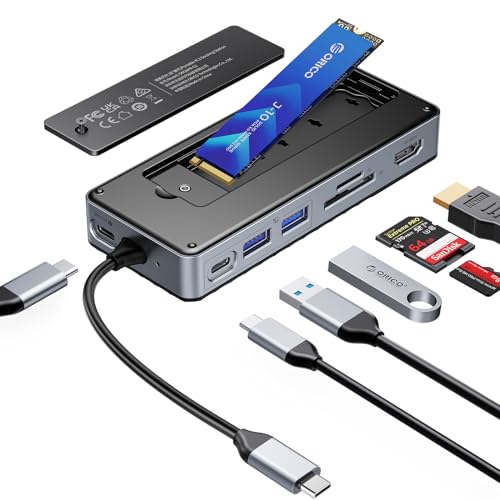
- Supports NVMe and SATA M.2 drives up to 8TB
- Adds 10Gbps USB and 4K@60Hz HDMI
- Includes cable, cooling parts, and tools
Best For: Mixed-drive households and flexible storage upgrades
Best Multi-Display Dock
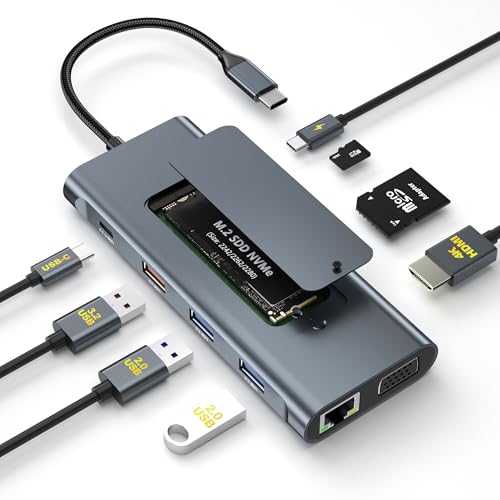
- Adds HDMI, VGA, Ethernet, and NVMe storage
- Supports simultaneous HDMI and VGA displays
- Offers 10Gbps data and 100W PD passthrough
Best For: Power users and dual-display office setups
Best for Thunderbolt 5 Creators – High-Speed NVMe Editing Dock
If you need a docking station with nvme slot for demanding creative work, the WAVLINK Thunderbolt 5 Dock combines PCIe Gen 4 x4 storage, multi-monitor support, fast networking, and extensive connectivity. Its M.2 slot accepts a 2280 M KEY NVMe SSD, while Thunderbolt 5 supports high-bandwidth workflows and up to 140W laptop charging.
Best For: Video editors, photographers, graphic designers, and professionals handling large RAW, PSD, or 3D files.
Pros:
- PCIe Gen 4 x4 M.2 slot with transfer rates up to 64Gbps.
- Supports single 8K, dual 8K, or triple 4K displays depending on the computer and operating system.
- Includes 2.5Gb Ethernet, four USB-A ports, SD 4.0, audio, and three downstream Thunderbolt 5 ports.
- Includes a two-year warranty and technical support.
Cons:
- NVMe SSD is not included and must be a 2280 M KEY drive.
- Triple-display support requires a Windows 11-or-later PC with Thunderbolt 5; macOS supports dual external displays.
- USB-C-to-HDMI/DisplayPort cables are not included.
This is a powerful choice when internal NVMe storage and Thunderbolt 5 performance matter more than a simple plug-and-play adapter. Confirm your computer and display requirements before buying.
Best MacBook Desk Setup – Dual-Monitor NVMe Dock
This docking station with nvme slot is built specifically for compatible MacBook models, combining dual 4K HDMI output, a vertical laptop stand, wired networking, card readers, and a 10Gbps M.2 NVMe enclosure. It can expand storage by up to 4TB while helping keep a compact desk organized.
Best For: Compatible MacBook users who want dual 4K monitors, extra NVMe storage, and a vertical clamshell-style workspace.
Pros:
- Provides dual 4K@60Hz HDMI output on supported MacBook models.
- Supports M.2 NVMe drives from 2230 through 2280 sizes at up to 10Gbps.
- Combines a vertical stand, 100W PD charging, Gigabit Ethernet, USB ports, and SD/TF readers.
- Includes a dedicated USB 2.0 port for keyboards and mice.
Cons:
- Dual-display functionality is not supported on base M1, M2, or M3 Mac chips, Windows, iPad, or MacBook Neo.
- Does not support SATA SSDs or SSDs with heatsinks, and the SSD is not included.
- Clamshell use requires setup steps and a 65W-or-higher power adapter connected to the PD input.
For the right MacBook configuration, this dock offers an unusually complete desktop setup in one unit. Check the listed compatibility requirements carefully, especially if dual external displays are essential.
Best Intel-Certified Option – V-Core Thunderbolt 5 NVMe Dock
For shoppers comparing a docking station with nvme slot for a high-performance office or creative setup, the VectoTech V-Core pairs Intel-certified Thunderbolt 5 connectivity with an M.2 2280 PCIe Gen 4 x4 slot. It also provides 140W charging, 2.5Gb Ethernet, multiple USB ports, and flexible high-refresh display support.
Best For: Thunderbolt 5 Windows users and Mac users who need built-in NVMe expansion, fast networking, and high-resolution display support.
Pros:
- Intel-certified Thunderbolt 5 dock with up to 120Gbps bandwidth.
- Supports an M.2 2280 PCIe Gen 4 x4 NVMe SSD up to 8TB, with claimed read speeds up to 6,200 MB/s.
- Offers up to triple 4K at 144Hz on Thunderbolt 5 PCs or dual 6K on Mac.
- Includes a Thunderbolt 5 cable, power adapter, screwdriver, and two-year warranty.
Cons:
- SSD is not included.
- There is no HDMI port; HDMI or DisplayPort monitors require a USB-C cable or adapter.
- Intel-based Macs are not supported, and display capabilities depend on the host computer.
The V-Core is a strong fit when certification, high-refresh displays, and user-installable storage are priorities. Its lack of built-in HDMI means your monitor cables and adapters deserve attention before purchase.
Best Windows USB4 Workflow – USB4 NVMe Enclosure Dock
This docking station with nvme slot is designed for Windows systems that support USB4, Thunderbolt 4/5, and the required display capabilities. It combines 40Gbps USB4, a 20Gbps M.2 NVMe enclosure, dual DisplayPort 2.1 outputs, 100W power delivery, and additional USB4 expansion for storage, peripherals, or capture equipment.
Best For: Windows video creators, developers, and technical users who need fast local NVMe storage and multi-display connectivity.
Pros:
- Supports USB4 throughput up to 40Gbps with native display lanes and no virtual graphics drivers.
- M.2 NVMe enclosure supports up to 8TB, with claimed read speeds up to 2,004MB/s.
- Supports single 8K@60Hz or triple 4K@144Hz display setups on compatible systems.
- Offers two downstream USB4 ports, dual DisplayPort 2.1, a 20Gbps USB-C port, and 100W power delivery.
Cons:
- Not compatible with Mac computers.
- The host must support DP 2.1, DSC, USB4, or Thunderbolt 4/5 for full functionality.
- SSD is not included, and the cooling fan produces some noise during normal operation.
This dock is best viewed as a Windows-focused workstation hub rather than a general-purpose accessory. Its bandwidth and expansion are compelling for technical workflows, provided your computer meets the display and USB4 requirements.
Best All-in-One Pick – UGREEN Revodok 10-in-1 NVMe Dock
If you want a docking station with NVMe slot that also handles displays, networking, memory cards, and everyday peripherals, the UGREEN Revodok is a well-rounded option. It combines 4K@60Hz HDMI, 10Gbps USB connectivity, Gigabit Ethernet, SD/TF readers, and 100W power delivery in one compact dock.
Best For: Laptop users who want one dock for storage expansion, external displays, fast file transfers, wired networking, and charging.
Pros:
- Built-in M.2 NVMe slot adds storage without a separate enclosure.
- 4K@60Hz HDMI supports smooth external-monitor and TV output.
- Includes 10Gbps USB ports, Gigabit Ethernet, SD/TF readers, and 100W PD.
- Plug-and-play compatibility with supported Mac, Windows, iPad Pro, and handheld devices.
Cons:
- The SSD is not included and must be supplied separately.
- Compatibility depends on the host device supporting the required USB-C features.
The Revodok is a practical choice when you want broad connectivity alongside NVMe expansion. Its mix of 4K video, fast USB ports, card readers, Ethernet, and charging makes it especially suitable for flexible home-office or creator setups.
Best Space-Saving Design – 11-in-1 Vertical NVMe Dock
This docking station with NVMe slot is designed for users who want a full workstation hub without adding much desk clutter. Its vertical form factor includes an M.2 enclosure, 4K@60Hz HDMI, 10Gbps USB-C, card readers, Gigabit Ethernet, and 100W PD input.
Best For: MacBook and USB-C laptop users who need expandable storage, a space-saving stand, and a broad selection of workstation connections.
Pros:
- Supports M.2 NVMe drives up to 4TB in 2230, 2242, 2260, and 2280 sizes.
- Vertical design saves desk space and can function as a laptop stand.
- Offers 4K@60Hz HDMI, dual 10Gbps USB-C ports, Ethernet, and SD/TF readers.
- Broad compatibility includes supported USB-C, USB4, Thunderbolt, Windows, ChromeOS, Android, and Ubuntu devices.
Cons:
- The SSD is sold separately.
- Video output requires a host USB-C port with DisplayPort Alt Mode support.
- Clamshell use may require additional laptop power or sleep-setting adjustments.
Choose this model if desk organization matters as much as connectivity. The vertical stand and up-to-4TB NVMe support make it a strong fit for compact offices, while its card readers and fast USB-C ports suit photo and video workflows.
Best SSD Accessory – ACASIS NVMe and SATA SSD Dock
Unlike a conventional laptop hub, the ACASIS is a docking station with NVMe slot focused primarily on fast, convenient drive access. It supports compatible M.2 NVMe and SATA SSDs, connects over USB-C at up to 10Gbps, and uses an open aluminum toaster-style design for simple drive swaps and airflow.
Best For: Users who frequently clone, back up, test, or swap M.2 NVMe and SATA drives outside a computer.
Pros:
- Supports M.2 NVMe and SATA drives in 2230, 2242, 2260, and 2280 sizes.
- 10Gbps USB-C connection enables fast transfers for large files and backups.
- Tool-free, driver-free design makes SSD insertion and removal straightforward.
- Aluminum construction and open layout help with heat dissipation.
Cons:
- It is an SSD reader and enclosure rather than a full multi-port laptop dock.
- Supports one drive at a time.
- Drive performance depends on the installed SSD and host USB connection.
The ACASIS makes more sense for hands-on storage management than for monitor or peripheral expansion. Its broad M.2 support, tool-free access, and cooling-focused construction are useful for rotating drives and creating external storage quickly.
Best Compact NVMe Hub – 9-in-1 USB-C Dock with NVMe Enclosure
If you need a docking station with nvme slot for everyday laptop expansion, this 9-in-1 model combines an M.2 NVMe enclosure with display, charging, USB, and card-reader connectivity. It supports M-Key PCIe NVMe drives up to 4TB, but not SATA M.2 SSDs.
Best For: Laptop users who want compact storage expansion, 4K display output, and fast USB connectivity in one dock.
Pros:
- Built-in M.2 NVMe slot supports drives up to 4TB.
- Offers 4K@60Hz HDMI, 100W PD, and 10Gbps USB ports.
- Includes a heatsink, cooling pad, screwdriver, and quick-start guide.
Cons:
- Does not support SATA M.2 SSDs.
- Power adapter and charging cable are not included.
- SD and TF cards cannot be used simultaneously.
This is a practical choice when portability matters and you need fast NVMe storage alongside core desktop accessories. Confirm that your laptop supports USB-C data, charging, and video output before buying.
Best NVMe/SATA Flexibility – ORICO 8-in-1 USB-C SSD Dock
For shoppers comparing a docking station with nvme slot, the ORICO stands out by supporting both M.2 NVMe and SATA SSDs. Its 8-in-1 design adds 10Gbps USB, 4K@60Hz HDMI, 100W PD, and SD/TF card access for a flexible desktop or travel setup.
Best For: Users who want one enclosure-dock that works with either M.2 NVMe or SATA SSDs.
Pros:
- Supports M.2 NVMe and SATA SSDs up to 8TB.
- Combines 10Gbps USB ports with 4K@60Hz HDMI output.
- Includes a USB-C cable, heatsink, cooling pad, screwdrivers, and guide.
- Backed by an 18-month warranty.
Cons:
- SSD is not included.
- Power adapter and charging cable are not included.
- SD and TF cards cannot be used at the same time.
The broad SSD compatibility makes this ORICO model especially useful if you already own different M.2 drive types or want more upgrade flexibility. Use PD charging for stable data transfer, and verify that the host USB-C port supports video for HDMI output.
Best Multi-Display Dock – 11-in-1 NVMe USB-C Dock
This 11-in-1 docking station with nvme slot is designed for users who need more than basic laptop ports. It combines an M.2 NVMe enclosure with HDMI, VGA, Gigabit Ethernet, card readers, USB expansion, and 100W PD charging, while supporting NVMe drives up to 2TB.
Best For: Power users, photographers, and office setups that need wired networking, dual-display support, and integrated NVMe storage.
Pros:
- Provides 11 functions, including NVMe storage, Gigabit Ethernet, HDMI, and VGA.
- Supports 10Gbps SSD, USB-C, and USB-A 3.2 data transfer.
- Can drive HDMI up to 4K@30Hz and VGA up to 1080p simultaneously.
- Includes SSD installation and cooling accessories.
Cons:
- Supports M.2 NVMe drives up to 2TB, but not M.2 SATA SSDs.
- HDMI output is limited to 4K@30Hz.
- Requires a fully functional USB-C or Thunderbolt 3 host port for its features.
Choose this model when port variety and multi-monitor capability matter more than the smallest footprint. Its Ethernet and legacy VGA connections are useful for office and presentation environments, while the NVMe slot reduces the need for a separate enclosure.
How We Picked the Best Docking Station with Nvme Slot
We selected these docking stations based on the features that matter most in daily use: NVMe compatibility, connection speed, display support, power delivery, port selection, and practical design. We also considered whether each model suits a particular use case, such as a MacBook workstation, a Windows laptop setup, portable storage, or a compact desk.
Specifications can vary by computer, operating system, installed SSD, and cable. Confirm the manufacturer’s compatibility information before buying, especially if you need multiple monitors or maximum transfer speeds.
Quick Comparison
| Priority | What to look for | Best fit |
|---|---|---|
| Maximum bandwidth | Thunderbolt 5 or USB4 connectivity | High-performance workstations and large file transfers |
| Balanced expansion | 10Gbps USB ports, HDMI, card readers, and NVMe support | Everyday productivity and creative work |
| Storage flexibility | Support for the required M.2 NVMe or SATA format | Users reusing spare SSDs |
| Portable setup | Compact housing, bus-powered operation, and essential ports | Travel and hybrid work |
Key Buying Factors for a Docking Station with Nvme Slot
Drive Compatibility and Cooling
Check whether the enclosure accepts M.2 NVMe drives only or also supports M.2 SATA SSDs. Confirm the supported lengths, such as 2242 or 2280, and look for a secure mounting system. Sustained transfers can generate heat, so an aluminum body, ventilation, or a thermal pad can help maintain performance.
Host Connection and Real-World Speed
A 10Gbps USB-C connection is sufficient for many backups and media libraries, while USB4 and Thunderbolt models offer more bandwidth for demanding storage and display workloads. The computer’s port and the included cable must support the advertised standard; plugging a fast dock into a slower USB-C port limits performance.
Display Support and Power Delivery
Verify the maximum resolution and refresh rate for your monitor arrangement. Some systems handle one external display natively, while others may require DisplayLink software for multiple monitors. Power delivery ratings such as 100W describe the dock’s input capability, not always the exact wattage delivered to the laptop after power overhead.
Port Layout and Reliability
Count the ports you actually use, including USB-A, USB-C, Ethernet, SD or microSD, audio, and extra display outputs. A front-facing port is useful for temporary devices, while a vertical or rear-facing design can reduce cable clutter. A dependable power adapter and a detachable host cable are also worthwhile for a permanent setup.
Who Should Buy Which Docking Station with Nvme Slot?
Choose a Thunderbolt 5 or USB4 model if you work with large video projects, high-resolution displays, or several fast peripherals. A 10Gbps USB-C dock is a better value for office work, backups, photography, and general laptop expansion. Pick a model with NVMe and SATA support if you want to reuse drives from different systems. For travel, prioritize a smaller hub with the ports you need rather than paying for unused display or networking features.