Finding a useful Christmas gift for a man who spends time at a computer is easier when you start with how he uses his setup. These picks cover gaming, creative work, remote work, and everyday desk comfort.
20 Computer Accessory Gift Ideas
1. Mount-It! Dual Monitor Sit-Stand Desk Converter
A Flexible Desk Upgrade
Mount-It! Dual Monitor Sit-Stand Desk Converter

- Raises or lowers the platform at the push of a button, from 1.4 to 21.1 inches.
- Holds two monitors up to 32 inches on included VESA arms.
- Compact 28.3 by 18.9 inch base fits on many existing desks.
Best For: Someone who wants to alternate between sitting and standing at a dual-screen desk.
2. Deco 7 Pro Wi-Fi 7 Mesh System
Whole-Home Network Gift
Deco 7 Pro Wi-Fi 7 Mesh System

- Three-pack system is listed to cover up to 7,600 square feet and support over 200 devices.
- Tri-band Wi-Fi 7 system includes a 10G WAN/LAN port and four 2.5G ports.
- Works with earlier Wi-Fi generations; a separate modem is required.
Best For: A tech enthusiast improving connectivity across a device-filled home.
3. Anker Prime 14-in-1 Laptop Dock
One-Cable Desk Organizer
Anker Prime 14-in-1 Laptop Dock

- Combines 14 functions, including charging, data connections, audio, Ethernet, and dual HDMI display outputs.
- Offers up to 160W total output and data transfer speeds up to 10Gbps.
- Supports USB-C, USB4, and Thunderbolt; check laptop display support and OS limits.
Best For: A laptop user who wants to connect peripherals and external displays at a desk.
4. XPPen Artist 12 3rd Drawing Tablet
A Screen for Digital Art
XPPen Artist 12 3rd Drawing Tablet

- Portable 11.9-inch drawing display includes an X4 pen and foldable stand.
- The pen supports 16,384 pressure levels and 60-degree tilt.
- Compatible with listed Windows, macOS, Android, ChromeOS, and Linux versions.
Best For: An artist, design student, or image editor who creates digital work.
5. Feker Alice98 Ergonomic Mechanical Keyboard
6. HUANUO FlowLift Dual Monitor Arm
More Room on His Desk
HUANUO FlowLift Dual Monitor Arm

- Supports two 13-to-32-inch monitors, each weighing 4.4 to 19.8 pounds, with compatible VESA holes.
- Offers tilt, swivel, rotation, and height adjustment up to 15.75 inches.
- Fits wooden desks 0.59 to 3.54 inches thick using a clamp or grommet mount.
Best For: Someone with compatible monitors and a suitable desk who wants adjustable screen positioning.
7. INIU 20,000mAh 65W Laptop Power Bank
Portable Power for Work and Play
INIU 20,000mAh 65W Laptop Power Bank

- Has 20,000mAh capacity and up to 65W charging output.
- Three ports can charge a laptop, phone, and another device simultaneously.
- Includes a detachable USB-C cable; check that his devices support its charging output.
Best For: A laptop user who travels between home, work, and other locations.
8. Acer 6-in-1 USB-C Hub
Extra Ports for a Laptop

- Adds HDMI, Gigabit Ethernet, two USB-A data ports, USB-C data, and USB-C power delivery.
- HDMI supports up to 4K at 60Hz when the device supports DP 1.4 Alt Mode and HDMI 2.0 or higher.
- Power delivery provides up to 85W output with a compatible 100W-or-higher charger.
Best For: A laptop owner who needs more connections for a monitor, wired network, and accessories.
9. STREBITO 142-Piece Precision Screwdriver Set
A Toolkit for PC Projects
STREBITO 142-Piece Precision Screwdriver Set
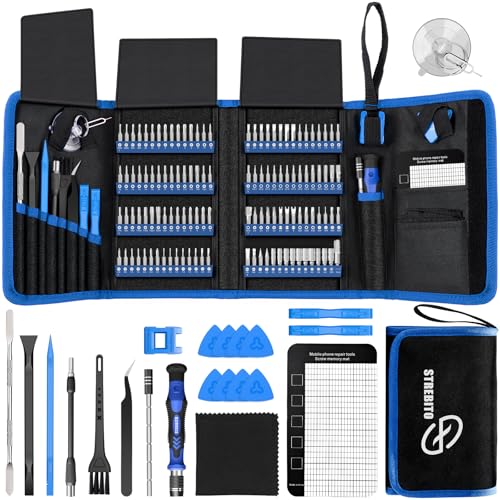
- Includes 120 driver bits and 22 accessories, including tweezers, a magnetic mat, and a suction cup.
- The kit is intended for electronics such as computers, laptops, tablets, and game consoles.
- A flexible extension shaft helps reach screws in tight spaces.
Best For: Someone who repairs, upgrades, or assembles computer and electronics gear.
10. HUION Keydial Mini Bluetooth Keypad
Shortcuts at His Fingertips
HUION Keydial Mini Bluetooth Keypad

- Offers 18 programmable keys and a dial that can switch between three functions.
- Bluetooth 5.0 connection and one-handed design make it easy to position beside a keyboard.
- Works with Mac and Windows; shortcut customization requires compatible software support.
Best For: A creator, gamer, or power user who wants customizable shortcuts.
11. RIWUCT Foldable Aluminum Laptop Stand
A More Comfortable Laptop Setup
RIWUCT Foldable Aluminum Laptop Stand
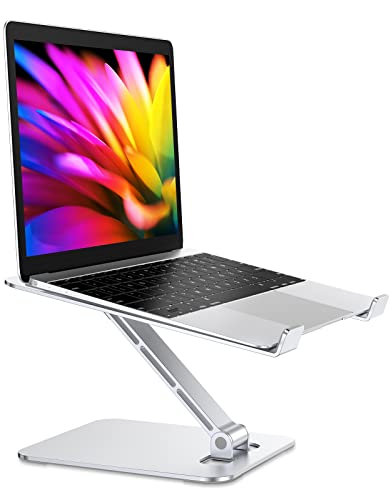
- Adjusts to raise a laptop as much as 7.48 inches and folds for storage or travel.
- Designed for laptops from 10 to 16 inches and supports up to 8.8 pounds.
- Open construction leaves space for airflow beneath the laptop.
Best For: A laptop user seeking a portable stand for a desk, meeting room, or home workspace.
12. AFIING 47-by-17-Inch Desk Mat
A Softer Desktop Surface

- Large surface accommodates a mouse, keyboard, writing, or drawing.
- Made with a cork base and vegan PU leather surface, with a non-slip backing.
- Waterproof surface can be wiped clean with a cloth.
Best For: Someone who wants a broad, easy-care surface for work or gaming.
13. BENFEI USB-C to Gigabit Ethernet Adapter
Wired Network on the Go
BENFEI USB-C to Gigabit Ethernet Adapter

- Connects a compatible USB-C device to a wired Ethernet network.
- Supports speeds up to 1Gbps and is backward compatible with 100Mbps and 10Mbps networks.
- Compact adapter; a CAT6-or-higher cable is needed to reach 1Gbps.
Best For: A laptop gamer or remote worker who wants the option of a wired connection.
14. Razer Stream Controller
A Control Center for Creative Work

- Includes 12 customizable haptic keys, six tactile dials, and eight programmable buttons.
- Custom layouts can group commands, and Dynamic Mode can switch profiles based on the detected app.
- Supports PC and Mac with listed streaming and creative software.
Best For: A streamer, editor, or multitasker who repeats commands across apps.
15. Acer 4K Webcam with Privacy Cover
A Clearer Video Call Setup
Acer 4K Webcam with Privacy Cover

- Uses a 4K sensor with phase-detection autofocus and two microphones.
- Connects by USB-C to A, with an adapter included, and works with Windows, Mac, and ChromeOS.
- Includes a magnetic lens cover for privacy when the camera is not in use.
Best For: Someone who works remotely, streams, or joins frequent video calls.
16. SABRENT Rocket Nano XTRM 2TB External SSD
Pocketable Space for Projects
SABRENT Rocket Nano XTRM 2TB External SSD
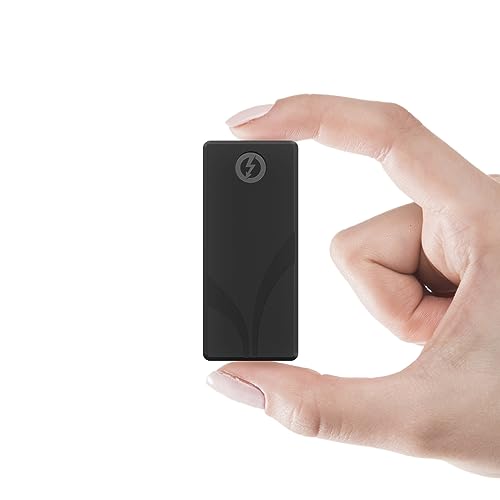
- Provides 2TB of external solid-state storage in a compact aluminum enclosure.
- Supports Thunderbolt 3 and USB 3.2 Gen 2; both Thunderbolt/USB-C and USB-C to USB-A cables are included.
- Compatible with Mac, PC, and Linux; top transfer speeds depend on the connection.
Best For: A gamer or creator who stores large files and moves between computers.
17. LG UltraGear 34-Inch Curved Gaming Monitor
A More Immersive Gaming Screen
LG UltraGear 34-Inch Curved Gaming Monitor

- 34-inch curved WQHD display has a 3440-by-1440 resolution and 21:9 aspect ratio.
- Offers a 160Hz refresh rate, AMD FreeSync Premium, and HDR10 support.
- Stand includes tilt, height, and swivel adjustment; built-in speakers are included.
Best For: A PC gamer who wants an ultrawide screen for gaming and multitasking.
18. Sony INZONE H6 Air Open-Back Gaming Headset
Open-Back Gaming Audio
Sony INZONE H6 Air Open-Back Gaming Headset

- Wired open-back headset includes 40mm drivers and a detachable microphone.
- Designed for PC, PS5, and mobile use; includes a USB-C audio box.
- Weighs approximately 199 grams and has onboard volume and mute buttons.
Best For: A gamer who wants open-back sound and a detachable voice microphone.
19. Logitech G502 Lightspeed Wireless Gaming Mouse
Wireless Control for His Games
Logitech G502 Lightspeed Wireless Gaming Mouse

- LIGHTSPEED wireless connection and an optical sensor support precise PC control.
- Eleven customizable buttons can be assigned shortcuts or macros through Logitech G Hub.
- PowerPlay wireless charging requires a separately sold system.
Best For: A PC gamer who wants a customizable wireless mouse with multiple buttons.
20. Klipsch ProMedia 2.1 Desktop Speakers
A Desktop Sound System
Klipsch ProMedia 2.1 Desktop Speakers

- Two satellite speakers pair with a 6.5-inch side-firing subwoofer.
- A 3.5mm input and control pod provide plug-and-play setup and volume adjustment.
- Compatible with computers, TVs, music players, and gaming consoles.
Best For: Someone who prefers speakers for games, music, and movies instead of a headset.
Choosing a Computer Accessory for Him
Start with the way he uses his computer each day. A PC gamer may appreciate the ultrawide monitor, wireless mouse, open-back headset, or desktop speakers. Someone who works across a laptop and external screens may get more everyday use from a dock, USB-C hub, stand, or monitor arm. For a creative user, the drawing tablet, programmable keypad, or stream controller can make familiar tasks easier to manage. A precision tool set is especially personal when he enjoys maintaining his own equipment.
Think about the problem the gift should solve. Does his desk feel crowded? A monitor arm or desk mat could help organize the work surface. Does he carry a laptop around? A foldable stand or power bank is easier to bring along. If he regularly moves large files, external storage could be more useful than another input device. A gift that fits an existing habit is more likely to become part of his normal setup.
Match the Gift to Your Budget
Small accessories can still feel thoughtful when they address a specific need. The Ethernet adapter, laptop stand, screwdriver set, and desk mat are practical choices for someone who has mentioned a connection, posture, repair, or workspace issue. A hub or keypad adds useful functions without replacing a major piece of equipment.
For a larger Christmas gift, consider an upgrade that changes how the whole setup feels: the curved gaming monitor, dual-monitor desk converter, mesh Wi-Fi system, speakers, or drawing display. These occupy more space and may require more setup, so make sure the recipient has room and a clear use for them. The SSD, power bank, and headset fall between simple desk additions and major workstation changes, depending on what gear he already owns.
Check Compatibility and Personalization
Computer accessories often depend on ports, operating systems, and physical fit. Before choosing a dock or hub, check whether his laptop has USB-C, USB4, or Thunderbolt and whether it supports video over USB-C. External monitor behavior can differ by computer and operating system. The hub’s 4K output also depends on device support, and high-wattage charging requires a suitable charger and cable.
For a monitor arm, check the display’s size, weight, and VESA mounting pattern, along with desk thickness and construction. A desk converter has a different footprint and supports a specified monitor size. A laptop stand should fit his screen size. For Wi-Fi equipment, remember that a modem is required for most internet service providers. When buying storage, a power bank, or wired networking gear, check the computer’s ports and supported connection standards.
Personalization can make a gift feel considered without requiring a custom design. A mechanical keyboard, programmable keypad, or stream controller lets the recipient arrange keys or functions around his workflow. If you know his preferred layout, editing tools, or gaming style, use that information to choose an accessory he can configure himself. For a more straightforward gift, focus on useful compatibility and familiar connections.
Timing and Last-Minute Decisions
If Christmas is close, favor accessories that are easy to understand and connect, such as a desk mat, USB-C Ethernet adapter, screwdriver set, or laptop stand, once you have checked the relevant fit. Avoid relying on a promised delivery date; confirm the current shipping details with the retailer. For larger gifts, plan for the space, mounting, cables, and setup time they may need. A short note explaining why you chose it—more desk room, simpler laptop connections, or a better video-call setup—can make a practical computer accessory feel personal.