Need a Secret Santa gift for a PC gamer? These ideas span useful desk comforts, audio and input gear, and bigger setup upgrades, so you can match the present to what they play and already own.
19 Christmas Gift Ideas for PC Gamers
1. beyerdynamic DT 770 Pro 80 Ohm Headphones
For Focused Listening
beyerdynamic DT 770 Pro 80 Ohm Headphones

- Closed-back over-ear design helps keep room sound out during gaming, recording, or music listening.
- 80-ohm model is described as loud enough from most laptops and works best with an audio interface or headphone amp.
- Includes replaceable grey velour ear pads, a fixed 3m straight cable, and a 1/4-inch adapter.
Best For: A gamer who also listens to music or records audio.
2. Nylavee 2.1 Desktop Speakers with Subwoofer
For Desk-Filling Sound
Nylavee 2.1 Desktop Speakers with Subwoofer

- 2.1 speaker system with a dedicated subwoofer and up to 60W peak output.
- Connects by USB, AUX, or Bluetooth 5.4; wired use is suggested for gaming.
- Features eight RGB lighting modes, four brightness levels, and a rotary control knob.
Best For: A gamer who prefers speakers to wearing a headset.
3. Snailax Heated, Vibrating Under-Desk Footrest
For Cozy Sessions
Snailax Heated, Vibrating Under-Desk Footrest
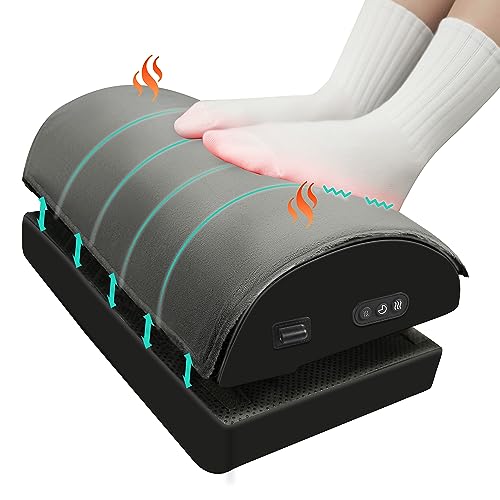
- Double-layer design offers adjustable height, memory foam support, and vibration massage.
- Three heat levels are controlled with a button.
- Non-slip underside and machine-washable cover; suited to office chairs, gaming stools, and sofas.
Best For: A desk gamer who appreciates warmth and foot support.
4. Univivi 36-Inch Under-Desk Cable Tray
For a Tidier Battlestation
Univivi 36-Inch Under-Desk Cable Tray

- 36-inch fabric tray provides space to hold and hide cables, adapters, and sockets beneath a desk.
- Can be installed with clamps or screws, with no-drill clamp mounting available.
- Measure the desk first: the listing calls for at least 5.3 inches of clear edge space around drawers or back-rods.
Best For: A gamer looking to organize visible desk cables.
5. AA Audio Accessory Low-Profile Microphone Arm
For a Streamlined Mic Setup
AA Audio Accessory Low-Profile Microphone Arm

- Gear-lock arm supports microphones up to 6.6 lb, according to the listing.
- Offers 360-degree horizontal and 120-degree vertical adjustment with tool-free knobs.
- Includes desk clamp, adapters, and extension rod; listed as compatible with several Shure, RODE, HyperX, Elgato, and Blue models.
Best For: A gamer who already has a compatible desktop microphone.
6. EasySMX X05Pro Controller with Charging Dock
For Ready-to-Play Control
EasySMX X05Pro Controller with Charging Dock

- Wireless gamepad supports PC, Switch, Android, and iOS; it is not for Xbox, PlayStation, Luna, or GeForce.
- Includes a magnetic charging dock with auto-reconnection and USB-C charging.
- Hall Effect sticks, quiet buttons, adjustable two-stage triggers, and programmable back buttons are listed features.
Best For: A PC gamer who wants a controller and charging dock.
7. LYMAX Monitor Light Bar with Wireless Controller
For Late-Night Desk Light
LYMAX Monitor Light Bar with Wireless Controller

- USB-powered light bar directs light onto the keyboard and desk, with adjustable 2900K–6000K color temperature.
- Includes touch and wireless remote control, with four color modes and dimming.
- Gravity-damper bracket is listed for screens 0.2 to 1.8 inches thick.
Best For: A gamer who wants focused light without using desk space.
8. FIFINE AmpliGame A6T USB Microphone Kit
For Voice Chats and Streaming
FIFINE AmpliGame A6T USB Microphone Kit

- Plug-and-play USB microphone is listed for Windows, Mac, PS4, and PS5.
- Includes boom arm, shock mount, pop filter, and an 8.2-foot USB-C to USB-A/C cable.
- Features RGB lighting, a top touch-mute button, and a volume knob.
Best For: A gamer who streams, chats, or joins frequent calls.
9. STREBITO 142-Piece Precision Screwdriver Set
For the DIY PC Builder
STREBITO 142-Piece Precision Screwdriver Set
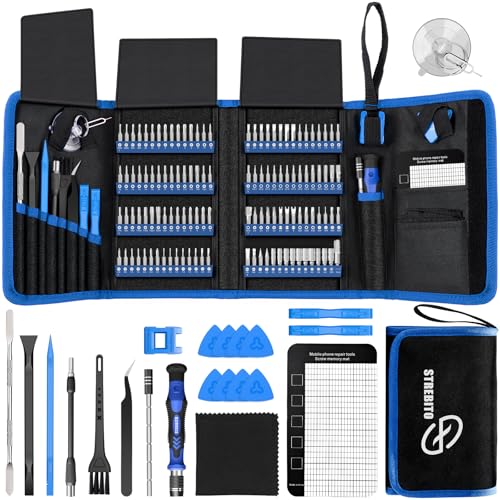
- Set includes 120 driver bits and 22 repair accessories, including tweezers, a magnetic mat, and a flexible extension shaft.
- Listed for repairs involving computers, laptops, game consoles, and other electronics.
- Bits are stored in a labeled holder inside a portable Oxford-fabric bag.
Best For: A gamer who builds, upgrades, or repairs electronics.
10. EKSA Wireless Gaming Headset with Detachable Mic
For Immersive Multiplayer
EKSA Wireless Gaming Headset with Detachable Mic

- Offers 2.4GHz wireless, Bluetooth 5.3, and 3.5mm wired connections; Xbox compatibility is listed for wired mode only.
- Includes a detachable microphone and switchable RGB lighting.
- Listing specifies up to 50 hours in Bluetooth mode and 25 hours in 2.4GHz mode with lighting on.
Best For: A gamer who plays with friends and wants headset audio.
11. ErGear Adjustable Single Monitor Arm
For More Flexible Screen Positioning
ErGear Adjustable Single Monitor Arm

- Fits listed 13–34-inch monitors up to 19.8 lb with 75x75mm or 100x100mm VESA patterns.
- Adjusts up to 17.5 inches in height and 18.1 inches in reach, with tilt, swivel, and rotation.
- Includes cable clips and clamp or grommet desk mounting; check monitor size, weight, and VESA pattern first.
Best For: A gamer seeking adjustable screen placement and desk space.
12. EasySMX X05Pro Wireless Gaming Controller
For Quiet Couch Gaming
EasySMX X05Pro Wireless Gaming Controller

- Works with Windows PC, Switch, Android, and iOS; listing excludes Xbox, PlayStation, Luna, and GeForce.
- Supports USB-C, 2.4G wireless, and Bluetooth connections.
- Features quiet silicone-damped buttons, Hall Effect joysticks, adjustable triggers, and programmable top buttons.
Best For: A PC gamer who enjoys platformers, racing, or couch play.
13. Large Extended Gaming Mouse Pad
For Wider Mouse Movement
Large Extended Gaming Mouse Pad

- 31.5-by-15.7-inch surface can fit a mouse and keyboard on the same pad.
- Natural rubber base is described as non-slip, with stitched edges and a smooth tracking surface.
- Waterproof coating is designed to help contain spills and make cleaning easier.
Best For: A gamer who wants more room for mouse movement.
14. AOC 27-Inch QHD 240Hz Gaming Monitor
For a Major Display Upgrade
AOC 27-Inch QHD 240Hz Gaming Monitor

- 27-inch IPS display with 2560-by-1440 resolution and a listed 240Hz refresh rate over DisplayPort.
- Features Adaptive-Sync, tilt adjustment, and a three-sided frameless design.
- Connections include one DisplayPort 1.4, two HDMI 2.0 ports, and audio out.
Best For: A PC gamer planning a substantial monitor upgrade.
15. Anker 8-in-1 USB-C Docking Station
For a Laptop Desk Hub
Anker 8-in-1 USB-C Docking Station

- Adds dual HDMI, Ethernet, two USB-A data ports, USB-C PD-IN, and microSD/SD card readers.
- Supports one external display at 4K/60Hz or two at 4K/30Hz; macOS mirrors the same image on both.
- Up to 85W pass-through charging requires a separate 100W PD wall charger and USB-C cable; not compatible with Linux.
Best For: A gamer who connects a USB-C laptop to desk accessories.
16. GTPLAYER Big and Tall Gaming Chair
For Long Desk Sessions
GTPLAYER Big and Tall Gaming Chair
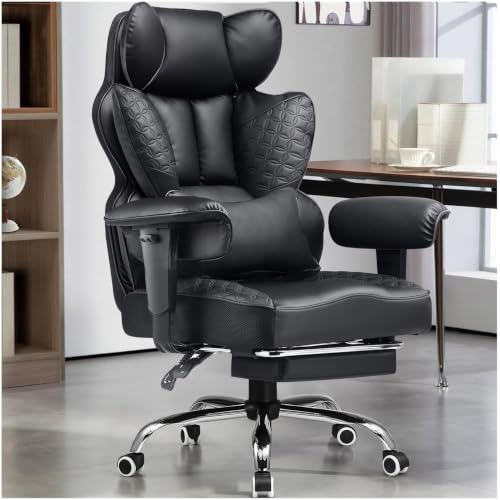
- Designed for big-and-tall seating, with a listed 400 lb capacity and wide seat cushion.
- Features spring lumbar support, adjustable backrest, headrest, footrest, and a throw pillow.
- Faux leather upholstery and a metal frame; listing says the backrest reclines from 90 to 135 degrees.
Best For: A gamer seeking a roomy chair with support features.
17. Logitech G29 Racing Wheel and Pedals
For Racing Sim Fans
Logitech G29 Racing Wheel and Pedals

- Compatible with PC, PS5, and PS4 gaming titles, according to the listing.
- Includes a force-feedback steering wheel and pressure-sensitive pedals with adjustable pedal faces.
- Wheel offers 900-degree lock-to-lock rotation and a hand-stitched leather cover.
Best For: A gamer who enjoys racing or driving simulators.
18. Crucial X9 2TB Portable SSD
For Extra Game Storage

- Portable external solid-state drive with 2TB capacity and listed transfer speeds up to 1050MB/s.
- Connects over USB-C and is listed as compatible with Windows, Mac, Android, and multiple consoles.
- Listing describes IP55 water and dust resistance and drop resistance up to 7.5 feet.
Best For: A gamer who wants more room for files and backups.
19. AULA F75 Pro 75% Mechanical Gaming Keyboard
For a Customizable Desk
AULA F75 Pro 75% Mechanical Gaming Keyboard

- Compact 81-key layout retains arrow keys and includes a multifunction knob and RGB backlighting.
- Connects by Bluetooth 5.0, 2.4GHz wireless, or USB; supports up to five devices, per the listing.
- Hot-swappable base supports 3-pin or 5-pin switches; includes pre-lubricated Reaper switches and side-printed PBT keycaps.
Best For: A PC gamer who wants a compact, customizable keyboard.
Choosing a Gift for a PC Gamer
Start with what the recipient already uses. A gamer who wears a headset may get more from a controller, mouse pad, or desk light than from desktop speakers. Someone who streams or spends time in voice chat might welcome a microphone kit, or a boom arm if they already own a compatible mic. For a gift that suits a wide range of setups, look at everyday desk upgrades such as cable management, a footrest, or extra storage.
Think about how they play, too. A controller suits platformers, racing games, and relaxed couch sessions. A racing wheel is a more focused choice for someone who plays driving simulators. Headphones and speakers serve different preferences: headphones keep sound close to the player, while desktop speakers let audio fill the room. These distinctions can help turn a broad search for Secret Santa gift ideas for PC gamers into a choice that feels personal.
Match the Gift to Your Budget
For a modest Secret Santa budget, useful accessories are a good place to look: a large mouse pad, cable tray, monitor light bar, or precision screwdriver set. They address common desk and PC needs without requiring the recipient to replace a major part of their setup. A footrest or microphone arm may also feel thoughtful when you know the person’s desk habits or equipment.
Mid-range gifts can add a new way to play or improve an existing setup. Consider a controller, headset, speakers, mechanical keyboard, or portable SSD. Larger presents such as a monitor, gaming chair, docking station, or racing wheel make more sense when the budget allows and you have enough information to check fit. If you are pooling money with others, agree on a spending limit and choose a single upgrade that the recipient can use regularly.
Check Compatibility and Personalization
PC accessories still have requirements worth checking. For a monitor arm, confirm the screen’s weight, size, and VESA mounting pattern, along with the desk’s edge and thickness. The monitor itself should fit the recipient’s available space, and its display connections should match the computer or graphics card. If the model lists a high refresh rate over DisplayPort, make sure that connection is available in the setup.
For audio gifts, identify the ports and devices the gamer uses. The microphone arm is useful only if it fits the desk and works with their microphone; the provided adapters cover several common thread sizes. The USB microphone kit has its own cable and mount, but desk thickness matters for its clamp. Headset connection modes also differ, so check the notes for the recipient’s console or computer before buying. A docking station can help a laptop-based setup, but confirm that the laptop supports USB-C video and power delivery. Its dual displays mirror on macOS, and the listing excludes Linux.
Personalization can be simple. Match a keyboard’s lighting and compact layout to the recipient’s desk, or choose a controller color and feature set they will use. A practical gift feels personal when it solves a known annoyance: tangled cords, limited desk space, short storage, or uncomfortable long sessions. If you are unsure about a large upgrade, choose a lower-commitment accessory that works with more setups.
Timing and Last-Minute Decisions
For a Christmas exchange, decide early when the gift depends on measurements or compatibility. Ask casually what monitor mount, headset connection, or controller platform they use, or check details they have mentioned before. Avoid relying on delivery estimates or assumed availability; product stock and shipping schedules can change.
If time is short, favor an item with fewer fit questions. A mouse pad, screwdriver kit, or cable organizer may be easier to choose than a monitor, chair, or docking station. Still check dimensions where relevant: the cable tray needs desk-edge clearance, and the mouse pad needs enough surface area. Keep the receipt and packaging in case a size or connection detail does not fit. A thoughtful Secret Santa gift for a PC gamer can be straightforward: choose one practical improvement that suits their habits and the space they play in.