Need more screen space without committing to a bulky desk setup? Laptop screen extenders are an easy way to turn a standard notebook into a portable multi-monitor workstation.
From lightweight travel models to larger triple-screen options, the best picks balance image quality, compatibility, and real-world portability.
Best 10 Laptop Screen Extenders Picks for 2026
Portable Dual-Screen Boost
KEFEYA 14" FHD Laptop Screen Extender

- 14-inch FHD IPS panel with 300-nit brightness
- Plug-and-play with USB-C, HDMI, and USB-A cables
- Mirror, extend, landscape, portrait, and 180° rotation
Best For: Remote workers and travelers who want a simple dual-screen setup
Flexible Triple-Screen Setup
15.6" Rotating Dual Monitor Extender
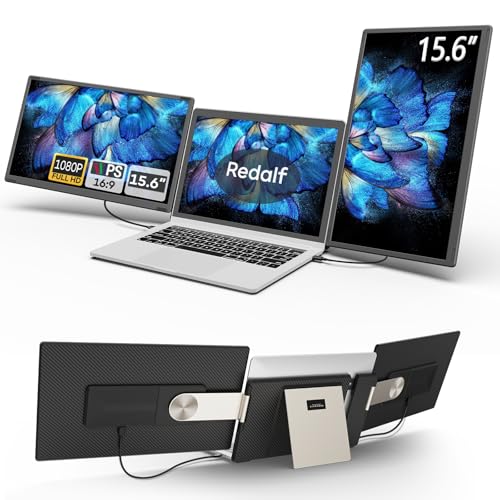
- 235° horizontal and 90° vertical rotation
- Detachable side screens for travel or sharing
- FHD IPS panels with speakers and anti-glare design
Best For: Users who want an adjustable, detachable triple-screen layout
Compact Dual-Screen Pick

- 14-inch 1080p IPS panel with 300 nits
- Plug-and-play via USB-C or HDMI
- Supports extend, mirror, and portrait modes
Best For: Portable everyday multitasking with minimal bulk
Travel-Friendly Triple Screen
15.6" Ultra-Light Triple Monitor

- 15.6-inch FHD IPS with 178-degree viewing
- 4-lb, 0.19-inch-thin portable design
- Plug-and-play with simplified cable setup
Best For: Frequent travelers who want a lighter triple-screen setup
Stable Triple-Screen Option

- 14-inch FHD IPS with 100% sRGB
- 3.0-lb ultra-light body with adjustable stand
- USB-C and HDMI plug-and-play support
Best For: Portable users who want a stable triple-screen workflow
Ultra-Portable Dual Setup
14.2-inch FHD portable monitor for 14"-17.3" laptops

- 1.87 lbs and 0.27" thin for easy travel
- 1080P IPS display with extend, mirror, and portrait modes
- Plug-and-play with included USB-C and HDMI/USB-A cables
Best For: Travelers and remote workers who want a lightweight second screen
Portable Dual-Screen Boost – KEFEYA 14" FHD Laptop Screen Extender
If you want laptop screen extenders that are simple to set up and practical for everyday multitasking, this KEFEYA model is built around plug-and-play convenience. Its 14-inch FHD IPS panel, multiple display modes, and broad device compatibility make it a solid pick for work, study, travel, and casual entertainment.
Best For: Remote workers, travelers, and users who want a lightweight dual-screen setup without driver hassles.
Pros:
- 14-inch 1080p IPS panel with 300-nit brightness and 72% NTSC color gamut
- Plug-and-play connection with USB-C, HDMI, and USB-A cables included
- Supports mirror, extended, landscape, portrait, and 180° rotation modes
- Wide compatibility across Windows, Mac, Android, Chrome, Linux, and game consoles
Cons:
- HDMI use requires an extra USB-A to USB-C connection for power
- 14-inch screen may feel small if you want a larger side display
- At 1.04 kg, it is portable but not the lightest option here
Overall, this is a straightforward choice if you want a dependable second screen that is easy to carry and quick to deploy. It focuses more on ease of use and broad compatibility than premium extras.
Triples Your Workspace – 15.6" Triple Monitor Extender
Among laptop screen extenders, this 15.6-inch triple-display model is aimed at users who need serious screen real estate on the go. It adds two FHD IPS panels, supports USB-C or HDMI connectivity, and is designed to help business and study workflows feel much less cramped.
Best For: Business travelers, students, and multitaskers who want a foldable three-screen workstation.
Pros:
- Triple 15.6-inch FHD IPS setup for up to 300% claimed efficiency gain
- Clip-free design works without attaching to the laptop screen
- Matte panels with 300 cd/m² brightness and 178° viewing angles
- Includes carrying bag, cables, power adapter, and a 365-day warranty
Cons:
- At 1.82 kg, it is heavier than simpler portable extenders
- Triple-screen design is less compact than single- or dual-panel options
- Brightness and color gamut are practical, not class-leading for creative work
This is a strong option if your priority is maximum multitasking space rather than the smallest possible travel footprint. The clip-free setup and included accessories make it especially appealing for frequent movers.
Flexible Triple-Screen Setup – 15.6" Rotating Dual Monitor Extender
If you want laptop screen extenders that can adapt to different work styles, this 15.6-inch model stands out for its flexible stand and detachable design. It supports multiple orientations, plugs in without drivers, and is built for users who switch between solo work, presentations, and shared viewing.
Best For: Users who want a highly adjustable triple-screen setup with detachable side screens.
Pros:
- 235° horizontal and 90° vertical rotation for landscape, portrait, and stacked layouts
- Detachable side screens can be used independently for travel
- 15.6-inch FHD IPS panels with built-in speakers and anti-glare, flicker-free design
- Plug-and-play support via USB-C, USB-A, or HDMI
Cons:
- Not compatible with standard M1/M2/M3 chips, per the notes
- Glossy screen finish may reflect more light than matte alternatives
- At 2.1 pounds per side, it is less minimal than a single portable monitor
This model makes sense if flexibility matters more than absolute simplicity. Its detachable layout and strong rotation range give it more placement options than many laptop screen extenders.
Compact High-Compatibility Choice – KYY 15.6" Triple Screen Extender
For buyers comparing laptop screen extenders with a focus on compatibility and portability, this KYY model offers a practical two-panel triple-screen setup. It uses 15.6-inch FHD IPS screens, supports one-cable USB-C connection, and is aimed at stock trading, finance, design, and other multi-window workflows.
Best For: Multi-monitor users who want a thin aluminum build and simple one-cable setup.
Pros:
- Two 15.6-inch FHD IPS screens with 178° viewing angles and matte finish
- One USB-C to USB-C cable can handle the connection, reducing cable clutter
- Built-in stand adjusts up to 90°, and each screen rotates 0° to 360°
- Includes cables and power adapter, with wide OS support noted
Cons:
- Drivers must be downloaded first, so it is not fully driver-free
- Not compatible with PS5, Xbox Series X, and other gaming consoles
- Its focus is workstation use, not console gaming or broad entertainment flexibility
This is a sensible pick if you want a streamlined workstation accessory with strong rotation options and a cleaner cable setup. It is best treated as a productivity tool first, rather than a general-purpose entertainment display.
Compact Dual-Screen Pick – 14" FHD IPS Portable Monitor
If you want one of the more compact laptop screen extenders, the ROYY 14-inch model is built for simple plug-and-play expansion without adding much bulk. It pairs a 1080p IPS panel with 300 nits of brightness, so text looks clear and the extra workspace is useful for multitasking, calls, presentations, and entertainment on the go.
Best For: Travelers, remote workers, and students who want a smaller, easy-to-carry laptop screen extender for everyday multitasking.
Pros:
- 14-inch FHD 1920 x 1080 IPS display with 300 nits and 1000:1 contrast
- Driver-free setup with USB-C or HDMI connection options
- Supports extend, mirror, second screen, landscape, and portrait modes
- 180-degree rotation helps with flexible viewing and sharing
Cons:
- Smaller 14-inch screen may feel tight if you want maximum workspace
- Some older devices may not support the required ports
- Compatibility depends on having the correct full-featured USB-C or HDMI setup
Overall, the ROYY is a practical choice if you care more about portability and easy setup than getting the largest possible display. It offers the core laptop screen extender features most buyers need, while keeping the experience straightforward and travel-friendly.
Travel-Friendly Triple Screen – 15.6" Ultra-Light Triple Monitor
The Synnov laptop screen extender is aimed at users who want a bigger, more immersive multi-screen setup without carrying a heavy rig. Its 15.6-inch FHD IPS display, ultra-thin build, and simplified cabling make it a strong fit for work trips, remote offices, and anyone who needs a fast triple-screen workstation.
Best For: Remote workers, travelers, and developers who want a lightweight triple-screen laptop screen extender with a larger display.
Pros:
- 15.6-inch FHD IPS screen with 178-degree viewing angle
- Lightweight 4-lb, 0.19-inch-thin design for easier travel
- Supports extend, mirror, and portrait modes for flexible workflows
- Plug-and-play setup with reduced cable clutter and included carry bag
Cons:
- Requires at least one full-featured USB-C port
- MacBook M1/M2/M3 compatibility is limited by chip restrictions
- 15.6-inch size and triple-screen design may be more than some users need
For buyers who want to work across multiple windows without constant switching, this Synnov model delivers a strong balance of size, portability, and simplicity. It stands out as a laptop screen extender for people who need more screen space but still want something easy to pack and use on the move.
Stable Triple-Screen Option – 14" Triple Screen Extender
The Vixtan laptop screen extender is built for users who want triple-screen productivity in a compact, stable package. With a 14-inch FHD IPS panel, 300-nit brightness, and a reinforced adjustable stand, it focuses on clear visuals and steady day-to-day use whether you are working at home, in a cafe, or while traveling.
Best For: Traders, developers, designers, and remote workers who want a stable triple-screen laptop screen extender with strong portability.
Pros:
- 14-inch 1080p IPS display with 300 nits and 100% sRGB color accuracy
- Ultra-light 3.0-lb, 0.3-inch-thin design
- Reinforced adjustable stand with multi-level height adjustment and 180-degree rotation
- Includes USB-C and HDMI cable options with driver-free plug-and-play setup
Cons:
- 14-inch display is smaller than some other triple-monitor options
- MacBook M1/M2/M3 models support single-screen only without a DisplayLink adapter
- May need a higher-power adapter if brightness issues appear
Vixtan is a good pick if stability matters as much as portability. It combines a lightweight frame with a sturdy stand and reliable color-focused IPS display, making it a practical laptop screen extender for productivity-focused users who move between locations.
Ultra-Portable Dual Setup – 14.2-inch FHD portable monitor for 14"-17.3" laptops
If you want laptop screen extenders that are easy to carry and quick to set up, this 14.2-inch option is built around portability and simple multitasking. It adds a second display for extending, mirroring, or portrait use, while keeping the setup light enough for travel, commuting, and remote work.
Best For: Frequent travelers, remote workers, students, and programmers who need a lightweight dual-screen setup.
Pros:
- Very light at 1.87 lbs and only 0.27" thin for travel-friendly use
- Supports extend, mirror, and portrait modes for flexible multitasking
- 1080P IPS panel with 300 nits brightness and adjustable viewing angle
- Plug-and-play setup with included USB-C and HDMI/USB-A cable options
Cons:
- Only fits laptops in the 14" to 17.3" range
- Requires the right cable path depending on your laptop ports
This is a practical pick if your priority is getting more screen space without adding much weight to your bag. It focuses on fast setup, broad system support, and a slim profile rather than flashy extras.
Triple-Mode Travel Monitor – 14-inch FHD dual/triple screen extender with case
Among laptop screen extenders, this 14-inch model stands out for turning a single laptop into a dual- or triple-screen workspace without much setup effort. It uses an FHD IPS panel, supports mirror and extended display modes, and includes the cables and case needed for work on the go.
Best For: Users who want a compact portable monitor with dual or triple-screen flexibility for travel or mobile work.
Pros:
- 14-inch FHD 1080P IPS screen with blue light filtering and anti-glare technology
- Supports dual/triple display modes for more flexible multitasking
- Built-in speakers and a protective case add convenience for travel
- Plug-and-play compatibility with Windows, macOS, Linux, and more
Cons:
- Not compatible with MacBook models using M1, M2, or M3 chips
- Some laptops with limited Type-C or port layouts may not work fully
If you need a compact extender that balances screen quality, portability, and extra display options, this one is a strong middle-ground choice. Just be sure to check port compatibility before buying, especially on newer MacBooks or single-port devices.
Triple-Screen Productivity Boost – 15.6-inch ultra-slim triple portable monitor with stand
If you need laptop screen extenders that create a true three-display workstation, this 15.6-inch model is built for heavier multitasking. It offers a larger IPS panel, a free-standing aluminum design, and plug-and-play connectivity for users who want more screen real estate without attaching anything to the laptop lid.
Best For: Traders, designers, and remote workers who want a larger triple-screen setup with a stand-based design.
Pros:
- 15.6-inch 1080P IPS display with 300 nits brightness and 180-degree foldable screens
- Triple-screen layout helps reduce tab switching and manage multiple tasks side by side
- Free-standing aluminum body with anti-slip pads and no lid attachment
- Includes low blue light mode for longer viewing sessions
Cons:
- Heavier than smaller portable options at 3.9 lbs
- Needs compatible video output ports, and some setups may require an H5 cable
This is a stronger choice if productivity matters more than minimal weight. The stand-based design and larger screens make it well suited to desk use, while still staying portable enough for travel in the included carry bag.
How We Picked the Best Laptop Screen Extenders
We focused on models that make everyday multitasking easier without adding unnecessary setup hassle. The strongest Laptop Screen Extenders in this roundup offer a practical mix of 1080p IPS image quality, broad laptop compatibility, stable mounting, and travel-friendly design. We also favored plug-and-play options that reduce friction for remote work, school, and business travel.
Quick Comparison: What Matters Most
Before choosing, compare screen size, weight, and connection type. A 14-inch extender is usually easier to pack and better for frequent travel, while 15.6-inch models give you more usable workspace for spreadsheets, coding, and split-screen productivity. If you want the simplest setup, look for USB-C single-cable support; if your laptop is older or has limited ports, HDMI and USB-A support can improve compatibility.
Key Buying Factors for Laptop Screen Extenders
Display Size and Resolution
Most buyers should prioritize 1080p resolution and IPS panels for sharper text and better viewing angles. That matters if you work in documents, creative apps, or long browsing sessions.
Portability and Build
Weight, thickness, and how the panels fold or detach affect daily use more than marketing claims. If you commute often, lighter Laptop Screen Extenders are easier to live with than larger triple-monitor designs.
Connectivity and Compatibility
Check whether your laptop supports USB-C display output, because not every USB-C port carries video. If it does not, make sure the extender includes HDMI or other fallback connections. Also verify support for your laptop size and operating system before buying.
Single, Dual, or Triple Screen Layout
Dual-screen models are the best all-around choice for most users. Triple-screen setups are more specialized and work best for power users who need constant side-by-side reference windows, dashboards, or dense workflow management.
Who Should Buy Which Laptop Screen Extenders?
Choose a lighter 14-inch model if you travel frequently or want the simplest portable setup. Go with a 15.6-inch screen if you want more room for multitasking at home, in the office, or at a coffee shop. Pick a triple-screen extender if your workflow regularly involves multiple apps open at once and portability is still important. If your priority is easy expansion with minimal setup, Laptop Screen Extenders with plug-and-play support are the safest bet.