Ultrawide computer monitors can transform a desk setup by giving you more room for timelines, spreadsheets, side-by-side windows, and immersive gaming.
In this roundup, we focus on practical differences that matter most: resolution, curvature, refresh rate, panel features, and connectivity.
Best 10 Ultrawide Computer Monitors Picks for 2026
Value Gaming Curved Pick
Sceptre 34" Curved Ultrawide WQHD Monitor

- 3440 x 1440 WQHD resolution on a 34-inch 21:9 screen
- 1ms MPRT with up to 180Hz/165Hz refresh support
- DisplayPort x2, HDMI, built-in speakers, and blue light filter
Best For: Gamers and multitaskers wanting speed and screen space
Office-Friendly Multitasker
Samsung ViewFinity S50GC 34" Ultra-WQHD

- 3440 x 1440 Ultra-WQHD with 21:9 workspace
- HDR10 plus PBP/PIP for multitasking and media
- Eye Saver Mode, Flicker Free, and auto brightness
Best For: Office users who want a clean ultrawide for multitasking
Budget Flat Ultrawide
Gawfolk 34" IPS 120Hz Ultrawide
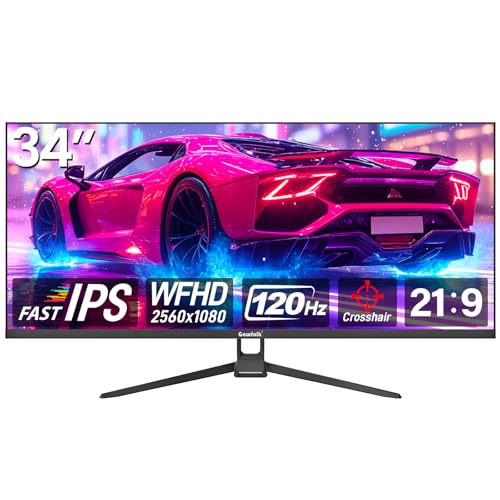
- 2560 x 1080 IPS panel with a 21:9 layout
- 120Hz refresh plus AMD FreeSync and flicker-free support
- 128% sRGB coverage and wide 178-degree viewing angles
Best For: Budget shoppers wanting a wide screen for mixed use
Work-Friendly Ultrawide
LG 34U530A-W 34-inch UltraWide WFHD IPS Monitor

- 34-inch 21:9 screen expands multitasking space
- 100Hz and IPS panel suit smooth everyday use
- USB-C, HDMI, and DisplayPort support flexible setups
Best For: Office work, multitasking, and tidy laptop setups
Curved Budget Gaming Pick
CRUA 34" WQHD 165Hz Ultrawide Curved Monitor

- 3440 x 1440 panel offers sharper ultrawide detail
- 165Hz and FreeSync are built for smooth gaming
- 1500R curve adds a more immersive wraparound feel
Best For: Gamers and mixed-use buyers seeking value and immersion
High-Refresh Gaming Upgrade
SANSUI 34-Inch Curved 200Hz Ultrawide Monitor

- 200Hz refresh rate targets fast-paced gaming
- 3440 x 1440 UWQHD panel keeps text and detail sharp
- PIP/PBP and HDMI 2.1 add practical versatility
Best For: Competitive gamers and power users who want speed and features
Editor’s Pick
LG 34U60ZB-B 34-inch UltraWide WQHD 120Hz HDR10 Curved Monitor

- 3440 x 1440 ultrawide panel for multitasking
- 120Hz refresh rate with 5ms response time
- 99% sRGB, HDR10, Reader Mode, and LG Switch
Best For: Everyday productivity, streaming, and light gaming
Gaming Value
Gawfolk 34" Ultrawide Curved Gaming Monitor 165Hz
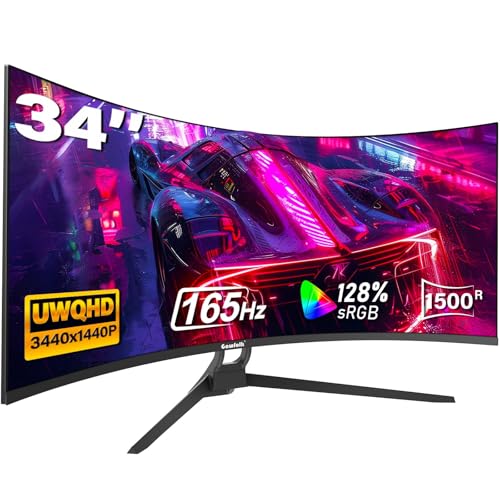
- 165Hz refresh rate with FreeSync support
- 3440 x 1440 resolution with 21:9 format
- 1500R curve and multiple HDMI/DisplayPort inputs
Best For: Budget gamers and multitaskers who want speed and immersion
Best Connectivity
LG 34WR55QK-B 34-inch UltraWide WQHD USB-C Monitor

- USB-C with up to 65W power delivery
- Picture-by-Picture and OnScreen Control support
- 3440 x 1440 ultrawide with height and tilt adjustment
Best For: Laptop users and office multitaskers who want USB-C convenience
Value Gaming Curved Pick – Sceptre 34" Curved Ultrawide WQHD Monitor
If you want ultrawide computer monitors that stretch both work and play across a big 34-inch canvas, this Sceptre model delivers a sharp 3440 x 1440 WQHD panel with a 21:9 aspect ratio. It leans into fast-paced use with a 1ms MPRT response time, up to 180Hz support, and AMD FreeSync Premium, while still offering a 99% sRGB claim for color-focused tasks.
Best For: Gamers and multitaskers who want a curved ultrawide with high refresh performance and broad screen space.
Pros:
- 3440 x 1440 WQHD resolution gives more detail than 1080p ultrawides.
- 1ms MPRT and up to 180Hz/165Hz support help keep motion looking smooth.
- 21:9 curved format provides about 30% more screen space than a standard monitor.
- Includes DisplayPort x2, HDMI, built-in speakers, and a blue light filter.
Cons:
- Brightness is listed at 280 cd/m, which is modest for a premium ultrawide.
- VA panel performance may not match IPS for all color-critical users.
- Built-in speakers are convenient, but not a substitute for dedicated audio.
This is a strong value choice if your priority is fast ultrawide gaming and practical desktop expansion rather than the highest-end panel tuning. The combination of high refresh support, curved immersion, and wide connectivity makes it easy to fit into a gaming or productivity setup.
Office-Friendly Multitasker – Samsung ViewFinity S50GC 34" Ultra-WQHD
Among ultrawide computer monitors, the Samsung ViewFinity S50GC is aimed at cleaner desktop productivity with a 34-inch 3440 x 1440 Ultra-WQHD panel, borderless styling, and 21:9 space for side-by-side work. It is also tuned for comfort with Eye Saver Mode, Flicker Free support, and an ambient light sensor that adjusts brightness automatically.
Best For: Office work, content review, and everyday multitasking on a single ultrawide display.
Pros:
- 3440 x 1440 Ultra-WQHD resolution gives ample room for multitasking.
- HDR10 support displays over 1 billion colors for richer compatible content.
- Eye Saver Mode, Flicker Free, and ambient light sensing help reduce eye strain.
- PBP and PIP support make it easier to view two sources at once.
Cons:
- 100Hz refresh is solid, but not as fast as gaming-focused ultrawides.
- 5ms response time is fine for work, but less ideal for competitive play.
- Color gamut is listed at 72, which may matter to more demanding creators.
This Samsung makes sense if you want a polished ultrawide for productivity first and gaming second. The feature set is practical rather than flashy, and the PBP/PIP tools plus eye-care features make it especially useful for long work sessions.
Budget Flat Ultrawide – Gawfolk 34" IPS 120Hz Ultrawide
If you are shopping ultrawide computer monitors on a tighter budget, this Gawfolk 34-inch model offers a 2560 x 1080 IPS panel with a 21:9 layout and a 120Hz refresh rate. It focuses on everyday versatility, pairing wide viewing angles and 128% sRGB coverage with AMD FreeSync, Flicker-Free support, and a frameless design.
Best For: Budget buyers who want a wide desktop view for gaming, school, or general productivity.
Pros:
- 34-inch 21:9 IPS display gives a wide, immersive workspace.
- 120Hz refresh rate helps motion feel smoother than standard 60Hz monitors.
- 128% sRGB coverage and 178-degree viewing angles support broad usability.
- Includes HDMI and DisplayPort, plus FreeSync and flicker-free features.
Cons:
- 2560 x 1080 resolution is less sharp than 3440 x 1440 ultrawides.
- Flat design may feel less immersive than curved alternatives.
- Contrast ratio is listed at 1000:1, which is basic for darker-room viewing.
This is a practical entry-level ultrawide if you want the broader 21:9 layout without paying for a higher-resolution panel. It is especially appealing for mixed use, where smoother refresh and IPS viewing angles matter more than premium resolution.
Immersive Curved Gaming Choice – Samsung Odyssey G5 34" Ultra-Wide
For buyers focused on gaming ultrawide computer monitors, the Samsung Odyssey G5 combines a 34-inch 3440 x 1440 display with a 1000R curve that is designed to fill more of your peripheral vision. It also brings a 165Hz refresh rate, 1ms MPRT response time, and AMD FreeSync Premium to keep fast movement smooth and responsive.
Best For: Gamers who want a deeply curved ultrawide for immersive play.
Pros:
- 1000R curvature creates a more enveloping, immersive viewing experience.
- 3440 x 1440 WQHD resolution offers strong detail across the wide panel.
- 165Hz refresh and 1ms MPRT support smoother, faster gaming motion.
- AMD FreeSync Premium helps reduce tearing, stutter, and input latency.
Cons:
- Brightness is listed at 250 cd/m2, which is not especially high.
- VA panel and 72 color gamut may not be the top choice for color-critical work.
- Gaming-first tuning makes it less specialized for office or creator workflows.
This Odyssey G5 is a straightforward gaming ultrawide with strong immersion and solid speed. If your main priority is fluid gameplay on a curved 34-inch screen, it covers the essentials well without adding unnecessary extras.
Work-Friendly Ultrawide – LG 34U530A-W 34-inch UltraWide WFHD IPS Monitor
If you want ultrawide computer monitors for everyday productivity, this LG 34-inch 21:9 display is built for spreading out documents, browser tabs, and creative apps without needing a dual-monitor setup. The 2560 x 1080 IPS panel adds extra horizontal space, while 100Hz keeps scrolling, calls, and general motion feeling smooth.
Best For: Office work, multitasking, and users who want an easy, tidy ultrawide setup with USB-C.
Pros:
- 34-inch 21:9 UltraWide layout gives you more room for multiple windows at once
- 100Hz refresh rate provides smoother everyday motion than standard 60Hz monitors
- USB Type-C, HDMI, and DisplayPort make laptop and desktop connections flexible
- Height, tilt, and swivel adjustments help with comfortable long-session viewing
Cons:
- WFHD 2560 x 1080 resolution is lower than 3440 x 1440 options
- Best suited to productivity and comfort rather than high-end gaming specs
Overall, this LG is a practical ultrawide pick if your priority is a clean workspace, easy connectivity, and smoother-than-basic performance. It offers a strong balance of screen space and comfort for work-focused setups.
Curved Budget Gaming Pick – CRUA 34" WQHD 165Hz Ultrawide Curved Monitor
Among ultrawide computer monitors, this CRUA model leans hard into gaming value with a 34-inch 3440 x 1440 curved panel, 165Hz refresh rate, and FreeSync support. The 1500R curve and wide 21:9 view help keep action centered and immersive, while the higher-resolution screen is also useful for photo, video, and office work.
Best For: Gamers and mixed-use buyers who want a curved 3440 x 1440 ultrawide with strong motion performance.
Pros:
- 3440 x 1440 ultrawide resolution delivers more detail and workspace than WFHD panels
- 165Hz refresh rate with FreeSync supports smoother gaming motion
- 1500R curve and 178-degree viewing angle create a more immersive viewing experience
- Multiple HDMI and DisplayPort inputs improve connection flexibility
Cons:
- HDMI is limited to 100Hz, so peak refresh requires DisplayPort
- No built-in speakers are included
- Stand adjustability is limited to front and rear angle adjustment
This CRUA is a compelling choice if you want ultrawide gaming performance without stepping up to premium pricing. It combines the resolution and refresh rate most buyers want in a curved 34-inch format.
High-Refresh Gaming Upgrade – SANSUI 34-Inch Curved 200Hz Ultrawide Monitor
If you’re comparing ultrawide computer monitors for fast-paced gaming and versatile everyday use, this SANSUI 34-inch model stands out with a 3440 x 1440 UWQHD panel and a 200Hz refresh rate. The Fast VA display, 1ms response time, and VRR support over HDMI 2.1 are aimed at smoother motion, while the 1500R curve and PIP/PBP features add practical flexibility.
Best For: Competitive gamers and power users who want a high-refresh curved ultrawide with strong feature depth.
Pros:
- 200Hz refresh rate and 1ms response time are ideal for fast gaming
- 3440 x 1440 resolution provides a sharp ultrawide workspace
- HDMI 2.1 and DisplayPort 1.4 both support up to 200Hz
- PIP/PBP, AI blue light reduction, and blue-light/anti-flicker features add convenience
Cons:
- No built-in speakers
- Stand tilt range is relatively basic compared with more adjustable displays
For buyers who want a feature-rich ultrawide with faster-than-average refresh rates, this SANSUI makes a strong case. It’s especially appealing if gaming performance and multitasking tools both matter.
Editor’s Pick – LG 34U60ZB-B 34-inch UltraWide WQHD 120Hz HDR10 Curved Monitor
If you want an ultrawide computer monitor that feels balanced for work and play, the LG 34U60ZB-B covers the essentials well. Its 34-inch 21:9 WQHD panel gives you plenty of room for side-by-side windows, while the 120Hz refresh rate helps keep scrolling, calls, and lighter gaming smooth.
Best For: Everyday productivity, streaming, and users who want a smooth ultrawide without overcomplicating the setup.
Pros:
- 3440 x 1440 ultrawide resolution creates useful space for multitasking.
- 120Hz refresh rate and 5ms response time keep motion smooth.
- 99% sRGB and HDR10 support help with balanced color and tonal transitions.
- Reader Mode, LG Switch, and tilt/height adjustment add comfort and convenience.
Cons:
- Only one HDMI port, so some users may need to manage inputs carefully.
- VA panel and 250 nits brightness may not suit those wanting a brighter display.
- No USB-C connectivity listed.
This is a practical ultrawide for people who value desk-friendly ergonomics and simple workflow tools more than flashy extras. It stands out as a steady all-rounder for business, desktop use, and entertainment.
Gaming Value – Gawfolk 34" Ultrawide Curved Gaming Monitor 165Hz
The Gawfolk 34-inch ultrawide computer monitor is built for buyers who want a fast, immersive display without moving away from the 3440 x 1440 format. With a 165Hz refresh rate, FreeSync support, and a 1500R curve, it is aimed at smoother gameplay and a more enveloping view for work or entertainment.
Best For: Budget-conscious gamers and multitaskers who want high refresh rates and a curved ultrawide layout.
Pros:
- 165Hz refresh rate with FreeSync support for fluid, responsive gameplay.
- 3440 x 1440 resolution and 21:9 aspect ratio increase usable screen space.
- 1500R curvature adds immersion for gaming and multitasking.
- 2 HDMI and 2 DisplayPort inputs make it easy to connect multiple devices.
Cons:
- Brightness is listed at 300 cd/m², which is solid but not exceptional.
- No USB-C or built-in productivity hub features are mentioned.
- Its gaming-first spec sheet may be more than casual users need.
For shoppers focused on speed and screen real estate, this model offers a strong mix of value and performance. It is especially appealing if you want an ultrawide monitor that can switch between PC gaming, console use, and everyday desktop work.
Best Connectivity – LG 34WR55QK-B 34-inch UltraWide WQHD USB-C Monitor
The LG 34WR55QK-B is a practical ultrawide computer monitor for users who want a cleaner desk and easier laptop connectivity. Its 34-inch 3440 x 1440 display gives you wide workspace for multitasking, while USB-C with up to 65W power delivery makes it especially useful in mixed laptop and desktop setups.
Best For: Laptop users, office work, and multitaskers who want USB-C convenience in an ultrawide format.
Pros:
- USB-C with up to 65W power delivery simplifies single-cable laptop connections.
- Picture-by-Picture support helps you view two inputs on one screen.
- 3440 x 1440 resolution and 21:9 format are well suited to productivity.
- Height/tilt adjustment, Reader Mode, and 3-side borderless design improve daily use.
Cons:
- 100Hz refresh rate is solid, but lower than some gaming-focused ultrawides.
- VA panel and 300 cd brightness are more practical than premium.
- Not designed as a feature-heavy gaming monitor.
This model makes sense if connectivity and workspace efficiency matter more than chasing the highest refresh rate. It is a good fit for people who split time between office tasks, media, and a laptop-docking workflow.
How We Picked the Best Ultrawide Computer Monitors
We prioritized models that balance screen size, image quality, and everyday usability. For Ultrawide Computer Monitors, that means looking closely at resolution class, refresh rate, panel type, curvature, color support, and port selection. We also weighed whether a monitor makes sense for work, play, or a mixed-use setup.
Quick Comparison
At a high level, the 3440 x 1440 models offer the best all-around experience for productivity and gaming, while 2560 x 1080 options usually cost less and are easier on midrange graphics hardware. Higher refresh rates are most useful for fast-paced gaming, while USB-C, PBP, and better ergonomics matter more for office and creator workflows.
Key Buying Factors for Ultrawide Computer Monitors
Resolution and Screen Space
Resolution strongly affects sharpness and how much content fits on screen. UWQHD models are the sweet spot for users who want a clear, expansive desktop. WFHD models can still be a smart value choice, especially if you want a lighter GPU load.
Refresh Rate and Response Time
If you game often, refresh rate can matter as much as size. A 100Hz panel is a noticeable step up from standard 60Hz, while 120Hz to 200Hz options are better suited for competitive or fast-action play.
Curvature and Viewing Comfort
Curved displays can improve immersion and help keep the edges of the panel within your natural field of view. Tighter curves such as 1000R feel more enveloping, while gentler curves are often easier for mixed work use.
Connectivity and Extra Features
Look for DisplayPort, HDMI, and USB-C based on your devices. Features such as PIP, PBP, HDR support, and built-in speakers can add convenience, but they should complement the core specs rather than replace them.
Who Should Buy Which Ultrawide Computer Monitors?
If your priority is productivity, choose a sharper 3440 x 1440 monitor with good ergonomics and flexible inputs. If you want smoother gaming, aim for a higher refresh rate and low response time. If you are budget-conscious, a 2560 x 1080 ultrawide can still deliver the wide-screen experience without the cost or GPU demands of higher-resolution models.
For most buyers, the best Ultrawide Computer Monitors are the ones that match your desk space, graphics hardware, and primary use case. Focus on the combination of resolution, refresh rate, and connectivity that fits how you actually work and play.