If you want a cleaner desk and fewer cable snags, a mouse bungee with USB hub can solve two problems at once: drag-free mouse movement and extra connectivity.
Below, we’ve narrowed the best options for different setups, from simple cable holders to feature-rich stands with USB 3.0, RGB lighting, and added card readers.
Best 10 Mouse Bungee with USB Hub Picks for 2026
All-in-One Pick

- Spring-loaded arm reduces mouse cable drag
- Includes 4 USB 2.0 ports for peripherals
- Weighted base and 7 lighting modes
Best For: Gamers who want cable control with extra USB ports and lighting
Simple Utility Pick

- Mouse bungee plus 4 USB-A ports
- USB 2.0 support for basic peripherals
- Mac and Windows compatible
Best For: People who want a basic cable holder with a small USB hub
Minimal Cable-Only Pick

- Works with any corded mouse
- Simple plastic-and-metal build
- No hub or lighting extras
Best For: Buyers who only need basic mouse cable management
Premium Feature Pick
RGB Hub Bungee with Card Reader
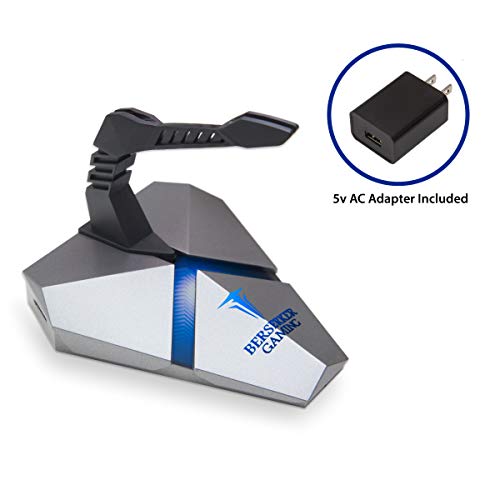
- Powered USB 3.0 hub with three ports
- Adds micro SD card reader support
- RGB lighting and detachable silicone clip
Best For: PC users who want a powered hub and mouse cable support
Premium RGB Bungee

- Adjustable spring arm reduces tangles.
- 240g weighted base with anti-slip feet.
- Compact RGB design fits small desks.
Best For: Gamers who want a stable, compact bungee with RGB flair.
All-in-One Desk Stand

- Combines headset stand, bungee, and 2-port USB hub.
- Weighted base and non-slip grips add stability.
- RGB lighting suits clean gaming setups.
Best For: Users who want a multifunction desk accessory with USB expansion.
Compact Cable Control
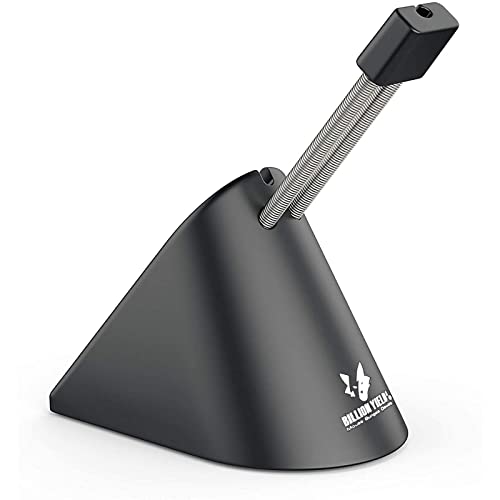
- Height-adjustable spring arm helps route cable.
- Flexible clip secures multiple cord sizes.
- Weighted base and rubber footing aid stability.
Best For: Gamers who want a compact, adjustable bungee for simple cable management.
Blue-LED USB 3.0 Pick
Narfi Gaming Mouse Bungee Stand with 4-Port Hub

- Flexible silicone arm reduces mouse-cord drag
- Powered 4-port USB 3.0 hub with included adapter
- Compact base with blue lighting and rubber feet
Best For: Users who want cable control and powered USB 3.0 expansion in one compact stand
RGB Headset Stand Combo
Tilted Nation Gaming Headphone Stand with Mouse Bungee

- Combines headset stand, mouse bungee, and 2-port USB 2.0 hub
- Weighted base and non-slip grips add stability
- RGB lighting gives it a gaming-style look
Best For: Gamers who want to save desk space with a combo headset stand and cable bungee
RGB Cable Manager Pick
KIWIFOTOS Mouse Bungee with USB and Type-C Ports
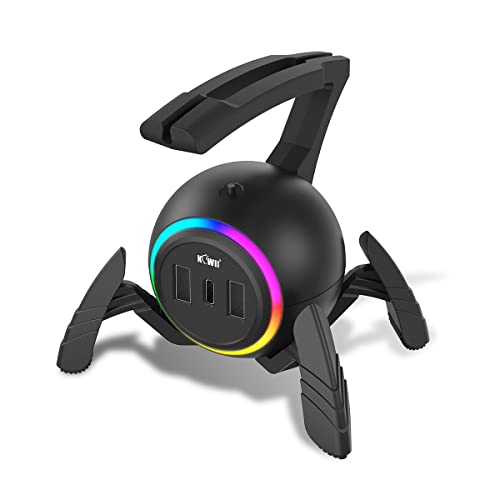
- Soft silicone arm wraps the cable to cut drag
- Offers 2 USB 2.0 ports plus 2 Type-C ports
- Weighted anti-slip base and side cable holder help organization
Best For: People who want the most port variety in a mouse bungee for a clean desktop
All-in-One Pick – 4-Port LED Bungee Hub
If you want a mouse bungee with usb hub that also adds desktop convenience, this Enhance Pro model combines cable support, a 4-port USB hub, and LED lighting in one accessory. Its spring-loaded arm is built to keep mouse cable drag under control, while the weighted base helps it stay put during fast movements.
Best For: Gamers who want cable control plus extra front-facing USB ports and customizable lighting.
Pros:
- Spring-loaded cable support moves fluidly with the mouse for easier aiming and smaller adjustments.
- Built-in 4-port USB 2.0 hub makes it easy to swap mice, keyboards, headsets, and flash drives.
- 7 LED color modes let you match the look of your gaming setup.
- Weighted, non-slip base is designed to stay stable during aggressive mouse movement.
Cons:
- Uses USB 2.0 ports rather than faster USB 3.0.
- Lighting and hub features may be more than you need if you only want simple cable management.
Overall, this is a practical all-in-one pick if you want your bungee to do more than just hold a cable. It adds useful desktop connectivity while keeping the mouse cord out of the way.
Simple Utility Pick – Compact 4-Port Hub Bungee
The Sandberg 2in1 USB Gaming hub Bungee is a straightforward mouse bungee with usb hub setup for players who want basic cable management and extra connectivity in one compact unit. It supports USB 2.0 speeds and includes four USB-A female ports, making it a simple desktop expansion option.
Best For: Users who want a simple USB 2.0 hub and mouse cable holder in a compact format.
Pros:
- Combines mouse support with a 4-port USB hub in one device.
- USB 2.0 interface supports high, full, and low speed devices.
- Compatible with both Mac and Windows systems.
- Lightweight acrylic enclosure keeps the design simple and desktop-friendly.
Cons:
- No RGB or decorative lighting features.
- USB 2.0 may be limiting for users looking for faster transfer speeds.
This is a no-frills choice for buyers who care more about function than extras. It suits a tidy desk setup where the main goal is combining cable control and basic USB expansion.
Minimal Cable-Only Pick – Flexible Cord Fixer
AOBOR AOZCBOR Flexible Mouse Bungee Mouse Cord Management Fixer Holder (Black)
Check Price On AmazonIf you only need a mouse bungee with usb hub? This AOZCBOR model is actually a pure cable-management accessory with no hub, so it is best viewed as a simple cord fixer for reducing mouse drag. Its flexible plastic-and-metal construction is designed to work with any corded mouse.
Best For: Players who want an affordable, flexible mouse cord holder without extra USB features.
Pros:
- Flexible design works with any corded mouse.
- Plastic and metal construction keeps the accessory simple and durable.
- Ambidextrous setup suits different grip and hand preferences.
- Compact, lightweight design is easy to place on a desk.
Cons:
- Does not include any USB hub or extra ports.
- Does not add lighting or other desktop features.
This is the most minimal option in the group, focused entirely on cable control. Choose it if you want a straightforward way to manage a wired mouse and nothing more.
Premium Feature Pick – RGB Hub Bungee with Card Reader
The LOKI Gaming Mouse Bungee Stand is a more feature-rich mouse bungee with usb hub for users who want cable control, RGB lighting, and extra connectivity. It includes three powered USB 3.0 ports on the base, plus a micro SD card reader and an AC adapter for the hub.
Best For: Gamers and PC users who want a powered USB 3.0 hub with mouse cable support and RGB lighting.
Pros:
- Powered USB 3.0 hub includes three ports for peripherals and charging.
- RGB lighting can be matched to other gaming gear or turned off with a base switch.
- Detachable silicone mouse clip and rubberized feet help with portability and stability.
- Micro SD card reader adds convenient file transfer support.
Cons:
- Hub requires the included AC adapter for powered operation.
- Bulkier feature set may be unnecessary for users who only want simple cable management.
For setups that need more than a basic bungee, this unit stands out with powered USB 3.0 and storage-card support. It is a strong desk companion if you want your cable holder to double as a small connectivity station.
Premium RGB Bungee – Razer V3 Chroma
If you want a mouse bungee with usb hub-like desk utility without adding extra clutter, the Razer Gaming Mouse Bungee V3 Chroma is really about premium cable control. It uses an adjustable spring arm to help route your mouse cord at the right angle, while the weighted base and anti-slip feet keep it planted during fast movement.
Best For: Players who want a compact, stable wired-mouse cable manager with RGB styling and broad cable compatibility.
Pros:
- Adjustable spring arm helps eliminate tangles and cable drag.
- 240g weighted base and non-slip feet improve stability.
- Compact frame saves desk space for other peripherals.
- Works with rubber, braided, and paracord mouse cables.
Cons:
- Does not include a USB hub.
- Focused on cable control rather than extra desk functions.
- RGB lighting may be unnecessary for minimalist setups.
Overall, this is a strong pick if your priority is a drag-free feel and a clean, stable bungee design. It stands out for its build quality, small footprint, and full RGB customization.
All-in-One Desk Stand – Tilted Nation RGB Bungee Hub
The Tilted Nation Gaming Headset Stand is a practical mouse bungee with usb hub option for anyone building a cleaner desk setup. Along with the headset holder, it combines a built-in mouse bungee and a 2-port USB 2.0 hub, so it adds everyday utility while keeping wired mouse movement drag-free.
Best For: Gamers who want a headset stand, mouse bungee, and basic USB port expansion in one desktop accessory.
Pros:
- Built-in mouse bungee helps make wired mouse movement feel more wireless.
- Includes a 2-port USB 2.0 hub for accessories and storage devices.
- Weighted base and non-slip grips improve stability.
- RGB lighting adds a clean gaming setup look.
Cons:
- Headset is not included.
- USB hub is limited to 2.0 ports.
- Bulkier than a standalone bungee.
This is the most multifunctional option in the group, especially if you want your cable management accessory to do more than one job. It makes sense for users who value convenience, desk organization, and a unified RGB look.
Compact Cable Control – Sisyphy 360g Bungee
If you’re looking for a straightforward mouse bungee with usb hub features elsewhere on your desk, the Sisyphy Gaming Mouse Bungee keeps the focus on cable control. Its height-adjustable spring arm, flexible rubber clip, and weighted base are designed to reduce drag, keep the cord in place, and support a more consistent wired-mouse feel.
Best For: PC gamers who want a compact, stable bungee with adjustable cable routing and no extra desktop extras.
Pros:
- Height-adjustable spring arm lets you set an ideal cable position.
- Flexible rubber clip secures different cord sizes in 3 locations.
- 12.7 oz weighted base with rubber footing improves stability.
- Compact footprint fits easily into smaller desktop setups.
Cons:
- No USB hub or additional desk features.
- More basic than RGB multi-function alternatives.
- Designed around Windows PC use in the supplied details.
This is a solid pick if you want a no-frills bungee that still offers adjustable routing and a stable base. It is especially appealing for smaller setups where desk space matters more than extra features.
Blue-LED USB 3.0 Pick – Narfi Gaming Mouse Bungee Stand with 4-Port Hub
If you want a mouse bungee with usb hub that also helps tidy up a busy desk, this Narfi stand combines a silicone cable holder with a powered 4-port USB 3.0 hub. The flexible arm is meant to suspend your mouse cord and reduce drag, while the small base keeps the unit compact and easy to fit beside a keyboard or headset.
Best For: Gamers and desktop users who want cable control plus extra powered USB 3.0 ports in one compact unit.
Pros:
- Flexible silicone bungee arm works with braided and non-braided mouse cables
- Powered 4-port USB 3.0 hub includes an AC adapter
- Blue lighting can be turned off with the base power switch
- Rubberized feet and compact size help it stay put without taking much desk space
Cons:
- USB hub needs the included power adapter for operation
- Lighting may be unnecessary if you prefer a plain desktop setup
Overall, this is the most feature-packed option here if you want both mouse-cable management and a powered USB hub. It makes sense for setups where desk space is tight, but you still need useful extra connectivity.
RGB Headset Stand Combo – Tilted Nation Gaming Headphone Stand with Mouse Bungee
This mouse bungee with usb hub is built into a desktop headset stand, so it’s aimed at people who want one accessory to handle both headphones and a wired mouse. The design includes a mouse bungee plus a 2-port USB 2.0 hub, along with RGB lighting and a weighted base for stability.
Best For: Gamers who want a headset stand, mouse bungee, and simple USB hub in a single RGB desktop accessory.
Pros:
- All-in-one design combines a headset stand, mouse bungee, and 2-port USB hub
- Weighted base and non-slip grips are meant to keep it stable
- RGB lighting adds a gaming-focused look
- Plug-and-play setup keeps installation simple
Cons:
- USB hub is only USB 2.0, not USB 3.0
- Headset is not included
This is a smart pick if you want to consolidate desk accessories instead of adding a separate bungee and stand. The tradeoff is that the hub is basic, but the stable base and combo layout make it practical for everyday gaming setups.
RGB Cable Manager Pick – KIWIFOTOS Mouse Bungee with USB and Type-C Ports
If you need a mouse bungee with usb hub that also adds Type-C connectivity, the KIWIFOTOS model stands out for flexibility. Its soft silicone arm is designed to wrap the cable fully, while the weighted, anti-slip base and side cable holder help keep the desk neat during fast mouse movement.
Best For: Users who want a cable-managing mouse bungee plus USB and Type-C ports for a tidy gaming or work setup.
Pros:
- Flexible silicone arm fully wraps mouse cable to reduce drag
- Includes 2 USB 2.0 ports and 2 Type-C ports
- Heavy internal block and silicone pads improve stability
- Detachable bungee and included 1.5m Type-C cable make it portable and easy to power
Cons:
- USB ports are for data transfer only and do not charge devices
- It uses USB 2.0 rather than faster USB 3.0
For buyers who want the widest mix of ports in a mouse bungee, this is the most versatile option in the group. Just keep in mind that the hub is for data use, so it works better as a connectivity add-on than a charging station.
How We Picked the Best Mouse Bungee with USB Hub
We focused on practical value: cable control, hub usefulness, build quality, stability, and how well each Mouse Bungee with USB Hub fits real gaming and desktop setups. We also considered port count, power delivery, compatibility, and whether the extra features add convenience without making the desk feel cluttered.
Quick Comparison
Simple cable-focused models are best if you only want smoother mouse movement and a minimal footprint. USB hub-equipped stands make more sense if you regularly plug in flash drives, peripherals, headsets, or card readers. RGB versions are mainly for users who want a more polished look, while heavier bases and anti-slip feet are important for high-sensitivity gaming.
Key Buying Factors for Mouse Bungee with USB Hub
Stability and Weight
A bungee should stay put during fast flicks and repetitive movement. Look for weighted bases, rubber feet, or a stand design that resists tipping.
USB Port Type and Speed
Not all hubs are equal. If you connect external storage or modern peripherals, USB 3.0 is a better choice than basic USB 2.0. Check whether the hub has enough ports for your current and future devices.
Power Requirements
Some hubs are bus-powered, while others include an AC adapter for stronger performance. If you plan to run multiple accessories, active power can be a useful upgrade.
Cable Routing and Clamp Design
The cable holder should guide the mouse cord smoothly without adding resistance. Adjustable arms or flexible supports usually work best with different cable thicknesses and mouse shapes.
Extra Features
RGB lighting, headset stands, and card readers can be helpful if they match your setup. Just make sure the add-ons do not compromise hub performance or desk space.
Who Should Buy Which Mouse Bungee with USB Hub?
Choose a simple bungee if you only want better mouse glide and less cable drag. Pick a Mouse Bungee with USB Hub if you need easier access to ports and want to consolidate desk accessories. Go for a premium powered model if you use several devices at once or want the most stable, full-featured setup. If aesthetics matter, RGB stand-style options are best for a clean, coordinated gaming desk.
For most buyers, the right choice comes down to balancing port count, stability, and how much desk space you’re willing to give up for convenience.