Choosing a wireless gaming keyboard used to mean trading off speed for convenience. Today’s best models deliver strong responsiveness, flexible connectivity, and features that suit both competitive play and everyday use.
Below, we’ve narrowed the field to 10 standout options for different budgets, layouts, and gaming styles, so you can quickly find the right fit.
Best 10 Wireless Gaming Keyboard Picks for 2026
Editor Pick

- Tri-mode Bluetooth 5.0, 2.4GHz, and USB-C
- Hot-swappable 3-pin/5-pin support
- 4000mAh battery with knob controls
Best For: Gamers wanting a compact customizable wireless keyboard
Premium Typing Choice
Logitech MX Keys S Low Profile

- Quiet low-profile typing with smart backlighting
- Pairs with up to 3 devices
- USB-C rechargeable with Logitech software support
Best For: People who want a premium quiet wireless keyboard for work and casual use
Value Custom Build
Redragon K673 PRO Gasket 81-Key

- Tri-mode USB-C, Bluetooth, and 2.4GHz
- Gasket mount with 5-layer noise dampening
- Hot-swap support and control knob
Best For: Buyers wanting a compact customizable wireless gaming board
Budget Wireless Pick

- 2.4G wireless plus wired mode
- 4000mAh rechargeable battery
- 15-zone RGB with 25-key anti-ghosting
Best For: Budget buyers who want a quiet rechargeable wireless keyboard
Premium Low-Profile Pick
Razer BlackWidow V4 Low Profile HyperSpeed

- Low-profile Green mechanical switches with tactile clicky feedback
- 2.4GHz HyperSpeed wireless plus Bluetooth device switching
- Up to 980 hours of battery life in Power Saving Mode
Best For: Gamers who want a premium low-profile wireless keyboard with tactile switches and strong controls
Best Value Spill-Resistant Option

- Plug-and-play USB receiver setup with no drivers
- Rechargeable battery and spill-resistant build
- RGB backlighting with static or breathing modes
Best For: Buyers who want a simple, durable wireless gaming keyboard at a value price
Flexible Multi-Mode Choice

- Tri-mode connectivity with Bluetooth 5.0, 2.4GHz, and USB-C wired
- Full-key macro programming with shortcut keys and a dual-mode knob
- 96% layout with number pad and RGB backlighting
Best For: Gamers and multitaskers who want a flexible wireless keyboard with macros and a number pad
Elite Wireless Performance

- Tri-mode Bluetooth, 2.4GHz, and USB connectivity
- Hot-swappable pre-lubed NX Snow linear switches
- Up to 1,500 hours battery life in 2.4GHz mode
Best For: Players who want a compact 96% board with premium wireless features
Budget-Friendly Tri-Mode Pick
Redragon K521KS Wireless Gaming Keyboard
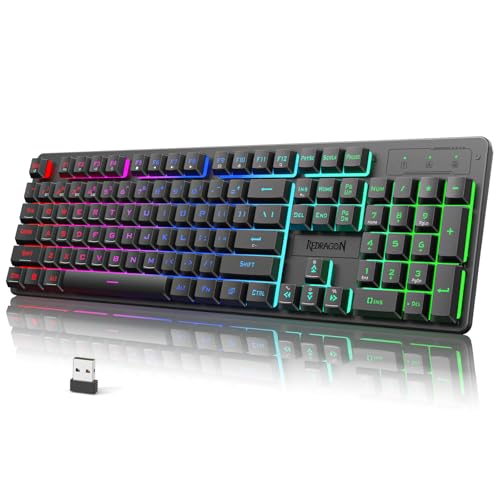
- Bluetooth, 2.4GHz, and USB-C wired modes
- 4000mAh rechargeable battery
- Programmable RGB, macros, and anti-ghosting
Best For: PC gamers who want an affordable customizable wireless board
Feature-Rich Display Choice
Wireless Gaming Keyboard with Smart Display & Knob
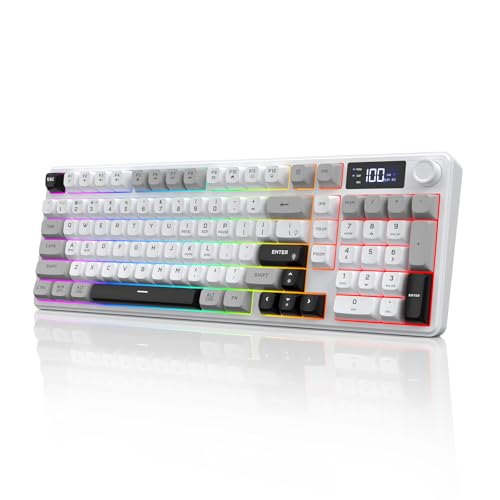
- Smart display shows battery, connection, and status
- Multifunction knob controls brightness and volume
- Tri-mode connectivity supports up to 4 devices
Best For: Multi-device users who want a full-size keyboard with display controls
Editor Pick – AULA F75 Pro Tri-Mode 75% RGB
The AULA F75 Pro is a wireless gaming keyboard built for players who want a compact 75% layout without giving up core controls. Its tri-mode connectivity, hot-swap support, and layered sound-dampening make it a strong choice if you want a customizable board that feels and sounds more refined than a basic budget model.
Best For: Gamers who want a compact, customizable wireless board with a knob and rich RGB.
Pros:
- Tri-mode connection with Bluetooth 5.0, 2.4GHz, and USB-C
- Hot-swappable 3-pin/5-pin support for easy switch changes
- 4000mAh battery and multi-device pairing support
- Knob control for lighting, media, and mode switching
Cons:
- 75% layout may feel small if you rely on a full number pad
- RGB and driver features may be more than casual users need
The F75 Pro stands out if you want a wireless gaming keyboard that blends flexibility, desk-saving size, and enthusiast-friendly features. It is best suited to users who value customization and tactile feel as much as gaming performance.
Premium Typing Choice – Logitech MX Keys S Low Profile
The Logitech MX Keys S is a wireless keyboard focused on quiet, fluid typing rather than competitive gaming extras. If your shopping list includes a wireless gaming keyboard only because you want reliable wireless use, backlighting, and a premium low-profile feel, this model is better suited to mixed work-and-play setups than fast-paced PC gaming.
Best For: Users who prioritize quiet typing, multi-device switching, and office-style comfort.
Pros:
- Low-profile keys with a quiet, precise typing feel
- Backlighting that activates as your hands approach
- Can pair with up to 3 devices via Bluetooth LE or Logi Bolt
- USB-C rechargeable with long runtime depending on backlight use
Cons:
- Not built around gaming-specific features like RGB effects or macros for play
- Low-profile design may not appeal to users who prefer mechanical gaming boards
MX Keys S is a strong pick when comfort, automation, and multi-device convenience matter more than a gamer-first layout. It works best as a premium wireless keyboard for people who split time between work, productivity, and casual use.
Value Custom Build – Redragon K673 PRO Gasket 81-Key
The Redragon K673 PRO is a wireless gaming keyboard built around a gasket-mounted feel, tri-mode connectivity, and a compact 81-key layout. It is aimed at buyers who want a softer typing experience, easy device switching, and customization options without moving into a full custom-board price range.
Best For: Gamers who want a compact wireless gasket board with easy switching and macro customization.
Pros:
- Tri-mode connectivity: USB-C, Bluetooth, and 2.4GHz wireless
- Gasket mount with 5-layer noise dampening for a softer feel
- Hot-swap socket supports most 3-pin and 5-pin switches
- Knob controls brightness and media playback
Cons:
- 81-key layout leaves out the full-size number pad
- Customization may require using the included software
This board is a good fit if you want a wireless gaming keyboard that feels cushioned and sounds more refined than a standard budget model. Its mix of tri-mode convenience and hot-swap support makes it especially appealing for users who like to tweak their setup over time.
Budget Wireless Pick – TECKNET 2-in-1 Quiet RGB
The TECKNET wireless gaming keyboard focuses on straightforward wireless play, long battery life, and a quieter typing experience. With 2.4G wireless plus wired support, a 4000mAh battery, and a durable metal base, it is a practical choice for gamers who want useful features without a complicated setup.
Best For: Budget-minded users who want a rechargeable wireless keyboard with quiet keys and simple controls.
Pros:
- 2-in-1 connectivity with 2.4G wireless and wired mode
- 4000mAh rechargeable battery rated for long use
- 15-zone rainbow backlighting with 11 modes and 4 brightness levels
- 25-key anti-ghosting and 12 multimedia keys
Cons:
- Only 2.4G wireless, not Bluetooth
- Multimedia keys are not compatible with Mac
TECKNET is a sensible pick if you want the basics done well in a wireless gaming keyboard: stable wireless, rechargeable power, and visible backlighting. It is most attractive for users who value convenience, spill resistance, and everyday durability over enthusiast-level customization.
Premium Low-Profile Pick – Razer BlackWidow V4 Low Profile HyperSpeed
If you want a wireless gaming keyboard that feels fast, compact, and premium, this Razer model is built around low-profile clicky switches and a slim 18.5 mm front height. It pairs 2.4GHz HyperSpeed wireless with Bluetooth, so it can handle both gaming and everyday multi-device switching without feeling cluttered on the desk.
Best For: Players who want a low-profile wireless keyboard with tactile mechanical feedback, long battery life, and strong media controls.
Pros:
- Low-profile Green mechanical switches with a 1.2 mm actuation point and tactile clicky feel
- HyperSpeed wireless plus Bluetooth with support for pairing up to 3 Bluetooth devices
- Multi-function roller, dedicated media/connectivity buttons, and 4 macro buttons
- Up to 980 hours of battery life in Power Saving Mode
Cons:
- Priced like a premium gaming keyboard, not an entry-level option
- Clicky switches may be less ideal if you prefer a quieter typing experience
Overall, this is a strong choice if you care about speed, responsiveness, and a polished feel in a wireless gaming keyboard. The low profile design and extra controls make it especially appealing for users who game often and also want a capable daily driver.
Best Value Spill-Resistant Option – KLIM Chroma Wireless Keyboard
The KLIM Chroma is a practical wireless gaming keyboard if you want simple plug-and-play setup, RGB backlighting, and a durable everyday build. Its membrane keys keep travel short for quick typing, and the rechargeable battery design helps avoid the hassle of buying replacements.
Best For: Budget-minded buyers who want an easy-to-use wireless keyboard for gaming, general PC use, and occasional console compatibility.
Pros:
- Instant USB receiver setup with no driver installation required
- Built-in rechargeable battery for cordless use
- Spill-resistant and durable construction for everyday accidents
- RGB backlighting with static or breathing modes
Cons:
- RGB colors are not customizable
- Membrane switches won’t deliver the feel of a mechanical keyboard
This model is a solid pick when value and convenience matter more than advanced customization. It covers the basics well for a wireless gaming keyboard and adds durability touches that make it feel suited to daily use.
Flexible Multi-Mode Choice – AULA S99 Gaming Keyboard
The AULA S99 is a versatile wireless gaming keyboard built for users who want tri-mode connectivity and plenty of customization. With Bluetooth 5.0, 2.4GHz wireless, and USB-C wired support, it adapts easily between gaming, office work, and mobile setups.
Best For: Users who want a full-featured wireless keyboard with macro support, a number pad, and flexible connection modes.
Pros:
- Tri-mode connectivity: Bluetooth 5.0, 2.4GHz wireless, and USB-C wired
- Full-key macro programming plus 3 shortcut keys and a dual-mode knob
- 96% layout with integrated number pad saves space while keeping key access familiar
- RGB backlighting and ergonomic two-stage stand for more comfortable use
Cons:
- It is a membrane keyboard, so it does not support hot-swapping
- Large feature set may be more than needed if you just want a basic wireless keyboard
For shoppers who prioritize flexibility and programmable controls, the S99 stands out as a practical all-rounder. It brings useful gaming features without dropping the full layout many people still prefer for work and everyday typing.
Elite Wireless Performance – ASUS ROG Strix Scope II 96
The ASUS ROG Strix Scope II 96 is a wireless gaming keyboard built for players who want a compact layout without giving up num pad access. Its tri-mode connectivity, hot-swappable switches, and long battery life make it a strong fit if you want one keyboard for gaming, streaming, and everyday work.
Best For: Gamers who want a compact 96% wireless board with premium features and full function-row utility.
Pros:
- Tri-mode connectivity with Bluetooth, 2.4GHz wireless, and USB wired support.
- Up to 1,500 hours of battery life in 2.4GHz wireless mode.
- Hot-swappable, pre-lubed NX Snow linear switches for a smooth typing feel.
- PBT keycaps, per-key RGB, and included wrist rest add to the premium setup.
Cons:
- Higher-end feature set may be more than a basic gaming setup needs.
- 96% layout is compact, but still larger than a true TKL board.
- Designed primarily for Windows users, though Mac support is listed.
This is a well-rounded wireless gaming keyboard for anyone who wants a refined typing feel, flexible connectivity, and desk-friendly sizing. It stands out most when you value convenience and customization as much as gaming performance.
Budget-Friendly Tri-Mode Pick – Redragon K521KS Wireless Gaming Keyboard
The Redragon K521KS is a wireless gaming keyboard aimed at users who want flexible connectivity and easy customization without a complicated setup. With Bluetooth, 2.4GHz, and USB-C wired modes, it works well if you move between devices and want a practical keyboard for gaming and daily use.
Best For: PC users who want an affordable tri-mode keyboard with RGB and macro support.
Pros:
- Tri-mode connection supports Bluetooth, 2.4GHz wireless, and USB wired use.
- 4000mAh battery helps reduce frequent recharging.
- Programmable software supports RGB, key remapping, and macros.
- 25-key anti-ghosting and 12 multimedia keys improve gaming and convenience.
Cons:
- Mechanical-feeling switches are not the same as a full mechanical premium board.
- Compatibility is listed for PC and Windows rather than broad platform support.
- The feature set is strong, but the build is more basic than premium gaming keyboards.
For buyers focused on value, this wireless gaming keyboard covers the essentials: multi-device flexibility, customization, and solid battery life. It is a sensible pick if you want practical gaming features without paying for a flagship model.
Feature-Rich Display Choice – Wireless Gaming Keyboard with Smart Display & Knob
This wireless gaming keyboard focuses on convenience features that make desk use feel more interactive. The smart display, multifunction knob, tri-mode connectivity, and full number pad make it appealing if you want a single keyboard that handles gaming, work, and device switching with minimal fuss.
Best For: Users who want a full-size wireless keyboard with a display, knob, and multi-device support.
Pros:
- Tri-mode BT5.0, 2.4GHz, and Type-C wired connectivity supports up to 4 devices.
- Smart LED display shows battery, connection, input, and system status.
- Multifunction knob adjusts backlight brightness and volume.
- 4000mAh battery and 26-key rollover support long sessions and gaming combos.
Cons:
- The product listing is mixed on switch and keyboard description details.
- Full-size 98-key layout takes more desk space than compact gaming boards.
- Feature-heavy design may be more than some users need for simple play.
If you want a wireless gaming keyboard with extra control features, this one stands out for its display and knob. It is especially practical for users who switch between several devices and want visible status information at a glance.
How We Picked These Wireless Gaming Keyboards
We focused on the factors that matter most in real use: connection quality, switch feel, layout, battery capacity, build quality, and extra controls such as knobs, media keys, and hot-swap support. We also looked for models that balance gaming performance with practical typing comfort, since many buyers want one keyboard for both play and work.
Quick Comparison: What Matters Most
If you want the simplest route, match the keyboard to your priority. Pick a low-profile or quiet option for shared spaces, a hot-swappable mechanical board if you like customizing switches, a compact layout if desk space is tight, and a larger or 96% design if you rely on arrow keys, navigation keys, or a numpad.
Key Buying Factors for a Wireless Gaming Keyboard
Connection Type and Latency
For gaming, 2.4GHz wireless is usually the best choice for the lowest perceived delay. Bluetooth is great for multi-device convenience, while tri-mode models add wired fallback for charging or maximum consistency.
Switch Type and Typing Feel
Mechanical switches tend to offer faster, more tactile feedback, while membrane and low-profile boards can be quieter and easier to live with in office or home settings. Consider sound level and actuation feel as much as speed.
Battery Life and Charging
Long battery life matters if you game frequently or dislike constant recharging. Larger batteries are useful, but real-world runtime also depends on RGB brightness, polling settings, and connection mode.
Layout, Size, and Usability
Compact keyboards free up mouse space, while 75%, 81-key, and 96% layouts each offer a different balance of portability and function access. Knobs, smart displays, and dedicated media controls can improve convenience if you use them regularly.
Who Should Buy Which Wireless Gaming Keyboard?
Competitive players should prioritize low-latency wireless and stable tri-mode support. Casual gamers and hybrid workers may prefer quieter, more comfortable boards with flexible device switching. Enthusiasts who want to tune their setup should look for hot-swap support, gasket mounting, and stronger customization options. If you need one board for gaming, typing, and general productivity, choose a Wireless Gaming Keyboard with a layout that fits your desk and workflow rather than chasing specs alone.