A premium console cooling stand can do more than keep your system upright. The best models also improve airflow, reduce clutter, and add convenient charging or storage features.
In this roundup, we focus on 10 practical options for gamers who want a cleaner setup and better everyday console support without sacrificing function.
Best 10 Premium Console Cooling Stand Picks for 2026
Best All-in-One Organizer
PS5 Cooling Stand with Dual Charging
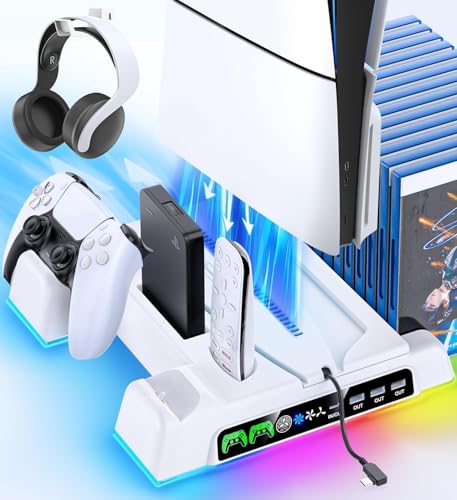
- Auto fan adjusts to console temperature
- Charges two controllers and stores accessories
- Fits PS5, Slim, and Pro disc/digital models
Best For: PS5 owners who want cooling, charging, and accessory storage in one dock.
Best for Xbox One S Vertical Setup
eXtremeRate Black Cooling Stand

- Secure fit made for Xbox One S
- Vented design supports passive airflow
- Simple upright stand saves shelf space
Best For: Xbox One S owners who want a clean vertical stand with basic cooling support.
Best for All-in-One PS5 Setup
PS5 Cooling Station with Dual Charger

- Dual controller charging with clear LED indicators
- 3-speed quiet fan for active console cooling
- RGB lighting plus storage for discs and headset
Best For: PS5 owners who want a tidy, feature-packed stand for cooling, charging, and organizing their console area.
Best for Xbox One X Owners
Mcbazel Vertical Cooling Stand

- Three high-speed fans with selectable modes
- Adds 3 USB 2.0 ports for accessories
- Vertical, space-saving design with light bar
Best For: Xbox One X owners who want a cooling stand with extra USB ports and a vertical footprint.
Best All-in-One Stand

- Fan-cooled vertical stand for PS4, Slim, and Pro
- Charges two controllers with LED status lights
- Stores up to 12 games in one compact dock
Best For: PS4 owners who want cooling, charging, and game storage in one vertical station.
Best for Easy Setup
FOSA Vertical Console Cooling Stand

- Universal fit for Disc and Digital Edition consoles
- Bottom-hole design helps maintain airflow
- Secure screw mount keeps the console steady
Best For: Gamers who want a simple vertical stand with basic cooling support and a tidy footprint.
Best for Auto Cooling
FASTSNAIL PS5 Pro/Slim Cooling Stand

- Auto temperature-based fan control with 3 speeds
- Horizontal stand helps improve airflow and save space
- Extra USB ports plus charging support for accessories
Best For: PS5 Slim and PS5 Pro owners who want cooling, charging, and USB expansion in one horizontal stand.
Best for All-in-One Storage
PS5 Cooling Stand with Dual Charging

- 3-speed fan for adjustable cooling
- Dual controller charging with LED indicators
- Extra slots for headset, remote, and game cards
Best For: PS5 owners who want cooling, charging, and accessory storage in one vertical stand.
Best for All-in-One Setup
PS5 Cooling Stand with Charging Dock

- 3-speed turbo fan for active console cooling
- Charges two controllers and adds 3 USB hubs
- Holds 13 game discs with headset storage
Best For: Gamers who want a single PS5 dock that cools, charges, and organizes accessories.
Best for PS5 Slim/Pro Owners
PS5 Horizontal Cooling Stand with Charger

- Fits PS5, Slim, and Pro models
- Charges two controllers at once
- Three-speed fan and compact horizontal layout
Best For: PS5 owners who want an all-in-one cooling and charging stand for a tidy setup.
Best All-in-One Organizer – PS5 Cooling Stand with Dual Charging
If you want a premium console cooling stand that does more than just move air, this PS5 station is built for tidy setups and hands-free convenience. It combines automatic fan control, dual controller charging, and storage for accessories, making it a practical choice for keeping a PlayStation 5 area organized and performance-ready.
Best For: PS5 owners who want an all-in-one vertical stand with cooling, charging, and accessory storage in one dock.
Pros:
- Auto-adjusting fan speeds help manage heat without constant manual tweaking
- Charges two controllers and adds handy slots for headset, remote, hard drive, and game cards
- Works with PS5, Slim, and Pro disc/digital versions for broad compatibility
Cons:
- More of a full docking station than a simple cooling stand, so it takes up extra desk space
- Accessory-heavy design may be more than needed if you only want basic cooling
As a premium console cooling stand, this model stands out most for buyers who value convenience and organization as much as thermal support. If your gaming setup needs a cleaner footprint with automatic cooling and controller charging built in, it delivers a strong all-in-one package.
Best for Xbox One S Vertical Setup – eXtremeRate Black Cooling Stand
If you want a simple, space-saving way to stand your console upright, this premium console cooling stand is a practical add-on for the Xbox One S. It gives the system a cleaner vertical profile, adds vented airflow, and is easy to place on a dry, stable surface.
Best For: Xbox One S owners who want a vertical stand that improves airflow and saves shelf space.
Pros:
- Designed specifically for the Xbox One S for a secure fit
- Vented construction helps promote airflow around the console
- Vertical orientation saves space and gives the setup a tidier look
- Very easy to use with no installation required
Cons:
- Only works with the Xbox One S
- Does not include active fans, so cooling benefits are passive
As a premium console cooling stand, it’s a straightforward choice for players who value a stable upright position and a neater entertainment area. Just keep expectations realistic: it helps airflow and organization, but it’s not a replacement for a powered cooling system.
Best for All-in-One PS5 Setup – PS5 Cooling Station with Dual Charger
If you want a premium console cooling stand that also handles charging and storage, this PS5 station is built to do it all. It combines a 3-speed fan, dual controller charger, RGB lighting, and space for games and accessories in one vertical setup.
Best For: PS5 owners who want a tidy, feature-packed stand for cooling, charging, and organizing their console area.
Pros:
- Charges two DualSense controllers at once with status LEDs and safety protection
- Three fan speeds and quiet cooling help manage console heat during long sessions
- RGB lighting and USB hub ports add extra utility and a more polished setup
- Stores the console, 12 game discs, and a headset to reduce clutter
Cons:
- Best suited to users who want a full dock rather than a simple fan stand
- Extra lighting and charging features may be unnecessary for minimal setups
This premium console cooling stand is a strong pick if you want one accessory to cover cooling, charging, and organization without adding separate devices. It delivers the most value to players who keep their PS5 set up vertically and want everything in one place.
Best for Xbox One X Owners – Mcbazel Vertical Cooling Stand
If you want a premium console cooling stand made specifically for the Xbox One X, this Mcbazel vertical dock is a simple space-saving way to add active airflow and extra USB connectivity. It keeps the console upright, adds a light bar for a cleaner setup, and is easy to use with no separate power adapter.
Best For: Xbox One X owners who want a vertical stand with cooling fans, USB hubs, and a tidy all-in-one setup.
Pros:
- Built for the Xbox One X for a secure, space-saving fit
- Three cooling fans with high/low/off modes help manage heat during long sessions
- Three USB 2.0 ports add handy connectivity for controllers and accessories
- Light bar and non-slip lock design give it a more polished, stable setup
Cons:
- Only compatible with the Xbox One X console
- USB ports do not support external hard drives
As a premium console cooling stand for a single-console setup, this is a practical pick if you value a neater vertical footprint and built-in fan support over universal compatibility.
Best All-in-One Stand – OIVO PS4 Cooling Station
If you want a premium console cooling stand that also handles charging and storage, the OIVO PS4 stand is a practical all-in-one pick. It supports PS4, PS4 Slim, and PS4 Pro, adds dual controller charging, and includes 12 game slots to keep your setup organized.
Best For: PS4 owners who want one vertical station to cool the console, charge controllers, and store games in a single setup.
Pros:
- Built-in fan cooling with a metal base for better airflow
- Dual controller charger plus LED charge indicators
- 12-game storage slots help reduce desk clutter
- Compatible with PS4, PS4 Slim, and PS4 Pro
Cons:
- PS4 Slim needs the included extra holder for a secure fit
- Cooling fan adds some noise, even if it is relatively low
- Designed specifically for PS4, not newer PlayStation consoles
Overall, this premium console cooling stand is a strong choice if you value convenience as much as cooling. It is less of a minimalist accessory and more of a full dock-style solution for keeping your PS4 area tidy and ready to play.
Best for Easy Setup – FOSA Vertical Console Cooling Stand
If you want a premium console cooling stand that keeps your setup tidy without adding complexity, this FOSA vertical stand is a practical pick. It supports both Disc and Digital Edition consoles, improves airflow through its bottom-hole design, and helps free up valuable space in tighter entertainment centers.
Best For: Gamers who want a simple, space-saving vertical stand with secure mounting and basic cooling support.
Pros:
- Universal fit for Disc and Digital Edition consoles
- Bottom ventilation design supports better airflow during long sessions
- Vertical layout can save up to 60% of space
- ABS build is lightweight, durable, and easy to install
Cons:
- Cooling is passive, not an active fan system
- Single-color design may feel plain for showier setups
Overall, this premium console cooling stand makes the most sense for buyers who value stability, space savings, and hassle-free assembly over flashy extras. It’s a solid everyday organizer for cleaner setups and more consistent console airflow.
Best for Auto Cooling – FASTSNAIL PS5 Pro/Slim Cooling Stand
If you want a premium console cooling stand that does more than just prop up your PS5, this FASTSNAIL combo is built for efficient airflow, simple charging, and a cleaner horizontal setup. It adds three fan speeds, automatic temperature-based fan control, and extra USB ports without taking up much room.
Best For: PS5 Slim and PS5 Pro owners who want a space-saving horizontal stand with active cooling, controller charging, and extra USB expansion in one accessory.
Pros:
- Automatic fan speed control with low, medium, high, and off settings
- Horizontal stand design helps improve airflow and save desk space
- Includes multiple USB ports for charging and accessory connectivity
- Sturdy, non-slip build with LED lighting for a cleaner setup
Cons:
- Only works with PS5 Slim/Pro horizontal setups
- Cooling fan and stand are separate pieces, so setup is less integrated
- Not ideal if you need a minimal accessory with no lighting
This is a strong premium console cooling stand if you value practical extras like auto cooling, USB hub functionality, and controller charging alongside basic console support. It’s especially appealing for users who want one accessory to handle storage, airflow, and convenience at once.
Best for All-in-One Storage – PS5 Cooling Stand with Dual Charging
This premium console cooling stand is a strong pick if you want to clean up your PS5 setup while adding active cooling and charging in one base. It combines a three-speed fan, dual controller charging, and dedicated slots for accessories, making it a practical all-in-one dock for busy gaming spaces.
Best For: PS5 owners who want a single stand to cool the console, charge controllers, and organize accessories without adding clutter.
Pros:
- Upgraded fan with 3 speed settings for adjustable airflow
- Charges two DualSense controllers and includes LED status indicators
- Built-in storage for headset, media remote, hard drive, and 14 game cards
- Includes adapter and Type-C cable for flexible power options
Cons:
- Large feature set may be more than minimal setups need
- Works best as a vertical stand, so it takes up desk space
- Not the simplest pick if you only want basic cooling
Overall, this premium console cooling stand makes the most sense for players who want convenience and organization as much as airflow. If your PS5 area is crowded, the combination of cooling, charging, and storage is the real selling point.
Best for All-in-One Setup – PS5 Cooling Stand with Charging Dock
If you want a premium console cooling stand that does more than just hold your PS5, this all-in-one station is a strong fit. It combines adjustable cooling, dual-controller charging, game storage, and extra USB ports into a tidy vertical hub for PS5 Pro, Slim, and standard models.
Best For: Players who want a space-saving PS5 stand that cools the console, charges controllers, and keeps accessories organized in one place.
Pros:
- 3-speed turbo fan helps pull heat away during long sessions
- Charges two DualSense controllers while also adding 3 USB hubs
- Stores up to 13 game discs plus a headset holder for cleaner setup
- Compatible with PS5 Pro, Slim, Disc, and Digital consoles
Cons:
- Not the most minimalist option if you only need basic cooling
- Works best when you want the full dock-style accessory setup
This is a practical premium console cooling stand for gamers who want maximum functionality from a single accessory. If your priority is keeping the PS5 cool while charging controllers and reducing desk clutter, this model delivers a lot of value in one vertical station.
Best for PS5 Slim/Pro Owners – PS5 Horizontal Cooling Stand with Charger
If you want a premium console cooling stand that does more than just prop up your system, this PS5 horizontal station is built for convenience. It supports PS5, Slim, and Pro models, adds adjustable cooling, and gives you a dual-controller charging dock in one compact setup.
Best For: PS5 owners who want a space-saving all-in-one stand with cooling and charging for daily use.
Pros:
- Compatible with PS5 Disc/Digital, PS5 Slim, and PS5 Pro models
- Dual charging dock supports DualSense and Edge controllers
- Three fan speeds help tailor cooling to casual or intense play sessions
- Horizontal design keeps the console setup organized and compact
Cons:
- Requires the console to have USB power available in Rest Mode for charging
- Horizontal-only layout may not suit buyers who prefer a vertical stand
This is a practical pick if you want a premium console cooling stand that combines airflow, controller charging, and tidy storage without adding extra clutter. It’s especially appealing for players who want one accessory to cover multiple PS5 generations.
How We Picked the Best Premium Console Cooling Stand
We focused on Premium Console Cooling Stand options that combine stable support, effective airflow, and useful extras like controller charging, USB ports, lighting, and game storage. We also looked for designs that fit common living-room and desk setups, with attention to ease of use and compatibility.
Quick Comparison
Some stands are built for vertical placement and all-in-one convenience, while others emphasize horizontal stability or temperature-controlled fan speed. If you want a simple docking-style setup, prioritize charging and accessory organization. If your console runs warm or sits in a tight space, airflow and fan placement matter more.
Key Buying Factors for a Premium Console Cooling Stand
Console Compatibility
Check the exact console family and model support first. Many stands are made for one platform generation or even one size variation, and a mismatch can affect fit, airflow, or balance.
Cooling Performance
Look for fans with sensible airflow design, adjustable speeds, or automatic temperature control. A Premium Console Cooling Stand should support cooling without adding unnecessary noise or vibration.
Power and Charging Features
Dual controller charging, USB expansion, and clear charging indicators can add a lot of value. These features are especially useful if you keep your setup in one place and want fewer cables on the floor or media cabinet.
Stability and Layout
Choose a stand with a secure base, solid material quality, and a layout that matches how you use your console. Vertical stands save space; horizontal stands can feel more stable in lower entertainment centers.
Storage and Convenience
Game slots, accessory hooks, and compact footprints help keep everything organized. The best Premium Console Cooling Stand options balance cooling with everyday usability instead of treating airflow as the only feature.
Who Should Buy Which Premium Console Cooling Stand?
If you want the most streamlined setup, choose a model with controller charging and a clean vertical footprint. If your console is tucked into a cabinet or warm area, prioritize stronger airflow and temperature-based fan controls. If you value organization, look for game storage and USB expansion. For buyers upgrading a full gaming station, the best choice is usually the stand that fits your exact console and delivers the right mix of cooling, charging, and stability.