If your console runs hot during long gaming sessions, a well-designed cooling stand can help improve airflow, reduce clutter, and add useful extras like charging and storage.
We focused on quiet console cooling stand options that make sense for everyday use, with attention to noise, compatibility, stability, and overall value.
Best 10 Quiet Console Cooling Stand Picks for 2026
Best for Auto Cooling
PS5 Cooling Stand with Dual Charging
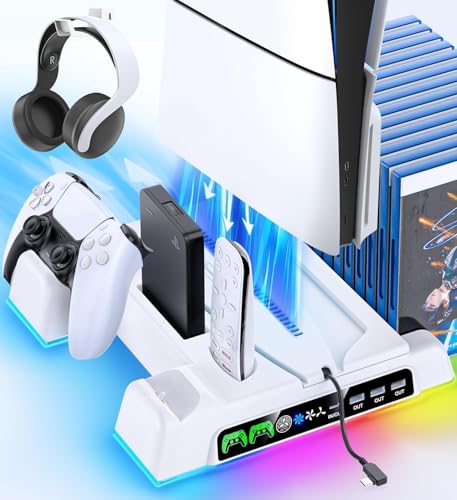
- Automatic fan adjusts to console temperature
- Charges two controllers and stores accessories
- Fits PS5 Original, Slim, and Pro models
Best For: PS5 owners who want temperature-based cooling with charging and organizer features.
Best for Quiet Multi-Fan Cooling
TECKNET 9-Fan Laptop Cooling Pad

- 9-fan cooling with stepless speed control
- Quiet operation under 40 dB
- 5 height settings plus phone holder
Best For: Laptop users who want strong, quiet cooling with extra comfort and device support.
Best for All PS5 Models
PS5/Slim/Pro Horizontal Stand with Cooling Fan

- Supports PS5, Slim, and Pro disc/digital models
- Charges two controllers, including Edge controllers
- Three fan speeds for adjustable cooling
Best For: PS5 owners who want one stand for cooling, charging, and broad compatibility.
Best for Xbox One X Owners
Mcbazel Vertical Cooling Stand for Xbox One X

- Built specifically for Xbox One X
- Three fan modes for adjustable cooling
- Adds 3 USB ports and a light bar
Best For: Xbox One X owners who want a space-saving vertical stand with built-in cooling and USB ports.
Best for Quiet Cooling
Kootek 5-Fan Laptop Cooling Pad

- Five quiet fans for broad cooling coverage
- 6 adjustable height settings for better ergonomics
- Dual USB hub adds handy extra connectivity
Best For: Quiet laptop cooling for users who want adjustable comfort and extra USB ports.
Best for All-in-One Setup

- Fan cooling with low-noise design
- Charges two controllers with LED status lights
- Stores up to 12 games in one dock
Best For: PS4 owners who want cooling, charging, and game storage in a single vertical stand.
Best for Xbox Series S Extras
Mcbazel Vertical Stand with Cooling Fan

- Dual fan speeds help manage heat during longer play sessions
- Removable cooler lets it switch to a basic vertical stand
- Adds 2 USB ports for charging and accessories
Best For: Xbox Series S owners who want cooling, vertical storage, and extra USB ports in one accessory.
Best All-in-One Charging Stand
PS5/Slim/Pro Cooling & Charging Station
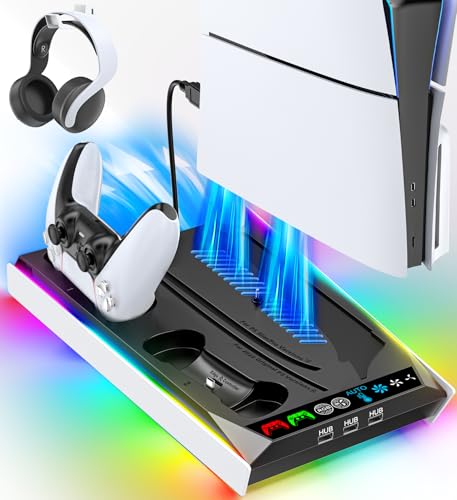
- Low-noise fan cooling for PS5, Slim, and Pro
- Charges original and Edge controllers
- Adds 3 USB hubs plus remote storage
Best For: PS5 owners who want a multi-use dock with cooling, charging, and accessory organization.
Best Smart Cooling Control
PS5 Pro Triple-Fan Cooling Stand

- Auto temp control for quieter, hands-off cooling
- Triple-fan airflow helps reduce overheating risk
- USB 3.0 port adds charging and accessory support
Best For: PS5 Pro gamers who want automatic cooling with extra USB utility.
Best for RGB Setup
PS5 Cooling Station with RGB & Dual Charging
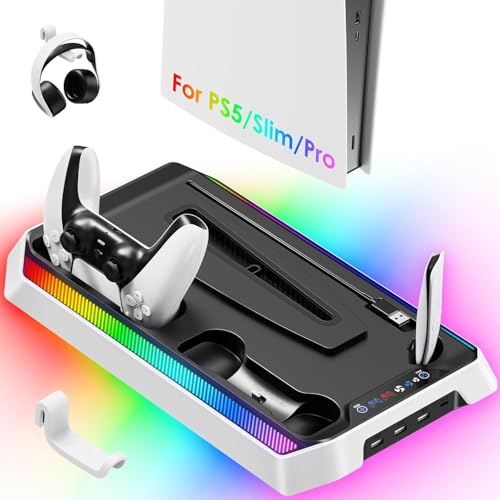
- Three fan speeds for console cooling
- Charges two controllers plus extra USB ports
- RGB lighting and headset holder add convenience
Best For: PS5 owners who want a feature-packed cooling dock with lighting and charging.
Best for Auto Cooling – PS5 Cooling Stand with Dual Charging
If you want a quiet console cooling stand that does more than just move air, this PS5 station is built for all-in-one desk organization. It supports PS5 Original, Slim, and Pro Disc/Digital models, automatically adjusts fan speed based on temperature, and adds controller charging plus storage for accessories.
Best For: PS5 owners who want automatic cooling, dual controller charging, and a tidy vertical stand in one accessory.
Pros:
- Auto fan control ramps airflow up only when the console gets hot
- Charges two controllers and includes extra slots for headset, remote, and games
- Works with PS5 Original, Slim, and Pro Disc/Digital editions
- Safety screw helps keep the console stable in vertical setup
Cons:
- Not the most minimal pick if you only want a basic stand
- Best suited to PS5 owners who will use the extra charging and storage features
This is a practical choice if you want a quiet console cooling stand that stays low-key under light loads but can step up when temperatures rise. The automatic fan, charging hub, and storage layout make it especially useful for players who want fewer cables and a cleaner gaming area.
Best for Quiet Multi-Fan Cooling – TECKNET 9-Fan Laptop Cooling Pad
If you want a quiet console cooling stand style setup for a laptop, this TECKNET pad is built for strong airflow without the usual fan noise. The 9-fan layout, adjustable speed control, and raised ergonomic angle make it a practical pick for longer work or gaming sessions.
Best For: Users who want powerful cooling with low noise, a built-in phone stand, and adjustable comfort for 12-17.3 inch laptops.
Pros:
- 9 fans with stepless speed control up to 2600 RPM for broad cooling coverage
- Whisper-quiet operation under 40 dB for less distracting use
- 5 height settings plus anti-slip support for a more comfortable, stable setup
- 2 USB ports and a built-in phone holder add everyday convenience
Cons:
- More of a laptop cooling accessory than a true console stand
- LED lighting may be unnecessary for buyers who prefer a plain look
- Best suited to larger laptops, so it may feel oversized for smaller devices
Overall, this is a strong choice if you need a quiet console cooling stand alternative for a laptop or tablet-style setup and want better airflow without giving up ergonomics. It balances cooling power, noise control, and convenience better than many basic pads.
Best for All PS5 Models – PS5/Slim/Pro Horizontal Stand with Cooling Fan
If you want a quiet console cooling stand that also handles charging and storage, this horizontal PS5 base is built for an all-in-one setup. Its scalable design supports PS5 Disc/Digital, Slim, and Pro models, while the integrated fan and dual-controller dock help keep your gaming area organized.
Best For: PS5 owners who want a single horizontal stand that cools the console, charges two controllers, and fits multiple PS5 versions.
Pros:
- Fits PS5, Slim, and Pro models with a scalable design and EVA foam support
- Charges two controllers at once, including original and Edge controllers
- Three fan speeds let you adjust cooling for lighter play or longer sessions
- Helps reduce clutter by combining stand, cooling, and charging in one base
Cons:
- Horizontal-only design may not suit users who prefer a vertical setup
- Fan noise may be noticeable at higher speed settings
- Requires cable power from the PS5, so placement is less flexible
This is a practical pick if you want a quiet console cooling stand alternative with more than just airflow: it adds charging convenience and broad PS5 compatibility. It makes the most sense for players who value a tidy, desk-friendly setup over a minimalist dock.
Best for Xbox One X Owners – Mcbazel Vertical Cooling Stand for Xbox One X
If you want a quiet console cooling stand built specifically for the Xbox One X, this Mcbazel vertical dock is a practical space-saving add-on. It combines a vertical base, three fan speeds, and extra USB ports, making it useful for keeping your setup tidy while helping airflow during long play sessions.
Best For: Xbox One X owners who want a compact stand with built-in cooling, USB expansion, and a simple plug-and-play setup.
Pros:
- Designed specifically for the Xbox One X for a secure vertical fit
- Three built-in cooling fans with high, low, and off modes
- Includes 3 USB 2.0 ports for controllers and other low-power accessories
- Light bar adds a more customized look without extra setup
Cons:
- Only compatible with Xbox One X, not other Xbox models
- USB ports do not support external hard drives
- Cooling fan noise may be noticeable at the highest setting
As a quiet console cooling stand, this model is a strong fit if you value a clean vertical layout and want basic cooling support without a complicated installation. It is most appealing to One X owners who prioritize convenience and desk-space savings over broad console compatibility.
Best for Quiet Cooling – Kootek 5-Fan Laptop Cooling Pad
If you want a quiet console cooling stand for long work or gaming sessions, the Kootek cooling pad is built around low-noise airflow and flexible fan control. Its five-fan layout, adjustable height settings, and dual USB hub make it a practical pick for everyday laptop use.
Best For: Students, remote workers, and gamers who want quiet cooling with adjustable comfort and broad laptop compatibility.
Pros:
- Five quiet fans provide strong cooling for 12-17 inch laptops.
- Two switches let you run 1, 4, or all 5 fans and LEDs.
- Six height settings improve typing and viewing comfort.
- Built-in dual USB hub adds extra device connectivity.
Cons:
- LED lighting may not suit buyers who prefer a minimal look.
- USB-powered design may need a Type-C adapter for newer devices.
Overall, this is a strong value option if you want a quiet console cooling stand that balances airflow, ergonomics, and convenience. It is less about premium finishes and more about dependable cooling with useful everyday features.
Best for All-in-One Setup – OIVO PS4 Cooling Stand
If you want a quiet console cooling stand that also handles charging and game storage, this OIVO dock is a practical PS4 accessory. It supports PS4, PS4 Slim, and PS4 Pro, adds a vertical base for better organization, and keeps the footprint tidy for TV stands and small gaming setups.
Best For: PS4 owners who want one stand to cool the console, charge controllers, and store games without extra clutter.
Pros:
- Built-in fan cooling with a claimed low-noise design for calmer sessions
- Dual controller charging with LED indicators for quick status checks
- 12-game slot storage helps keep accessories organized in one place
- Compatible with PS4, PS4 Slim, and PS4 Pro
Cons:
- Works best as a convenience dock, not a heavy-duty cooling solution
- PS4 Slim requires the included extra holder
- Fan noise may still be noticeable in very quiet rooms
This is a good pick if you want a quiet console cooling stand that doubles as a charging hub and storage station. It’s especially useful for players who value a cleaner setup more than maximum cooling power.
Best for Xbox Series S Extras – Mcbazel Vertical Stand with Cooling Fan
If you want a quiet console cooling stand for an Xbox Series S, this Mcbazel vertical dock is a practical pick thanks to its dual fan speeds, removable cooler, and built-in USB expansion. It keeps the console upright while adding airflow for longer sessions, and the fan module can be detached when you only need a simple stand.
Best For: Xbox Series S owners who want cooling plus a vertical stand with extra USB ports for everyday gaming setup convenience.
Pros:
- Two built-in cooling fans with low, medium, and high speed settings
- Removable fan system lets it function as a plain vertical stand
- Extra 2 USB ports add helpful connectivity for accessories and charging
- Powered by the console through USB-C for a tidy setup
Cons:
- Only compatible with Xbox Series S, not Series X or Xbox One S
- Cooling performance depends on fan speed, so it may not be truly silent
- White finish may not match every gaming setup
This is a strong fit if you need a quiet console cooling stand that also doubles as a neat vertical organizer. It is especially appealing for Series S owners who want a little extra airflow and USB convenience without adding a bulky separate accessory.
Best All-in-One Charging Stand – PS5/Slim/Pro Cooling & Charging Station
If you want a quiet console cooling stand that does more than just move air, this PS5 dock is built for cooling, charging, and accessory storage in one setup. It supports PS5, PS5 Slim, and PS5 Pro consoles, with a secure base, RGB lighting, controller charging, and extra USB ports for everyday use.
Best For: Players who want a single dock for cooling, charging controllers, and keeping PS5 accessories organized.
Pros:
- Built-in fan system is designed for lower-noise cooling during long sessions
- Charges PS5 and Edge controllers with a movable port for better fit
- Includes 3 USB hubs plus a media remote slot for added convenience
- Works with PS5, Slim, and Pro consoles using USB power options
Cons:
- RGB lighting may be unnecessary if you prefer a minimalist setup
- More of a multi-function dock than a simple cooling-only stand
- Bulky compared with basic vertical console stands
This is a smart pick if you want a quiet console cooling stand that also replaces a separate controller charger and USB hub. The tradeoff is extra size and features, but for many PS5 owners, the all-in-one design makes setup cleaner and easier to live with.
Best Smart Cooling Control – PS5 Pro Triple-Fan Cooling Stand
If you want a quiet console cooling stand for the PS5 Pro that handles heat automatically, this smart triple-fan stand is built for long sessions. It turns on above 36°C, shuts off below 35°C, and adds adjustable cooling plus RGB lighting without needing an external power brick.
Best For: PS5 Pro owners who want automatic temperature-based cooling, a clean USB-powered setup, and a stand that adds extra functionality.
Pros:
- Automatic temp control helps keep cooling quiet and efficient during extended play
- Triple-fan design improves airflow for a more stable PS5 Pro setup
- USB 3.0 pass-through adds useful expansion for charging and accessories
- RGB lighting gives the console a more polished, stream-ready look
Cons:
- Made specifically for PS5 Pro, so it is not a universal console cooler
- RGB styling may be unnecessary for players who prefer a minimal setup
- Cooling effectiveness depends on placement and overall room airflow
This is a practical pick if you want a quiet console cooling stand that feels more like an upgrade hub than a basic fan. The automatic thermal control and USB 3.0 port make it especially appealing for players who want convenience, while the compact stand design keeps the setup straightforward.
Best for RGB Setup – PS5 Cooling Station with RGB & Dual Charging
If you want a quiet console cooling stand that also cleans up your PS5 area, this station does a lot in one footprint: cooling fan, controller charging, USB expansion, and RGB lighting. It’s a practical pick for PS5, Slim, and Pro owners who want better airflow and a more organized dock-style setup.
Best For: Players who want a multi-function PS5 stand with cooling, charging, and customizable lighting in one unit.
Pros:
- Three fan speeds help move heat away from the console base.
- Charges two controllers while adding 3 USB ports and 1 Type-C port.
- Touch-controlled RGB lighting offers multiple effects for a more styled setup.
- Includes a headset holder and built-in stability features for the PS5.
Cons:
- The RGB lighting may be unnecessary if you prefer a minimal setup.
- Not the most compact option if you only need basic cooling.
This is a strong all-in-one dock if your priority is convenience rather than a bare-bones cooler. For buyers comparing a quiet console cooling stand with charging and accessory support, it stands out as a feature-rich desktop hub.
How We Picked the Best Quiet Console Cooling Stand
For this roundup, we favored products that balance cooling performance with low noise, practical console support, and useful extras such as controller charging or USB expansion. Because a Quiet Console Cooling Stand should be more than just a fan, we also looked at build quality, footprint, ease of setup, and whether the design suits vertical or horizontal placement.
Quick Comparison
Some options are best for PS5 owners who want an all-in-one dock with charging, while others suit Xbox or PS4 users who mainly want improved airflow and a cleaner entertainment center. If you prefer a minimal setup, choose a model with simple fan controls and a compact base. If you want a fuller feature set, look for bundled controller charging, RGB lighting, or extra USB ports.
Key Buying Factors for a Quiet Console Cooling Stand
Noise Level
Look for fans marketed as quiet, low-decibel, or speed-adjustable. Variable controls matter because the quietest setting may be enough for light gaming, while a higher setting can help during longer sessions.
Compatibility and Fit
Make sure the stand matches your exact console model, including Slim, Pro, Disc, or Digital versions where applicable. A poor fit can affect stability and airflow, especially with larger consoles.
Cooling Design
Not all cooling systems work the same way. Some stands use one or two larger fans, while others rely on multiple smaller ones. The best choice depends on whether you want broad airflow, targeted exhaust assistance, or simple heat management.
Extra Features
Charging docks, game storage, RGB lighting, and USB ports can be helpful, but only if they do not add noise or create a bulky footprint. For many buyers, the best value comes from a Quiet Console Cooling Stand that keeps things simple and reliable.
Who Should Buy Which Quiet Console Cooling Stand?
Choose a feature-rich dock if you want one place to cool, charge, and organize your setup. Pick a simpler stand if noise reduction and compact size matter most. Xbox and PS4 owners should prioritize model-specific compatibility first, since the best airflow design is only useful if the stand fits securely and leaves vents unobstructed.
In short, the right stand should cool effectively, stay quiet, and support the way you actually game. That combination usually matters more than flashy extras alone.