A good vertical console cooling stand does more than save space. It helps keep your console upright, supports airflow, and can add useful extras like charging docks, USB ports, or controller storage.
Below, we’ve narrowed the field to practical, buyer-friendly picks for PlayStation and Xbox owners who want a cleaner setup and a cooler-running console in 2026.
Best 10 Vertical Console Cooling Stand Picks for 2026
Best for Storage and Charging

- Cools and supports PS4, PS4 Slim, and PS4 Pro
- Charges 2 controllers while storing 12 games
- LED indicators make charging status easy to see
Best For: PS4 owners who want a space-saving dock that cools, charges, and organizes accessories.
Best for Easy Setup
MyLifeUNIT Xbox One Vertical Cooling Stand

- No-tools, one-step installation
- Stable vertical support for Xbox One
- Grid base helps airflow and heat management
Best For: Xbox One owners who want a simple upright stand with airflow-friendly design.
Best for Cooling Control
PS5 Disc/Digital Stand with RGB Charging
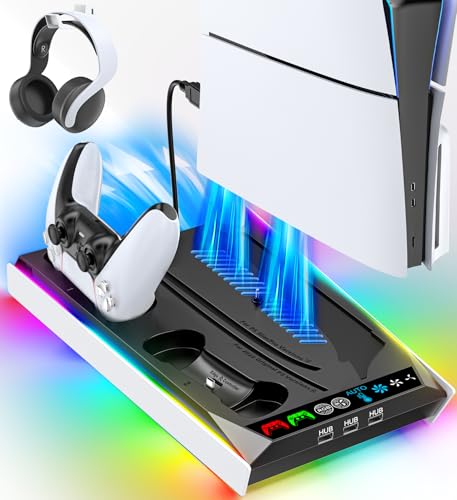
- 3-level fan plus auto mode for adjustable cooling
- Built-in controller charging and console storage
- RGB accents for a more customized setup
Best For: PS5 owners who want an all-in-one vertical stand with cooling, charging, and light customization.
Best for Xbox One S
eXtremeRate Cooling Vertical Stand

- Secure fit made for Xbox One S
- Vertical design saves shelf space
- Vented body supports airflow
Best For: Xbox One S owners who want a simple upright stand with basic cooling support.
Best for All-in-One Charging
PS5 Cooling Stand with Dual Controller Charger

- Supports PS5, PS5 Slim, and PS5 Pro
- Three fan speeds plus RGB lighting
- Charges two controllers and adds storage
Best For: PS5 owners who want a single stand to cool the console, charge controllers, and organize accessories.
Best for Xbox One X Owners
FASTSNAIL Xbox One X Cooling Stand
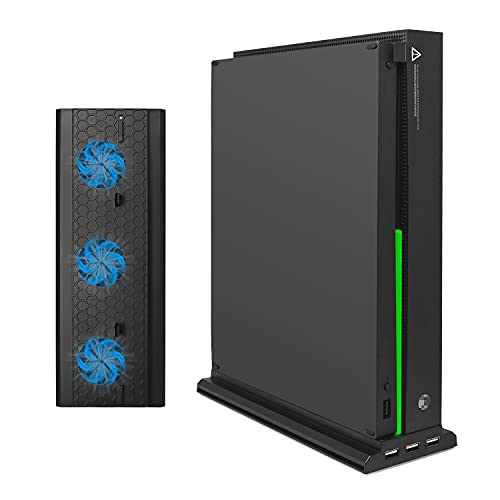
- Three built-in cooling fans for better airflow
- Three USB 2.0 ports for charging and accessories
- Simple plug-and-play vertical dock design
Best For: Xbox One X owners who want a cooling stand with extra USB ports and an upright setup.
Best for Xbox Series S Only
Mcbazel Vertical Stand with Cooling Fan

- Two built-in fans for active cooling
- Three speed settings with LED indicators
- Includes 2 USB ports and a removable fan unit
Best For: Xbox Series S owners who want cooling, vertical storage, and extra USB ports in one dock.
Best Heavy-Duty Pick
Xbox Series S Vertical Cooling Stand Base

- Tool-free installation with a simple drop-in fit
- Non-slip feet help keep the console steady
- Bottom ventilation design supports airflow
Best For: Xbox Series S owners who want an easy, space-saving upright stand with basic cooling support.
Best Simple Pick
Mcbazel Vertical Cooling Stand

- Three fans help reduce heat during long play sessions
- Adds 3 USB ports for controllers and accessories
- Light bar and locking base improve style and stability
Best For: Xbox One X owners who want a space-saving stand with cooling and USB expansion.
Best for Storage and Charging – OIVO PS4 Vertical Stand
If you want a vertical console cooling stand that also tidies up your setup, this OIVO dock is a practical all-in-one choice for PS4, PS4 Slim, and PS4 Pro owners. It combines console support, fan cooling, dual controller charging, and 12 game slots in one compact base.
Best For: Players who want one vertical dock to cool the console, charge controllers, and store games without adding extra accessories.
Pros:
- Supports regular PS4, PS4 Slim, and PS4 Pro with a snug vertical fit
- Built-in fan helps move air while the metal bottom adds stability
- Charges two controllers and includes 12 game slots for better organization
- LED indicators make charging status easy to check at a glance
Cons:
- PS4 Slim needs the included holder for a proper fit
- Fan noise is reduced, but it is still a powered cooling dock
- Designed specifically for PS4 systems, not a universal console stand
This vertical console cooling stand makes sense if you want to save space and simplify your PS4 setup at the same time. It is less about flashy extras and more about combining cooling, charging, and storage into one useful dock.
Best for Easy Setup – MyLifeUNIT Xbox One Vertical Cooling Stand
If you want a simple vertical console cooling stand for an Xbox One, this MyLifeUNIT base keeps the console upright, stable, and off the desk with no tools required. The grid-style design is aimed at improving airflow, making it a practical pick for players who want a cleaner setup and a little extra peace of mind during long sessions.
Best For: Xbox One owners who want a quick, no-fuss vertical stand that helps support airflow and save space.
Pros:
- One-step installation with no tools needed
- Helps keep the Xbox One secure in a vertical position
- Grid design supports airflow and reduces heat buildup
- Compact, lightweight black finish fits neatly on most setups
Cons:
- Made specifically for the Xbox One, not universal
- Offers cooling support, but not active fan cooling
- Very minimal design if you want extra features or storage
This is a straightforward vertical console cooling stand that focuses on stability and airflow rather than extras, which makes it a good value for players who just want the console upright and better ventilated.
Best for Cooling Control – PS5 Disc/Digital Stand with RGB Charging
If you want a vertical console cooling stand that does more than just hold the system upright, this PS5 base adds adjustable fan speeds, controller charging, and RGB lighting in one compact setup. It’s geared toward owners who want a cleaner gaming area with extra airflow and everyday charging convenience.
Best For: PS5 owners who want an all-in-one vertical stand with cooling, charging, and light customization.
Pros:
- Built-in fan with 3 levels plus auto adjustment for flexible cooling
- Charges PS5 controllers while also serving as a storage base
- RGB lighting adds a more customized gaming setup
- Compatible with Disc and Digital PS5, including Slim/Pro support
Cons:
- RGB lighting may feel unnecessary if you want a plain setup
- Extra features make it bulkier than a simple stand
As a vertical console cooling stand, this model stands out for combining airflow management with charging and display features, making it a practical pick for users who want fewer accessories on the desk. It’s especially appealing if you prefer an organized, all-in-one dock instead of separate chargers and fan add-ons.
Best for Xbox One S – eXtremeRate Cooling Vertical Stand
If you want a simple vertical console cooling stand for an Xbox One S, this eXtremeRate option is a straightforward fit. It lifts the console upright to save shelf space, adds vented airflow support, and gives the system a cleaner, more compact look.
Best For: Xbox One S owners who want an easy, low-fuss vertical stand that improves placement and helps air circulate.
Pros:
- Designed specifically for the Xbox One S for a secure fit
- Vertical orientation helps save space on crowded entertainment centers
- Vented design allows air to circulate around the console
- Simple setup with no tools required
Cons:
- Works only with the Xbox One S
- Doesn’t add active cooling, just airflow support
As a vertical console cooling stand, this is best for buyers who care more about fit and convenience than extra features. It’s a practical accessory if you want to stand the console upright and keep the setup tidy.
Best for All-in-One Charging – PS5 Cooling Stand with Dual Controller Charger
If you want a vertical console cooling stand that does more than just hold your PS5, this model is a practical all-in-one pick. It supports PS5, PS5 Slim, and PS5 Pro, adds adjustable fan cooling, and includes dual controller charging plus extra storage for a cleaner setup.
Best For: PS5 owners who want one stand to cool the console, charge two controllers, and reduce desk clutter.
Pros:
- Fits PS5, PS5 Slim, and PS5 Pro with a locking screw for stability
- Three fan speeds and RGB lighting with simple touch controls
- Charges two DualSense controllers while adding USB ports, phone holder, and headset hook
- Quiet operation and easy installation make it easy to live with day to day
Cons:
- Requires the PS5’s USB power and depends on the console being in use
- Accessory bundle is useful, but not all included devices are part of the package
- The extra lighting and charging features may be more than minimalists need
This vertical console cooling stand stands out most for convenience: it combines cooling, charging, and storage in a single compact base. If you want to streamline your PS5 setup without adding multiple accessories, it’s an efficient all-in-one option.
Best for Xbox One X Owners – FASTSNAIL Xbox One X Cooling Stand
If you want a simple vertical console cooling stand for an Xbox One X, this FASTSNAIL dock adds airflow, upright storage, and extra USB ports in one compact accessory. It is designed specifically for the Xbox One X, so it makes the most sense for owners who want a cleaner setup without extra clutter.
Best For: Xbox One X owners who want a vertical stand with built-in cooling and handy USB expansion.
Pros:
- Three cooling fans help improve airflow around the console.
- Built-in vertical dock keeps the Xbox One X upright and organized.
- Three USB 2.0 ports add convenient charging and accessory support.
- Plug-and-play setup keeps installation quick and easy.
Cons:
- Only compatible with Xbox One X, so it is not a universal stand.
- Not suitable for external hard drives through the USB hub.
This vertical console cooling stand is a good fit if you mainly care about targeted Xbox One X compatibility, extra ports, and a straightforward cooling dock. It is less flexible than universal stands, but the focused design is exactly what some buyers want.
Best for Comfort – PS4 Vertical Stand with Cooling Vents
If you want a simple way to save shelf space and improve airflow, this vertical console cooling stand is a practical add-on for a PS4 setup. It raises the console upright, adds non-slip stability, and uses built-in vents to help air move more freely around the system.
Best For: PS4 owners who want a quick, no-fuss vertical stand that helps organize their gaming area and supports better ventilation.
Pros:
- Space-saving vertical design frees up room on your TV stand or entertainment center
- Built-in cooling vents promote better airflow around the console
- Non-slip feet and sturdy construction help keep the PS4 stable
- Easy to install with a straightforward setup
Cons:
- Made specifically for PS4, so it is not a universal console stand
- Cooling vents help airflow, but do not replace active cooling fans
This vertical console cooling stand is a smart pick if your main goals are cleaner desk organization and a safer upright PS4 position. It is less about advanced cooling and more about reliable everyday convenience, which makes it a solid fit for most casual setups.
Best for Xbox Series S Only – Mcbazel Vertical Stand with Cooling Fan
If you want a vertical console cooling stand made specifically for the Xbox Series S, this Mcbazel unit is a practical add-on. It combines a vertical dock with two built-in fans, adjustable speeds, and extra USB ports, so it helps with airflow while adding a little more convenience to your setup.
Best For: Xbox Series S owners who want a simple vertical stand with active cooling and a couple of extra USB ports for accessories.
Pros:
- Two high-speed cooling fans help reduce heat during long sessions.
- Three fan speeds with LED indicators make it easy to adjust airflow.
- Removable cooler design works as a plain vertical stand when needed.
- Includes two extra USB ports for charging and data transfer.
Cons:
- Only compatible with Xbox Series S, not Series X or Xbox One S.
- Powered by the console, so it adds another cable to manage.
This is a good fit if you mainly need a vertical console cooling stand for the Series S and like the idea of built-in fan control without a bulky setup. It is less versatile than universal stands, but for the right console, it covers the basics well.
Best Heavy-Duty Pick – Xbox Series S Vertical Cooling Stand Base
KlsyChry Vertical Stand for Xbox Series S Console, Vertical Cooling Stand Base Holder(White)
Check Price On AmazonIf you want a simple vertical console cooling stand for an Xbox Series S, this ABS base keeps the console upright, helps save desk or shelf space, and adds bottom ventilation for better airflow. It’s a straightforward accessory rather than a feature-packed dock, but that also makes it easy to live with.
Best For: Xbox Series S owners who want a low-cost, no-fuss stand for vertical placement and basic cooling support.
Pros:
- Tool-free setup makes installation quick and painless
- Non-slip feet help keep the console stable
- Bottom hole design supports improved heat dissipation
- Compact vertical orientation saves space
Cons:
- Only fits the Xbox Series S
- Offers stand-and-airflow support, not active cooling
- Basic design with no extra storage or ports
For buyers who mainly want a simple vertical console cooling stand to keep the Series S secure and upright, this is an easy, practical add-on. It’s best suited to minimal setups where space savings and stability matter more than advanced features.
Best Simple Pick – Mcbazel Vertical Cooling Stand
If you want a vertical console cooling stand made specifically for the Xbox One X, this Mcbazel model is built to save space while adding active airflow and a few handy extras. It combines three cooling fans, USB expansion, and a light bar in one simple dock-style setup, so it works well for players who want a cleaner entertainment center without adding a separate adapter.
Best For: Xbox One X owners who want a compact stand with cooling, USB ports, and a bit of visual flair.
Pros:
- Three built-in fans help move air during long gaming sessions
- Includes 3 USB 2.0 ports for controllers and accessories
- Light bar and lock/non-slip design add style and stability
- USB-powered setup keeps installation simple
Cons:
- Compatible with Xbox One X only, so it is not a universal stand
- USB ports do not support external hard drives
As a vertical console cooling stand, this is a practical pick if you value a tighter footprint and easy setup more than broad compatibility. The cooling performance and built-in USB hub make it more useful than a basic vertical dock, though the limited console support means it is mainly for dedicated Xbox One X owners.
How We Picked the Best Vertical Console Cooling Stand
We focused on stands that match the console closely, improve stability, and add real everyday value. That means checking for cooling design, footprint, charging features, USB expansion, and whether the stand is built for the specific console family rather than being a loose universal fit.
We also favored options that make sense for different setups: simple vertical bases for minimalists, and all-in-one docks for players who want storage and charging in one place.
Quick Comparison
At a high level, the list splits into three useful categories: basic vertical stands with airflow support, cooling stands with extra USB or fan features, and charging stations for users who want a dock-like hub. If you mainly want stability and better ventilation, a simpler Vertical Console Cooling Stand may be enough. If you regularly charge controllers or use accessories, a feature-rich station is likely the better value.
Key Buying Factors for a Vertical Console Cooling Stand
Console Compatibility
Start with the exact model: PS4 Slim, PS4 Pro, PS5 Disc, PS5 Digital, Xbox One S, Xbox One X, or Xbox Series S. A stand built for the wrong shell shape can fit poorly or block ports and vents.
Cooling Design
Some stands rely on passive ventilation, while others add powered fans. Passive designs are quieter and simpler; fan-assisted models can be helpful if your console lives in a tight media cabinet or sees long play sessions.
Stability and Grip
Look for non-slip feet, secure locking points, or a snug base. A vertical setup should feel planted, especially if your console is on carpet, a shelf edge, or in a busy family room.
Extra Features
USB ports, controller charging, game storage, and light bars can be useful, but only if you’ll actually use them. Prioritize core fit and airflow first; extras should be a bonus, not the reason to buy.
Who Should Buy Which Vertical Console Cooling Stand?
Choose a simple stand if you want the lowest-profile way to keep your console upright and ventilated. Pick a cooling station with charging if you want one dock to handle both console support and controller power. Go for a fan-equipped model if heat management is your main concern or your setup has limited open airflow.
For most buyers, the best Vertical Console Cooling Stand is the one that matches the console exactly, stays secure under daily use, and adds only the features that improve your setup without creating clutter.