If you’ve ever experienced your gaming console overheating during an intense session, you know how frustrating it can be. Investing in a reliable cooling fan can make all the difference in maintaining performance and extending the life of your system. From adjustable speed settings to quiet operation, the right fan can enhance your gaming experience. Let’s explore some of the top options available to help keep your setup cool and efficient.
AC Infinity MULTIFAN S3 USB Fan for Receiver and Computer Cabinet Cooling

If you’re looking to keep your gaming console or computer cabinet cool, the AC Infinity MULTIFAN S3 USB Fan is an excellent choice. This ultra-quiet 120mm fan operates at just 18 dBA, ensuring minimal noise while it efficiently cools your devices. With an airflow of 52 CFM and a maximum speed of 1300 RPM, it’s designed to handle various electronics, from receivers to gaming consoles. You can easily adjust its speed using the multi-speed controller, and its USB compatibility makes setup a breeze. Plus, with a lifespan of 67,000 hours, you won’t need to worry about frequent replacements anytime soon.
Best For: Those looking for an effective and quiet cooling solution for their gaming consoles or computer cabinets.
Pros:
- Ultra-quiet operation at only 18 dBA, making it perfect for noise-sensitive environments.
- Multi-speed controller allows for customizable airflow and noise levels.
- Long lifespan of 67,000 hours, reducing the need for frequent replacements.
Cons:
- Limited to USB power, which may restrict placement options.
- Airflow may not be sufficient for larger or heavily loaded electronics.
- Design may not fit aesthetically in all setups or environments.
KIWIHOME Cooling Fan for PS5 Accessories

For gamers seeking to keep their PS5 cool during intense play sessions, the KIWIHOME Cooling Fan is an excellent choice. This fan features a powerful 3500 RPM speed and operates quietly at just 28.8 decibels, ensuring you stay focused on your game. It easily clips onto your console, whether placed vertically or horizontally, and its auto speed adjustment monitors temperature for ideal cooling. Utilizing your PS5’s USB3.0 port, it eliminates the need for extra power supplies while providing additional connectivity for charging controllers. With a solid rating of 4.3 stars from over 10,000 users, it’s a trusted accessory for any serious gamer.
Best For: Gamers looking for an efficient and quiet cooling solution for their PS5 during extended gaming sessions.
Pros:
- Powerful Cooling: Operates at 3500 RPM to effectively push hot air out, keeping the console cool.
- Quiet Operation: With a noise level of only 28.8 decibels, it ensures a serene gaming experience.
- Easy Installation: Clips on securely to the console, suitable for both vertical and horizontal orientations.
Cons:
- Compatibility Limitations: Only designed for the 2020 PS5 models, not compatible with 2023 PS5 Slim or 2024 PS5 Pro.
- USB Dependency: Requires connection to the PS5’s USB3.0 port, which may limit other USB device connectivity.
- Size Constraints: Requires sufficient space for air circulation, which might be challenging in compact setups.
G-STORY Cooling Fan for Xbox Series X

The G-STORY Cooling Fan for Xbox Series X is an essential accessory for gamers who want to keep their console running smoothly and efficiently. This fan features automatic speed adjustment based on temperature, ensuring peak cooling with minimal noise. You can monitor your console’s temperature in real-time thanks to the LED display, which changes color to indicate different temperature ranges. With three adjustable speeds and RGB lighting, you can customize your cooling experience. It’s lightweight, powered directly by your Xbox, and easy to install. Just place it on your console, connect the cable, and enjoy enhanced performance during your gaming sessions.
Best For: Gamers looking to enhance their Xbox Series X performance while preventing overheating during extended play sessions.
Pros:
- Automatic fan speed adjustment based on temperature ensures optimal cooling and low noise operation.
- Real-time temperature monitoring with color-coded LED indicators helps prevent overheating.
- Lightweight and portable design powered directly by the Xbox console for easy installation and space-saving.
Cons:
- Limited manual control may not satisfy users who prefer full customization over fan speeds.
- Dependence on console power means it cannot be used independently for other devices.
- Potential for RGB lighting distraction during gameplay for those who prefer a minimalist setup.
MENEEA Cooling Fan Dust Proof for Xbox Series X Console

Gamers looking to enhance their Xbox Series X experience will find the MENEEA Cooling Fan Dust Proof an essential addition. This fan features a high-speed motor with three adjustable speeds, allowing you to optimize cooling while minimizing noise. The colorful light strip adds a fun touch, with multiple color options controlled via a touch switch. Plus, it includes two USB ports for charging devices and data transfer. The dust-proof design, complete with filters and silicone plugs, protects your console from dust buildup, extending its lifespan. Easy installation means you can set it up without any hassle, keeping your gaming sessions smooth and enjoyable.
Best For: Gamers looking to optimize their Xbox Series X performance while adding aesthetic appeal and ensuring dust protection.
Pros:
- Versatile cooling options with three adjustable speeds to cater to different gaming sessions.
- Colorful lighting features enhance the gaming atmosphere with multiple color choices.
- Convenient USB ports allow for simultaneous charging and data transfer, enhancing overall user experience.
Cons:
- Potential noise at higher fan speeds may be distracting for some gamers.
- Additional installation may be required for dust covers, which could be seen as inconvenient.
- Limited compatibility with other console models, making it specific to Xbox Series X only.
ELUTENG 120mm USB Powered Case Fan
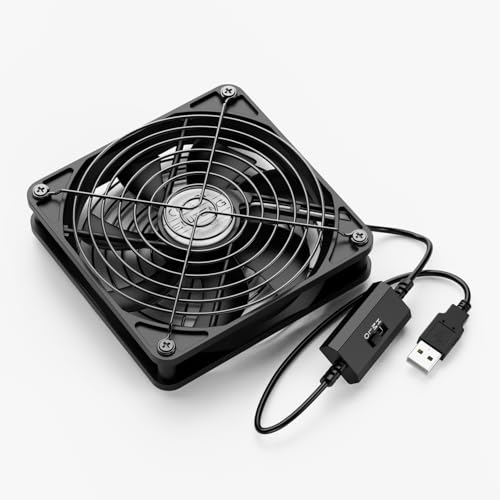
If you’re looking to keep your gaming console or electronics cool, the ELUTENG 120mm USB Powered Case Fan stands out with its impressive airflow and quiet operation. With a speed of 1500 RPM and a low noise level of just 23dB, it won’t disturb your gaming sessions. This fan’s 7-blade design guarantees strong airflow, while the speed controller lets you adjust settings based on your needs. You can position it flat or upright, fitting snugly in tight spaces. Plus, with aluminum grills for safety, it protects your hands and cords during operation. Stay cool and focused on your game!
Best For: Gamers and electronics users looking for an efficient and quiet cooling solution for their devices.
Pros:
- Low noise operation at just 23dB, ensuring a peaceful gaming experience.
- Adjustable speed settings allow for customized airflow based on specific cooling needs.
- Versatile placement options enable it to fit in tight spaces, making it ideal for various electronics.
Cons:
- USB powered, which may limit placement options based on available ports.
- Speed control may not provide enough airflow for high-performance gaming setups.
- Limited to a single size (120mm), which may not fit all cooling requirements or larger setups.
AC Infinity MULTIFAN S7 Quiet Dual USB Fan for Cabinet Cooling

For anyone looking to keep their gaming setup or entertainment center cool and quiet, the AC Infinity MULTIFAN S7 is an excellent choice. This dual 120mm USB fan offers a total airflow of 104 CFM while operating at just 19 dBA, ensuring a peaceful gaming experience. With its dual-ball bearings and a lifespan of 67,000 hours, it’s built to last. You can easily power it via USB ports on your devices, and it can be laid flat or stood upright for versatile placement. The multi-speed controller lets you optimize airflow and noise levels, making it a smart addition to any cabinet.
Best For: Gamers and electronics enthusiasts looking for a quiet and efficient cooling solution for their devices.
Pros:
- Ultra-quiet operation at only 19 dBA, ensuring minimal noise disruption during use.
- Dual-ball bearings provide a long lifespan of up to 67,000 hours, ensuring durability and reliability.
- Versatile installation options allow it to be positioned flat or upright, making it adaptable to various setups.
Cons:
- USB-powered only, which may limit placement options if USB ports are not available.
- Airflow may not be sufficient for larger cabinets or setups with high heat output.
- Multi-speed controller may require some adjustments to find the optimal setting for specific needs.
Wathai Cooling Case Fan for Receiver and Xbox

The Wathai Cooling Case Fan is an essential accessory for anyone looking to keep their gaming consoles and electronic devices cool and running smoothly. With its 120mm size and 5V USB power, it fits seamlessly into tight spaces, perfect for your Xbox Series X or AV receiver. Operating at 1500 RPM, it delivers 56.7 CFM of airflow while maintaining a quiet noise level of just 23 dBA, ensuring your gaming sessions remain distraction-free. Installation is a breeze with included screws and mounting accessories. Plus, its effective cooling performance helps prevent overheating, ensuring your devices function efficiently for years to come.
Best For: Gamers and electronics enthusiasts looking for an effective cooling solution to prevent overheating in devices like the Xbox Series X and AV receivers.
Pros:
- Effective Cooling: Provides efficient airflow of 56.7 CFM to keep devices cool and functioning optimally.
- Quiet Operation: Maintains a low noise level of just 23 dBA, ensuring a distraction-free gaming experience.
- Easy Installation: Comes with mounting accessories for quick and hassle-free setup in tight spaces.
Cons:
- Limited Power Source: Requires a USB power connection, which may limit placement options for some devices.
- Lifespan: While rated for 35,000 hours, the lifespan may vary based on usage and environment.
- Single Fan Design: May not be sufficient for larger setups or environments requiring more extensive cooling solutions.
JUSPRO Cooling Fan for PS5 Slim

Designed specifically for the PS5 Slim, the JUSPRO Cooling Fan is the ultimate solution for gamers concerned about overheating. With its compact design, it easily fits your setup, ensuring you save space while keeping your console cool. Featuring three fans, it efficiently disperses heat to prevent malfunctions and extend your console’s lifespan. The intelligent temperature control activates the fan when temperatures exceed 102℉, automatically shutting off when things cool down. Installation is a breeze, and it operates quietly, even at maximum efficiency. Plus, adjustable speeds and a blue LED light enhance your gaming experience without distraction.
Best For: Gamers using the PS5 Slim who want to prevent overheating and extend their console’s lifespan.
Pros:
- Efficient Cooling: Three fans provide effective heat dispersion, preventing malfunctions.
- Intelligent Control: Automatic temperature sensor ensures optimal performance by activating and deactivating the fan as needed.
- User-Friendly Design: Easy installation and quiet operation enhance the overall gaming experience.
Cons:
- Limited Compatibility: Not compatible with the original PS5 or PS5 Pro versions.
- Space Requirement: Although compact, it still adds additional hardware to your console setup.
- Dependent on Temperature: May not engage if the console does not reach the specified temperature threshold.
ELUTENG Dual USB Fan 80mm, 3 Speed Adjustable USB Ventilator

If you’re looking for an efficient cooling solution for your gaming console or computer setup, the ELUTENG Dual USB Fan is an excellent choice. With its 80mm size and three adjustable speeds, you can optimize airflow while keeping noise to a minimum—just 25 dB at its lowest setting. This fan delivers a maximum airflow of 64 CFM at 2750 RPM, guaranteeing your devices stay cool. Its compact design fits easily in narrow spaces, and the durable build assures longevity. Plus, plug-and-play functionality makes setup a breeze. Just remember not to connect it to USB hubs to avoid power issues.
Best For: The ELUTENG Dual USB Fan is best for gamers and computer users seeking efficient cooling for their devices in compact spaces.
Pros:
- Compact design fits easily into tight areas without sacrificing performance.
- Three adjustable speeds allow for customized airflow and noise levels.
- Durable build quality with high-quality hydraulic bearings ensures a long lifespan.
Cons:
- Not suitable for USB hubs due to power requirements, limiting connectivity options.
- Limited compatibility with devices that may require more power than the fan’s maximum input.
- Fixed size may not be ideal for users looking for larger cooling solutions.
G-STORY Cooling Fan for Xbox Series S

For gamers who want to keep their Xbox Series S running smoothly, the G-STORY Cooling Fan is an essential accessory. This fan features automatic speed adjustment based on temperature, ensuring superior cooling while you play. The LED temperature display gives you real-time readings, preventing overheating and extending your console’s lifespan. You can choose between three manual speeds, with color indicators showing the current temperature range. Plus, its low noise operation keeps distractions at bay. Installation is a breeze—just place it on your console, connect the cable, and enjoy immediate cooling efficiency. Stay cool and game on!
Best For: Gamers looking to enhance their Xbox Series S gaming experience with efficient cooling and real-time temperature monitoring.
Pros:
- Automatic fan speed adjustment based on temperature prevents overheating and maintains optimal console performance.
- LED temperature display provides real-time readings, making it easy to monitor the console’s condition.
- Low noise operation ensures minimal distractions during gameplay, allowing for an immersive experience.
Cons:
- Dependent on console power, which may limit placement flexibility for some setups.
- Manual speed selection might be unnecessary for users who prefer fully automatic operation.
- Portability is limited, as it is designed specifically for the Xbox Series S and may not be compatible with other consoles.
Factors to Consider When Choosing Console Cooling Fans
When you’re picking a console cooling fan, there are several key factors to keep in mind. Consider the noise level, airflow capacity, and power source options to guarantee it fits your gaming setup. Don’t forget to check the size and speed control features for ideal compatibility and performance.
Noise Level Considerations
Choosing the right console cooling fan involves more than just cooling efficiency; noise level is an essential factor that can greatly impact your gaming experience. Noise levels are measured in decibels (dBA), with lower values indicating quieter operation. For instance, fans can be as quiet as 18 dBA, similar to a whisper. If you prefer minimal disruption, look for fans below 25 dBA, often considered ultra-quiet. Many models, like the KIWIHOME fan at 28.8 dBA, provide specifications for noise levels, helping you choose according to your tolerance. Additionally, features like dual ball bearings can lower noise output, while adjustable speed settings let you manage sound without sacrificing cooling. Prioritize these aspects to enhance your gaming setup.
Airflow Capacity Ratings
How can you guarantee your console stays cool during intense gaming sessions? One key factor is airflow capacity, measured in cubic feet per minute (CFM). Higher CFM ratings usually mean better cooling performance. For instance, a fan with 52 CFM can effectively manage the heat output of powerful consoles. However, don’t overlook noise levels, measured in decibels (dBA); fans with higher airflow might be noisier, which can disrupt your gaming experience. Consider fans with adjustable speed settings to optimize airflow based on your console’s temperature, allowing for quieter operation when maximum cooling isn’t needed. Finally, the fan’s design and placement matter; position it to guarantee airflow over the console’s hottest components for the best cooling results.
Power Source Options
Finding the right power source for your console cooling fan is essential for ideal performance. Most cooling fans are USB-powered, making them easy to connect to your console without needing extra supplies. They typically operate at a standard voltage of 5V and consume around 5 watts. Some models even come with USB passthrough ports, allowing you to charge your controllers while keeping the fan running. However, be aware that certain fans may require higher current, which could limit compatibility with USB hubs. Additionally, the power source can impact noise levels and airflow performance; while higher-powered fans may deliver increased airflow, they can also generate more noise. Choose wisely to balance performance and tranquility.
Size and Compatibility
When selecting a cooling fan for your gaming console, it’s important to ascertain the fan’s dimensions fit the designated space. Many fans are designed to be compact and versatile, perfect for various placements. Compatibility is essential, so confirm the fan is specifically designed for your console model, like the PS5 or Xbox Series X. Consider the installation type, as some fans clip on while others need to be placed flat or upright; this will influence where you can effectively position them. Also, check the power source; most fans operate via USB, so verify you have enough available ports on your console or connected devices. Finally, review the fan’s airflow rating and noise level for peak performance without disrupting your gaming experience.
Speed Control Features
After ensuring you’ve chosen a compatible cooling fan for your console, speed control features become a significant factor in maintaining ideal performance. Many fans offer adjustable speed settings, letting you tailor airflow to match your cooling needs or your console’s temperature. Some advanced models even include automatic speed adjustments that monitor temperature in real-time, enhancing cooling efficiency without your input. You might find fans with multiple operational modes, such as ‘Auto’ and ‘Constant,’ allowing you to choose between temperature-based control or a fixed speed. Keep in mind that higher RPM ratings, like 3500 RPM, deliver aggressive cooling but could increase noise levels. Effective speed control can also extend your console’s lifespan by preventing overheating and maintaining efficient operating temperatures.
Design and Aesthetics
Although many gamers prioritize performance, the design and aesthetics of console cooling fans shouldn’t be overlooked. Selecting a fan that matches your console, like the PS5 Slim or Xbox Series X, guarantees compatibility and ideal cooling. Aesthetic elements, such as color schemes and RGB lighting, can enhance your gaming setup’s visual appeal while keeping your system cool. Compact designs are also essential; they save space and fit snugly in tight areas without obstructing other devices. Look for fans with adjustable orientations to accommodate your preferences and setup. Finally, consider noise levels; quieter models operating below 25 dBA provide a better gaming experience, allowing you to immerse yourself in your favorite titles without distractions.
Installation Ease
Choosing the right console cooling fan is essential for maintaining best performance, and installation ease plays a significant role in that decision. Look for fans that offer a simple plug-and-play installation, allowing you to quickly connect the fan without any tools or complicated setups. Consider models with multiple mounting options, like clip-on, clamp mounts, or flat positioning, guaranteeing compatibility with your console’s design and available space. Lightweight fans enhance portability, making it easier to reposition as needed. Additionally, check for adjustable speed settings and operation modes so you can customize cooling based on your console’s needs. Finally, verify the fan comes with clear installation instructions to minimize setup time and enhance your overall experience.
Additional Functions Offered
When selecting a console cooling fan, consider the additional functions that can enhance your gaming experience. Look for models with intelligent temperature control, which automatically adjusts the fan speed based on your console’s temperature, optimizing cooling and energy use. Some fans come with extra USB ports, allowing you to charge devices or connect peripherals, adding functionality beyond just cooling. LED displays that show the current temperature can help you monitor performance and prevent overheating. Additionally, noise reduction technologies guarantee quieter operation, making your gaming sessions more immersive. Finally, consider cooling fans with integrated lighting features, offering customizable color options that not only look good but also serve a functional cooling purpose.