When it comes to setting up your sim racing station, the right monitor stand can make all the difference. You want something that not only supports your screens but also enhances your overall experience. With options like the Thermaltake GR300 and Marada Triple Monitor Stand, you’ll find various styles and features to fit your needs. But what should you really look for in a monitor stand? Let’s explore the top choices and key factors to contemplate.
Thermaltake GR300 Racing Simulator Monitor Stand (GSC-R3M-MDSLBB-01)

If you’re a sim racing enthusiast looking to elevate your setup, the Thermaltake GR300 Racing Simulator Monitor Stand (GSC-R3M-MDSLBB-01) is an excellent choice. This sturdy stand supports single monitors or TVs from 32″ to 50″, accommodating both flat and curved displays. Weighing only 8.6 lbs, it’s made from durable powder-coated steel. With VESA compatibility and a maximum load capacity of 35kg, you’ll enjoy a secure fit. The adjustable height allows for ideal viewing angles, enhancing your immersive racing experience. Plus, setup is a breeze, thanks to its contoured brace mounts. Get ready to race in style!
Best For: Sim racing enthusiasts seeking a reliable and adjustable monitor stand for their setup.
Pros:
- Sturdy construction with durable powder-coated steel for long-lasting use.
- Compatible with a wide range of monitor sizes (32″ to 50″) and types (flat and curved).
- Easy setup with contoured brace mounts for quick installation.
Cons:
- Limited to single monitor setups, which may not suit users with multi-monitor preferences.
- Weight capacity of 35kg may not accommodate larger, heavier displays.
- Adjustable height only up to 50mm, which may not provide enough flexibility for all users.
Thermaltake GR300 Racing Simulator Monitor Stand (GSC-R3M-MDSLWH-01)

For racing enthusiasts seeking an immersive experience, the Thermaltake GR300 Racing Simulator Monitor Stand (GSC-R3M-MDSLWH-01) offers exceptional support for screens ranging from 32″ to 50″. Weighing just 8.6 pounds and featuring dimensions of 6 x 22 x 22 inches, it’s easy to integrate into your setup. With VESA compatibility up to 400x200mm and a maximum load capacity of 35kg (77lbs), this stand supports both flat and curved displays. You can adjust the height by up to 50mm for ideal viewing angles, enhancing your gaming immersion as the screen sits directly in front of you.
Best For: Racing enthusiasts looking to enhance their immersive gaming experience with a sturdy and adjustable monitor stand.
Pros:
- Supports a wide range of screen sizes from 32″ to 50″, accommodating various setups.
- Adjustable height feature allows for optimal viewing angles, enhancing immersion during gameplay.
- Lightweight design and simple setup process make it easy to integrate into existing racing simulator setups.
Cons:
- Requires assembly, which may be a drawback for users preferring ready-to-use products.
- Limited to VESA mount compatibility, which may not suit all monitor models.
- Customer reviews indicate a moderate rating of 4.0 out of 5 stars, suggesting potential quality concerns.
Marada Sim Racing Triple Monitor Stand with Wheels for 27/32-inch Displays

Designed for serious sim racers and aviation enthusiasts, the Marada Sim Racing Triple Monitor Stand provides an ultimate triple-screen experience that elevates your gaming setup. It supports 27-inch and 32-inch displays, ensuring compatibility with your favorite monitors. The heavy-duty steel construction and A-frame stability minimize tipping risks, while customizable height and angle adjustments enhance ergonomics, reducing neck strain. Enjoy effortless mobility with 360° swivel casters, complete with locking brakes for secure placement. Whether you’re racing at home or streaming in a commercial setup, this stand guarantees stability and performance for every intense gaming session.
Best For: The Marada Sim Racing Triple Monitor Stand is best for serious sim racers, aviation enthusiasts, and professional esports setups seeking an immersive multi-screen experience.
Pros:
- Ultimate Immersion: Supports 27-inch and 32-inch displays for a seamless triple-screen setup.
- Sturdy Design: Heavy-duty steel construction and A-frame stability ensure durability and minimize tipping.
- Customizable Ergonomics: Height and angle adjustments reduce neck and eye strain, enhancing comfort during long sessions.
Cons:
- Space Requirement: The large dimensions may require significant space in your gaming area.
- Weight Limitations: Heavier monitors may need careful consideration to ensure the stand’s stability.
- Assembly Complexity: The setup process may be more complex compared to simpler stands, requiring time and effort.
Next Level Racing Round Tube Freestanding Triple Monitor Stand, Black

The Next Level Racing Round Tube Freestanding Triple Monitor Stand is perfect for sim racing enthusiasts who want to elevate their gaming experience with a multi-monitor setup. This stand supports up to three monitors, each up to 43 inches, ensuring you have ample screen real estate. Its extensive VESA compatibility caters to various monitor sizes and mounting patterns, making it versatile. Constructed from durable steel, it offers robust stability, preventing any wobbling during intense sessions. With a freestanding design, it maximizes space while providing ideal viewing angles, creating a cohesive and professional simulation environment that enhances your overall experience.
Best For: Sim racing enthusiasts looking for a stable and versatile multi-monitor setup to enhance their gaming experience.
Pros:
- Extensive VESA compatibility allows for various monitor sizes and mounting patterns, ensuring versatility.
- Durable steel construction provides robust stability, preventing wobbling during intense gaming sessions.
- Freestanding design optimizes space and allows for ideal viewing angles without cluttering the desk.
Cons:
- May require additional tools for installation, which could be inconvenient for some users.
- Limited to monitors up to 43 inches, which may not accommodate larger screens.
- Freestanding design may take up more floor space compared to wall-mounted options.
Dardoo Sim Racing Triple Monitor Stand for 24-32 Inch Displays

Offering exceptional versatility, the Dardoo Sim Racing Triple Monitor Stand is perfect for sim racing enthusiasts who want to elevate their setup with 24-32 inch displays. You’ll appreciate the adjustable height and angle, ensuring a comfortable viewing experience that reduces eye strain during intense racing sessions. This stand is compatible with VESA mounting holes, making installation a breeze. Its robust flange structure provides stability, while non-slip pads protect your surfaces. Weighing 39 pounds and measuring 67 x 20 x 51.8 inches, it can support three smaller screens or one large screen up to 65 inches. Enjoy a high-quality racing experience!
Best For: Sim racing enthusiasts looking for a versatile and adjustable monitor stand for 24-32 inch displays.
Pros:
- Adjustable height and angle for optimal viewing comfort, reducing eye strain during long racing sessions.
- Robust and stable design with a flange structure and non-slip pads for durability and surface protection.
- Compatible with a wide range of monitors and gaming consoles, including VESA mounting holes for easy installation.
Cons:
- Weighty at 39 pounds, which may make it less portable or difficult to move.
- Limited to 24-32 inch displays for the optimal setup, which may not accommodate larger monitors without sacrificing performance.
- Customer rating of 4.2 out of 5 stars indicates some user dissatisfaction that potential buyers should consider.
Marada Racing Sim Monitor Frame for Racing Simulator Cockpit
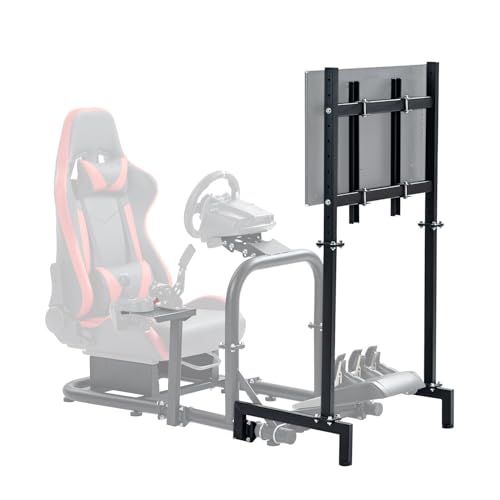
If you’re looking for a sturdy and adjustable monitor stand that enhances your racing simulator setup, the Marada Racing Sim Monitor Frame is an excellent choice. It supports screen sizes from 24 to 60 inches and holds up to 110 pounds, ensuring a secure fit for your display. The square steel tube frame provides durability, while height and positional adjustments give you ideal viewing angles. Assembly is a breeze with pre-drilled holes and included accessories. Plus, its compact design saves space without compromising stability. With a 4.7 out of 5-star rating, it’s a favorite among racing enthusiasts.
Best For: Racing enthusiasts looking for a sturdy and adjustable monitor stand to enhance their simulator cockpit setup.
Pros:
- Durable Construction: Made from a robust square steel tube frame that ensures long-lasting use.
- Flexible Adjustability: Features height and positional adjustments for optimal viewing angles.
- Easy Assembly: Comes with pre-drilled holes and all necessary accessories for a hassle-free setup.
Cons:
- Monitor Not Included: The frame is sold separately from the monitor, requiring an additional purchase.
- Weight Limit: Maximum weight capacity of 110 pounds may not accommodate larger or heavier monitors.
- Limited Color Options: Available only in black, which may not suit all aesthetic preferences.
Dyn X Cockpit Monitor Mount for Ultrawide Displays

Crafted specifically for ultrawide displays, the Dyn X Cockpit Monitor Mount elevates your sim racing experience by securely supporting a single 49” monitor. With VESA 75x75mm and 100x100mm compatibility, it integrates seamlessly with your Dyn X cockpit frame, ensuring a clean and unified setup. This mount enhances stability and precise alignment, essential for serious sim racers, while eliminating the need for a separate floor stand. Weighing just 7.58 pounds and measuring 15 x 12 x 3 inches, it’s designed for ideal viewing in any Dyn X driving position, whether GT, Formula, or hybrid. Get ready to race!
Best For: Serious sim racers looking for a stable and immersive setup with a single 49” ultrawide display.
Pros:
- Seamless integration with Dyn X cockpit frame for a clean, unified look.
- Enhanced stability and alignment for improved performance during racing.
- Lightweight and compact design makes it easy to install and adjust.
Cons:
- Limited to ultrawide displays; not suitable for standard monitors.
- Weight may not support extremely heavy monitors beyond the specified size.
- Potential compatibility issues with non-Dyn X cockpit setups.
Marada Sim Monitor Stand for 32 to 55 inches TVs
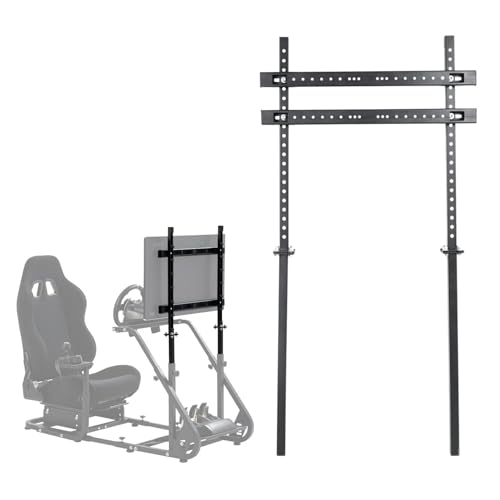
The Marada Sim Monitor Stand is ideal for sim racing enthusiasts looking to enhance their setup with screens ranging from 32 to 55 inches. Designed to fit the Marada Racing Cockpit 37, it offers a sturdy floor mount made from durable alloy and carbon steel. You’ll appreciate its compatibility with various VESA patterns, ensuring easy mounting. With adjustable height and position, you can achieve the perfect viewing angle during intense races. Rated 4.7 out of 5 stars by users, this stand is a reliable choice for gamers wanting a solid foundation for their display.
Best For: Sim racing enthusiasts seeking a stable and adjustable monitor stand for screens between 32 to 55 inches.
Pros:
- Sturdy construction with alloy and carbon steel for durability.
- Adjustable height and position for optimal viewing angles.
- Compatible with a wide range of VESA mounting patterns for easy setup.
Cons:
- Fixed movement type may limit repositioning options.
- Primarily designed for use with the Marada Racing Cockpit 37, which may not suit all setups.
- Maximum supported screen size of 55 inches may not accommodate larger displays.
Kensington SmartFit Extra Wide Monitor Stand (K52797WW)

For sim racing enthusiasts seeking an ergonomic solution, the Kensington SmartFit Extra Wide Monitor Stand (K52797WW) stands out with its adjustable height feature. This versatile stand fits monitors up to 27 inches and supports a load capacity of 40 pounds. SmartFit Technology allows for intuitive height adjustments, ensuring your screen is at eye level, which reduces strain during long gaming sessions. The extra-wide platform optimizes your desktop space, providing room for accessories or paperwork underneath. With a sturdy design and a solid 4.5-star rating, it’s a reliable choice for both comfort and functionality in your gaming setup.
Best For: Sim racing enthusiasts and computer users seeking an ergonomic monitor setup that reduces eye and neck strain during extended use.
Pros:
- Adjustable Height: SmartFit Technology allows for easy height adjustments to achieve optimal viewing angles.
- Extra Wide Platform: Accommodates larger monitors and provides ample space underneath for keyboard and accessories.
- Sturdy Construction: Designed for stability and durability, ensuring reliable support for monitors up to 40 pounds.
Cons:
- Weight Limit: May not support heavier monitors beyond the 40-pound capacity.
- Size Constraints: The 24-inch width may not fit all desk spaces comfortably.
- Limited Color Options: Available only in black, which may not match all aesthetic preferences.
Turtle Beach VelocityOne Universal Stand for Flight and Racing Simulation Accessories

Looking for a versatile solution that enhances your flight and racing simulation experience? The Turtle Beach VelocityOne Universal Stand offers solid steel construction and adjustable features, allowing you to customize height, length, angle, and tilt easily. Its fold-flat design makes storing your gear a breeze, while adjustable rubber feet guarantee stability during intense gameplay. Compatible with PC and Xbox, this stand works seamlessly with the VelocityOne Flight Yoke System and other third-party accessories. Weighing 19.82 pounds and featuring a quick-release latch, it’s the perfect addition to elevate your setup. With a 4.0-star rating, gamers love its functionality and stability.
Best For: Gamers and simulation enthusiasts looking for a sturdy and adjustable stand for their flight and racing accessories.
Pros:
- Solid steel construction ensures durability and stability during intense gaming sessions.
- Stepless adjustments for height, length, angle, and tilt offer a customizable experience.
- Fold-flat design provides convenient storage and portability without the need to remove accessories.
Cons:
- Weighs 19.82 pounds, which may be heavier than some users prefer for portability.
- Limited to PC and Xbox compatibility, potentially excluding other gaming platforms.
- Requires predrilled mounting holes for certain accessories, which may not fit all third-party products.
Factors to Consider When Choosing a Sim Racing Monitor Stand
When choosing a sim racing monitor stand, you’ll want to contemplate several key factors. Monitor size compatibility, adjustability, and stability are essential for a superior racing experience. Don’t forget about VESA mounting options and how easy the setup process is, as these can make a big difference in your overall satisfaction.
Monitor Size Compatibility
Choosing the right sim racing monitor stand hinges on ensuring it’s compatible with your monitor size. Most stands accommodate monitors ranging from 24 to 60 inches, so check the specifications carefully. Many stands are optimized for monitors between 32 to 50 inches, offering the best performance and stability. Don’t forget to verify the VESA mounting specifications, which detail the hole arrangement on your monitor’s back, ensuring a secure connection to the stand. If you’re looking to create an immersive setup, some stands support multiple monitors, allowing configurations of three screens, often sized at 27 or 32 inches. Make sure to evaluate these factors to enhance your racing experience while maintaining a solid and stable setup.
Adjustability and Ergonomics
To enhance your sim racing experience, consider how adjustability and ergonomics play an essential role in selecting the right monitor stand. Look for stands that offer adjustable height options, typically allowing for changes up to 50mm. This flexibility helps you achieve ideal viewing angles and keeps you comfortable during long sessions. Ergonomic designs are significant, as they reduce neck and eye strain by letting you fine-tune the tilt and angle of your display. Many stands also feature customizable VESA mounting patterns, ensuring compatibility with various monitor sizes for flexible positioning. Finally, choose a stand with easy assembly and user-friendly instructions, making it accessible and straightforward for users of all skill levels.
Stability and Durability
While adjustability and ergonomics are important, stability and durability are equally essential when selecting a sim racing monitor stand. A robust construction, often made from high-strength materials like steel, guarantees your setup can handle the weight of multiple monitors without wobbling during intense racing sessions. Look for designs with wide bases or A-frame structures that enhance stability and minimize tipping risks. Features like locking mechanisms or anti-wobble feet can prevent excessive movement, especially during high-speed racing. Make certain the stand’s maximum load capacity comfortably exceeds the combined weight of your monitors for safety. Additionally, adjustable height and angle features help you find ideal viewing angles while keeping the stand securely positioned.
VESA Mounting Options
When it comes to sim racing monitor stands, understanding VESA mounting options is essential for achieving the best setup. Look for standard sizes like 75x75mm, 100x100mm, and up to 400x400mm to guarantee compatibility with your monitor. Check the maximum load capacity as well; many mounts can support monitors up to 35kg (77lbs) or more, providing the stability you need during intense gaming sessions. Some stands are versatile enough to accommodate both flat and curved displays, catering to your preferences. Also, consider height and angle adjustability features to optimize your viewing experience and reduce eye strain. Remember, proper alignment and installation are vital for immersion, so take your time to position everything correctly.
Installation and Setup
Choosing the right sim racing monitor stand isn’t just about aesthetics; it’s vital for a smooth installation and setup. First, check if your chosen stand includes clear assembly instructions and all necessary accessories. This can save you time and frustration during setup. Look for models with pre-drilled holes to simplify mounting and minimize misalignment risks. Compatibility with various VESA mounting patterns is also important, making it easier to install different monitor sizes. Consider stands featuring contoured brace mounts for a quicker and more secure installation. Finally, evaluate the stand’s weight and stability; heavier, sturdier constructions generally provide a more secure setup, especially during those intense racing sessions. Your setup will benefit from these thoughtful choices.