If you’re serious about gaming, you know that a reliable connection is essential for performance. Upgrading to a Wi-Fi 7 adapter can dramatically enhance your online experience, offering faster speeds and reduced latency. With options like the TP-Link BE6200 and NETGEAR Nighthawk A9000, you can take your gameplay to the next level. Curious about which adapters stand out and why they matter? Let’s explore the top choices that could redefine your gaming setup.
TP-Link BE6200 Tri-Band Wi-Fi 7 Wireless USB Adapter (Archer TBE401UH)

If you’re a serious gamer looking to elevate your online experience, the TP-Link BE6200 Tri-Band Wi-Fi 7 Wireless USB Adapter (Archer TBE401UH) stands out with its ability to deliver lightning-fast connectivity. With a maximum speed of 2,882 Mbps on the 6 GHz band, you’ll enjoy ultra-fast downloads and smooth 4K streaming. Its advanced technology, including OFDMA and MU-MIMO, allows multiple devices to connect simultaneously without lag. Plus, the two high-gain antennas extend coverage, ensuring a stable connection. Enhanced security features like WPA3 encryption protect your data while you focus on dominating your game. Plug it in, and you’re ready to play!
Best For: Serious gamers and streaming enthusiasts seeking ultra-fast, reliable Wi-Fi connectivity for an immersive online experience.
Pros:
- High-speed connectivity: Achieves up to 2,882 Mbps on the 6 GHz band, ideal for fast downloads and 4K streaming.
- Simultaneous connections: OFDMA and MU-MIMO technology allows multiple devices to connect without lag.
- Enhanced security: Features WPA3 encryption for stronger protection against potential data breaches.
Cons:
- Limited compatibility: Primarily designed for Windows 11 and 10, which may exclude other operating systems.
- Physical size: The two high-gain antennas may require more space for optimal placement.
- Price point: As a high-performance adapter, it may be more expensive compared to basic USB adapters.
BrosTrend BE6500 USB WiFi 7 Adapter for Desktop PC and Laptop

The BrosTrend BE6500 USB WiFi 7 Adapter stands out as the perfect choice for gamers and power users who demand ultra-low latency and high-speed connectivity. Operating on tri-band frequencies—6 GHz, 5 GHz, and 2.4 GHz—it delivers impressive speeds of up to 6.5 Gbps. With dual external antennas and beamforming technology, you’ll enjoy a strong, stable connection even through walls. This adapter excels in competitive gaming, multitasking, and seamless 4K/8K streaming, ensuring you can fully utilize your internet speed. Plus, installation is a breeze with its pre-loaded driver, making it compatible with Windows 11/10.
Best For: Gamers and power users seeking ultra-low latency and high-speed connectivity for demanding tasks.
Pros:
- High-Speed Performance: Delivers speeds up to 6.5 Gbps across tri-band frequencies for optimal internet usage.
- Stable Connection: Features dual external antennas and beamforming technology for enhanced signal strength and stability.
- Easy Installation: Comes with a pre-loaded driver for quick setup without the need for CDs or downloads.
Cons:
- Limited Compatibility: Not compatible with macOS, Linux, or Bluetooth connections.
- Windows 11 Requirement for 6 GHz: Access to the 6 GHz band requires Windows 11, limiting options for Windows 10 users.
- No CD or Manual: The absence of a physical manual may be inconvenient for those who prefer printed instructions.
TP-Link WiFi 7 BE9300 PCIe WiFi Card for Desktop PC

Looking for a Wi-Fi adapter that elevates your gaming experience? The TP-Link WiFi 7 BE9300 PCIe WiFi Card offers incredible speeds of up to 5760 Mbps on the 6 GHz band, perfect for lag-free gaming and immersive VR. Its advanced features, like OFDMA and MU-MIMO, guarantee smooth performance even during heavy usage. With two adjustable antennas, you can optimize your signal strength throughout your home. Plus, WPA3 security keeps your network safe from threats. Installation is a breeze, and the multicolor LED lighting adds a stylish touch. Upgrade your setup and enjoy the benefits of Wi-Fi 7 today!
Best For: Gamers and VR enthusiasts seeking high-speed and reliable Wi-Fi performance for an immersive experience.
Pros:
- Incredible speeds of up to 5760 Mbps on the 6 GHz band for lag-free gaming.
- Advanced features like OFDMA and MU-MIMO minimize lag during heavy usage.
- Adjustable antennas enhance signal strength and coverage throughout your home.
Cons:
- Not compatible with Windows 10, limiting user options.
- Installation may require a USB drive for driver setup, which could be inconvenient for some.
- Multicolor LED lighting might not appeal to all users, depending on aesthetic preferences.
NETGEAR Nighthawk WiFi 7 USB 3.0 Adapter (A9000)

Gamers seeking lightning-fast connectivity will find the NETGEAR Nighthawk WiFi 7 USB 3.0 Adapter (A9000) an exceptional choice. With tri-band speeds up to 6.5 Gbps, it guarantees a seamless gaming experience. This adapter automatically selects the best frequency—2.4GHz, 5GHz, or 6GHz—giving you the strongest signal for 4K/8K streaming and online gaming. Designed for Windows 11 and above, it’s compatible with any router or mesh system, featuring WPA3 encryption for enhanced security. The included USB cradle and adjustable antenna boost signal strength, making it a reliable companion for your gaming setup. Upgrade your connectivity now!
Best For: Gamers and streaming enthusiasts looking for high-speed, reliable wireless connectivity on Windows 11 and above.
Pros:
- Tri-band speeds up to 6.5 Gbps provide seamless gaming and streaming.
- Automatic band selection ensures optimal signal strength for various applications.
- WPA3 encryption enhances security for your network.
Cons:
- Not compatible with Windows 10 or lower versions.
- Limited to US and Canada for use, restricting international customers.
- Requires a WiFi 7 router for optimal performance, which may necessitate additional purchases.
NETGEAR Nighthawk WiFi 6E USB Adapter (A8000)

For those seeking top-tier connectivity, the NETGEAR Nighthawk WiFi 6E USB Adapter (A8000) stands out with its impressive AXE3000 tri-band speed, delivering up to 3Gbps. Compatible with any WiFi 6 or 6E router, it’s designed specifically for Windows PCs, enhancing your HD video conferencing, gaming, and streaming experiences. The adapter connects to the 6GHz express lane for peak performance, making it 2.5x faster than WiFi 5. Its compact cradle and flippable antenna improve signal strength, ensuring flexibility whether you’re at home or on the go. With a solid rating of 4.4 stars, it’s a reliable choice for gamers.
Best For: Those looking for high-speed wireless connectivity for gaming, streaming, and video conferencing on Windows PCs.
Pros:
- Fast AXE3000 WiFi speed of up to 3Gbps, significantly enhancing online activities.
- Compatible with all WiFi 6 and 6E routers, ensuring future-proofing and versatility.
- Compact and portable design makes it easy to use at home or while traveling.
Cons:
- Limited to Windows PC compatibility, which may exclude users with other operating systems.
- May require USB 3.0 ports for optimal performance, limiting usage with older devices.
- Flippable antenna design might be less stable than fixed antennas, potentially affecting signal in certain positions.
TP-Link WiFi 6 USB Adapter (Archer TX20U Plus)

The TP-Link WiFi 6 USB Adapter (Archer TX20U Plus) stands out for its impressive dual-band speeds, reaching up to 1.8 Gbps, making it an excellent choice for those who demand high performance from their gaming PCs. Utilizing a USB 3.0 port, it guarantees peak connectivity with minimal latency. Equipped with dual high-gain antennas, you’ll enjoy expanded range and signal quality. Plus, its support for MU-MIMO and OFDMA technologies means smoother gameplay during intense sessions. With WPA3 encryption for added security, you can game confidently. Backed by 24/7 support and a two-year warranty, it’s a reliable addition to your setup.
Best For: Gamers and high-performance users who require fast and reliable wireless connectivity for their desktop PCs.
Pros:
- Supports high-speed dual-band connectivity with speeds up to 1.8 Gbps for seamless online gaming and streaming.
- Equipped with adjustable high-gain antennas that enhance range and signal quality, ensuring a stable connection.
- Offers robust security features with WPA3 encryption, providing peace of mind for users concerned about network safety.
Cons:
- Manual driver upload is required for Mac OS, which may be inconvenient for some users.
- Designed primarily for desktop PCs, limiting its portability compared to other USB adapters.
- Relatively larger size compared to some compact USB adapters, which may not suit all setups.
BE6500 USB WiFi 7 Adapter for Gaming and 4K Streaming
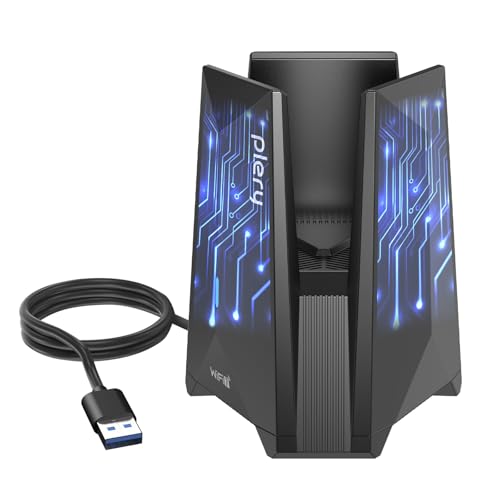
Delivering lightning-fast speeds of up to 6.5 Gbps, the BE6500 USB WiFi 7 Adapter is perfect for anyone who craves seamless 4K and 8K streaming or intense competitive gaming. With tri-band support at 6GHz, 5GHz, and 2.4GHz, you’ll enjoy stable connectivity, even in crowded environments. Its USB 3.0 interface enhances data transfer rates, making lag a thing of the past. Plus, built-in drivers simplify installation on Windows 11/10. With WPA3 encryption, your connection is secure from intrusions. Its sleek design complements any setup, making this adapter a must-have for gamers and streamers alike.
Best For: Gamers and streamers looking for high-speed connectivity and reliable performance for 4K/8K streaming and competitive gaming.
Pros:
- Supports lightning-fast speeds up to 6.5 Gbps for seamless streaming and gaming.
- Tri-band performance ensures stable connectivity even in crowded environments.
- Easy installation with built-in drivers for Windows 11/10.
Cons:
- Limited compatibility with operating systems outside of Windows 11/10.
- May require a USB 3.0 port for optimal performance, which could be a limitation for some devices.
- Slightly larger design may not be suitable for all compact setups.
TP-Link AC600 USB WiFi Adapter for PC (Archer T2U Plus)

Looking to enhance your gaming experience on a budget? The TP-Link AC600 USB WiFi Adapter (Archer T2U Plus) is a fantastic choice. This compact adapter supports dual-band frequencies, offering speeds up to 200 Mbps on 2.4GHz and 433 Mbps on 5GHz. With its 5dBi high-gain antenna, you’ll enjoy improved signal quality, perfect for gaming and streaming. Installation is a breeze, compatible with various operating systems including Windows 11 and Mac OS X. With a customer rating of 4.4 stars and a lightweight design, the Archer T2U Plus is your go-to option for reliable, fast internet without breaking the bank.
Best For: Gamers and streamers looking for a budget-friendly solution to enhance their wireless connectivity.
Pros:
- Supports dual-band frequencies for optimal performance with speeds up to 433 Mbps on 5GHz.
- 5dBi high-gain antenna improves signal reception and transmission for a more stable connection.
- User-friendly installation process compatible with multiple operating systems including Windows 11 and Mac OS X.
Cons:
- OS driver installation may be required, which could be a hassle for some users.
- Limited range compared to built-in WiFi cards, potentially requiring closer proximity to the router.
- Lightweight design might make it susceptible to disconnection if bumped or moved frequently.
WAVLINK Tri-Band WiFi 7 Adapter for Desktop PC

For gamers seeking ultra-fast connectivity, the WAVLINK Tri-Band WiFi 7 Adapter stands out with its impressive tri-band speeds of up to 2882Mbps on both the 5GHz and 6GHz bands. It’s perfect for 8K streaming and lag-free gaming, thanks to Wi-Fi 7 technologies that guarantee lower latency and stable connections. With a sleek design featuring four high-gain antennas, you’ll enjoy strong signal coverage. This adapter supports Windows 10/11 and offers easy installation. Plus, its Hotspot Mode lets you share your PC’s internet connection. Elevate your online experience with this high-performance adapter and stay ahead in gaming!
Best For: Gamers and streamers looking for ultra-fast, reliable internet connectivity for high-bandwidth activities.
Pros:
- Tri-band speeds of up to 2882Mbps provide fast and stable connections for gaming and streaming.
- Built-in driver ensures easy installation on Windows 10/11, simplifying the setup process.
- Hotspot Mode allows users to share their PC’s internet connection, enhancing versatility.
Cons:
- Limited compatibility as it only supports Windows 10/11, excluding users on other operating systems.
- Performance may be limited when paired with WiFi 6/6E routers, reducing its full potential.
- Not a WiFi booster or extender, which may confuse users looking for those features.
UGREEN BE6500 WiFi Adapter for Desktop PC

The UGREEN BE6500 WiFi Adapter is an excellent choice for gamers seeking cutting-edge performance on their desktop PCs. With tri-band capability, it utilizes 6GHz, 5GHz, and 2.4GHz bands, achieving combined speeds up to 6 Gbps. You’ll enjoy seamless 4K/8K streaming and lag-free gaming thanks to advanced technologies like 4K-QAM and Multi-RU. Dual high-gain antennas enhance signal coverage, ensuring a stable connection even through walls. Plus, WPA3 encryption keeps your online activities secure. Installation is a breeze, as it features plug-and-play convenience with built-in Windows drivers, making setup quick and hassle-free. Get ready for an elevated online experience!
Best For: The UGREEN BE6500 WiFi Adapter is best for gamers and streaming enthusiasts looking for high-speed, reliable internet connectivity on their desktop PCs.
Pros:
- Tri-band capability allows for enhanced speed and performance with up to 6 Gbps combined.
- Dual high-gain antennas improve signal coverage and stability, even in challenging environments.
- WPA3 encryption provides robust security for safe online activities.
Cons:
- May require a compatible WiFi 7 router to fully utilize its advanced features.
- Limited compatibility with older operating systems beyond Windows 10/11.
- The external antennas may take up additional space and could be prone to damage if not handled carefully.
Factors to Consider When Choosing a Wifi 7 Adapter for Gaming PC
When you’re picking a WiFi 7 adapter for your gaming PC, there are several key factors to keep in mind. You’ll want to assess speed and performance metrics, antenna quality, and how easy it is to install. Don’t overlook security features and the overall design, as these can greatly impact your gaming experience.
Speed and Performance Metrics
Choosing a Wi-Fi 7 adapter for your gaming PC hinges on understanding speed and performance metrics that can greatly influence your experience. Look for adapters that deliver maximum speeds up to 6.5 Gbps, as this notably enhances your gaming and reduces lag during intense online play. Advanced technologies like 4K-QAM and Multi-RU boost data throughput and reliability, essential for competitive gaming and high-resolution streaming. Opt for tri-band functionality to connect seamlessly across 2.4 GHz, 5 GHz, and 6 GHz bands, minimizing congestion. Wide channels of 160 MHz maximize bandwidth, ensuring smooth gameplay. Features like MU-MIMO and OFDMA allow multiple devices to communicate efficiently, enhancing performance in multi-user environments. These metrics are critical for an elevated gaming experience.
Antenna Quality and Coverage
A strong connection is essential for a smooth gaming experience, making antenna quality and coverage important factors in selecting a Wi-Fi 7 adapter for your gaming PC. Look for high-gain antennas, around 5dBi, as they enhance signal reception and transmission, especially in challenging environments. Dual external antennas can greatly boost coverage and stability, ensuring your connection remains strong even through walls. Adjustable antennas let you optimize placement for maximum signal strength, critical for gaming and streaming. Additionally, consider adapters with beamforming technology, which directs the Wi-Fi signal towards your devices, reducing lag. Finally, more antennas typically mean better multi-device connectivity, enhancing your overall online experience during intense gaming sessions.
Installation and Compatibility Ease
Installing a Wi-Fi 7 adapter for your gaming PC should be a straightforward process, so look for options that simplify setup. Choose adapters with built-in drivers, as these allow for quick installation without needing additional software or CDs. It’s essential to guarantee compatibility with your operating system; some adapters only support Windows 11 or specific versions of Windows 10. Opt for plug-and-play functionality to streamline the installation and minimize hassle. Additionally, verify that the adapter supports the latest Wi-Fi standards to maximize Wi-Fi 7’s performance capabilities. Finally, check for backward compatibility with older Wi-Fi standards, ensuring seamless connectivity with your existing devices and preventing any disruption to your online gaming experience.
Security Features Offered
When you’re selecting a Wi-Fi 7 adapter for your gaming PC, it’s important to prioritize security features to protect your data and enhance your online experience. Look for adapters that support the latest WPA3 encryption protocol, which offers robust protection against brute-force attacks and secures your personal information during wireless communication. Many Wi-Fi 7 adapters comply with industry security standards, integrating advanced measures to safeguard your data and Wi-Fi passwords. Some even come with secure-by-design pledges, ensuring high security throughout the device’s lifecycle. Additionally, features like automatic firmware updates help you stay protected by addressing vulnerabilities as they arise. Supporting advanced encryption standards is vital for safeguarding sensitive information during online gaming and streaming sessions.
Design and Aesthetic Appeal
Choosing the right Wi-Fi 7 adapter for your gaming PC goes beyond just functionality; design and aesthetic appeal play an essential role too. Look for adjustable antennas that enhance signal reception and coverage, ensuring your gaming experience remains uninterrupted. Aesthetically pleasing designs, especially those with multicolor LED indicators, can elevate your setup while providing real-time network status feedback. Compact and portable options are ideal, allowing for flexible placement to optimize connection quality in different environments. Consider materials and finishes that complement your modern desktop theme, adding to your rig’s overall appeal. Finally, an ergonomic design can make setup and adjustments easier, enhancing your interaction with the adapter. All these factors contribute to a seamless gaming experience.
Connectivity Options Available
A Wi-Fi 7 adapter’s connectivity options can greatly influence your gaming experience. Look for tri-band support, as it utilizes 2.4 GHz, 5 GHz, and 6 GHz bands, maximizing speed and reducing congestion during intense gaming sessions. Most adapters feature USB 3.0 interfaces, allowing data transfer rates up to 10 times faster than USB 2.0, which guarantees seamless gameplay and quick file transfers. Advanced technologies like MU-MIMO and OFDMA let multiple devices connect simultaneously without performance loss, perfect for setups with several users. External antennas enhance signal strength and coverage, maintaining stable connections even in larger spaces. Finally, verify your adapter includes WPA3 encryption for a secure gaming environment against unauthorized access and data breaches.
Price and Warranty Considerations
While evaluating Wi-Fi 7 adapters for your gaming PC, you’ll want to keep price and warranty in mind to guarantee you’re making a smart investment. Prices can vary considerably, so it’s essential to find a balance between features and your budget. Look for adapters that offer advanced technologies like OFDMA and MU-MIMO, ensuring you don’t overspend. Most adapters come with warranties of one to two years, providing protection against defects and performance issues. Customer reviews can help gauge reliability and whether the warranty is likely to be needed. Additionally, consider the potential for future-proofing; investing a bit more upfront might save you from frequent upgrades as gaming and internet demands evolve.