If you’re juggling multiple gaming consoles, figuring out how to connect them all can be a hassle. An HDMI switch can simplify this, allowing you to easily switch between devices without the mess of cables. But not all switches are created equal. You’ll want to evaluate resolution support, input options, and additional features. Let’s explore the top HDMI switches that can enhance your gaming setup and streamline your experience.
Anker HDMI Switch, 4K@60Hz 4 in 1 Out HDMI Switcher

If you’re a gamer looking to streamline your setup, the Anker HDMI Switch, 4K@60Hz 4 in 1 Out HDMI Switcher is your best bet. This device expands one HDMI output into four inputs, making it perfect for your consoles, PC, or laptop. You’ll enjoy effortless switching thanks to the intuitive remote control, allowing you to switch with just one click. With support for stunning 4K visuals, your gaming experience will be crystal-clear and vibrant. Plus, it guarantees stable signals for smooth streaming, whether you’re working or playing. The included 18-month warranty also assures peace of mind with your investment.
Best For: Gamers and multimedia enthusiasts looking for a seamless way to connect multiple devices to a single display.
Pros:
- Effortless switching between devices with an intuitive remote control.
- Supports stunning 4K@60Hz visuals for an immersive experience.
- Guarantees stable signals for smooth, uninterrupted streaming.
Cons:
- Does not support HDMI CEC feature for automatic device control.
- Charger and remote control batteries are not included.
- HDMI cables are not included in the package.
UGREEN HDMI Switch 5 in 1 Out 4K@60Hz

The UGREEN HDMI Switch 5 in 1 Out 4K@60Hz is an excellent choice for gamers who want to connect multiple devices without the hassle of constant cable swapping. It lets you connect up to five devices, such as your PS5, Xbox, and Switch, to a single TV input while supporting stunning 4K@60Hz resolution. With a USB-powered design and 18Gbps data transmission, you’ll enjoy smooth gameplay without frame drops. The included remote control makes switching between devices easy from up to 33 feet away. Just remember, it requires a power source and doesn’t support automatic switching, but it’s a solid addition to your setup.
Best For: Gamers who want to connect multiple HDMI devices to a single TV input seamlessly.
Pros:
- Supports stunning 4K@60Hz resolution for high-quality visuals.
- Includes a remote control for convenient switching from up to 33 feet away.
- USB-powered design ensures stable video transmission without frame drops.
Cons:
- Requires a power source for operation, as it does not come with a power adapter.
- Does not support automatic switching between devices.
- No HDMI cables or batteries included, requiring additional purchases.
Acer HDMI Switch 5 in 1 Out with Remote
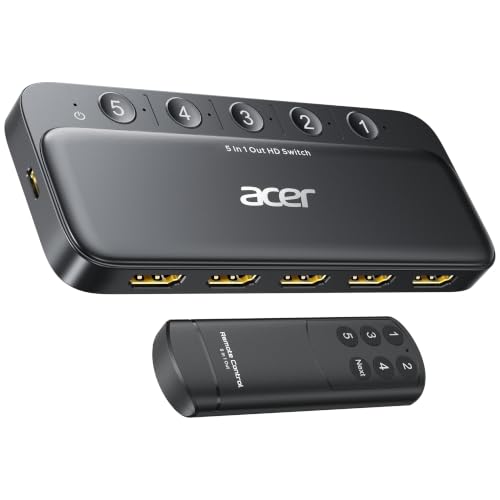
For gamers who juggle multiple devices, the Acer HDMI Switch 5 in 1 Out with Remote is a game-changer. Supporting 4K@60Hz and HDMI 2.0, it connects up to five devices like your PS5, Xbox, or laptops to a single display. With its sleek metallic design and gold-plated ports, you’ll enjoy pure signal transmission and durability. The included remote makes switching between devices effortless, while the LED indicators keep you informed about active connections. Although it doesn’t support automatic switching, its solid performance and ease of use make it a must-have for any multi-console setup.
Best For: Gamers and users with multiple HDMI devices looking for an efficient way to connect and switch between them seamlessly.
Pros:
- Supports high-resolution 4K@60Hz for an enhanced gaming and viewing experience.
- Sleek metallic design with gold-plated ports ensures durability and superior signal transmission.
- Remote control and LED indicators make switching between devices easy and convenient.
Cons:
- Does not support automatic switching, requiring manual operation for device selection.
- Power adapter, remote control battery, and HDMI cables are not included, which may add to additional costs.
- Maximum cable length for 4K is limited to 10ft (3m), which may restrict placement options for some setups.
Y.D.F 3 Way HDMI Switcher with RCA to HDMI Converter

Designed specifically for gamers juggling multiple consoles, the Y.D.F 3 Way HDMI Switcher with RCA to HDMI Converter stands out with its ability to support three HDMI 2.0 inputs alongside two RCA to HDMI conversions. This versatile switcher works seamlessly with devices like the PS4/5, Xbox, and even older consoles like the Sega and Nintendo systems. With support for 4K@60Hz output, it enhances your gaming experience with vibrant colors and sharp details. The plug-and-play feature makes setup a breeze, while its durable aluminum design guarantees long-lasting performance. Enjoy smooth shifts between your favorite games without any hassle!
Best For: Gamers who own multiple consoles and need a reliable switcher for seamless transitions between devices.
Pros:
- Supports multiple devices: Compatible with a wide range of consoles and media players, including both modern and classic systems.
- High-quality output: Delivers 4K@60Hz resolution with vibrant colors and improved details for an enhanced gaming experience.
- Easy setup: Plug-and-play functionality makes it simple to connect and switch between devices without complicated installation.
Cons:
- Cable length limitation: To achieve optimal 4K performance, the total length of the HDMI cables must be within 10 feet, which may restrict placement.
- Limited HDMI inputs: While it offers three HDMI inputs, users with more devices may find it insufficient for their needs.
- Weight: At 10 ounces, it may be slightly heavier than some other compact switchers, which could be a consideration for portability.
GANA Aluminum Bidirectional HDMI Switcher 2 in 1 Out

Gamers seeking seamless shifts between multiple devices will appreciate the GANA Aluminum Bidirectional HDMI Switcher, which offers a versatile 2 in 1 Out configuration. This switcher supports 4K resolution at 60Hz, ensuring stunning visuals while you toggle between consoles like the PS5 or Xbox. With three HDMI ports, you can easily connect two sources to one display or switch between two displays. The intuitive button press makes switching effortless, while the LED indicators keep you informed of the active port. Plus, you don’t need external power, and lifetime technical support is just a message away.
Best For: Gamers and multimedia enthusiasts who need to switch effortlessly between multiple HDMI devices without sacrificing video quality.
Pros:
- Supports 4K resolution at 60Hz, delivering high-quality visuals for gaming and media playback.
- Easy to use with a simple button press for switching between connected devices, making it user-friendly.
- No external power required, ensuring a straightforward setup without extra cords or adapters.
Cons:
- Only one display can be active at a time, limiting simultaneous viewing options.
- HDMI cable not included, which may require an additional purchase for complete setup.
- Limited to a maximum cable length of 3M for optimal performance, which may restrict placement options.
GANA HDMI Switch 5 in 1 Out 4K@60Hz

If you’re looking for an HDMI switch that can seamlessly connect multiple gaming consoles to a single display, the GANA HDMI Switch 5 in 1 Out 4K@60Hz stands out with its impressive support for high-definition resolutions. This aluminum switch allows you to connect up to five devices, like your Xbox and PS5, using a single HDMI output. With a remarkable transmission speed of 18Gbps and support for 3D and HDR, your gaming experience will be smooth and immersive. Plus, the included IR remote lets you switch effortlessly from anywhere in the room. Enjoy hassle-free gaming with this reliable device!
Best For: Gamers who want to connect multiple consoles and devices to a single display without the hassle of constantly switching cables.
Pros:
- Supports high resolutions: Handles up to 4K@60Hz for stunning visual quality.
- Convenient switching: Features an IR remote control for easy access from a distance.
- Versatile compatibility: Works with various devices including Xbox, PS5, and Blu-Ray players.
Cons:
- Power requirement: Needs USB power; does not include a power adapter.
- Limited range: Remote control works only within a 33ft range.
- Material may scratch: Aluminum casing can be prone to visible scratches over time.
UGREEN 8K@60Hz HDMI Switch 5 in 1 Out Splitter (Compatible with PS5/4, Xbox, Nintendo Switch, Roku, Apple TV, Fire Stick)

The UGREEN 8K@60Hz HDMI Switch 5 in 1 Out Splitter is an essential tool for anyone looking to simplify their gaming setup. It connects up to five devices, like your PS5, Xbox, and Nintendo Switch, to a single TV input, allowing effortless switching with a remote or button. Enjoy stunning visuals with support for ultra-HD 8K@60Hz, HDR10+, and Dolby Atmos. The remote control works up to 33 feet, and five LED indicators show active ports. Plus, it guarantees a low-latency gaming experience, making it perfect for competitive play. Upgrade your setup and enjoy seamless gaming without the hassle of constant cable swapping!
Best For: Gamers and multimedia enthusiasts looking for a convenient way to connect multiple devices to a single TV input.
Pros:
- Supports ultra-HD 8K@60Hz resolution for stunning visuals and fluid gameplay.
- Allows easy switching between five devices with a remote control or button, eliminating the need for constant cable swapping.
- Provides low-latency gaming experience with VRR support, enhancing competitive gameplay.
Cons:
- Does not support automatic switching or ARC pass-through, which may limit convenience for some users.
- Performance may be affected if HDMI cable lengths exceed recommended limits (1m for input, 2m for output).
- May not be suitable for users with devices requiring unique HDMI features not supported by this switch.
HDMI Multiviewer Switch 4×1 with Remote Control
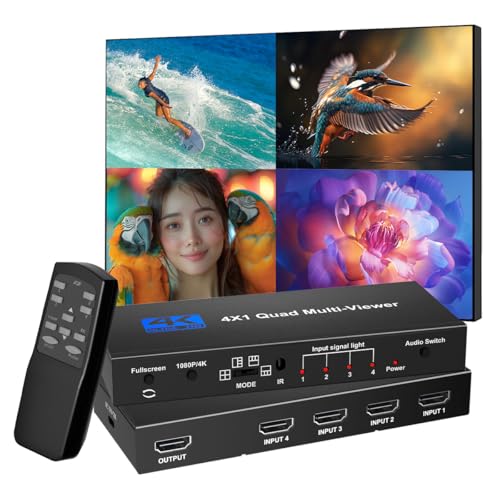
For those who juggle multiple devices, the HDMI Multiviewer Switch 4×1 with Remote Control is a game-changer. It seamlessly switches between four inputs, supporting 4K@30Hz and 1080p@60Hz resolutions. With five display modes, you can customize your viewing experience—whether you prefer full-screen or split views. The included remote makes it easy to switch modes without hassle. You’ll enjoy uninterrupted audio and video, perfect for gaming, teaching, or security setups. Compatible with a wide range of HDMI devices, this compact switcher weighs just 12.7 ounces and is rated 4.7 stars, ensuring you get excellent performance for your multi-console setup.
Best For: Those who utilize multiple HDMI devices for gaming, teaching, or surveillance setups.
Pros:
- Supports high resolutions up to 4K@30Hz and 1080p@60Hz, ensuring excellent video quality.
- Offers five customizable display modes, allowing flexibility in how content is viewed.
- Seamless switching between inputs with a remote control for convenient operation.
Cons:
- Remote control requires a battery, which is not included in the package.
- Limited to HDMI-equipped devices, potentially excluding older technology.
- Compact size may limit some users’ ability to manage cable organization effectively.
HDMI Multiviewer Switch 4×1 with IR Remote

Gamers looking for a seamless multi-image viewing experience will find the HDMI Multiviewer Switch 4×1 with IR Remote to be an ideal choice. This switcher supports four HDMI inputs, allowing you to connect devices like consoles, Blu-Ray players, and computers, all outputting to one HDMI display. With support for resolutions up to 4K HD, you can enjoy stunning visuals. The nine display modes, including Picture-by-Picture, enhance your viewing options. You can easily switch inputs with the included IR remote, providing hassle-free control. Just make sure your devices are compatible, and you’re ready to elevate your gaming setup.
Best For: Gamers and multimedia enthusiasts seeking a seamless multi-image viewing experience with multiple HDMI devices.
Pros:
- Supports high resolutions up to 4K HD (30Hz) for stunning visuals.
- Nine display modes, including Picture-by-Picture, offer versatile viewing options.
- Easy control with an IR remote for hassle-free input switching.
Cons:
- Not compatible with widescreen monitors, limiting display options.
- Requires AAA batteries for the remote, which are not included.
- Brief wait time may occur when changing modes, potentially disrupting viewing.
Anker HDMI Switch, 4K@60Hz HDMI Switcher (2 in 1 Out)

Looking for a reliable HDMI switch that simplifies your gaming setup? The Anker HDMI Switch, 4K@60Hz (2 in 1 Out) is your perfect solution. It supports HDR, 3D, and Dolby, making it compatible with a variety of devices, including laptops, Xbox Series, and PS5/PS4. With a single button, you can easily switch between media without unplugging cables. Enjoy stunning visuals with resolutions up to 4K@60Hz—just remember to use the right HDMI cables. Plus, it comes with an 18-month warranty for peace of mind. Elevate your gaming experience effortlessly with this versatile HDMI switch.
Best For: Gamers and multimedia enthusiasts looking for an efficient way to switch between multiple HDMI devices without hassle.
Pros:
- Simplified switching: Easily transition between devices with a single button press, eliminating the need to unplug cables.
- High-resolution support: Enjoy stunning visuals with resolutions up to 4K@60Hz, perfect for gaming and high-definition media.
- Wide compatibility: Works with a variety of devices including laptops, game consoles, and projectors.
Cons:
- Limited HDMI CEC support: Does not support HDMI CEC, which may limit some automated control features across devices.
- Cable length restrictions: To achieve 4K@60Hz, specific cable lengths and types must be used, which can be a hassle for some setups.
- Only 2 in 1 output: Limited to two inputs, which may not be sufficient for users with multiple devices needing connections.
Factors to Consider When Choosing Hdmi Switch for Multi Console
When choosing an HDMI switch for multiple consoles, you’ll want to take into account several key factors. Think about the number of inputs you need, the resolution support for your devices, and how the switching mechanism works. Also, check for compatibility with your consoles and the overall build quality to guarantee durability.
Number of Inputs
Choosing the right HDMI switch involves considering the number of inputs it offers, which dictates how many devices you can connect to your display at once. HDMI switches typically range from 2 to 8 inputs; the more inputs you have, the more flexibility you gain in connecting multiple consoles or devices. If you’re a gamer with several consoles, a switch with 4 or more inputs is usually recommended. This setup allows you to easily switch between gaming consoles, streaming devices, or computers. Also, look for switches with convenient switching mechanisms, like remote controls or manual buttons, to make changes between devices quick and hassle-free. This way, you can enjoy seamless gaming without the constant need to unplug and replug cables.
Resolution Support
To guarantee you get the most out of your gaming setup, it’s essential to take into account the resolution support of your HDMI switch. Look for options that support up to 4K at 60Hz for stunning high-definition clarity. If you’re planning for the future, consider switches that can handle 8K at 60Hz. Pay attention to the bandwidth capacity; a higher bandwidth, like 18Gbps or 40Gbps, enhances performance and supports advanced features such as HDR. Don’t forget to check for backward compatibility with older devices, ensuring support for resolutions like 1080p or 1440p. Finally, keep in mind the maximum cable length recommended by the manufacturer, usually between 3 to 10 feet for ideal 4K signal quality.
Switching Mechanism
After ensuring your HDMI switch supports the right resolution for your gaming needs, the switching mechanism becomes a key factor in your decision. You’ll find options ranging from manual switches that require you to physically change inputs to remote-controlled models that let you switch devices from afar. Some HDMI switches even have automatic switching capabilities, detecting active signals and adjusting accordingly, while others need manual selection. Look for LED indicators that show the current active input, making it easy to identify which console is connected. Additionally, consider the remote control range; some models work from up to 33 feet away. Quick switch functionality is also essential for seamless changes, with some offering one-click input alterations for instant access.
Compatibility With Devices
When selecting an HDMI switch for multiple consoles, it’s crucial to guarantee compatibility with all your devices. Make sure the switch works with your gaming consoles, laptops, Blu-ray players, and projectors to prevent connectivity headaches. Check the HDMI standards it supports, like HDMI 2.0 or 2.1, to verify it meets your resolution needs and features such as HDR or 3D. Consider how many HDMI inputs and outputs you’ll need based on the number of devices you’ll connect at once. Confirm that the switch supports the maximum resolution and refresh rate for your setup—think 4K@60Hz for ideal gaming or video playback. Also, look for extra features like CEC support and audio formats to complete your entertainment experience.
Build Quality
Build quality is an essential factor to contemplate when choosing an HDMI switch for your gaming setup. A switch made from durable materials like aluminum will resist wear and tear much better than plastic. Look for high-quality HDMI switches that feature gold-plated connectors; these enhance signal transmission and minimize corrosion. Additionally, a well-designed switch should have heat dissipation features, such as vents, to prevent overheating during long gaming sessions, ensuring stable performance. Pay attention to the overall weight and sturdiness; heavier models often house more robust components. Finally, consider the manufacturer’s warranty, as it reflects their confidence in the build quality and performance of the product, giving you peace of mind with your investment.