If you’re finding your PC’s USB ports constantly overwhelmed, you’re not alone. Many users seek better connectivity solutions to accommodate their growing number of devices. That’s where internal USB hubs come into play. With a range of options available, you can expand your USB capabilities efficiently. Let’s explore the top internal USB hubs that can transform your setup and enhance your overall experience.
NZXT Internal USB Hub 3 – Expands 4 USB 2.0 Ports

If you’re looking to expand your PC’s connectivity without cluttering your setup, the NZXT Internal USB Hub 3 is an ideal choice. This hub adds four USB 2.0 ports, giving you plenty of options for peripherals. Its sleek, multifunctional design seamlessly integrates into any PC, while its compact size allows for discreet placement. The SATA power connection guarantees a reliable power source, ensuring consistent performance. Installation is a breeze, thanks to its magnetic body and 3M dual lock tapes for secure mounting. Plus, it’s compatible with a wide range of PC builds, enhancing your system’s overall functionality.
Best For: Users looking to enhance their PC’s connectivity with additional USB ports in a compact and organized manner.
Pros:
- Expands connectivity with 4 additional USB 2.0 ports for peripherals.
- Sleek and compact design allows for easy integration and discreet placement within the PC.
- User-friendly installation with magnetic body and 3M dual lock tapes for secure mounting.
Cons:
- Limited to USB 2.0 speeds, which may not be suitable for high-speed devices.
- Requires SATA power connection, which may not be available on all setups.
- Internal installation may not be ideal for users unfamiliar with PC hardware.
Corsair 4-Port USB 2.0 Hub

The Corsair 4-Port USB 2.0 Hub is ideal for PC builders who need to maximize their internal connectivity without sacrificing space. With four 9-pin USB 2.0 ports, it easily connects additional devices like power supplies and RGB lighting controllers. Its magnetic installation simplifies setup, allowing you to attach it to any magnetic surface within your case. Measuring just 1.97 x 3.35 x 0.63 inches, it fits snugly in Mini-ITX cases and tight spaces. Offering a bandwidth of up to 480Mbps, this hub enhances your PC’s functionality while receiving rave reviews, boasting a stellar 4.8-star rating from customers.
Best For: PC builders looking to expand internal USB connectivity in compact spaces.
Pros:
- Easy magnetic installation allows for quick setup without tools.
- Compact size fits well in Mini-ITX cases and other tight spaces.
- High customer satisfaction with a rating of 4.8 out of 5 stars.
Cons:
- Limited to USB 2.0 speeds, which may not meet the needs of high-speed devices.
- Requires SATA power connection, which may be an inconvenience for some setups.
- Only compatible with Intel® and AMD® motherboards, limiting its usability for certain users.
Hyte Powered Internal USB Hub – 4 USB 2.0 Output Headers

For PC enthusiasts looking to expand their internal connectivity, the Hyte Powered Internal USB Hub is an ideal choice. This hub transforms a single USB 2.0 header into four outputs, giving you the flexibility to connect multiple USB 2.0 devices effortlessly. Its design allows for easy installation inside your case, secured by stable magnets or an adhesive strip. Plus, it promotes clean cable management for a tidy setup. You’ll appreciate the troubleshooting features, including an illuminated indicator and a rotary switch for quick fixes. Enhance your PC’s functionality with this reliable and efficient internal USB hub.
Best For: PC enthusiasts seeking to expand their internal connectivity with multiple USB 2.0 devices.
Pros:
- Transforms a single USB header into four outputs, allowing for greater connectivity options.
- Easy installation with stable magnets or an adhesive strip for versatile mounting.
- Includes troubleshooting features like an illuminated indicator and a rotary switch for quick problem-solving.
Cons:
- Limited to USB 2.0 speeds, which may not be sufficient for high-speed devices.
- Internal installation only, meaning it cannot be used externally for additional ports.
- May require additional space inside the case, which could be a concern for compact builds.
Delta EU04 BK Internal USB 2.0 Hub, 4-Port Expansion for PC

Looking to expand your PC’s connectivity without the hassle of external hubs? The Delta EU04 BK Internal USB 2.0 Hub is a perfect solution, offering a 5-in-1 port expansion with one motherboard input and four USB 2.0 output ports. It’s designed for easy installation, featuring a magnetic body and 3M dual lock tapes for secure attachment. Plus, its compact size of 3.8*2.3*0.6 inches means it fits seamlessly in various PC cases. With direct SATA power supply support and protective caps on port pins, you can enjoy reliable performance and compatibility with most peripherals.
Best For: Users looking to enhance their PC’s internal connectivity with multiple USB ports in a compact form factor.
Pros:
- Easy Installation: The magnetic body and 3M dual lock tapes make attaching the hub hassle-free.
- Compact Design: Small dimensions allow for seamless integration into various PC cases without taking up much space.
- Reliable Power Supply: Direct connection to SATA power ensures stable and consistent power output for connected devices.
Cons:
- Limited USB Speed: Being a USB 2.0 hub, it may not support faster data transfer rates compared to USB 3.0 hubs.
- Internal Use Only: Designed exclusively for internal installation, limiting flexibility in placement compared to external hubs.
- Potential Compatibility Issues: While compatible with most components, some specific peripherals may not function as intended.
Airgoo Internal USB Hub, 9-Pin USB 2.0 Header Splitter
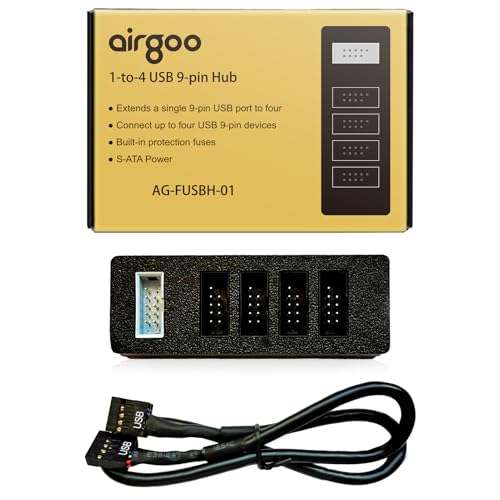
If you’re seeking a solution to expand your PC’s connectivity, the Airgoo Internal USB Hub, 9-Pin USB 2.0 Header Splitter is an ideal choice. This hub converts one internal 9-pin USB header into four ports, allowing you to connect front panels, LED controllers, and other devices effortlessly. It’s powered by S-ATA, ensuring stable performance even when all four ports are in use. With compact dimensions and a magnetic mount, installation is a breeze. Plus, its plug-and-play functionality means you won’t need any drivers. Customers rave about it, giving it an impressive 4.8 out of 5 stars!
Best For: Users looking to expand their PC’s USB connectivity options with a reliable and efficient internal hub.
Pros:
- Converts one 9-pin USB header into four ports, allowing for multiple device connections.
- S-ATA powered for stable operation and consistent power supply, even under full load.
- Plug-and-play functionality ensures easy setup without the need for drivers.
Cons:
- Limited to USB 2.0 speeds, which may not be suitable for high-bandwidth devices.
- Magnetic mount may not adhere well to all PC case materials, potentially limiting installation options.
- Compact size may lead to crowded connections in cases with limited internal space.
Internal USB 2.0 Hub 1 to 4 for PC Modders

The Internal USB 2.0 Hub 1 to 4 is perfect for PC modders who want to streamline their builds and enhance functionality. This hub expands a single 9-pin USB header into four, allowing you to power ARGB lighting and PWM fans effortlessly. With a dedicated SATA power connector, you’ll guarantee stable power for high-LED-count setups without overloading your motherboard. Plus, it integrates seamlessly with monitoring modules for custom water cooling loops, displaying real-time data on compatible LCD coolers. Its magnetic backplate allows for easy installation, simplifying cable management and making your setup look professional and clean.
Best For: PC modders, custom loop water cooling users, and RGB lighting enthusiasts looking to enhance their system’s functionality and organization.
Pros:
- Expands a single USB header into four, allowing for more device connections.
- Dedicated SATA power connector provides stable power to prevent motherboard overload.
- Magnetic backplate allows for easy, tool-free installation and improved cable management.
Cons:
- Limited to USB 2.0 speeds, which may not be sufficient for some high-performance devices.
- Compatibility may be restricted to specific monitoring modules and LCD coolers.
- Internal installation may be challenging in cramped PC cases with limited space.
ELUTENG PCIe USB 3.0 Expansion Card

For users needing multiple USB ports without sacrificing performance, the ELUTENG PCIe USB 3.0 Expansion Card stands out with its impressive seven-port design. This expansion card operates efficiently, providing each port with 5V2A power and boasting a remarkable speed of up to 5Gbps—10 times faster than USB 2.0. It’s compatible with various Windows versions, including 11, 10, and 7, while ensuring stable performance via NEC720201 & NEC720210 chips. With solid capacitors for enhanced voltage stability, you can trust that your devices will charge quickly and reliably. Installation is straightforward, making it an excellent choice for your connectivity needs.
Best For: Users who need multiple high-speed USB ports for their devices without external power requirements.
Pros:
- High-speed performance with USB 3.0 providing speeds up to 5Gbps, significantly faster than USB 2.0.
- Independent power supply for each port, ensuring stable performance and reliable charging for connected devices.
- Easy installation and compatibility with various Windows versions, making it user-friendly for a wide range of setups.
Cons:
- Not compatible with Mac or gaming consoles like PS3/PS4, limiting its use for some users.
- Requires driver installation for Windows XP and 7, which may complicate setup for those unfamiliar with the process.
- Limited to PCI-E slots, which may not be available on all motherboards, restricting its installation options.
Multi Port Internal USB Hub – 5 Internal USB 2.0 Ports

Expanding your PC’s USB connectivity has never been easier with the Multi Port Internal USB Hub featuring 5 internal USB 2.0 ports. This hub includes three 9-pin USB headers, one Type-E, and one standard USB port, guaranteeing compatibility with all PC motherboards. Its plug-and-play functionality allows for a hassle-free installation process, while the 11.8-inch cable length gives you flexibility in positioning. Plus, the SATA auxiliary power connector assures your high-power devices receive adequate energy. Use double-sided tape to secure the hub within your chassis, and enjoy enhanced connectivity for your PC setup effortlessly!
Best For: Users looking to expand their PC’s USB connectivity with multiple internal ports for various devices.
Pros:
- Plug-and-play functionality makes installation quick and easy.
- Compatible with all PC motherboards, ensuring broad usability.
- SATA auxiliary power connector provides sufficient power for high-demand USB devices.
Cons:
- Limited to USB 2.0 speeds, which may not meet the needs of users requiring faster data transfer rates.
- Requires physical installation within the chassis, which may not be ideal for all users.
- Dependence on double-sided tape for securing the hub may not offer a permanent solution.
9Pin USB Header Splitter with SATA Power Cable

If you’re looking to enhance your PC’s connectivity without compromising on power, the 9Pin USB Header Splitter with SATA Power Cable is an ideal solution. This splitter expands a single USB header from your motherboard into four internal USB 2.0 ports, perfect for connecting devices like CPUs, WiFi receivers, fans, and RGB lights. The extra SATA power connector guarantees a stable power supply, preventing potential short circuits. With a flexible 50cm length and self-stick design, installation is a breeze. You can easily mount it directly on your motherboard or chassis, keeping your system organized and efficient.
Best For: Users looking to expand USB connectivity in their PC while ensuring stable power supply for multiple devices.
Pros:
- Increases USB connectivity with 1 to 4 ports, allowing multiple devices to be connected simultaneously.
- SATA power connector ensures stable power supply, reducing the risk of short circuits.
- Flexible installation options with a self-stick design for easy mounting on motherboards or chassis.
Cons:
- Limited to USB 2.0, which may not support higher-speed devices that require USB 3.0 or higher.
- May require adequate space inside the case for installation, especially if the motherboard layout is cramped.
- Adhesive tape may wear over time, potentially compromising the mounting stability.
GRAUGEAR 3.5 Inch Front Panel USB C Hub
The GRAUGEAR 3.5 Inch Front Panel USB C Hub is an excellent choice for PC users looking to enhance their connectivity options without sacrificing valuable drive space. This hub converts your old floppy disk drive space into two USB 3.2 Gen 2 USB-C ports, two USB 3.0 ports, and slots for SD and microSD cards. With data transmission rates reaching up to 20 Gbps, it guarantees speedy data transfers. Installation is straightforward, and the sturdy build assures durability. Plus, safety features like over-current protection add peace of mind. Upgrade your PC’s connectivity effortlessly with this reliable hub.
Best For: PC users who need to enhance their connectivity options while utilizing limited space effectively.
Pros:
- High data transmission rates of up to 20 Gbps for fast data transfers.
- Easy installation process with included cables and screws for a hassle-free setup.
- Durable construction with safety features like over-current and over-voltage protection.
Cons:
- Limited compatibility with older motherboards lacking USB 3.2 Type-E/Key-A 20-pin headers.
- Requires 3.5’’ floppy disk drive space, which may not be available on newer PC cases.
- No USB-C power delivery support for charging devices through the hub.
Factors to Consider When Choosing an Internal USB Hub for PC
When you’re choosing an internal USB hub for your PC, consider factors like port expansion capabilities and power stability requirements. You’ll also want to think about how compact the design is and how easy it is to install. Finally, make sure it’s compatible with your motherboard to avoid any issues.
Port Expansion Capabilities
Choosing the right internal USB hub can greatly enhance your PC’s connectivity, especially if you need multiple ports for various devices. Look for hubs that expand a single header into four or more ports, giving you more flexibility. If you plan to connect various internal devices like RGB lighting controllers or AIO CPU coolers, hubs with multiple 9-pin USB 2.0 output headers are vital. Compact designs are perfect for Mini-ITX cases, guaranteeing you maximize space without sacrificing port availability. Additionally, features like plug-and-play functionality simplify installation, saving you time and hassle. Always consider what devices you’ll connect to ascertain the hub meets your specific needs for seamless performance.
Power Stability Requirements
To guarantee your internal USB hub operates effectively, power stability is a key factor you can’t overlook. It’s essential for ensuring consistent performance and preventing device malfunctions, especially when you connect multiple devices simultaneously. Opt for a hub with a dedicated SATA power connection; this minimizes the risk of overloading your motherboard’s USB headers. Some hubs even feature independent power supply modules for each output port, allowing stable voltage without needing external power. Always consider the total power requirements of your devices to avoid insufficient power supply issues. Look for hubs that maintain performance under full load, ensuring high-powered devices like ARGB lighting and PWM fans receive the necessary power without degrading performance.
Compact Design Options
While compact design options might seem secondary, they play an essential role in selecting an internal USB hub for your PC. These hubs often come in dimensions that allow for discreet placement in various cases, fitting snugly in Mini-ITX setups or tight spaces. Many utilize a magnetic installation method, making attachment to metal surfaces effortless, without screws or adhesives. A smaller footprint enhances your cable management, helping keep your setup tidy and organized. Some compact hubs offer multiple USB outputs, fitting neatly near other components or in cramped areas. Plus, their lightweight nature makes installation a breeze, perfect for modders and enthusiasts keen to integrate them into custom builds. Choose wisely to maximize your connectivity options!
Installation Ease Factors
After considering compact design options, the next key factor in selecting an internal USB hub is the ease of installation. Look for hubs that feature magnetic installations or adhesive strips, allowing you to attach them without screws or tools. User-friendly designs minimize clutter and simplify cable management within your PC case. It’s important to choose a hub that fits well in tight spaces, making integration into various setups easier. Additionally, check for models with clear orientation for mounting and connecting, which can streamline the installation process considerably. Finally, opt for hubs that come with thorough installation instructions or guides to guarantee a smooth setup experience, making your upgrade hassle-free.
Compatibility With Motherboards
When choosing an internal USB hub for your PC, ensuring compatibility with your motherboard is essential. First, confirm that the hub works with your specific motherboard type, as some only support Intel or AMD architectures. Next, check for adequate USB header ports; motherboards vary in configurations of USB 2.0 and USB 3.0 headers. If your hub requires a PCIe connection, review the number of available PCIe slots for installation options. Additionally, consider the hub’s power supply requirements to avoid overloading your motherboard’s USB ports. Ultimately, make sure the hub supports the USB version compatible with your motherboard’s headers to enhance performance. Taking these steps will help you select a hub that integrates seamlessly with your setup.
Data Transfer Speeds
Data transfer speeds are an essential factor to evaluate when selecting an internal USB hub for your PC. USB 2.0 hubs offer speeds up to 480 Mbps, which works for most peripherals but falls short for high-demand devices. If you’re connecting external hard drives or SSDs, a USB 3.0 hub is a better choice, reaching speeds up to 5 Gbps. For even more demanding applications, consider the latest USB standards like USB 3.1 and USB 3.2, which can achieve speeds of 10 Gbps and 20 Gbps, respectively. Always check that the hub’s ports support the desired USB version to maximize performance. Remember, the quality of cables and devices also influences data transfer efficiency.
Cable Management Solutions
Effective cable management is essential for maintaining a clean and efficient PC setup. Choosing an internal USB hub with cable management solutions can enhance both aesthetics and airflow, reducing clutter and overheating risks. Look for hubs that offer magnetic mounts or adhesive strips; these make installation a breeze without needing tools. Some hubs even include routing channels or clips, ensuring your cables stay organized and tangle-free during assembly or maintenance. A compact design is another important factor, allowing for better use of tight spaces within your case. Proper cable management not only improves your PC’s visual appeal but also simplifies troubleshooting and future upgrades by providing easier access to connections and components.