Choosing among the best computer cases for workstations means balancing expansion room, cooling, storage capacity, noise control, and physical size. A gaming-focused case may not provide the drive bays, GPU clearance, or sustained airflow that demanding professional builds require.
This roundup compares 10 workstation-ready cases, from large E-ATX towers and NAS-focused chassis to quieter ATX enclosures and an HTPC-style option. Use the guide below to narrow your choice based on workload, components, and upgrade plans.
Best 10 Computer Cases for Workstations Picks for 2026
Best Airflow Pick

- Two 200mm intake fans plus a 140mm exhaust fan
- Supports 420mm radiators and 440mm GPUs
- E-ATX support with USB-C 20Gbps connectivity
Best For: High-power workstations needing strong airflow and component clearance
Best Expandable Tower
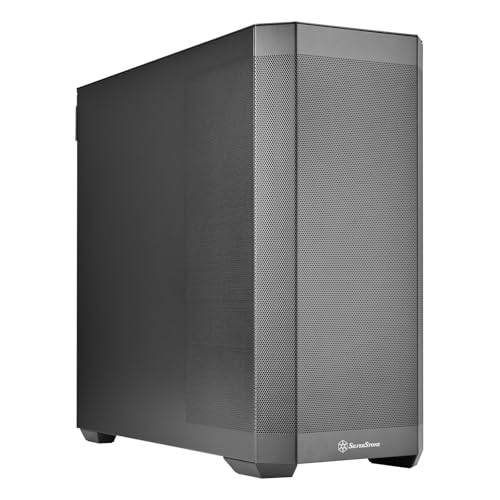
- Supports up to 15 SSDs or HDDs
- Accepts SSI-EEB through Mini-ITX motherboards
- Eight expansion slots support multi-GPU builds
Best For: Custom storage-rich and multi-GPU workstation configurations
Best for Drive Capacity

- Holds 10 3.5-inch HDDs and three 2.5-inch SSDs
- Includes four 120mm fans
- Supports a 360mm radiator and vertical GPU mounting
Best For: Data-heavy workstations requiring extensive internal storage
Best NAS-Ready Chassis

- Supports up to 11 HDDs or 13 SSDs
- Accepts E-ATX boards and 400mm expansion cards
- Includes USB 3.2 Gen Type-C connectivity
Best For: NAS, AI server, media server, and storage-heavy workstation builds
High-Airflow Workstation Pick

- Two 220mm intakes plus a 180mm exhaust fan
- Supports four dual-slot GPUs and 430mm cards
- Includes 360mm AIO support and flexible storage
Best For: AI workstations and multi-GPU builds
Storage-Focused Workstation Pick

- Offers 12 internal bays for mixed drive types
- Supports SSI-EEB and extended ATX motherboards
- Compatible with air and water cooling
Best For: Storage-heavy workstation and media builds
NAS and Compute Workstation Pick

- Supports 12 hot-swap HDDs and four SSDs
- Accommodates up to four GPUs and eight PCI slots
- Includes three fans and 240/280mm AIO support
Best For: NAS, home-server, and multi-GPU compute builds
Maximum Expansion

- E-ATX, SSI-EEB, and Threadripper support
- Dual-GPU clearance up to 495mm
- Six fans, 420mm radiator support, and nine bays
Best For: AI workstations and high-expansion builds
Compact Media Fit

- Supports ATX, Micro-ATX, and SSI-CEB
- 358mm depth for cabinet installations
- Positive-pressure cooling with quick-access filters
Best For: Compact ATX workstations and home-theater setups
Quiet Flexibility

- Two pre-installed quiet Pure Wings 2 fans
- Repositionable HDD slots and removable ODD cage
- Supports radiators up to 360mm
Best For: Quiet office workstations and adaptable ATX builds
Best Airflow Pick – ASUS ProArt PA602
For demanding computer cases for workstations, the ASUS ProArt PA602 emphasizes airflow, cooling flexibility, and room for large components. Its ventilated front panel, preinstalled fans, 420mm radiator support, and graphics-card clearance suit powerful professional builds.
Best For: Workstations that need strong stock airflow, extensive cooling support, and space for large GPUs.
Pros:
- Includes two 200mm front fans and a 140mm rear exhaust fan.
- Supports a 420mm radiator and graphics cards up to 440mm.
- Supports E-ATX motherboards and includes a USB-C 20Gbps port.
- Front-panel IR dust indicator helps signal when cleaning is needed.
Cons:
- Its 35.5-pound full-tower size may be excessive for compact work areas.
- Only one USB-C port is listed in the specifications.
The PA602 is a strong choice when thermal performance and component clearance matter more than a compact footprint. Its built-in fan hub and airflow-focused design simplify setup for high-power workstation hardware.
Best Expandable Tower – SilverStone SETA H2
Silverstone Technology SETA H2 Full-Size Workstation Tower Chassis, SST-SEH2-B
Check Price On AmazonThe SilverStone SETA H2 is a practical option among computer cases for workstations when storage, motherboard compatibility, and expansion capacity are priorities. Its fully perforated front supports airflow, while the large chassis accommodates enterprise-oriented configurations.
Best For: Storage-heavy and multi-GPU workstations using SSI-EEB, E-ATX, or other supported motherboard formats.
Pros:
- Supports up to 15 2.5-inch SSDs or 3.5-inch HDDs.
- Compatible with SSI-EEB, SSI-CEB, E-ATX, ATX, Micro-ATX, and Mini-ITX boards.
- Provides eight expansion slots for multi-GPU configurations.
- Fully perforated front mesh promotes unobstructed airflow.
Cons:
- Fans are not included, so cooling hardware must be added separately.
- The one-year limited warranty is shorter than some competing options.
The SETA H2 stands out for flexible platform support and substantial drive capacity. Plan for a separate fan purchase, but the chassis offers a solid foundation for large, customized workstation or server builds.
Best for Drive Capacity – DARKROCK Classico Max
The DARKROCK Classico Max focuses on storage density while retaining room for E-ATX-class workstation hardware. With support for up to 10 3.5-inch hard drives and three 2.5-inch SSDs, it is a compelling choice among computer cases for workstations built around large local data sets.
Best For: Storage-focused workstations needing many internal drives and included cooling.
Pros:
- Supports up to 10 3.5-inch HDDs and three 2.5-inch SSDs.
- Includes four preinstalled 120mm non-RGB fans.
- Supports a top-mounted 360mm radiator.
- Offers vertical GPU mounting through three vertical slots.
Cons:
- E-ATX installation requires removing the hard-drive cages.
- Its seven expansion slots provide less expansion capacity than some full towers.
The Classico Max is well suited to workstation users who value abundant internal storage and straightforward cooling. Its E-ATX clearance comes with a storage trade-off, so plan the layout before installation.
Best NAS-Ready Chassis – Rosewill Thor NAS
The Rosewill Thor NAS combines E-ATX support with high-density storage and server-oriented features, making it a specialized option among computer cases for workstations. It accommodates up to 11 3.5-inch HDDs or 13 2.5-inch SSDs and supports expansion cards up to 400mm.
Best For: AI servers, NAS systems, media servers, and storage-intensive workstation builds.
Pros:
- Supports E-ATX motherboards and expansion cards up to 400mm.
- Accommodates up to 11 3.5-inch HDDs or 13 2.5-inch SSDs.
- Includes a USB 3.2 Gen Type-C port for high-speed transfers.
- Provides 11 external 5.25-inch drive bays for additional expansion.
Cons:
- Only one 140mm PWM fan is included.
- Its server-focused drive-bay layout may be more than a conventional workstation needs.
- The warranty is limited to one year.
The Thor NAS is best viewed as an infrastructure-oriented chassis rather than a typical desktop case. It offers exceptional drive and expansion potential, but additional cooling may be appropriate for heavily loaded systems.
High-Airflow Workstation Pick – Cooler Master HAF II 500
For computer cases for workstations that prioritize airflow and expansion, the Cooler Master HAF II 500 combines three oversized fans, broad ventilation openings, and support for ATX or E-ATX motherboards. Its layout also accommodates graphics cards up to 430mm and up to four dual-slot GPUs.
Best For: AI workstations, multi-GPU builds, and demanding systems that need strong air cooling.
Pros:
- Includes two 220mm front intake fans and one 180mm rear exhaust fan.
- Supports up to four dual-slot GPUs and 430mm graphics cards.
- Offers 360mm AIO support, six PWM/ARGB fan-hub support, and flexible storage mounting.
Cons:
- The mid-tower design and eight expansion slots may be less suitable for exceptionally large workstation configurations.
- Its 21.3-pound weight and large dimensions may require substantial desk or floor space.
The HAF II 500 is a strong choice when cooling throughput and GPU stability matter more than compactness. Its dedicated GPU holder and large-fan configuration make it especially practical for compute-focused workstation builds.
Storage-Focused Workstation Pick – SilverStone SETA D1
The SilverStone SETA D1 is a practical option among computer cases for workstations that need extensive storage and broad component compatibility. Its modular design supports 5.25-inch, 3.5-inch, and 2.5-inch devices, while the chassis accommodates ATX through SSI-EEB or extended ATX motherboards.
Best For: Storage-heavy workstations, media systems, and builds using multiple drive types.
Pros:
- Provides 12 internal bays for flexible combinations of HDDs, SSDs, and optical drives.
- Supports SSI-EEB/extended ATX motherboards and expansion cards up to 394mm long.
- Offers both air- and water-cooling compatibility with USB Type-C connectivity.
Cons:
- The seven expansion slots provide less expansion capacity than some specialized workstation cases.
- The case is listed with a 250mm maximum power-supply length, which may limit PSU choices.
The SETA D1 stands out for builders who need a configurable storage layout rather than a GPU-dense enclosure. Its steel construction and wide motherboard support make it a versatile foundation for office, media, and workstation systems.
NAS and Compute Workstation Pick – JONSBO N5 NAS PC Case
The JONSBO N5 is designed for computer cases for workstations that also serve as NAS or home-server platforms. It supports up to 12 hot-swap 3.5-inch HDDs, four 2.5-inch SSDs, and as many as four GPUs, with compatibility for ITX, Micro-ATX, ATX, and E-ATX motherboards.
Best For: Home servers, NAS systems, and high-performance computing builds with substantial storage or GPU needs.
Pros:
- Provides 12 hot-swap HDD bays plus four SSD positions.
- Supports up to four GPUs and eight PCI expansion slots.
- Includes three rear 120mm fans and supports 240mm or 280mm AIO cooling.
- Offers a removable top cover and removable four-bay HDD cage for easier installation.
Cons:
- Full 12-drive operation depends on the power-supply length and can reduce the available front drive slots.
- GPU, CPU cooler, and PSU dimensions require careful component selection.
The N5 is a specialized enclosure rather than a general-purpose tower. Its unusually high drive capacity and four-GPU support make it compelling for storage-intensive compute, but builders should verify PSU, GPU, and cooling clearances before purchasing.
Maximum Expansion – Antec 900 Workstation Case
For demanding computer cases for workstations, the Antec 900 is built around expansion, graphics-card clearance, and airflow. Its full-tower layout supports E-ATX, SSI-EEB, and Threadripper motherboards, while accommodating dual GPUs and extensive storage.
Best For: AI workstations, Threadripper builds, dual-GPU systems, and large data-storage configurations.
Pros:
- Supports E-ATX, SSI-EEB, and Threadripper motherboards.
- Fits dual GPUs up to 495mm long and 160mm thick.
- Includes six PWM fans, support for a 420mm front radiator, and nine drive bays.
- Offers USB Type-C 3.2 Gen 2 connectivity and tool-free tempered-glass access.
Cons:
- Its full-tower footprint and 33.1-pound weight require substantial desk or floor space.
- The expansive feature set may be more than a conventional office PC needs.
The Antec 900 is the strongest choice here when workstation expandability, GPU clearance, cooling capacity, and storage are priorities. Its large chassis is less suited to compact work areas, but it provides considerable room for specialized hardware.
Compact Media Fit – SilverStone GD09 HTPC Case
The SilverStone GD09 takes a different approach to computer cases for workstations, using a low-profile home-theater design that supports ATX and Micro-ATX systems. Its 358mm depth is useful when a full-size case must fit inside a cabinet or media enclosure.
Best For: Compact ATX workstations, home-theater PCs, cabinet installations, and rack-compatible setups.
Pros:
- Supports SSI-CEB, ATX, and Micro-ATX motherboards.
- 358mm depth helps it fit comfortably inside home-theater cabinets.
- Positive air pressure is designed to support cooling, quietness, and dust prevention.
- Includes quick-access filters and compatibility with SilverStone RA02 rackmount ears.
Cons:
- The low-profile 6.69-inch height limits its suitability for large workstation components.
- It provides four internal bays, fewer than the Antec 900.
- Its front-mounted power supply layout may require more planning during assembly.
The GD09 is a practical option when enclosure depth and discreet placement matter more than maximum expansion. It suits compact ATX-based workstations and media-oriented systems, but its slim form factor is not intended for oversized multi-GPU builds.
Quiet Flexibility – be quiet! Pure Base 600 Case
The be quiet! Pure Base 600 is a balanced choice among computer cases for workstations, combining two pre-installed Pure Wings 2 fans with flexible drive placement. Its ATX-compatible layout also supports water-cooling radiators up to 360mm for systems that need additional cooling capacity.
Best For: Quiet office workstations, adaptable ATX builds, and systems using moderate air or liquid cooling.
Pros:
- Includes two pre-installed fans designed for quiet operation and airflow.
- Repositionable HDD slots and a removable ODD cage allow layout customization.
- Supports radiators up to 360mm and includes an adjustable top-cover vent.
- Backed by a 3-year manufacturer’s warranty.
Cons:
- Its three internal bays offer less storage expansion than the Antec 900.
- Only two fans are pre-installed, so additional cooling may be needed for demanding builds.
- The listed specification identifies it as a mini-tower despite its ATX-focused layout, so buyers should verify fit requirements.
The Pure Base 600 is a sensible middle ground for a quiet, customizable workstation. It offers useful cooling flexibility and a longer warranty, though users building storage-heavy or especially demanding systems may prefer a larger enclosure.
How We Picked These Computer Cases for Workstations
We selected cases that offer practical advantages for professional builds: support for larger motherboards, strong GPU and CPU-cooler clearance, useful drive capacity, accessible internal layouts, and cooling options suited to sustained workloads. The list includes full towers for multi-GPU or storage-heavy systems, mid-towers for balanced builds, and specialized enclosures for NAS or living-room workstation applications.
Because workstation needs vary, no single case is best for every buyer. Check the manufacturer’s current specifications before purchase, particularly for radiator support, maximum GPU length, drive-bay configuration, and motherboard compatibility.
Quick Comparison
- Best for large professional builds: ASUS ProArt PA602 and SilverStone SETA H2.
- Best for extensive storage: Rosewill Thor NAS and JONSBO N5.
- Best for airflow-focused builds: Cooler Master HAF II 500 and Antec 900.
- Best for flexible mid-size systems: SilverStone SETA D1 and be quiet! Pure Base 600.
- Best for compact or media-center layouts: SilverStone GD09.
Key Buying Factors for Computer Cases for Workstations
Motherboard and Expansion Support
Confirm whether your board is ATX, E-ATX, or another format, and check the case’s actual compatibility notes. Extra expansion slots and internal clearance matter if you use capture cards, RAID controllers, sound cards, or multiple GPUs.
Cooling and Sustained Airflow
Workstation processors and graphics cards can run at high load for hours. Prioritize front-to-back airflow, multiple fan mounts, dust filtration, and sufficient clearance for a large air cooler or radiator. Pre-installed fans are useful, but verify their size, speed control, and replacement options.
Storage Capacity and Accessibility
Video production, 3D work, scientific datasets, and local servers can require several hard drives or SSDs. Count the number of bays you need, then check whether installing drives compromises GPU space or airflow. Tool-less trays and accessible cabling can save considerable maintenance time.
Noise, Size, and Connectivity
A larger tower is easier to build in but may not fit beneath a desk. For office environments, consider acoustic panels, fan control, and vibration isolation. Also check front-panel USB ports, audio connections, and whether the case layout suits your desk orientation.
Who Should Buy Which Computer Cases for Workstations?
Choose the ASUS ProArt PA602 or SilverStone SETA H2 for a premium, spacious workstation with demanding cooling and expansion requirements. Choose the Rosewill Thor NAS or JONSBO N5 if numerous hard drives, SSDs, or server-style storage are central to the build.
Choose the Cooler Master HAF II 500 or Antec 900 for airflow-conscious performance systems, especially when component temperatures are a priority. Choose the SETA D1 or be quiet! Pure Base 600 for a more manageable ATX workstation that balances expandability, cooling, and everyday usability.
Choose the SilverStone GD09 when the computer must fit a horizontal home-theater-style setup. Before ordering, measure the available space and compare the case’s supported component dimensions with your exact parts list.