Sharing a keyboard, mouse, printer, scanner, or other USB accessory between two laptops should not require unplugging cables every time you switch workstations. The best USB switch boxes for laptops make that handoff quick, organized, and reliable.
This roundup covers simple USB selectors, USB-C models, and HDMI KVM switches so you can match the setup to your devices, displays, and daily workflow.
Best 10 USB Switch Boxes for Laptops Picks for 2026
Best Value USB Sharing
UGREEN 2-Computer USB 3.0 Switch
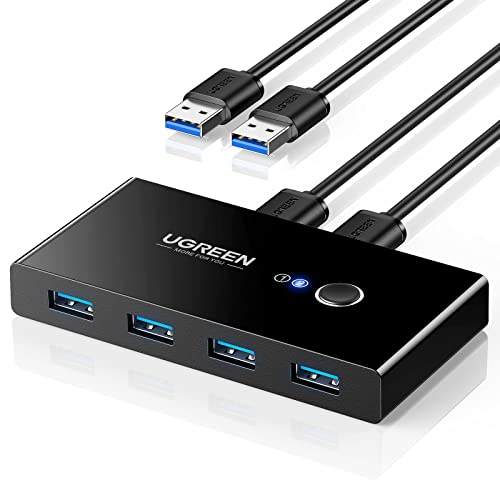
- Shares four USB devices between two computers
- Up to 5Gbps USB 3.0 data transfer
- One-button, driver-free switching
Best For: Sharing USB peripherals between two laptops
Best Premium USB-C KVM
Cable Matters Dual-Laptop KVM Switch

- Shares one HDMI display between two USB-C laptops
- Up to 4K at 60Hz and 100W charging
- 10Gbps USB ports with RF remote
Best For: USB-C dual-laptop workstations with charging
Best for Four Computers

- Shares four USB devices among four computers
- Up to 5Gbps USB 3.0 transfer speeds
- Adds 3.5mm audio output and four included cables
Best For: Multi-computer offices sharing USB peripherals
Best Budget HDMI KVM
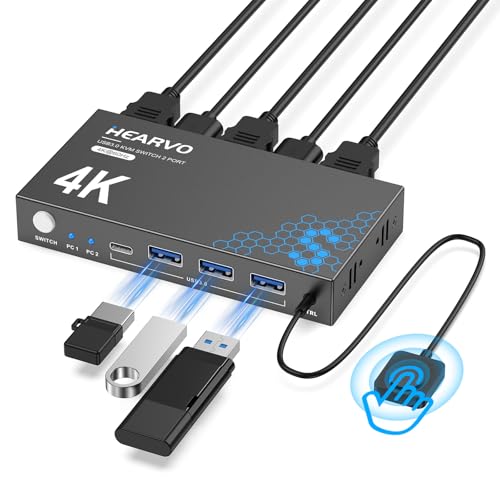
- Shares one HDMI monitor between two computers
- Four USB 3.0 ports, including USB-C
- 4K at 60Hz with wired remote switching
Best For: Two-computer desks needing monitor and USB sharing
Best Overall

- Shares four USB devices between two computers
- Combines USB-A and USB-C connectivity
- Offers 5Gbps transfers and remote switching
Best For: Flexible dual-computer USB peripheral setups
Best for Warranty Coverage

- Shares four USB peripherals between two computers
- Supports 5Gbps transfers and major operating systems
- Includes an 18-month warranty
Best For: Simple, warranty-backed peripheral switching
Best Compact Setup
4-Port USB 3.0 Peripheral Switch

- Shares USB devices between two computers
- Has three USB-A and one USB-C port
- Uses a wired remote controller
Best For: Organized dual-computer desks with hidden cabling
Best HDMI KVM Pick

- Shares one 4K/60Hz HDMI monitor and USB controls
- Includes two HDMI and two USB cables
- One-button, driver-free switching for two computers
Best For: Two-computer workstations needing shared 4K display access
Best Feature-Rich USB Switch
BENFEI USB 3.0 and USB-C Switcher

- Shares three USB 3.0 and one USB-C device
- Offers button and remote-control switching
- Supports up to 5Gbps data transfers
Best For: Laptop users sharing varied USB peripherals between two computers
Best Four-Port Value

- Shares four USB devices between two computers
- Includes two long USB 3.0 connection cables
- Manual switching with plug-and-play support
Best For: Simple multi-device USB sharing on a two-computer desk
Best Value USB Sharing – UGREEN 2-Computer USB 3.0 Switch
If you need usb switch boxes for laptops to share accessories between a work machine and a personal computer, the UGREEN USB 3.0 Switch is a straightforward option. It connects four USB devices to two computers and lets you change control with one button, without handling video signals.
Best For: Laptop users sharing keyboards, mice, storage devices, printers, scanners, or other USB peripherals between two computers.
Pros:
- Shares four USB devices between two computers.
- Supports USB 3.0 transfer speeds up to 5Gbps and USB 2.0 backward compatibility.
- Includes two USB 3.0 data cables and offers driver-free compatibility with Windows, macOS, Chrome OS, and Linux.
- One-button switching with an LED status indicator.
Cons:
- Does not support monitors or video transmission.
- Power adapter is not included, and extra power may be needed for multiple or high-power devices.
- USB-C-only laptops may require a USB-C-to-A adapter.
This is a practical peripheral-sharing switch rather than a full KVM. Choose it when your setup only needs shared USB accessories and you want a compact, simple control method.
Best Premium USB-C KVM – Cable Matters Dual-Laptop KVM Switch
For a dual-laptop desk that needs display sharing as well as peripheral switching, the Cable Matters USB-C KVM is a more complete choice among usb switch boxes for laptops. It connects two USB-C or Thunderbolt laptops to one HDMI display and shared USB accessories, while also providing laptop charging.
Best For: USB-C laptop workstations needing one HDMI monitor, shared peripherals, high-speed USB ports, and charging from a single switch.
Pros:
- Supports two USB-C or Thunderbolt laptops sharing one HDMI monitor and USB peripherals.
- Supports HDMI output up to 4K at 60Hz when the connected laptops support DisplayPort Alt Mode over USB-C or Thunderbolt.
- Provides up to 100W to one laptop or up to 85W each when two are connected.
- Includes 10Gbps USB-C and USB-A ports, an RF remote, and a 180W power adapter.
Cons:
- Requires compatible USB-C video output; it is not intended for HDMI-output PCs or USB-C portable monitors.
- Keyboard and mouse hotkey switching requires downloading software.
- Its charging and video benefits depend on the laptops’ capabilities and system limits.
This model is suited to a feature-rich, USB-C-centered workspace. It costs more complexity than a USB-only switch, but combines display switching, peripheral sharing, remote control, and charging in one unit.
Best for Four Computers – eKL 4-Computer USB 3.0 Switch
The eKL USB 3.0 Switch is designed for setups where four computers need access to the same USB accessories. As usb switch boxes for laptops go, it offers broad device sharing, one-button selection, and an added 3.5mm audio output, but it does not function as a monitor KVM.
Best For: Offices, labs, or multi-computer desks that need to share four USB peripherals among up to four laptops or PCs.
Pros:
- Lets four computers share four USB 3.0 devices.
- Supports data transfer speeds up to 5Gbps and USB 2.0 backward compatibility.
- Includes four cables and works without drivers across Windows, macOS, Linux, and Chrome OS.
- Provides one-button switching, LED status lights, and a 3.5mm audio output.
Cons:
- Power adapter is not included, and high-power devices may require additional power.
- Using the USB port to power a speaker may cause an unstable connection.
- It shares USB and audio accessories but does not provide monitor switching.
If four computers must access the same keyboard, mouse, storage, printer, or scanner, the eKL offers useful capacity without requiring a full video KVM. Check your power needs before connecting several demanding devices.
Best Budget HDMI KVM – S7232H 2-Computer 4K HDMI KVM
If you want usb switch boxes for laptops that also handle a monitor, the S7232H combines USB peripheral sharing and HDMI switching for two computers. It supports one shared display, four USB 3.0 ports, and both on-unit and wired-remote switching.
Best For: Two-computer desks that need to share one HDMI monitor, keyboard, mouse, webcam, headset, storage device, or printer.
Pros:
- Combines USB switching and HDMI switching for two computers and one monitor.
- Supports 4K at 60Hz, plus 4K at 30Hz, 2K, 3D, and 1080p signals.
- Offers three USB-A and one USB-C USB 3.0 ports with speeds up to 5Gbps.
- Includes a wired remote, adaptive EDID, two USB cables, and plug-and-play setup without a power supply or drivers.
Cons:
- It supports one shared monitor rather than multiple displays.
- Video switching requires HDMI connections, so it is not a USB-C display solution.
- Actual 4K at 60Hz performance depends on the connected equipment and signal setup.
This is a sensible all-in-one option when display switching matters but USB-C charging and dual-laptop docking are not priorities. The wired remote is useful if the main unit needs to sit out of reach.
Best Overall – UGREEN 4-Port USB 3.0 Switch
For shoppers comparing USB switch boxes for laptops, the UGREEN CM662 is a versatile option for sharing four USB peripherals between two computers. It combines three USB-A ports with one USB-C port, supports USB 3.0 speeds up to 5Gbps, and offers both onboard and remote switching.
Best For: Dual-computer workstations that need flexible USB-A and USB-C peripheral sharing.
Pros:
- Shares up to four USB devices between two computers.
- Includes three USB-A ports and one USB-C port.
- Supports up to 5Gbps data transfer and multiple operating systems.
- Optional USB-C power input helps stabilize higher-power devices.
Cons:
- Does not support monitors, video transmission, or USB-C display output.
- Power adapter is optional rather than included.
- USB ports are intended for data, not device charging.
The UGREEN stands out for its port variety and convenient controller, but it is strictly a USB peripheral switch rather than a full KVM. Choose it when you want to share accessories—not a display—between a laptop and another computer.
Best for Warranty Coverage – BENFEI 4-Port USB 3.0 Switch
The BENFEI is a practical choice among USB switch boxes for laptops when you want to share four USB accessories between two computers with one button. Its four USB 3.0 ports support transfers up to 5Gbps, while the LED indicator shows which computer is active.
Best For: Users who want straightforward switching, broad OS compatibility, and an 18-month warranty.
Pros:
- Shares keyboards, mice, storage, printers, scanners, cameras, and headphones.
- Provides up to 5Gbps USB 3.0 data transfer with USB 2.0 backward compatibility.
- One-click button switching includes an LED status indicator.
- Compatible with Windows, Mac, Linux, and Chrome OS.
Cons:
- Requires the supplied USB-A-to-USB-A cables for operation.
- Power adapter is not included.
- Its extra power input is needed for some higher-consumption devices.
BENFEI offers a simple, driver-free setup and useful status feedback for everyday peripherals. It is a good fit for laptop users who value compatibility and warranty coverage, provided they already have—or are willing to add—the necessary power adapter.
Best Compact Setup – 4-Port USB 3.0 Peripheral Switch
This four-port peripheral switch is designed for shoppers seeking USB switch boxes for laptops without repeatedly swapping cables. It connects three USB-A devices and one USB-C device to two computers, then lets you switch from a convenient wired desktop controller.
Best For: Clean two-computer desks where the switch itself can stay tucked away.
Pros:
- Shares a keyboard, mouse, printer, scanner, storage device, or other USB peripheral.
- Offers three USB-A ports plus one USB-C port.
- Includes an extended wired controller for easy desktop access.
- USB 3.0 provides high-speed connectivity for compatible devices.
Cons:
- The supplied notes do not specify a maximum transfer rate.
- No operating-system list is provided beyond general computer compatibility.
- It is intended for USB peripherals and does not provide display switching.
The remote controller is the main convenience feature, especially when the main unit is hidden behind a desk or monitor. Consider it for a tidy laptop-and-PC workstation, while buyers needing detailed speed or OS specifications may prefer a more fully documented model.
Best HDMI KVM Pick – 4K 2-Port HDMI KVM Switch
For shoppers comparing USB switch boxes for laptops, this 2-port KVM switch is a practical choice when you want two computers to share one HDMI monitor, keyboard, and mouse. It supports 4K at 60Hz, includes the necessary USB and HDMI cables, and switches computers with a push button.
Best For: Laptop and desktop users who need to share one 4K HDMI display and one set of USB controls between two computers.
Pros:
- Supports UHD 4K at 60Hz, along with 4K at 30Hz, 3D, and 1080p resolutions.
- Includes two USB cables and two HDMI cables for a simpler setup.
- Driver-free compatibility with Windows, macOS, Linux, and Chrome OS.
- One-button switching with LED indicators showing the active computer.
Cons:
- Designed for sharing one HDMI monitor rather than multiple displays.
- It has two computer positions, so it is not intended for larger multi-computer setups.
- High-power USB devices may require more power than the switch itself provides.
This model stands out when display quality matters as much as USB sharing. Its included cables and 4K/60Hz support make it a well-rounded option for a two-computer workstation, home office, or gaming setup.
Best Feature-Rich USB Switch – BENFEI USB 3.0 and USB-C Switcher
This BENFEI model is one of the more flexible USB switch boxes for laptops, letting two computers share three USB 3.0 devices plus one USB-C device. It offers up to 5Gbps transfer speeds, push-button or remote switching, and an optional USB-C power connection for demanding peripherals.
Best For: Users switching keyboards, mice, storage devices, printers, scanners, cameras, or headphones between two laptops or computers.
Pros:
- Provides three USB 3.0 ports and one USB-C port for shared peripherals.
- Supports data transfer speeds up to 5Gbps and is backward compatible with USB 2.0.
- Can be controlled with the switch button or included remote control.
- Compatible with Windows, macOS, Chrome OS, and Linux without switch-driver installation.
Cons:
- Requires USB A-to-USB A cables for the computer connections.
- High-power devices may need an additional power connection through the USB-C power slot.
- It switches USB peripherals only and does not provide HDMI display switching.
The BENFEI is a strong fit for a mixed-peripheral setup, especially if USB-C connectivity and remote control are useful. Its optional power input also gives it more flexibility with cameras, headphones, and storage devices than a basic USB switch.
Best Four-Port Value – USB 3.0 2-Computer Switcher
If you need USB switch boxes for laptops with several standard peripherals, this four-port USB 3.0 switcher offers a straightforward solution. Two computers can share connected keyboards, mice, printers, storage devices, and other USB accessories, with switching handled by a front button and status light.
Best For: Budget-conscious users who want to share up to four USB devices between two computers without repeatedly unplugging cables.
Pros:
- Lets two computers share four USB devices simultaneously.
- Supports USB 3.0 transfer speeds up to a stated theoretical 500MB/s.
- Includes two 59-inch USB 3.0 cables for connecting the computers.
- Plug-and-play operation supports Windows, macOS, Linux, and other compatible systems.
Cons:
- High-power devices such as large hard drives, SSDs, or digital cameras may require an external 5V adapter.
- Switching is manual and button-based rather than remote-controlled.
- The supplied warranty is six months.
This is a sensible choice for a conventional USB workstation with several shared accessories. It keeps the setup simple and provides four front-facing USB ports, but users with power-hungry devices should plan for the optional external adapter.
How We Picked These USB Switch Boxes for Laptops
We focused on the features that make a switch useful in a real desk setup: the number and type of shared ports, compatibility with modern laptops, switching method, data performance, display support, and power requirements. The selection includes straightforward USB 3.0 switches for peripherals as well as full KVM-style units that can share a monitor and USB devices.
Because product listings can vary by seller and revision, verify the included cables, supported resolutions, charging limits, and operating-system compatibility before buying.
Quick Comparison
| Type | Best For | What to Check |
|---|---|---|
| USB-A switch | Keyboard, mouse, printer, or scanner sharing | USB 3.0 speed and included host cables |
| USB-A/USB-C switch | Mixed modern and older accessories | Port layout, USB-C data support, and power needs |
| USB-C KVM | Laptops using USB-C and one shared display | Video standard, charging wattage, and laptop compatibility |
| HDMI KVM | One monitor plus shared peripherals | Resolution, refresh rate, HDMI version, and EDID behavior |
| Remote-control model | Switching without reaching behind the desk | Remote range, receiver placement, and button controls |
Key Buying Factors for USB Switch Boxes for Laptops
Port Type and Device Count
Count the accessories you want to share before choosing a model. Four-port switches are more flexible for a keyboard, mouse, webcam, printer, and storage device, while compact models can be better for a minimal setup. USB-C ports may support newer accessories, but do not assume every USB-C port carries video, charging, or high-speed data.
USB Speed and Power
USB 3.0 is preferable for external drives, scanners, and other bandwidth-heavy devices. Basic keyboards and mice work over slower connections. Some switches draw enough power from the host computers for low-power accessories, while hard drives, webcams, and multiple devices may need an external power adapter.
Display and Charging Support
A standard USB switch shares peripherals only; it does not automatically switch a monitor. Choose an HDMI KVM when you want one display controlled alongside the keyboard and mouse. For USB-C laptops, check whether the unit supports video output, charging pass-through, the required USB-C mode, and your target resolution and refresh rate.
Switching Method and Compatibility
Physical buttons are simple and dependable. Wired desktop buttons or remotes are useful when the switch is hidden or mounted out of reach. Confirm that the product supports your operating systems and that your printer, scanner, webcam, or storage device does not require special drivers or continuous connection.
Who Should Buy Which USB Switch Boxes for Laptops?
- For a basic two-laptop desk: Choose a USB 3.0 switch with four USB ports for a keyboard, mouse, printer, and occasional accessory.
- For mixed USB-A and USB-C equipment: Select a model that clearly identifies USB-C as a data-sharing port and includes suitable host cables.
- For one monitor and two computers: Buy an HDMI KVM, checking its supported resolution and refresh rate before ordering.
- For USB-C laptop users: A USB-C KVM can reduce cable clutter, but prioritize charging capability and video compatibility over port count alone.
- For a hidden or hard-to-reach setup: A switch with a wired button or remote control can make daily switching more convenient.