A well-chosen USB extension cable can make a desktop workspace easier to organize, especially when ports are tucked behind a tower or monitor. The right option depends on your device, required reach, transfer speed, and available desk space.
We compared 10 USB extension cables for desktop setups, including compact single cables, multipacks, braided designs, and desktop-friendly models with added port access.
Best 10 USB Extension Cables for Desktop Setups Picks for 2026
Long-Range Desktop Extension
10ft USB 3.0 Extension Cable 2-Pack

- Two 10-foot USB-A extension cables
- Up to 5Gbps data transfer
- Braided construction with 18-month warranty
Best For: Long desktop and entertainment-center cable runs
Compact Desk Upgrade
3ft USB-A 3.0 Extension Cable 2-Pack

- Two short 3-foot extension cables
- 5Gbps data and up to 15W charging
- Braided sheath with reinforced connectors
Best For: Nearby desk peripherals and tidy workstations
Durability-Focused Pick
AINOPE 6.6ft USB 3.0 Extension 2-Pack
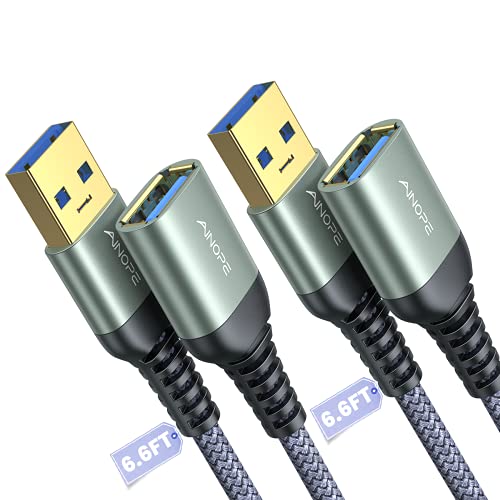
- Two 6.6-foot USB-A extension cables
- Braided, bend-tested construction
- Includes sticky cable-management buckles
Best For: Frequently used or rearranged desktop workstations
Simple Desktop Standard
StarTech 5ft USB 2.0 Extension Cable
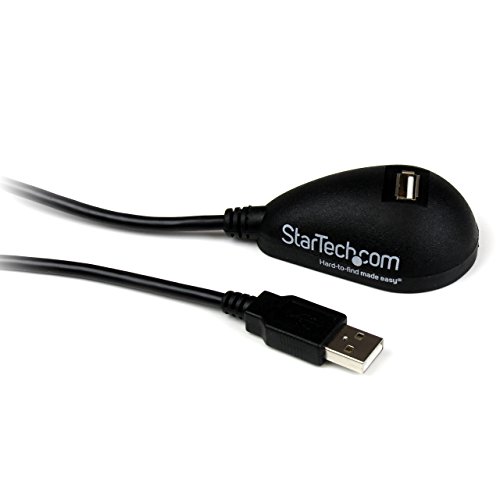
- 5-foot USB-A male-to-female design
- Up to 480Mbps USB 2.0 transfer
- Backed by a lifetime warranty
Best For: Basic peripheral access and port relocation
Best All-Around Pick
UGREEN 3ft USB 3.0 Extension Cable 2-Pack
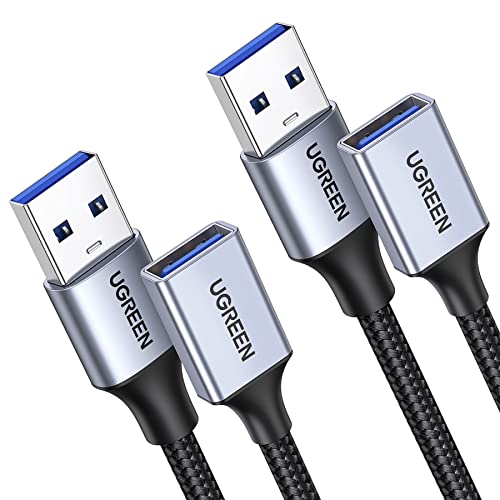
- Two 3-foot USB 3.0 extension cables
- Up to 5 Gbps data and 2A charging
- Braided construction with aluminum-alloy connectors
Best For: Everyday USB-A desktop peripherals
Best for Long Reach
10ft USB 3.0 Extension Cable 2-Pack

- Two 10-foot USB-A extension cables
- Up to 5 Gbps data and 2A charging
- Backward compatible with USB 2.0 and 1.1
Best For: Desks and devices positioned far from the computer
Best Desktop Hub Design
Tripp Lite 6ft 2-Port USB 3.0 Extension

- 6-foot USB 3.0 desktop extension
- One data/power port plus one power-only port
- Lifetime limited warranty
Best For: Workstations needing convenient front-access USB ports
Fast-Access Desktop Extension
4.7-Foot USB 3.0 Pedestal Cable
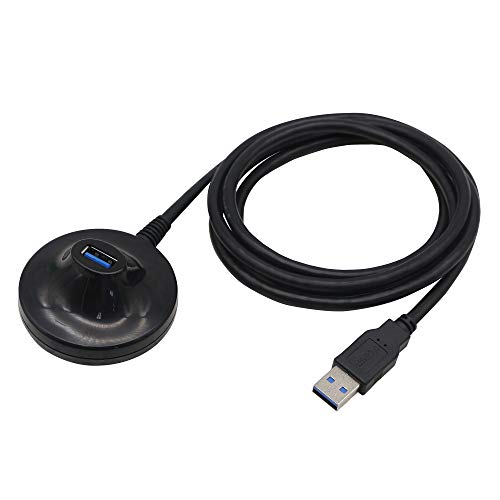
- Up to 5Gbps USB 3.0 data transfer
- Pedestal design improves port accessibility
- Shielded, reinforced construction
Best For: Accessible desktop connections for keyboards, mice, and flash drives
Compact Everyday Extension

- Up to 5Gbps transfer speed
- Convenient short length for desktops
- Shielding helps reduce interference
Best For: Neat office, desktop, and gaming connections
Multi-Station Cable Value
3-Pack 6-Foot USB 2.0 Extenders
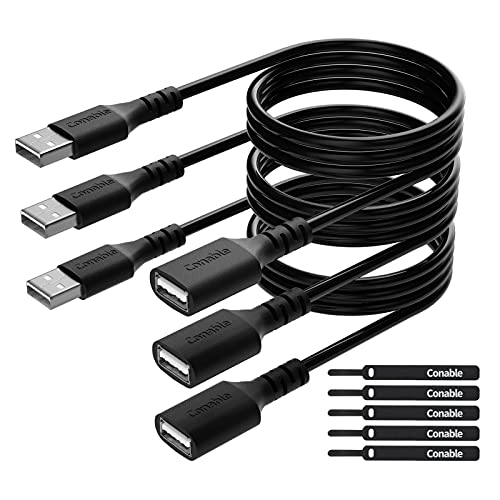
- Three cables provide broad coverage
- USB 2.0 speeds up to 480Mbps
- Includes five cable ties
Best For: Multiple peripherals, longer reach, and budget-friendly setups
Long-Range Desktop Extension – 10ft USB 3.0 Extension Cable 2-Pack
For desktop setups that need extra reach, the JSAUX 2-pack provides two 10-foot USB-A male-to-female cables. It is a practical option among usb extension cables for desktop setups when you need to move peripherals away from a computer or reduce repeated access to hard-to-reach USB ports.
Best For: Long-distance connections to webcams, printers, storage drives, hubs, keyboards, and other USB peripherals.
Pros:
- Two 10-foot cables provide substantial reach for desktop or entertainment setups.
- USB 3.0 supports data transfer speeds up to 5Gbps and is backward compatible with USB 2.0 and USB 1.1.
- Nylon braiding, gold-plated connectors, shielding, and molded joints support durability and signal stability.
Cons:
- The 10-foot length may create extra cable management work on compact desks.
- This is a USB-A male-to-female cable, so it does not directly address USB-C-only ports.
Choose this set when reach and having a spare cable matter more than minimizing desk clutter. The included 18-month warranty adds useful coverage for a long cable run.
Compact Desk Upgrade – 3ft USB-A 3.0 Extension Cable 2-Pack
This 3-foot 2-pack is suited to desktop users who want a little extra reach without managing long cables. It combines USB 3.0 data transfer with charging support, making it a flexible pick among usb extension cables for desktop setups.
Best For: Bringing nearby keyboards, mice, flash drives, card readers, cameras, and other USB-A accessories within easier reach.
Pros:
- Short 3-foot length helps extend ports while limiting excess cable on a desk.
- Supports up to 5Gbps USB 3.0 data transfer and up to 15W charging.
- Braided covering, gold-plated connectors, aluminum housing, and layered shielding are designed for durability and stable signals.
Cons:
- The 3-foot length may not be sufficient for devices positioned far from the computer.
- It uses USB-A connectors, so compatibility depends on having an available USB-A port or adapter.
This is a sensible everyday choice when you need modest reach for a clean workstation. Its two-in-one data and charging capability adds versatility for compatible USB devices.
Durability-Focused Pick – AINOPE 6.6ft USB 3.0 Extension 2-Pack
The AINOPE 2-pack balances useful reach with construction features aimed at frequent everyday use. For shoppers comparing usb extension cables for desktop setups, its 6.6-foot length and included sticky buckles make it easier to position and organize peripherals.
Best For: Busy desktop setups using keyboards, mice, storage devices, hubs, printers, scanners, cameras, and gaming controllers.
Pros:
- Two 6.6-foot cables offer flexible reach without the length of a 10-foot extension.
- USB 3.0 supports fast data syncing and charging, with backward compatibility for USB 2.0 and USB 1.1.
- 400,000-plus bend-tested joints, nylon braiding, metal connectors, shielding, and sticky buckles support long-term organization.
Cons:
- The 6.6-foot length can still require cable routing on smaller desks.
- USB-A male-to-female connections may require an adapter for systems without USB-A ports.
Consider this model when durability and cable organization are priorities. The combination of reinforced joints and included buckles makes it especially practical for a frequently rearranged or heavily used workstation.
Simple Desktop Standard – StarTech 5ft USB 2.0 Extension Cable
The StarTech USBEXTAA5DSK is a straightforward 5-foot USB-A male-to-female extension designed to relocate a hard-to-reach computer port. It remains a practical option among usb extension cables for desktop setups when basic peripheral access is more important than USB 3.0 speeds.
Best For: Moving access to webcams, thumb drives, cameras, MP3 players, and other standard USB peripherals around a PC or Mac.
Pros:
- Five feet of reach can place a USB port on top of a case or within easier desktop access.
- Simple male-to-female design supports hassle-free installation with an available USB port.
- Lifetime warranty provides long-term coverage.
Cons:
- USB 2.0 data transfer is limited to up to 480Mbps, slower than the USB 3.0 alternatives.
- The single-cable package provides less flexibility than the two-packs in this roundup.
- It is best suited to basic USB connections rather than high-speed storage workflows.
Pick this cable for a dependable, uncomplicated way to bring a rear computer port closer to your workspace. Its USB 2.0 specification is adequate for many everyday peripherals, but users moving large files should consider a USB 3.0 model instead.
Best All-Around Pick – UGREEN 3ft USB 3.0 Extension Cable 2-Pack
For desktop setups that need a dependable reach upgrade, the UGREEN 3ft pair is a practical choice among USB extension cables for desktop setups. It supports USB 3.0 data transfer up to 5 Gbps and up to 2A charging, while the braided jacket and aluminum-alloy connectors are suited to regular indoor use.
Best For: Extending webcams, keyboards, mice, printers, hubs, drives, and other USB-A peripherals without adding excessive cable length.
Pros:
- Includes two 3-foot USB 3.0 male-to-female cables.
- Supports data transfer speeds up to 5 Gbps and charging up to 2A.
- Braided shielding, multiple shielding layers, and aluminum-alloy connectors support durability and signal clarity.
- Plug-and-play design requires no driver installation.
Cons:
- The 3-foot length may not suit setups requiring a long run.
- Designed for USB-A connections rather than USB-C ports.
This two-pack offers a useful balance of speed, durability, and flexibility for everyday desk peripherals. Choose it when two moderate-length extensions are more useful than one extra-long cable.
Best for Long Reach – 10ft USB 3.0 Extension Cable 2-Pack
If your desktop, entertainment area, or workstation has ports tucked out of reach, this 10-foot two-pack stands out among USB extension cables for desktop setups. The USB 3.0 cables support up to 5 Gbps data transfer and up to 2A charging, with backward compatibility for USB 2.0 and USB 1.1 devices.
Best For: Reaching peripherals positioned across a desk, behind furniture, or farther from a computer or wall charger.
Pros:
- Two 10-foot male-to-female USB extension cables provide substantial reach.
- Supports USB 3.0 speeds up to 5 Gbps and charging up to 2A.
- Works with USB 3.0, USB 2.0, and USB 1.1 devices.
- Braided shielding, reinforced strain relief, and aluminum-alloy connectors are designed for durability.
Cons:
- The long 10-foot length can create extra cable to manage on a compact desk.
- Uses USB-A connectors, so it is not a direct solution for USB-C-only devices.
This is the better fit when distance is the main problem. Its two-cable bundle also makes it convenient to extend multiple devices, provided your setup has room to route the additional cable length.
Best Desktop Hub Design – Tripp Lite 6ft 2-Port USB 3.0 Extension
Tripp Lite 6ft 2-Port USB 3.0 Superspeed Desktop Extension Cable M/F 6' (U324-006-DSK2), Black
Check Price On AmazonThe Tripp Lite U324-006-DSK2 takes a more desktop-focused approach to USB extension cables for desktop setups. Its 6-foot cable terminates in a two-port desktop extension unit, with one USB 3.0 data-and-power port and one power-only port for convenient access at the edge of a workstation.
Best For: Desktop users who want extended USB access with one high-speed data port and an additional power-only port.
Pros:
- Provides a 6-foot reach for USB-A peripherals.
- Includes one USB 3.0 data/power port and one power-only port.
- Supports data transfer rates up to 5 Gbps and is backward compatible with previous USB generations.
- Includes a lifetime limited warranty.
Cons:
- Only one of the two ports supports data; the other is power-only.
- Includes one cable rather than a multi-pack.
- Its PVC construction may be less flexible than braided alternatives.
Choose this model when convenient desktop access matters more than having two fully data-capable extension cables. The integrated two-port design can reduce the need to reach behind a PC while preserving USB 3.0 performance on its primary port.
Fast-Access Desktop Extension – 4.7-Foot USB 3.0 Pedestal Cable
For desktop setups that need a more accessible USB port, this 4.7-foot USB 3.0 extension cable adds useful reach without requiring drivers. Its pedestal design is intended to make connecting devices such as flash drives, keyboards, and mice quicker and easier.
Best For: Users who want a convenient, durable USB-A extension for fast data transfers and frequently accessed peripherals.
Pros:
- Supports USB 3.0 transfer speeds up to 5Gbps when paired with a USB 3.0 host.
- Pedestal-style end helps position the connection in a more accessible location.
- Shielding, tin-plated copper conductors, and nickel alloy connectors help resist interference and wear.
Cons:
- Uses USB Type-A connectors, so it is not a direct solution for USB-C-only devices.
- The listed 4.7-foot length may be more cable than needed for compact setups.
This is a strong choice among USB extension cables for desktop setups when speed, reach, and easy access matter. It is especially practical for a workstation where the computer’s rear USB ports are inconvenient to reach.
Compact Everyday Extension – 3.3-Foot USB 3.0 Cable
This 3.3-foot USB 3.0 extension cable is sized for everyday desktop, office, and gaming use. It provides a practical way to move a USB-A port closer to your workspace while supporting transfers up to 5Gbps.
Best For: Desktop users who need a short, straightforward extension for keyboards, mice, flash drives, printers, controllers, or similar USB devices.
Pros:
- Supports USB 3.0 data rates up to 5Gbps.
- Compact 3.3-foot length helps extend a nearby port without excessive slack.
- Multi-layer shielding and reinforced connectors are designed for stable, repeated use.
Cons:
- Only one cable is included.
- The short length may not reach devices positioned far from the computer.
- USB Type-A connectors limit compatibility with devices that lack a USB-A port.
Among USB extension cables for desktop setups, this model is a sensible middle ground for tidy workstations and gaming areas. Its short length keeps cable management manageable while preserving USB 3.0 speed.
Multi-Station Cable Value – 3-Pack 6-Foot USB 2.0 Extenders
This three-pack of 6-foot USB 2.0 extension cables is built for users who need extra reach at several workstations or around a busy desk. The included cable ties also make it easier to keep longer runs organized.
Best For: Budget-conscious users extending multiple USB peripherals such as printers, keyboards, mice, controllers, flash drives, and hard drives.
Pros:
- Three 6-foot cables provide useful reach and multi-device value.
- Includes five cable ties for tidier cable management.
- Pure copper conductors, shielding, and reinforced strain relief support regular use.
Cons:
- USB 2.0 speeds are limited to up to 480Mbps, slower than USB 3.0 options.
- Not the best fit for frequent large-file transfers.
- The longer cables can create extra slack in compact desktop setups.
These are a practical pick among USB extension cables for desktop setups when quantity and reach matter more than maximum transfer speed. They suit general peripherals and charging, especially when several ports need repositioning.
How We Picked the Best USB Extension Cables for Desktop Setups
We focused on the features that matter most at a desk: connector compatibility, USB generation, cable length, construction, convenience, and likely use case. The selection includes USB-A male-to-female cables in several lengths, with USB 3.0 models for faster data transfer and USB 2.0 options for basic peripherals. We also considered multipacks for users who need to extend several devices at once.
Because performance can vary by computer, device, and cable quality, treat stated speeds as maximum specifications rather than guaranteed results in every setup.
Quick Comparison
- Best for faster transfers: Choose a USB 3.0 cable rated up to 5Gbps, such as options designed for external storage, cameras, or high-bandwidth peripherals.
- Best for keyboards and mice: USB 2.0 is generally sufficient and can be a practical value choice.
- Best for multiple devices: Two- and three-packs provide flexibility for a printer, webcam, keyboard, or charging station.
- Best for awkward port locations: Longer 6- to 10-foot cables can route around a desk, but shorter cables usually create less clutter.
- Best for a cleaner workspace: Desktop-oriented designs or cables with braided jackets can be easier to position and manage.
Key Buying Factors for USB Extension Cables for Desktop Setups
USB Standard and Speed
USB 3.0, also marketed as USB 3.1 Gen 1 or USB 3.2 Gen 1 in some listings, can support up to 5Gbps under suitable conditions. It is the better choice for external drives, cameras, and frequent file transfers. USB 2.0 is usually adequate for keyboards, mice, printers, and other lower-bandwidth accessories.
Length and Cable Routing
Measure the path from the computer’s port to the device rather than choosing based only on straight-line distance. A 3-foot cable suits nearby peripherals, while 6- to 10-foot models help reach across or behind a desk. Extra length can add loops and clutter, so avoid overbuying when a shorter cable will work.
Power and Compatibility
These products use USB-A connections, so confirm that both the computer and peripheral have the required USB-A ports or appropriate adapters. Extension cables may not provide enough power for every bus-powered device, and they should not be assumed to replace a powered hub or dedicated charging cable.
Build Quality
Braided jackets can improve flexibility and resistance to everyday abrasion, while molded strain relief helps protect the connector ends. For stationary office use, a basic PVC cable may be sufficient; for frequent repositioning, choose a sturdier design.
Who Should Buy Which USB Extension Cables for Desktop Setups?
Choose a USB 3.0 model if you regularly connect storage drives, webcams, cameras, or other devices that benefit from higher bandwidth. Select a USB 2.0 cable for a simple keyboard, mouse, printer, or flash drive used casually. A multipack is useful when you are outfitting several workstations or organizing multiple peripherals. For a compact desk, start with a 3- to 5-foot cable; for a tower positioned under or beside the desk, consider 6 feet or more. Finally, select a desktop-focused or braided option when neat routing and repeated handling matter as much as basic connectivity.