Network switches with SFP ports make it easier to connect fast fiber or uplink connections alongside standard Ethernet devices. They are especially useful for home labs, small businesses, surveillance systems, and networks built around multi-gig internet or NAS storage.
We selected 10 switches covering unmanaged plug-and-play models, easy-managed options, PoE hardware, industrial designs, and high-density 2.5GbE configurations. The right choice depends on port speed, SFP or SFP+ compatibility, management features, and installation requirements.
Best 10 Network Switches with Sfp Ports Picks for 2026
Best Flexible 2.5Gb Upgrade

- Five 2.5Gb RJ45 ports and one 10Gb SFP+ port
- Standard, Link Aggregation, and VLAN modes
- Supports desktop or wall mounting
Best For: NAS users and small networks needing flexible multi-gigabit connectivity
Best Managed Option

- Eight 2.5Gb RJ45 ports
- Two 10Gb SFP+ uplink slots
- VLAN, IGMP Snooping, and Omada management
Best For: Managed home-office and small-business networks
Best for Industrial Installations
Hardened Gigabit Switch with SFP
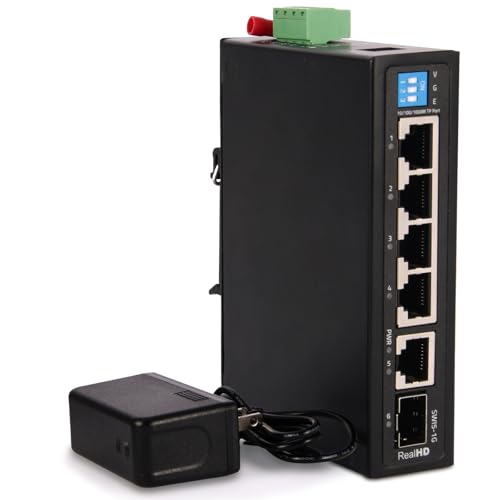
- Four gigabit ports plus RJ45 uplink and SFP
- -40°C to 85°C operating range
- DIN-rail mounting and dual power inputs
Best For: Factories, warehouses, and control panels
Best Compact 2.5G SFP Switch
6-Port 2.5G Switch with Dual 10G SFP

- Four adaptive 2.5G RJ45 ports
- Two 10G SFP ports; modules not included
- Fanless design with one-key VLAN
Best For: Compact NAS, Wi-Fi 6, and gaming networks
Best PoE SFP Switch
8-Port Gigabit PoE+ Switch with SFP
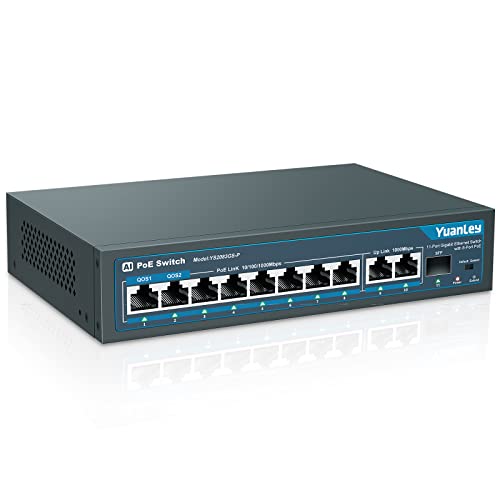
- Eight 802.3af/at PoE+ ports
- 120W total PoE budget with 30W per port
- One 1G SFP port plus two Gigabit uplinks
Best For: PoE cameras, access points, and IP phones
Best High-Port-Count 2.5G SFP Switch
16-Port 2.5G Switch with 10G SFP+

- Sixteen 2.5G RJ45 ports
- Two 10G SFP+ uplink ports
- Fanless, rack-mountable metal chassis
Best For: Dense office, lab, NAS, and multi-Gigabit networks
Best Flexible 2.5Gb Upgrade – UGREEN 6-Port 2.5Gb Switch
For buyers comparing network switches with SFP ports, this UGREEN model combines five 2.5Gb Ethernet ports with a 10Gb SFP+ port. Its selectable Standard, Link Aggregation, and VLAN modes add flexibility for NAS setups, small teams, and home networks.
Best For: NAS users and small networks that need 2.5Gb access with a flexible 10Gb backbone connection.
Pros:
- Five 2.5Gb ports plus a 10Gb SFP+ port that supports 1G, 2.5G, and 10G modules.
- Link Aggregation can combine ports 4 and 5 for up to 5Gbps of bandwidth.
- VLAN mode isolates ports 1-4 while preserving access to ports 5-6.
- Metal, fanless-style heat-dissipating design with desktop or wall mounting.
Cons:
- The SFP+ module is not included.
- It is an unmanaged, non-PoE Layer 2 switch.
This is a strong choice when you want multi-gigabit Ethernet and more than a basic plug-and-play setup. The three operating modes are especially useful for NAS performance and simple network segmentation.
Best Managed Option – TP-Link Omada ES210X-M2
This TP-Link model stands out among network switches with SFP ports by pairing eight 2.5Gb RJ45 ports with two 10Gb SFP+ uplinks. It also adds easy managed features, including VLAN support, IGMP Snooping, Auto Loop Prevention, and Omada cloud management.
Best For: Home offices, NAS networks, and small businesses that need managed traffic control and fast uplinks.
Pros:
- Eight 2.5Gb Ethernet ports provide broad multi-gigabit device connectivity.
- Two 10Gb SFP+ slots support high-speed links to servers or core switches.
- VLAN, IGMP Snooping, and Auto Loop Prevention improve network management.
- Fanless metal construction operates silently and includes shielded ports.
Cons:
- Managed features may be more than a basic plug-and-play network requires.
- The listed upper temperature rating is 40°C.
Choose this switch if you want room for several 2.5Gb devices and dedicated 10Gb uplinks. Omada compatibility makes it the most management-focused option in this group.
Best Simple Value Pick – Real HD 5-Port 2.5Gb Switch
If you want network switches with SFP ports without configuring a managed system, this Real HD switch offers five 2.5Gb RJ45 ports and one 10Gb SFP+ port. Its plug-and-play operation, fanless design, and compact metal housing suit straightforward multi-gigabit upgrades.
Best For: Users upgrading a small home, gaming, NAS, or Wi-Fi 6 network with minimal setup.
Pros:
- Five 2.5Gb Ethernet ports and one 10Gb SFP+ port.
- Unmanaged plug-and-play operation requires no software installation.
- Fanless metal housing supports quiet operation and heat dissipation.
- Designed for devices such as 2.5G PCs, Wi-Fi 6 access points, NAS systems, and 4K video equipment.
Cons:
- Connected devices and cables must support 2.5Gb speeds to achieve them.
- SFP, DAC, and connected-device compatibility should be checked before purchase.
- It does not offer the listed managed features found on the TP-Link models.
This is a practical choice for a small, quiet network where simple installation matters more than VLAN or centralized management. Confirm cable, adapter, and SFP compatibility before ordering.
Best Compact Managed Switch – TP-Link Omada ES206X-M2
The compact TP-Link Omada ES206X-M2 is a useful option among network switches with SFP ports when you need five 2.5Gb connections and one 10Gb SFP+ slot. It supports plug-and-play setup while providing VLAN, IGMP Snooping, Auto Loop Prevention, and Omada management for added control.
Best For: Desktop or wall-mounted networks that need managed features in a small, quiet enclosure.
Pros:
- Five 2.5Gb RJ45 ports support multi-gigabit client devices.
- One 10Gb SFP+ slot provides a fast uplink option.
- VLAN, IGMP Snooping, and Auto Loop Prevention support organized network traffic.
- Fanless metal design supports quiet operation and desktop or wall mounting.
Cons:
- It has fewer total ports and SFP+ slots than the ES210X-M2.
- Managed configuration may be unnecessary for users seeking only basic switching.
This model balances a compact footprint with useful management tools. It is a good fit when one 10Gb uplink is sufficient and silent operation matters.
Best 2.5G Value – NICGIGA 2.5G Switch with 10G SFP+
For buyers comparing network switches with SFP ports, this NICGIGA model combines four adaptable 2.5G Ethernet ports with two 10G SFP+ ports. Its unmanaged design keeps setup simple, while the fanless metal enclosure suits a quiet desktop or wall-mounted network.
Best For: 2.5G NAS, Wi-Fi 6 access points, gaming PCs, servers, and other small networks needing faster-than-gigabit Ethernet with SFP+ expansion.
Pros:
- Four RJ45 ports support 10/100/1000/2500Mbps connections.
- Two 10G SFP+ ports are compatible with 1G and 2.5G modules.
- Fanless metal design, wall-mount support, and 60Gbps switching capacity.
Cons:
- SFP modules are not included.
- Unmanaged operation provides no configuration features.
This is a practical choice when you want compact 2.5G copper connectivity plus SFP+ uplinks without adding management complexity. The silent fanless design is particularly useful in home offices and media-focused setups.
Best Warranty – TRENDnet TEG-S562 2.5G Switch
The TRENDnet TEG-S562 is a compact option for shoppers seeking network switches with SFP ports and straightforward multi-gig performance. It offers four 2.5GBASE-T ports, two 10G SFP+ ports, and plug-and-play installation in a quiet fanless housing.
Best For: Small offices, home labs, and installations that need 2.5G connections, 10G SFP+ links, and the reassurance of lifetime manufacturer protection.
Pros:
- Four 2.5G ports work with 100Mbps, 1Gbps, and 2.5Gbps devices.
- Two 10G SFP+ ports add high-speed fiber or compatible uplink capability.
- Fanless metal design, wall mounting, 60Gbps switching capacity, and lifetime protection.
Cons:
- It is an unmanaged switch, so advanced network configuration is unavailable.
- SFP modules are not specified as included in the supplied details.
Choose this model if support coverage and broad backward compatibility matter as much as speed. It is especially appealing for a quiet, compact deployment where 2.5G access ports and 10G SFP+ connectivity are both useful.
Best for Industrial Installations – Hardened Gigabit Switch with SFP
For industrial environments, this hardened model takes a different approach to network switches with SFP ports. It provides four gigabit Ethernet ports, one RJ45 uplink, and one SFP port, along with DIN-rail and wall mounting, wide-voltage input, and a temperature range designed for demanding installations.
Best For: Factories, warehouses, control panels, outdoor deployments, and other sites needing rugged gigabit connectivity and flexible DC power options.
Pros:
- Includes four gigabit ports, one RJ45 uplink, and one SFP port.
- Supports -40°C to 85°C operation, IP40 protection, and 6KV lightning resistance.
- Offers DIN-rail or wall mounting, dual power inputs with auto-failover, and 12–55V DC input.
Cons:
- Its gigabit ports are slower than the 2.5G and 10G options in the other products.
- The supplied specifications are inconsistent about the port count, so verify the listing before purchase.
- It is described as managed Layer 2 in the details, while the features emphasize plug-and-play operation.
This switch is better suited to reliability-focused infrastructure than typical desktop networking. Its rugged mounting, broad power range, and fail-safe features make it a strong fit for industrial cabinets and control systems, provided its exact management behavior matches your requirements.
Best Compact 2.5G SFP Switch – 6-Port 2.5G Switch with Dual 10G SFP
If you need network switches with SFP ports for a small high-speed setup, this YuanLey model combines four adaptive 2.5G Ethernet ports with two 10G SFP ports. Its unmanaged design, one-key VLAN mode, fanless operation, and desktop or wall-mount installation make it practical for NAS, Wi-Fi 6 access points, gaming PCs, and similar equipment.
Best For: Compact 2.5G networks that need fast SFP uplinks for a NAS, server, or wireless access point.
Pros:
- Four RJ45 ports support 10/100/1000/2500Mbps connections.
- Two 10G SFP ports are compatible with 1G and 2.5G modules.
- Fanless metal housing supports quiet desktop or wall-mounted operation.
- One-key VLAN mode helps isolate RJ45-port traffic.
Cons:
- SFP modules are not included.
- It is an unmanaged switch, so advanced configuration options are limited.
With a 60Gbps switching capacity and a compact footprint, this switch is a strong fit for upgrading a small network beyond standard Gigabit speeds. Verify that your SFP modules and connected devices match the supported speeds before buying.
Best PoE SFP Switch – 8-Port Gigabit PoE+ Switch with SFP
Among network switches with SFP ports, this YuanLey model is designed for installations that also need power delivery. It provides eight Gigabit PoE+ ports, two Gigabit uplinks, and one 1G SFP port, along with a 120W power budget, VLAN isolation, QoS on ports 1 and 2, and automatic PoE device restart.
Best For: Camera, wireless access point, and IP phone installations that need PoE and a longer-distance SFP connection.
Pros:
- Eight 802.3af/at PoE+ ports provide up to 30W per port.
- 120W built-in power supply eliminates the need for an external adapter.
- One 1G SFP port supports longer-distance transmission than Ethernet.
- AI Watchdog can automatically restart failed or offline PoE devices.
Cons:
- The SFP port is limited to 1Gbps.
- It is not compatible with 24V passive PoE.
- As an unmanaged switch, it does not provide advanced network management.
This is a practical choice for small surveillance or access-point deployments where PoE convenience matters more than multi-Gigabit speeds. Its plug-and-play setup and port isolation simplify installation, while the SFP port adds a wired option for longer runs.
Best High-Port-Count 2.5G SFP Switch – 16-Port 2.5G Switch with 10G SFP+
For larger wired networks, this Real HD model is one of the network switches with SFP ports that pairs dense 2.5G connectivity with high-speed uplinks. It includes 16 2.5G RJ45 ports and two 10G SFP+ ports, with a fanless metal design, plug-and-play setup, and included rack-mount support.
Best For: Offices, labs, and home networks with many 2.5G devices, NAS systems, Wi-Fi 6 equipment, or gaming PCs.
Pros:
- Sixteen 2.5G RJ45 ports support dense multi-Gigabit connectivity.
- Two 10G SFP+ ports provide fast uplink options.
- Fanless operation and a metal housing support quiet, sturdy installation.
- Works with existing Cat6, Cat6a, and Cat7 cabling.
Cons:
- It is an unmanaged switch with no advanced configuration features.
- The larger 16-port chassis weighs about 3.59 kg.
- Connected devices and cabling must support 2.5G to realize the higher speeds.
This switch makes sense when port count is the priority and you want to move beyond Gigabit without replacing compatible copper cabling. Its 120G bandwidth and dual 10G SFP+ ports provide useful capacity for demanding multi-device environments, while the fanless design keeps operation quiet.
How We Picked the Best Network Switches with Sfp Ports
We compared the selected models by port count, copper Ethernet speed, SFP or SFP+ uplink capability, management options, power delivery, build quality, and installation flexibility. The lineup includes compact desktop switches, fanless multi-gig hardware, managed Omada models, PoE equipment, industrial switches, and larger 16-port designs.
Because specifications vary significantly, check the exact product listing before purchase. In particular, confirm whether the optical ports are SFP or SFP+, whether transceivers are included, and whether the advertised uplink speed requires compatible modules and cabling.
Quick Comparison
- Best for compact multi-gig networks: A 5- or 6-port 2.5GbE switch with one or two 10Gb SFP+ ports.
- Best for basic management: An Omada Easy Managed model with configuration and monitoring features.
- Best for PoE installations: A switch with 802.3af/at support and a clearly stated power budget.
- Best for larger networks: A 16-port 2.5GbE switch with 10Gb SFP+ uplinks.
- Best for harsh environments: A hardened industrial switch with DIN-rail or wall mounting.
Key Buying Factors for Network Switches with Sfp Ports
Port Speed and Capacity
Choose 2.5GbE if you have multi-gig internet, Wi-Fi 6 or Wi-Fi 7 access points, or fast network storage. Gigabit remains suitable for ordinary desktops, cameras, printers, and smart-home equipment. Also consider the total switching capacity so multiple ports can operate without creating an internal bottleneck.
SFP Versus SFP+
Standard SFP commonly supports up to 1Gbps, while SFP+ is designed for 10Gbps connections. Compatibility depends on the switch, transceiver, fiber type, and distance. Some products list SFP+ ports but do not include modules, so budget for compatible optics or direct-attach cables.
Management and VLAN Support
Unmanaged switches are easiest to install, but managed or easy-managed models are better when you need VLANs, traffic monitoring, link aggregation, loop prevention, or controlled guest access. Do not pay for management features if your network only needs additional ports.
PoE, Cooling, and Installation
For access points, cameras, or VoIP phones, verify PoE standard, per-port limits, and total wattage. Fanless metal switches are quiet for desks and media cabinets, while industrial models are better suited to vibration, temperature variation, and fixed mounting.
Who Should Buy Which Network Switches with Sfp Ports?
Home users and small offices should favor a compact unmanaged 2.5GbE switch with at least one 10Gb SFP+ uplink. Choose an Omada model if centralized configuration and monitoring matter. Buyers deploying cameras or access points should select the PoE model and match its power budget to the connected devices.
For a growing lab, editing workflow, or NAS-heavy network, prioritize multiple 2.5GbE ports and dual 10Gb SFP+ uplinks. Industrial or outdoor-adjacent installations should use hardened hardware with appropriate mounting and environmental ratings. Finally, choose a 16-port model when expansion matters more than compact size, and confirm rack, wall, or desktop placement before ordering.