Compact network switches make it easy to add wired Ethernet connections without taking up much desk or shelf space. They are useful for home offices, entertainment centers, small businesses, cameras, access points, and other devices that benefit from stable wired networking.
This roundup compares 10 five- and eight-port models, including simple plug-and-play switches, smart-managed options, and PoE-capable units. Use the guide below to match port count, management features, power delivery, and installation style to your network.
Best 10 Compact Network Switches Picks for 2026
Best Compact All-Rounder
TP-Link TL-SG105 5-Port Gigabit Switch
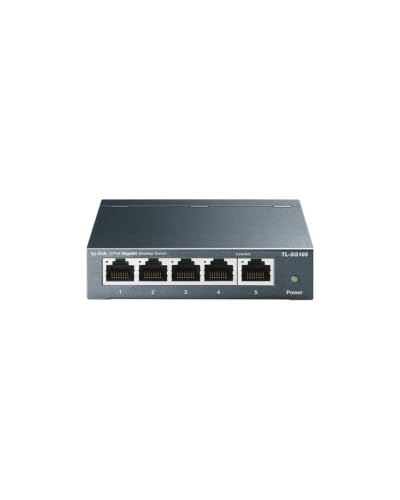
- Five gigabit ports with auto-negotiation
- Fanless metal design for quiet use
- QoS and IGMP Snooping support
Best For: Quiet plug-and-play expansion in home offices and small workspaces
Best for Easy Management
NETGEAR GS305E 5-Port Smart Switch

- Five gigabit Ethernet ports
- VLAN, QoS, monitoring, and security features
- Fanless metal design with flexible mounting
Best For: Small networks needing basic management and traffic controls
Best PoE Compact Switch
TP-Link TL-SG1005P 5-Port PoE+

- Four PoE+ ports with a 65W budget
- One additional gigabit non-PoE port
- Fanless metal plug-and-play design
Best For: Small PoE device installations needing power and data
Best Simple Plug-and-Play Pick

- Five gigabit Ethernet ports
- No software or configuration required
- Silent, energy-efficient metal design
Best For: Simple wired expansion in homes and small offices
Best Managed Pick
TP-Link 8-Port Easy Smart Switch
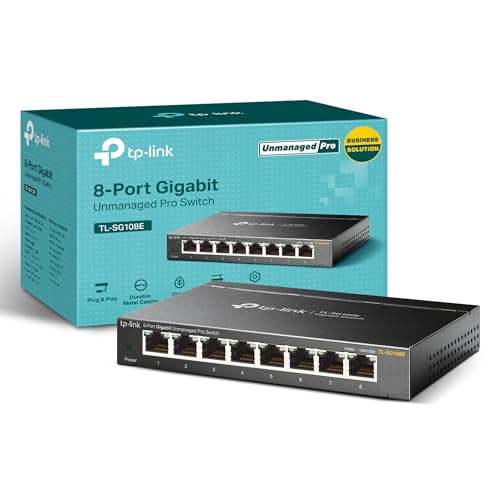
- Eight Gigabit ports for network expansion
- VLAN, QoS, monitoring, and LAG support
- Metal desktop or wall-mount design
Best For: Small networks needing smart management features
Best for PoE Devices

- Four PoE+ ports with a 63W budget
- Five Gigabit Ethernet ports
- Unmanaged, quiet, and wall-mountable
Best For: Small PoE device deployments
Best Budget Plug-and-Play Pick

- Five automatic Gigabit RJ45 ports
- Driver-free, plug-and-play setup
- Fanless desktop or wall-mount design
Best For: Basic quiet home and small-office networks
Balanced 5-Port Pick

- Five auto-sensing Gigabit ports
- QoS prioritizes video and audio traffic
- Power saving detects unused ports
Best For: Small wired networks needing simple traffic prioritization
Smallest 5-Port Option

- Five Gigabit RJ45 ports
- Fanless and quiet operation
- Compact, lightweight plug-and-play design
Best For: Tight spaces and quiet desktop network expansion
High-Capacity Compact Choice
TP-Link TL-SG108 8-Port Switch

- Eight Gigabit Ethernet ports
- Sturdy metal, shielded enclosure
- Fanless and energy-efficient operation
Best For: Multiple wired devices in a quiet home-office setup
Best Compact All-Rounder – TP-Link TL-SG105 5-Port Gigabit Switch
The TP-Link TL-SG105 is a practical choice among compact network switches when you need five gigabit connections without software setup. Its fanless metal design supports quiet desktop or wall-mounted installation, while QoS and IGMP Snooping help prioritize voice and video traffic.
Best For: Home offices, small workspaces, and users who want a quiet plug-and-play gigabit switch.
Pros:
- Five 10/100/1000 Mbps ports with auto-negotiation and Auto MDI/MDIX.
- Fanless operation and durable metal casing.
- Supports traffic prioritization through QoS and IGMP Snooping.
- Desktop and wall-mounting options.
Cons:
- Unmanaged design does not provide advanced network configuration.
- Offers five ports, which may be limiting for larger networks.
With gigabit connectivity, quiet operation, and a compact metal enclosure, the TL-SG105 is a straightforward fit for everyday wired expansion.
Best for Easy Management – NETGEAR GS305E 5-Port Smart Switch
The NETGEAR GS305E adds basic management capabilities to the compact network switches category. Its five gigabit ports support VLAN configuration, traffic prioritization, port monitoring, and network security settings through an intuitive software interface.
Best For: Small businesses and home users who need VLANs or traffic controls in a compact switch.
Pros:
- Five 1 Gbps Ethernet ports with auto-negotiation.
- Supports VLANs, QoS, port monitoring, and security management.
- Fanless, energy-efficient operation with IEEE 802.3az support.
- Compact metal housing supports desktop or wall placement.
Cons:
- More configuration than a basic unmanaged switch may be unnecessary for simple setups.
- Regional compatibility is listed as U.S. and Canada only.
The GS305E is a strong option when a small switch needs more control than plug-and-play operation alone, while remaining silent and easy to install.
Best PoE Compact Switch – TP-Link TL-SG1005P 5-Port PoE+
The TP-Link TL-SG1005P stands out among compact network switches by supplying power and data over Ethernet. Four PoE+ ports provide up to 30W per port within a 65W total budget, while the fifth gigabit port handles a non-PoE connection.
Best For: Small installations with compatible PoE devices such as access points, cameras, or other powered network hardware.
Pros:
- Four 802.3af/at PoE+ ports with up to 65W total power.
- One additional gigabit non-PoE port.
- Plug-and-play setup with QoS and IGMP Snooping support.
- Fanless metal case supports desktop or wall mounting.
Cons:
- PoE power is limited to the 65W total budget.
- Designed for compatible IEEE 802.3af/at powered devices.
- Heavier than the other listed compact switches at 0.8 kg.
For compact deployments that need both network connectivity and device power, the TL-SG1005P offers a useful four-port PoE layout without requiring software configuration.
Best Simple Plug-and-Play Pick – NETGEAR GS305 5-Port Switch
The NETGEAR GS305 keeps compact network switches simple with five gigabit ports and no required software or configuration. Its fanless metal enclosure supports quiet operation, while desktop and wall-mounting options make it easy to place in a home or office.
Best For: Users who need straightforward wired network expansion for desktops, offices, or home networks.
Pros:
- Five 1 Gbps ports with auto-negotiation.
- Plug-and-play setup with no software installation.
- Silent fanless operation and energy-efficient Ethernet support.
- Compact metal design allows desktop or wall mounting.
Cons:
- Unmanaged operation does not support advanced network controls.
- Regional compatibility is listed as U.S. and Canada only.
- Five ports may not accommodate larger wired setups.
The GS305 is a sensible choice when reliability and simplicity matter more than VLANs or other managed features, providing quiet gigabit connectivity in a compact enclosure.
Best Managed Pick – TP-Link 8-Port Easy Smart Switch
For compact network switches that offer more control than a basic plug-and-play hub, the TP-Link TL-SG108E combines eight Gigabit Ethernet ports with easy smart management. Its metal desktop or wall-mount design suits small offices, home networks, and setups that need traffic segmentation or monitoring.
Best For: Users who need VLAN, QoS, monitoring, and link-aggregation features in a compact eight-port switch.
Pros:
- Eight 10/100/1000Mbps ports provide room for multiple wired devices.
- Supports VLANs, QoS, IGMP snooping, port mirroring, loop prevention, and cable diagnostics.
- Sturdy metal housing supports desktop or wall-mount installation.
- Fanless operation is not specified, but the switch includes a three-year warranty and technical support.
Cons:
- Smart features require configuration through a web interface or free software.
- It is larger and more feature-focused than a simple five-port unmanaged switch.
The TL-SG108E is a strong choice when a small network needs management features without moving to a more complex enterprise switch. Choose it over simpler models if VLANs and traffic controls are priorities.
Best for PoE Devices – NETGEAR 5-Port PoE+ Switch
Among compact network switches, the NETGEAR GS305P stands out for powering compatible devices over Ethernet. It provides five Gigabit ports, including four PoE+ ports with a 63W total power budget, while keeping setup simple through its unmanaged plug-and-play design.
Best For: Homes and small offices connecting PoE devices such as compatible cameras, access points, or phones.
Pros:
- Four PoE+ ports share a 63W total power budget.
- Five 1Gbps ports support high-speed wired connectivity.
- Plug-and-play operation requires no software or configuration.
- Fanless metal design supports quiet desktop or wall-mounted installation.
Cons:
- Only five total ports are available.
- As an unmanaged switch, it does not provide configurable VLAN or traffic-management features.
- PoE power is limited by the 63W shared budget.
The GS305P is a practical pick when Ethernet power delivery matters more than advanced network controls. Its compact form and automatic PoE allocation make it convenient for straightforward small-device deployments.
Best Budget Plug-and-Play Pick – UGREEN 5-Port Gigabit Switch
The UGREEN five-port model is one of the simplest compact network switches for expanding a home, office, or small workstation network. It offers automatic 10/100/1000Mbps adjustment, a fanless design, and both desktop and wall-mount placement without requiring drivers or configuration.
Best For: Users who need an affordable, quiet, non-PoE switch for laptops, routers, NAS devices, and other wired equipment.
Pros:
- Five Gigabit RJ45 ports support automatic speed adjustment.
- Plug-and-play operation works without drivers or setup software.
- Compact fanless design provides quiet operation.
- Can sit on a desk or mount on a wall to save space.
Cons:
- It does not support PoE.
- Unmanaged operation provides no VLAN, QoS, or advanced monitoring controls.
- Five ports may be limiting for larger wired networks.
Choose the UGREEN switch for uncomplicated Gigabit expansion where quiet operation and low-effort installation are the main priorities. It is best suited to basic connections rather than managed or powered network devices.
Balanced 5-Port Pick – Linksys SE3005 Gigabit Switch
The Linksys SE3005 is a practical choice when you need to add a few wired connections without configuring a managed network. Among compact network switches, it stands out with five auto-sensing Gigabit ports, QoS support for prioritizing video and audio traffic, and power-saving features for unused ports.
Best For: Home offices, desktops, streaming devices, and small setups that need five plug-in Gigabit connections.
Pros:
- Five RJ45 ports support 10/100/1000 Mbps speeds.
- Auto MDI/MDI-X detection simplifies cable connections.
- QoS support can prioritize video and audio applications.
- Advanced power saving detects unused ports.
Cons:
- It has fewer ports than an eight-port alternative.
- The supplied dimensions make it less tiny than some ultra-compact options.
Choose the SE3005 if convenient automatic operation and traffic prioritization matter more than maximum port count. Its unmanaged design keeps expansion straightforward.
Smallest 5-Port Option – TP-Link LS1005G LiteWave
The TP-Link LS1005G is built for simple network expansion in tight spaces. This compact network switch offers five 10/100/1000 Mbps RJ45 ports, plug-and-play setup, fanless operation, and an energy-efficient design for adding wired devices with minimal fuss.
Best For: Small desks, home offices, and users who want a quiet, lightweight switch for laptops, consoles, printers, or other Ethernet devices.
Pros:
- Five Gigabit ports support Auto-Negotiation and Auto MDI/MDIX.
- Fanless construction provides quiet operation.
- Plug-and-play setup requires no software or configuration.
- Its compact body weighs about 2.8 ounces.
Cons:
- The plastic housing may be less rugged than a metal switch.
- It provides fewer ports than the eight-port model in this roundup.
The LS1005G is a strong fit when size, silence, and simplicity are priorities. It adds four output connections beyond an uplink without introducing setup complexity.
High-Capacity Compact Choice – TP-Link TL-SG108 8-Port Switch
The TP-Link TL-SG108 expands a wired network with eight Gigabit ports in a sturdy metal enclosure. For shoppers comparing compact network switches, it combines plug-and-play operation with fanless cooling, shielded ports, traffic optimization, and power adjustments based on link status and cable length.
Best For: Home offices, entertainment areas, or small workspaces with several wired devices that need a durable eight-port switch.
Pros:
- Eight RJ45 ports support 10/100/1000 Mbps connections.
- Metal housing improves durability and heat dissipation.
- Fanless design operates quietly in noise-sensitive spaces.
- Energy-efficient operation adjusts power use based on link conditions.
Cons:
- Its eight-port enclosure is larger and heavier than the smallest five-port option.
- As an unmanaged switch, it does not provide advanced configuration controls.
The TL-SG108 is the practical pick when port capacity and a sturdy enclosure outweigh ultra-small dimensions. It offers room to connect more devices without requiring network configuration.
How We Picked the Best Compact Network Switches
We focused on compact Gigabit Ethernet switches suited to homes, home offices, labs, and small businesses. The selection includes five-port models for basic expansion and eight-port options for growing networks. We also considered managed and unmanaged designs, PoE support, construction, cooling, mounting flexibility, and ease of setup.
Every model offers a practical way to expand wired connectivity, but the right choice depends on whether you need simple switching, traffic controls, or power for connected devices.
Quick Comparison
- Best for simple expansion: Choose a five-port unmanaged switch such as the TP-Link TL-SG105, NETGEAR GS305, UGREEN five-port model, Linksys SE3005, or TP-Link LS1005G.
- Best for network controls: The NETGEAR GS305E or an eight-port Easy Smart TP-Link switch adds features such as VLAN and QoS configuration.
- Best for powered devices: The TP-Link TL-SG1005P or NETGEAR GS305P can supply power to compatible cameras, access points, phones, and other PoE devices.
- Best for extra capacity: An eight-port switch leaves more room for printers, storage, computers, consoles, and smart-home equipment.
Key Buying Factors for Compact Network Switches
Port Count and Speed
Five ports are usually enough for a small office or entertainment setup, while eight ports provide more flexibility and reduce the need to replace the switch as your network grows. Gigabit ports support speeds up to 1,000 Mbps, though actual performance depends on your devices, cabling, and internet or local network traffic.
Managed or Unmanaged Operation
Unmanaged switches work immediately with no configuration, making them the simplest option for everyday wired expansion. Smart-managed models are better when you need VLANs, QoS, monitoring, or more control over traffic. Those features are useful but add setup decisions.
PoE Power Budget
PoE models can carry both data and electrical power over one Ethernet cable. Check the total power budget and the per-port requirements of your devices before buying. A PoE switch is worthwhile for compatible cameras and access points, but unnecessary for standard computers and wired peripherals.
Build, Cooling, and Placement
Metal housings can provide a sturdy enclosure and help with passive heat dissipation. Fanless designs run quietly, which matters on desks and in living spaces. Also check whether the switch supports wall mounting and whether its ports and power connection suit your intended location.
Who Should Buy Which Compact Network Switches?
Buy a basic five-port unmanaged model if you want an affordable, quiet, plug-and-play upgrade for a few wired devices. Choose an eight-port model if you expect to add equipment soon or want fewer compromises in a central wiring location.
Choose a smart-managed switch when you understand or specifically need VLANs, traffic prioritization, or network monitoring. Select PoE when the switch will power compatible devices; otherwise, a standard model is typically simpler and less expensive. Finally, verify cable compatibility, available outlet space, and the switch’s physical dimensions before ordering.